For most people, the best tablet for a security camera is a current 10–11-inch Android model such as the Samsung Galaxy Tab S10 FE. It has Google Play access, enough performance for camera apps and browser dashboards, and a display large enough for a useful multi-camera view. Choose the current base-model iPad if your household is already centered on Apple. Choose the Galaxy Tab A9 or A9+ for a cheaper dedicated screen.
The camera system should decide the purchase, however. Check its app, browser viewer, minimum operating-system version, multi-camera limits and local-stream support before buying. A tablet cannot compensate for an unsupported camera app, an unreliable Wi-Fi network or a battery camera that sleeps between events.
Quick recommendations
| Use case | Recommended tablet | Why | Main qualification |
|---|---|---|---|
| Best overall | Samsung Galaxy Tab S10 FE | Current Android, Google Play and a 10.9-inch display suit apps, browsers and local dashboards. | More expensive than a basic single-camera display. |
| Best for Apple households | Current base-model iPad | Consistent hardware, polished apps and simple sharing. | Less flexible for some RTSP/ONVIF workflows. |
| Best budget choice | Samsung Galaxy Tab A9 or A9+ | Lower-cost standard Android for one or two feeds. | Less memory and shorter useful life than newer midrange models. |
| Best for Wyze | iPad or Google-certified Android tablet | Supported official app and browser options. | Wyze’s current guide requires Android 10 or later, iOS 16 or later, and excludes Kindle Fire tablets. |
| Best for Reolink | Android tablet, or iPad for simplicity | Both platforms support the official app; Android offers more third-party viewing flexibility. | RTSP, ONVIF, RTMP and browser access vary by camera model. |
| Permanent multi-camera station | 10–12-inch Android tablet or iPad, or a monitor/NVR | Screen size and reliable power matter more than flagship speed. | A monitor or TV avoids battery aging for genuinely continuous use. |
What makes a good security-camera tablet?
1. Confirm the viewing method first
There are three ways to view cameras:
- Manufacturer app: usually the easiest route to live view, playback, notifications and two-way audio. Tablet layouts, subscriptions and features vary by brand.
- Web viewer: useful for dashboards or when a tablet app is unavailable. Wyze Web View supports live streaming and event playback in a tablet browser, but camera eligibility and subscription limits apply. See Wyze Web View and its compatibility list.
- Local dashboard or protocol: Reolink, NVR, Home Assistant, Frigate, Blue Iris and compatible viewers may use RTSP, ONVIF, RTMP, HLS or another local method. Reolink documents Android/iPad apps and browser or third-party access for some models, not all, at its tablet and computer support page.
Write down your camera model and required features—live view, playback, alerts, two-way audio, local storage and multi-camera grids—before comparing tablets.
2. Choose the operating system for your workflow
Android is the best default when flexibility matters. Google Play provides broad camera-app access, and Android offers more kiosk, split-screen, RTSP and local-dashboard choices. Avoid no-name tablets with poor update histories, weak Wi-Fi or dim screens.
Quick wins for a faster PC:
Clear out junk files and repair common Windows errorsFree Scan →Fix the driver behind crashes, sound loss and screen glitchesFind Drivers →Repair Windows errors before they cause bigger problemsFix Now →#1 Best Overall

- 【Android 16 OS & High-Performance CPU】 Evermyth GMS-certified tablet runs on the Android 16 operating system, allowing direct downloads of popular apps from the Play Store. Powered by a robust 5-core processor that hits speeds up to 1.8GHz, the android tablet is engineered to boost multitasking performance. Whether you’re working, watching videos, or gaming, this 5-core tablet pc operates seamlessly, delivering a fast, professional-grade experience.
- 【24GB RAM + 64GB ROM + 1TB Expandable Storage】 Our 10 inch electronics tablets comes with 24GB RAM (3GB physical + 21GB virtual), 64GB ROM, and supports up to 1TB of expandable storage via a TF card (not included). This ensures quick app launches and smooth gameplay.
- 【10 inch HD IPS In-Cell Display】 This tablet PC boasts a 1280×800 high-resolution IPS screen that delivers vibrant, true-to-life colors. Enjoy sharper, brighter visuals for a more immersive viewing experience. The 5MP front and 8MP rear camera can handle video calls and photo recording with ease. LCD touchscreen uses low-blue-light tech to cut down on eye strain from screen flicker and harsh blue light. Slim and lightweight, this 10-inch tablet amps up immersion for all your favorite activities.
- 【6000mAh Rechargeable Battery】 Electronics tablets Packed with a 6000mAh battery and a low-power-consuming CPU, Evermyth 10 inch tablet offers up to 3 days of standby time and up to 8 hours of mixed usage—perfect for reading, streaming, or web browsing. Charging is a breeze via the USB-C port, making the tablet an ideal companion for both entertainment and work!
- 【Wi-Fi 6 & Bluetooth 5.4】 Evermyth Android 16 tablet features the latest Wi-Fi 6 and upgraded Bluetooth 5.4. It supports dual-band (5GHz/2.4GHz) Wi-Fi connectivity for stable, high-speed transfers. Bluetooth 5.4 ensures seamless compatibility with all your favorite accessories.
iPadOS is attractive for Apple households and less technical users. Mainstream camera apps are usually consistent, but some Android-only viewers and protocol tools are unavailable. Reolink officially supports both Android and iOS; neither platform is universally more compatible.
Fire OS is not equivalent to standard Android. Wyze’s current setup guide says the Wyze app is unavailable on Kindle Fire tablets. A Fire tablet may still work with a browser viewer, Alexa integration or a tested third-party dashboard, but sideloading is not official compatibility.
3. Select the right screen size
- 8-inch class: suitable for one camera on a counter or bedside table; cramped for grids and timelines.
- 10–11-inch class: the best compromise for most homes, mounts and two-to-four-camera grids.
- 12–14-inch class: easier to read across a room or with many feeds, but heavier, costlier and harder to mount.
A larger display makes a feed easier to inspect; it does not improve the camera’s sensor, recording quality or detection accuracy.
4. Prioritize Wi-Fi, memory and support life
For one feed, flagship performance is unnecessary. For several streams, browser dashboards or split-screen controls, prefer a recent processor and at least 4GB of RAM where possible. Dual-band Wi-Fi, a current operating system, useful brightness and reliable antennas matter more than benchmark scores.
Crashes, No Sound, or Screen Glitches?
Random freezes, missing sound and display glitches usually trace back to one bad driver. Find and replace yours safely.Free scan · under a minutePC Slower Than It Used to Be?
A free scan shows the junk files, broken settings and background clutter dragging Windows down - then fixes them in one click.Free scan · Windows 10 & 11Rank #2

- 【Automatic Human Tracking Dual-Lens System】When human motion is detected, the camera automatically focuses on and tracks the moving people to record a more detailed event. Unlike any single-lens camera that forces a trade-off between a wide view and a close-up, our camera features both a fixed wide-angle lens and a remote-controlled PTZ lens. This allows you to monitor a broad area permanently while simultaneously zooming in on any activity, effectively eliminating blind spots. Enjoy peace of mind knowing that your property is under great surveillance. It would be the ultimate all-in-one solution in outside cameras for home security.
- 【10" Portable Touchscreen Monitor Pre-installed 500GB HDD】Experience convenience like never before with our 10CH 10-inch portable touchscreen monitor, equipped with a pre-installed 500GB HDD for on-the-go monitoring. Includes a 500GB HDD (no monthly fees!) and smart encoding to maximize storage. This intuitive monitor allows you to view multiple camera feeds simultaneously, providing real-time access to your surveillance footage with ease.
- 【Solar/Battery Powered & True Wireless & IP66 Waterproof】Equipped with solar panel and rechargeable battery, keeps the camera charged year-round. Say goodbye to frequent charging and complicated wiring. Easy to install this solar camera wherever you need, with its IP66 waterproof rating ensuring durability against rain, snow, and harsh elements. IP66 level dustproof and waterproof, -10 ℃ to 50 ℃ extreme weather normal operation.
- 【2.4G&5G WiFi Pro】Enjoy smoother streaming and faster response with dual-band WiFi support. Whether you’re checking live video or reviewing playback, you’ll get a more stable and reliable connection through the mobile app—anytime, anywhere.
- 【PIR Sensing & Real-Time Communication】The wireless cameras are equipped with advanced PIR and smart AI detection technology, reduce false alarms and instant alerts. Also, the camera supports two-way talk function and remote access, allowing you to have a conversation between you and your visitor.
Use 2.4GHz when range and wall penetration dominate; 5GHz is preferable at shorter range when congestion is lower. Mesh-node placement, guest-network isolation and captive portals can matter more than your advertised internet speed. Wyze says its cameras do not work with enterprise Wi-Fi requiring a landing page or browser sign-in; its Wi-Fi guidance also identifies model-specific 5GHz limitations.
Best tablets by use case
Best overall Android: Samsung Galaxy Tab S10 FE
The Galaxy Tab S10 FE is the strongest general recommendation for a dedicated camera screen: a 10.9-inch display, standard Android with Google Play, and enough headroom for camera apps, browser dashboards and split-screen smart-home controls. It is a sensible fit for Reolink, Wyze, Ring, Arlo, Eufy, Nest and similar systems when the relevant app supports the device.
Samsung’s March 2026 U.S. MSRP file lists Wi-Fi configurations at $499.99 for 8GB/128GB and $569.99 for 12GB/256GB. Those are MSRP signals, not guaranteed retail prices; sales can be lower. See the official buying page and Samsung’s March 2026 price file.
Best Apple option: the current base-model iPad
Buy the current base iPad when you value a stable interface, consistent hardware and straightforward family use. It suits mainstream cloud-camera apps, browser dashboards and event review, especially in an Apple household. Verify the current generation, storage and U.S. price on Apple’s iPad page because model names and prices change. Choose another platform if your system depends on Android-only local viewers or extensive kiosk customization.
Do these 3 things before closing this tab:
1Fix the driver behind crashes, sound loss and screen glitches2Clear out junk files and repair common Windows errors3Scan for outdated or missing drivers - takes under a minuteRank #3
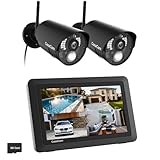
- True DIY DVR system with toucscreen monitor. Simply connect the camera to a power supply and experience the ease of use and peace of mind you’ve come to expect from CasaCam!
- See, hear and speak to people on your property from your 7" monitor, phone or tablet. Keep track of your property from anywhere at any time. System works locally without the need of Internet.
- Portable 7" touchscreen monitor with auto, manual and scheduled recording modes. Five seconds pre-record period ensures the event is fully captured. Rechargeable battery and SD card are included.
- System supports up to 4 cameras with single, split or quad display. Also compatible with CasaCam Spotlight Camera (SKU#VC1000). You can expand your system with add-on VC1000 Spotlight Camera to gain a useful security light feature!
- Smart motion detection uses dual sensors (heat and video motion) to minimize false alarms.
Best budget Android: Samsung Galaxy Tab A9 or A9+
The A9/A9+ can be a good refurbished or discounted monitor for one or two feeds. Samsung’s March 2026 U.S. MSRP file lists the A9 Wi-Fi 4GB/64GB at $191.99, and A9+ Wi-Fi models at $219.99 (4GB/64GB) and $269.99 (8GB/128GB). Retail prices vary. Check the official A9 page and verify that the tablet’s Android version meets your camera app’s current requirement.
Best for Wyze
Use an iPad or standard Google-certified Android tablet. Wyze’s newer setup guide specifies Android 10 or later and iOS 16 or later and excludes Kindle Fire tablets. Wyze’s public app page contains older minimum-version language, so use the stricter setup-guide requirement and check the app listing for your exact device. Web View can be convenient, but supported cameras and the number of simultaneous streams can depend on the plan.
Best for Reolink and local systems
Android is the more flexible choice for Reolink, NVR, Home Assistant and third-party viewers. Reolink’s official app supports Android tablets and iPads, while selected cameras support browser access or RTSP, ONVIF and RTMP. Reolink warns that compatibility can vary on unusual tablet or iPad form factors; consult its compatibility guidance for the exact model.
Camera-brand compatibility checklist
| System | Tablet approach | Check before buying |
|---|---|---|
| Wyze | Official iPad/Android app or Web View | Android 10+/iOS 16+, Kindle Fire exclusion, camera and subscription eligibility |
| Reolink | Official app, browser or local viewer | Exact camera support for RTSP, ONVIF, RTMP, browser and multi-camera view |
| Ring, Arlo, Eufy, Nest, Blink | Official app or supported browser | Current app availability, tablet layout, alerts, playback and plan restrictions |
| ONVIF/RTSP/NVR/Home Assistant | Android browser/viewer or iPad dashboard | Protocol, credentials, decoding, VPN and local-network design |
How to set up the tablet
Official app
- Confirm the camera maker’s minimum Android or iPadOS version and tablet support.
- Connect the tablet at the intended mounting location and install the app from Google Play or the Apple App Store.
- Sign in, enable notifications and allow local-network access where requested.
- Add the cameras, then test live view, playback, two-way audio and a motion alert.
- Rotate to landscape if it produces a better grid, and mount only after the connection remains stable.
Browser viewer
- Confirm that the vendor supports browser viewing and that your cameras qualify.
- Open the official viewer in Safari or Chrome, sign in and verify every intended feed.
- Test playback, two-way audio, session expiry and behavior after sleep/wake.
- Add the page to the home screen if useful, then test it again after a reboot.
Local dashboard or NVR
- Confirm the camera or NVR exposes the required protocol and local credentials.
- Open the documented dashboard or install a compatible viewer.
- Do not expose camera ports directly to the public internet; use a VPN or secure remote-access method.
- Run all feeds together and test reconnection after a brief Wi-Fi interruption.
Making a tablet suitable for long viewing
A tablet can remain powered for extended periods, but it is not automatically a purpose-built surveillance appliance. LCD models reduce (but do not eliminate) static-image wear compared with OLED. Lower brightness, use a screen saver when a live image is unnecessary, keep the device ventilated and avoid direct sun or sealed mounts. Heat from decoding several streams while charging accelerates battery aging.
The Tool Desk
Outbyte Driver Updater FREEScan for outdated or missing drivers - takes under a minuteDriver Scan →Outbyte PC Repair FREERepair Windows errors before they cause bigger problemsFix Now →Rank #4

- 【1080P HD & 150° ULTRA-WIDE VIEW】 Deliver crystal-clear 1080P HD video quality to capture fine details like pet movements or faces. The 150° ultra-wide lens eliminates blind spots, covering your entire living room or bedroom in a single frame. (Note: This camera does not record audio).
- 【WIFI & BLUETOOTH CONNECTION】 Frustrated by complicated setups? Unlike older single-WiFi cameras, our advanced WiFi & Bluetooth dual-connection technology makes pairing a breeze. Simply turn on Bluetooth and get the camera online with your home network in just 10 seconds. Perfect for tech novices!
- 【24/7 CONTINUOUS HOME SECURITY】 Keep an eye on your home around the clock. The built-in battery provides up to 120 minutes of wire-free power for temporary monitoring. For 24/7 uninterrupted day-and-night surveillance, simply plug it into a USB power bank or wall outlet. Never miss a moment while working or traveling.
- 【SMART MOTION ALERTS & MULTI-USER】 Receive instant push notifications on your phone the second movement is detected. Tap the app to view the live feed immediately. The app also supports multi-device viewing and family sharing, allowing you and your loved ones to monitor the same camera simultaneously.
- 【FLEXIBLE STORAGE & WORRY-FREE SUPPORT】 Supports loop recording via a Micro SD card up to 128GB (Not Included), automatically overwriting the oldest files when full. Backed by a 30-day money-back guarantee and 1-year technical support. Contact us anytime for prompt troubleshooting!
- Use the manufacturer’s charger or a reputable USB-C supply and an unobstructed cable.
- Enable charge-limiting or battery-protection features if the tablet provides them.
- Set screen timeout or always-on behavior deliberately; background-app permissions are separate from screen timeout.
- Allow notifications, local-network access and camera-app background activity where necessary, without disabling every security control.
- After setup, reboot the tablet and briefly interrupt Wi-Fi to confirm the app reconnects.
For truly permanent 24/7 viewing, a small monitor, TV or NVR display connected to a mini-PC may be a better appliance because it has no internal battery to age.
Independent reader supportYour contribution helps us test, update, and keep practical guides available for everyone.Battery cameras and continuous live view
Battery-powered cameras often sleep between events, delay live-view startup or require a manual Play action. Wyze documents this behavior for battery models in its app guidance. If you need a permanent live image, prefer wired indoor/outdoor cameras, PoE cameras with an NVR or plug-in Wi-Fi models. A more expensive tablet will not make a sleeping camera stream continuously.
Common problems and fixes
The app installs but looks broken
Try updating the app and tablet, switching orientation, disabling split screen and using the browser viewer. Unusual aspect ratios and older devices can be technically supported but poorly tested; Reolink documents such form-factor caveats.
Live view stops
Check Wi-Fi at the mount, reduce stream quality, exempt the app from overly aggressive battery optimization, improve ventilation and test a wired camera. Cloud sessions can also expire.
Best Value

- Ultra-Clear 8MP HD Video Quality: Capture every detail with 8MP high-definition resolution, delivering crystal-clear 4k images and videos. Whether day or night, this camera ensures sharp visuals, helping you monitor your home or business with precision.
- 10-Inch Touchscreen Monitor for Easy Control: The built-in 10'' touchscreen monitor provides a user-friendly interface, allowing you to control and view footage effortlessly. No need for additional devices—simply tap to access live feeds, playback recordings, or adjust settings.
- Expandable 10-Channel Coverage with WiFi-Pro Technology: Protect your entire home with a security system that supports up to 10 channels, offering full-range monitoring for every corner of your property. Powered by advanced WiFi-Pro technology, it ensures a strong and stable wireless connection—even at distances up to 100ft—so you never miss a moment, no matter where your cameras are placed.
- Advanced Night Vision & Smart Motion Detection: Equipped with infrared LEDs, the camera delivers full HD night vision, ensuring visibility even in complete darkness. Smart motion detection instantly alerts you to any unusual activity, enhancing security and peace of mind.
- 1TB HDD Without Monthly Fees (Supports Up to 10 Cameras):The built-in 1TB hard drive, eliminating the need for cloud subscriptions or recurring fees. Scale your security setup with ease by adding up to 10 cameras to a single system. Whether for home or business, expand coverage effortlessly to monitor multiple areas, ensuring comprehensive protection from every angle.
Notifications do not arrive
Check operating-system notification permission, Do Not Disturb/Focus, background activity, account status, subscription requirements and Wi-Fi. Trigger a test event and compare with alerts on a phone.
The tablet overheats
Lower brightness and stream count, remove a thick case, replace a poor-quality charger, improve airflow and keep the device out of sunlight. Never enclose a charging tablet in insulation or a sealed wall cavity.
The feed is delayed
Cloud routing, buffering, Wi-Fi congestion and camera encoding can add latency. A local NVR or LAN dashboard may reduce cloud dependence, but results depend on the camera and network.
Tablet, smart display or monitor?
Choose a tablet for a compact, interactive screen and easy app access. Choose a smart display for voice control, a TV or monitor for a large permanent grid, and an NVR/mini-PC display for local systems and long-running operation. A tablet does not improve recording reliability, detection accuracy or camera security by itself.
Free tools Windows power users keep installed
One-click scans. No signup required.
Security and privacy checklist
- Use a unique camera-account password and two-factor authentication.
- Use separate viewer accounts instead of sharing administrator credentials when the platform allows it.
- Keep the tablet and camera firmware updated.
- Use a lock screen if visitors can reach the display.
- Understand whether feeds are cloud-based or local, and avoid unofficial app downloads where possible.
- Secure wall mounts and route the charging cable so it cannot be easily unplugged or pulled.
The Bottom Line
Buy the current 10–11-inch tablet that officially supports your camera system: the Samsung Galaxy Tab S10 FE is the most flexible general Android choice, the current base iPad is the easiest Apple choice, and the Galaxy Tab A9/A9+ is the budget route. For Wyze, avoid Kindle Fire tablets; for Reolink or NVR systems, confirm the exact model’s browser or local-protocol support. If the goal is a permanently powered multi-camera station, compare the tablet with a monitor or NVR display before buying.
Quick Recap
Product prices and availability are accurate as of the date/time indicated and are subject to change. Any price and availability information displayed on Amazon at the time of purchase will apply.




