The best sound card depends on what you need it to do: gaming and music listening often call for headphone output, useful connections and gaming controls, while recording calls for microphone or instrument inputs, DAW support and dependable monitoring. Before choosing an internal PCIe card, external gaming DAC or USB audio interface, match its connections and driver support to your actual setup—not just its headline audio-resolution figures.
Choose the right kind of device for the job
“Sound card” can mean several different devices. Their features overlap, but they are designed around different workflows.
As an Amazon Associate I earn from qualifying purchases.
| Device type | What it is suited to | What to check |
|---|---|---|
| Internal PCIe sound card | Desktop PC audio, with features that may include headphone amplification, gaming controls or digital outputs. | Available PCIe slot, case clearance, operating-system and driver support, and the inputs and outputs you need. |
| External gaming DAC or sound card | Gaming and listening through a USB-connected device; some models add headset inputs, controls or virtual surround features. | USB and headset compatibility, headphone output, speaker or digital connections, software support and platform compatibility. |
| USB audio interface | Recording microphones or instruments and routing audio to and from a DAW. | Input types and simultaneous channel count, microphone preamps, phantom power if required, direct monitoring and Windows ASIO support if your DAW uses it. |
A device can serve more than one purpose, but the priorities differ. A gaming-focused product may emphasize headphone drive and controls; an interface is built around recording inputs and DAW routing. If you plan to record, confirm it has the right inputs and workflow rather than assuming a gaming sound card’s microphone connection will meet your needs.
What’s actually slowing this PC down?
Pick the symptom - the matching free tool is one click away.
Check connections and channel count first
List what you will connect now, and what you may need to use simultaneously. A connector that exists on a product is not necessarily the connector—or number of inputs—you need.
#1 Best Overall

- HIGH-RESOLUTION AUDIO - Delivers ultra-clear playback with 32-bit / 384 kHz and up to 120 dB SNR
- SURROUND SOUND - Supports discrete 7.1-channel analog output for immersive multi-channel audio on your PC
- VERSATILE CONNECTIVITY - Connects effortlessly to multi-channel PC speaker systems, SPDIF output and headset outputs, mic-in, as well as line-in sources
- ALL-NEW CREATIVE NEXUS APP - AutoEq customization that allows users to simulate the frequency response of various headphones for a tailored listening experience
- COMPACT LOW-PROFILE DESIGN - The card is 10.5 cm in length and comes with a half-height bracket to ensure compatibility with smaller cases and different build needs
- Headset and microphone: Check whether your headset uses a combined plug or separate headphone and microphone plugs, and confirm the device supports that wiring.
- Headphones and speakers: Verify the headphone output and the speaker connection you intend to use, such as analog or optical where available.
- Recording sources: Identify whether each microphone or instrument requires a mic, line or instrument input. Count how many sources you need to record at the same time.
- Monitoring and routing: Look for a headphone output and, if useful to your recording setup, direct monitoring and the required speaker outputs.
- Digital connections: Confirm the exact input or output type rather than relying on a general claim of digital-audio support.
For recording, the number of physical inputs is not always the same as the number of sources you can capture simultaneously. Check the manufacturer’s channel and routing specifications for the exact model.
Match headphone output to your headphones
A high-resolution DAC specification does not tell you whether a device will drive your headphones well. Check output level or power at the headphone load you intend to use; when a manufacturer publishes output data for different impedances, compare the figure relevant to your headphones. Do not treat a stated maximum supported impedance by itself as proof of adequate output for every headphone.
Rank #2

- Plug and play without drivers for all platforms: Supports all systems including Windows, Mac, iOS, and Android. Connects directly with a single USB-C cable, eliminating the need for complicated driver installation. Adaptable to various scenarios such as live streaming, karaoke, and music production. It also boasts a powerful 20mW @ 600Ω output, easily driving high-impedance devices. Enjoy a stable and powerful sound experience without complicated settings.
- Four-Mode Professional Audio: Featuring four modes—Music, Game, 7.1 Virtual Cinema, and Voice Enhancement—to meet diverse needs such as daily music listening, e-sports gaming, immersive movie watching, and voice calls: 🎮Game Mode: Makes footsteps and gunshots three-dimensionally distinguishable, resulting in more accurate sound positioning. 🎬Movie Mode: Cinema-grade surround sound for an immersive viewing experience. 🎵Music Mode: High-resolution lossless audio quality for an audiophile-grade listening experience. 🗣️Voice Enhancement Mode: Optimizes voice clarity for clearer calls/live streaming.
- High-end hardware core for pure and transparent sound quality: Equipped with a 16bit/48kHz high-end DSP digital chip, boasting a maximum signal-to-noise ratio and negligible distortion, every note is clean and bright, from the subtle details of classical music to the explosive dynamics of rock, completely eliminating background noise interference and allowing your ears to enjoy an authentic HiFi feast.
- Interface Compatibility + Intelligent Noise Reduction: Features an independent audio interface, an independent microphone interface, and a 2-in-1 audio/microphone interface, compatible with various headphones. The separate headphone and microphone design ensures uninterrupted plugging and unplugging. Combined with a built-in intelligent microphone noise reduction algorithm, it automatically filters keyboard sounds during gaming and completely silences background noise during live streaming, allowing teammates and viewers to hear your voice clearly.
- Compact and portable, ready to use anytime: The device is small and portable, with a magnetic base design that allows it to be easily attached to metal surfaces. It can be easily removed in 3 seconds and put into a bag. Whether at home, traveling or outdoors, it can bring you great sound wherever you go, completely freeing you from the constraints of other devices.
Also consider practical fit: the right connection, accessible volume controls and a headphone output that works with your headphones matter more than a format ceiling you may never use.
Do these 3 things before closing this tab:
1Scan for outdated or missing drivers - takes under a minute2Repair Windows errors before they cause bigger problems3Fix the driver behind crashes, sound loss and screen glitchesFor recording, prioritize inputs and DAW support
Choose an audio interface around the recording session you expect to run. A solo vocal-and-guitar setup has different needs from recording several microphones at once.
Rank #3

- Power source type: Corded Electric
- Easy Headphone connectivity -- Compatible with all analog headsets, from standard mobile phone earbuds to gaming and studio-grade headphones; Connect your headsets with single or split stereo/mic connector easily without the use of a Y-splitter cable
- Powerful downloadable software -- control panel software gives powerful Audio Enhancements and unprecedented control; Also includes optimized profiles for multiple earphone brands
- No drivers needed -- works straight out of the box
- Input types and count: Confirm mic, line and instrument inputs, and the number of sources that can be recorded simultaneously.
- Phantom power: Check for 48 V phantom power if your microphone requires it.
- Monitoring: A headphone output and direct-monitoring option can help you hear a live source while recording.
- DAW and driver compatibility: Confirm that your exact interface and DAW support the driver mode you plan to use.
On Windows, Focusrite describes ASIO as the preferred driver type in supported DAW applications for low-latency recording and playback and high channel counts. Many everyday, non-recording apps use other Windows audio paths, so ASIO support is chiefly relevant to a compatible DAW workflow. Driver behavior varies by manufacturer and application; check the documentation for your chosen interface and software. Focusrite explains ASIO and WDM.
Understand sample rate, bit depth and buffer size
These specifications describe different parts of digital audio, and a larger number in one category does not automatically make a device the better choice.
Rank #4
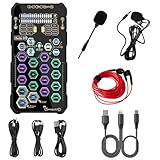
- [Portable Handheld Sound Card] This SK9 basic sound card set features BT, voice changing, ambiance sounds, reverb, electronic effects, noise reduction, and more for singing, recording, and live streaming. It is compatible with phones, computers, tablets, headphone, PS5, and speakers(via 3.5mm audio cable only, not via BT).
- [Multiple Voice Changing Modes] Enjoy six fun voice-changing modes: Male, Female, Child, Girl, Monster, and Robot. These modes add a fun twist for entertainment and enhance your streaming experience.
- [Various Reverb Effects] Choose from six reverb modes: Voice, KTV1, KTV2, KTV3, KTV4, and MC. These effects are perfect for karaoke and singing, providing a professional sound for your live sessions.
- [Diverse Ambiance Sound Effects] The sound card includes 14 fixed ambiance effects and a 12-step electronic music effect, making your live streams more engaging and dynamic, adding a unique atmosphere to any performance.
- [Multiple Live Streaming Functions] Features like one-click noise reduction, sound bypass, original sound, make live streaming effortless and professional, covering all the basic streaming needs.
- Sample rate is how many times per second audio is captured. Focusrite says 44.1 and 48 kHz cover the typical human hearing range it describes, and notes that the value of higher sample rates for general recording is debated. Choose a rate that fits your project and workflow rather than buying on a maximum figure alone. Focusrite’s guide to sample rate, bit depth and buffer size explains the distinctions.
- Bit depth is a separate format specification. Check the device and software’s supported formats, but do not read a higher advertised ceiling as proof of audible superiority.
- Buffer size affects the trade-off between monitoring latency and computer workload. Lower settings can reduce latency but may increase processing load and cause glitches or dropouts. If that happens, increase the buffer or reduce session load.
Windows recording settings also depend on the driver and device. Focusrite says that, in its documented Windows ASIO recording context, the Windows Sound-panel 16/24-bit selection does not control recording depth; it states, “The audio stream captured from our hardware is always 24-bit.” That guidance applies to Focusrite hardware in the described context, not automatically to every interface or operating system. Read Focusrite’s Windows bit-depth guidance.
What two product specifications can—and cannot—tell you
These examples illustrate different device categories; they are manufacturer specifications, not a ranked list or controlled comparison.
| Example | Manufacturer-described role and specifications | What to take from it |
|---|---|---|
| Creative Sound BlasterX G6 | Creative describes it as an external USB gaming DAC and sound card with headphone amplification and input/output connections. Its technical specifications list recording resolution up to 32-bit/192 kHz. | The figure is a supported-format ceiling, not evidence by itself of better sound. Check the exact connections, platform support and headphone output for your setup. Creative’s technical specifications and product page describe the device. |
| Focusrite Scarlett 2i2 Anniversary Edition | Focusrite lists two mic/line/instrument inputs, 48 V phantom power, a headphone output, 24-bit depth and supported sample rates through 192 kHz. Its 2026 specifications list 116 dB A-weighted microphone-input dynamic range. | These are specifications for a USB recording interface, not a gaming-card comparison or independent performance test. Verify that two inputs and its other connections meet your recording needs. Focusrite’s specifications for the 2i2 Anniversary Edition provide the listed details. |
Verify compatibility before choosing
Support can depend on the operating system, connection, driver and exact product revision. Before buying, check the current documentation for the specific model and your computer or console.
Quick Recap
- Confirm the required connection: USB type and port for external devices, or an available PCIe slot for an internal card.
- Check current operating-system and platform support, including whether the manufacturer provides the driver or software controls you need.
- Confirm the exact input, output and channel configuration for your planned setup.
- For DAW use, verify driver support with your operating system and DAW; for gaming, confirm the device works with the intended platform and headset wiring.
- Check that the specifications apply to the model and revision being sold, not a similarly named version.
Product prices and availability are accurate as of the date/time indicated and are subject to change. Any price and availability information displayed on Amazon at the time of purchase will apply.

