What’s actually slowing this PC down?
Pick the symptom - the matching free tool is one click away.
The best “camera smartwatch” depends on where the camera actually lives. A built-in-camera watch records photos or video on the watch itself; a phone-camera controller uses the watch as a wrist-mounted preview and shutter for a compatible smartphone. Those are different products with different buyers, controls and compatibility requirements.
For a child-oriented watch with its own camera, VTech’s KidiZoom Smartwatch DX is the clearly documented example here. For adult group photos, selfies or a phone positioned across a room, Samsung’s Galaxy Watch Camera Controller is the relevant approach: the paired Galaxy phone takes the picture while the watch provides controls. Official product pages do not provide comparable image-quality tests, sample galleries or benchmark figures, so “excellent” camera performance cannot be established from the available evidence.
As an Amazon Associate I earn from qualifying purchases.
Two meanings of “smartwatch with camera”
Searches for “best smartwatch with camera” combine two use cases that should be separated before you compare products.
Crashes, No Sound, or Screen Glitches?
Random freezes, missing sound and display glitches usually trace back to one bad driver. Find and replace yours safely.Free scan · under a minuteWindows Errors? Fix Them Before They Spread
Repair common Windows errors and clear accumulated junk for a smoother, more stable PC - no reinstall needed.Free scan · no reinstallBuilt-in camera watches
A built-in model contains an image sensor and lens in the watch case. It can capture without using a nearby phone, subject to its own storage, battery and software. VTech describes the KidiZoom Smartwatch DX as a children’s watch with photo and video capture, effects, frames, filters and storage for pictures and videos.
#1 Best Overall

- 【All in One Smart Watch for Kids】Kids smart watch with selfie-cam, MP3 player, voice recorder, habit tracking, games, pedometer, flashlight, alarm, stopwatch, calculator, theme, screensaver select, parental control, silent profile, time format, volume, etc. Which can bring convenience, fun and unprecedented new experience to children's lives.
- 【Upgrade Kids Watch】As the fun kids smart watch, with 39 games to choose from kids. These games are more playable and suitable for children of multiple ages. That can effectively exercise kids logical thinking ability, reaction ability and hand-eye coordination. It is a gift for 4-12 year old boys and girls. There are Habits Tracking and Parental Control that traditional watches don't have.
- 【HD Selfie-Camera & Video】The kids touchscreen smartwatch not only has camera and video support, but also has amazing HD pixels. Children can take photos and record videos, capture record every wonderful moment in their lives. With pop big head sticker shooting, children can take some hilarious photos with family or friends. The first step in training a child to be a photographer.
- 【Powerful Battery Life】Kids watch built-in rechargeable battery that lasts more than 7 days on a full charge, the battery of this girls watch is upgraded to 500mA, allows kids to play anywhere, anytime, and is equipped with a USB cable. Let the children enjoy a happy playtime and give them a good childhood!
- 【Great Gift for Kids】Our kids watches is designed with a durable aluminum frame design and a 1.54 inch IPS HD touch screen, it's easier to operate for kids. This watch introduces a fun function: habit tracking, cultivating children's good habits. Perfect birthday, Christmas, festival, and holiday gifts for boys and girls aged 6~10. We provide friendly customer service.
Watches that control a phone camera
A controller watch does not photograph through its own lens. It communicates with a compatible phone, shows a live preview or control screen, and sends commands such as shutter, timer or video start. Samsung documents this arrangement for Galaxy Watch Camera Controller. The Galaxy smartphone remains the camera and stores the resulting image.
Calling the second category a “watch with a camera” is misleading: if the phone is incompatible, out of range or unavailable, the watch cannot substitute for a standalone camera.
At-a-glance comparison
| Option type | Where the camera is | Primary audience | Documented controls | Compatibility | Image-quality evidence |
|---|---|---|---|---|---|
| VTech KidiZoom Smartwatch DX | Inside the watch | Children’s play and casual toy photography | Photo and video capture, effects, frames, filters and on-watch storage | Uses the watch’s own hardware; phone requirements are not established in the cited product information | No comparable published test, sample set or benchmark stated |
| Samsung Galaxy Watch Camera Controller | Inside a paired Galaxy smartphone | Adults using a wrist remote for group shots, selfies or a distant phone | Watch preview, timer, photo shutter, photo/video mode switching, video start/stop and latest-photo thumbnail | Requires a compatible Galaxy Watch and compatible connected Galaxy phone; availability can vary by phone, software and region | No comparable published test, sample set or benchmark stated |
This table is a capability comparison, not a ranking of photographic quality. The available official information does not support a megapixel leaderboard or a claim that either option outperforms a phone camera.
Do these 3 things before closing this tab:
1Repair Windows errors before they cause bigger problems2Scan for outdated or missing drivers - takes under a minute3Clear out junk files and repair common Windows errorsBuilt-in camera pick: VTech KidiZoom Smartwatch DX
What it actually does
VTech’s product description identifies the KidiZoom Smartwatch DX as a children’s watch with photo and video functions. It also mentions playful photo effects, frames and filters, plus storage for captured pictures and videos. The product-page wording says: “Photo and Video camera allows kids to capture photo and videos anytime, anywhere.” That is promotional copy describing availability of the functions, not a measured quality claim.
Rank #2
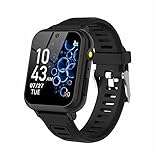
- 👍⌚【Muti-Functional Smart Watch for Kids】Kids smart watch with selfie-cam, 39 puzzle games, torch, MP3 player, voice recorder, pedometer, alarm, stopwatch, calculator, theme, screensaver select, backlight time, audiobooks, learn card, habit tracker, silent profile, five country language, ringtone volume etc.
- 👍⌚【Fun Selfie-Cam & Video】Kids touchscreen smart watch supports such as camera and video perfectly. Children usually use "VCRS + magic cameras" to record every happy moment in their lives. Set your favorite photo as wallpapers. Kids watch is capable of store 10000+ HD photos or 6+ hours video.
- 👍⌚【Easy to Use】No SIM Card Required. The watch for kids don't have call function, don’t need to download app, all the functions are built-in the kids watch, very easy to operate for kids. We also provide SD memory cards Built-in this kids smart watch, helps your child download MP3 children's songs, pictures and videos.
- 👍⌚【Longer Lasting Battery】Kids watch built in re-chargeable battery, the working time can be 3-7 days (varies with use and other factors), this kids smart watch has excellent battery life allows for uninterrupted fun throughout the day and night, and USB cable included (About 2 hours charging fully).
- 👍⌚【Our Forever Guarantee】Smart watch for kids using environmentally friendly silicone material, soft and comfortable, leaving no trace. Please fully charge the kids smart watch before first use. And we provide 90 days money-back, 1 year warranty and life-time friendly customer service. If you have any questions, please contact us in time. We will solve the problem for you as soon as possible.
Who should consider it
- Children who want a wearable gadget for experimenting with pictures and short videos.
- Families prioritizing built-in creative effects over phone-grade detail or manual controls.
- Buyers who specifically need the watch itself to capture rather than remotely trigger another device.
What not to expect
The documentation positions this as a toy-oriented children’s product, not an adult photography tool. It does not establish sensor resolution, lens specifications, dynamic range, stabilization, low-light performance, transfer speed or battery life during repeated recording. Do not infer those capabilities from the presence of a camera icon or from the word “video.”
How to evaluate it before purchase
- Confirm that the listing is the KidiZoom Smartwatch DX generation you intend to buy; similarly named children’s watches can have different hardware.
- Check the seller’s current specification panel for included storage, charging equipment and any stated export or transfer method.
- Decide whether the child needs still photos, video, effects or all three, then verify each function in the current manual or product description.
- Set expectations that the watch is for casual, playful captures rather than a replacement for a modern phone camera.
- Review supervision, privacy and local rules before allowing photography in school, public or shared spaces.
Phone-camera remote: Samsung Galaxy Watch Camera Controller
How the setup works
Samsung’s support documentation, updated July 8, 2026, describes Camera Controller as a way for a Galaxy Watch to operate the camera on a compatible, connected Galaxy smartphone. The phone supplies the lens and image processing. The watch acts as a remote display and control surface.
Controls documented by Samsung
- A preview of the phone’s camera view on the watch.
- A timer for getting into position before the exposure.
- Photo capture from the watch.
- Switching between photo and video modes.
- Starting and stopping video recording.
- A thumbnail view of the latest photo.
These controls make the feature useful when the phone is mounted on a tripod, placed on a table, held at arm’s length for a group or positioned for a self-portrait. They do not turn the watch into an independent camera.
The Tool Desk
Outbyte Driver Updater FREEFix the driver behind crashes, sound loss and screen glitchesFind Drivers →Outbyte PC Repair FREERepair Windows errors before they cause bigger problemsFix Now →Compatibility is conditional
Samsung lists supported Galaxy Watch and Galaxy phone families, but warns that Camera Controller may be unavailable depending on the connected smartphone. Support can also differ by software release and region. A watch and phone that look compatible by brand name may still fail to expose the feature if the exact models, operating systems or local distribution do not match.
Rank #3

- This super-cool smartwatch has two cameras, a large screen, high resolution, a premium metal body, a music player and more; set to English, Spanish or French
- Get out and play with this splash-proof watch, featuring exciting activities, challenges and reaction games designed to get you moving
- Explore your creativity with the dual cameras, adding effects to photos and videos or making music with the composer app
- Includes 50 built-in clock faces, plus more to download to practice telling time, or shake the watch to hear the time out loud
- Intended for ages 4+ years; rechargeable lithium-ion battery; charge device using included micro-USB cable only and avoid third-party adapters
Pairing and first-use checklist
- Identify the exact Galaxy Watch model and the exact Galaxy smartphone model, including regional variant where relevant.
- Update both devices to the software versions offered by their normal system-update screens.
- Pair the watch with the intended Galaxy phone and confirm that the phone is the device currently connected to the watch.
- Open Camera Controller on the watch. If it is missing or reports that the phone is unsupported, stop and verify compatibility rather than assuming a hardware fault.
- Place the phone where you want the shot, open the watch preview, select photo or video mode, and test the shutter or recording control before arranging people.
- Use the timer when you need time to move into the frame, then check the latest-photo thumbnail on the watch or the original file on the phone.
Choosing the right category
Choose a built-in camera when…
- The wearer must take pictures without carrying or positioning a phone.
- The buyer is looking for a child-focused creative toy with effects and simple capture modes.
- On-watch storage and casual sharing matter more than detailed image quality.
Choose a phone controller when…
- You already own a compatible Galaxy phone and want a remote shutter.
- You need a preview while the phone is several feet away or mounted for a group picture.
- You want to control both stills and video without touching the phone after framing.
Neither is a clear fit when…
- You need independently verified image quality, low-light performance or professional controls.
- You use a non-Galaxy phone and are considering Samsung’s Camera Controller.
- You require a camera watch for security, medical documentation or other situations where reliability and evidence quality are critical.
A practical compatibility decision framework
Use this sequence before spending money. It prevents the most common mistake: buying a watch because it has “camera” in its description without checking whether the camera is onboard or remote.
- Define the capture device. Write down whether the watch must record itself or merely control a phone. Do not proceed until one of those answers is explicit.
- Match the user and setting. A children’s toy, an adult selfie remote and a family group-photo tool have different priorities. Compare within the same use case.
- Verify the exact hardware. Record the full watch and phone model names, not just “Galaxy Watch” or “Android phone.”
- Check current regional support. Samsung’s availability warning means a feature can depend on the connected phone and local software distribution.
- List the controls you need. For the VTech option, look for photo, video and effects. For Camera Controller, look for preview, timer, shutter, mode switching, video controls and thumbnail viewing.
- Separate documented functions from quality assumptions. A camera can capture an image without producing phone-level detail. Treat quality as unproven unless a reliable, comparable test is available.
- Plan storage and transfer. A built-in watch stores its own media; a remote controller places the file on the phone. That difference affects backup, editing and who controls the captured images.
What is known about image quality
No owner-attributed photo test, standardized chart comparison, sample gallery or camera benchmark is established for the two options described here. There is therefore no defensible basis for ranking them by megapixels, sharpness, color, night performance or video quality.
The KidiZoom documentation confirms capture functions and creative effects, while Samsung’s documentation confirms remote operation of a compatible phone camera. Neither page supplies a like-for-like test under the same lighting, distance, resolution or software conditions. The phone used with Camera Controller may produce very different results from another compatible Galaxy model because the phone, not the watch, determines the imaging hardware.
Recommended Free Tools
When evaluating a listing that makes stronger claims, ask for the sensor resolution, video modes, storage limits and independent sample images. If those details are absent, describe the product by its documented controls rather than by an unsupported quality adjective.
Rank #4

- 【Durability and IP68 Waterproof】: Considering comfort and durability, our kids watch comes with an additional woven watch strap. It is also equipped with 2 screen protectors to prevent drops, collisions and scratches. This sturdy and durable children's watch features a waterproof aluminum frame, ensuring it can function properly even when washing hands, swimming or taking a shower.
- 【All-in-One Kids Smart Watch】: The boys watch with 39 puzzle games, HD camera, video, music player, audiobooks, learn card, landmark card, habit tracking, recorder, pedometer, alarm, stopwatch, calculator, calendar, flashlight, parental control etc. The game watch offers a wide range of activities to bring children new experiences and enjoyment.
- 【39 Games & Learning Toys】: The kids watch is upgraded with 39 suitable games for kids ages 5-12, which help exercise brain and logic skills. Kids smart watch also has parental control to manage children's playtime. Our game watch introduces the newest habit tracking and audiobooks, cultivating children's good habits and imagination. It is equipped with learning cards and landmark cards to help kids learn about the world around them.
- 【HD Camera & Video】: The kids watch is equipped with a high-definition camera, allowing children to clearly record every happy moment in life. Children can use the built-in cute stickers to take some interesting photos with their families or friends. The smart watch for kids can store 15,000+ photos or 6+ hours of video.
- 【Longer Battery Life】: Without frequent recharging, the rechargeable battery will last about 7-14 days in standby mode, allowing kids to enjoy uninterrupted use.
Use cases and trade-offs
Children’s creative play
The KidiZoom approach keeps capture functions on the child’s wrist and adds effects, frames and filters. Its appeal is immediacy and play. The trade-off is that the available documentation does not position it as a high-fidelity camera, and parents should establish where photography is appropriate.
Family and group photographs
A Galaxy Watch used with Camera Controller can let the photographer place a compatible phone at the desired distance, check the preview from the wrist and trigger the shot without running back to the phone. The phone remains essential; without a supported connection, this workflow does not operate.
Selfies and tripod shots
The watch timer and preview can help a user frame a shot while standing away from the phone. The practical benefit is positioning control, not a new lens. Image quality will follow the paired phone’s camera and the scene’s lighting.
Video starts and stops
Camera Controller’s documented video controls are useful when touching the phone would shake a setup or disturb a scene. Confirm that the desired phone model exposes video control before relying on it for an event.
Best Value

- 【Perfect Smart Watch for Kids】The smart watch for kids with sleep monitor, heart rate, blood oxygen, stress,100+ sport modes, DIY dial, voice assistant, SOS, music, sedentary/drink water reminder, alarm clock, Torch, class mode, camera, games, storybook, voice recorder, learn card, calculator, pedometer, multi-languages, bluetooth call and many other functions. This is an excellent gift for boys and girls for birthdays, Easter, Christmas, holidays, and vacations.
- 【24/7 Health Guardian】Smartly monitors heart rate, blood oxygen, sleep and stress levels around the clock. Analyzes sleep stages (light/deep) using a 2,000+ pediatric health database to generate actionable insights. Triggers vibration alerts for abnormal data, helping parents detect risks like exercise overload or sleep disorders in real time.
- 【1.85" Interactive Display & Growth Rewards System】Features a vibrant HD touchscreen with 100+ personalized watch faces (regularly updated) and custom photo dials to capture precious moments. Exclusive "Reward Coins" system: Kids earn virtual coins by completing fitness goals or learning cards or specific tasks, which can be redeemed for games/audiobooks or other rewards - making life fun while cultivating self-discipline.
- 【Study Focus Mode & SOS】Parents can block distractions during class via app scheduling (minute-level precision). This allows children to concentrate on their tasks at school. In an emergency, kids can press and hold the side button for 3 seconds to activate the SOS alarm to attract the attention of people around them and get help.
- 【IP68 Waterproof & Durability】This kids watch built with a sturdy stainless steel case(1.5-meter drop tested) and IP68 waterproofing for storms/pool play. Smart Watch for Kids Teens Automatically counts steps, distance, calories burned, and active minutes and Supports 100+ sports modes.
Troubleshooting by symptom
Camera Controller is missing
- Confirm that the watch is a supported Galaxy Watch family and that the connected phone is a supported Galaxy phone.
- Install available system updates on both devices.
- Check the region-specific Samsung support information for the exact combination.
- Reconnect the watch to the intended phone if it is paired with another device.
The watch says the phone is unsupported
Treat that message as a compatibility issue first. Samsung explicitly notes that availability may depend on the connected smartphone. Record the exact model and software versions, then verify them against current support documentation; changing camera settings will not add an unsupported feature.
The preview does not appear
- Keep the phone and watch connected and within normal wireless range.
- Open the phone’s camera and Camera Controller again after confirming the intended phone is connected.
- Check whether the phone is already occupied by another camera or recording session.
- If the feature worked previously, test after software updates and reconnect the devices.
The shutter or video command does not respond
First determine whether the phone preview itself is live. A frozen or absent preview points to connection or compatibility; a live preview with an unresponsive command points to the controller session or software. Reopen Camera Controller, reconnect the watch and phone, and test with a simple still image before attempting a timed recording.
A child’s watch does not save a photo or video
Check the watch’s available storage and battery, then review the current KidiZoom instructions for its capture and file-management process. Do not assume that a full watch can automatically offload media to a phone; the cited product information confirms storage but does not establish a universal transfer workflow.
Free tools Windows power users keep installed
One-click scans. No signup required.
Buying checklist
- Camera location: onboard watch camera or remote phone camera.
- Audience: child-focused toy use or adult phone photography.
- Exact models: full watch and phone model numbers where pairing is required.
- Regional software: feature availability can vary, particularly for Camera Controller.
- Controls: capture, effects and storage for the built-in option; preview, timer, shutter, mode switching and video controls for the remote option.
- Evidence standard: documented functions are established; comparative photo quality is not.
- Current listing details: verify stock, price, included accessories, warranty and return terms at the time of purchase because those details are not established by the capability documentation.
Bottom line: pick by camera location, not the marketing phrase
For a watch that genuinely takes pictures, the VTech KidiZoom Smartwatch DX is the documented built-in-camera choice, aimed at children and playful capture. For a wrist-based viewfinder and shutter, Samsung Galaxy Watch Camera Controller is the better match, provided the exact Galaxy Watch, Galaxy phone, software and region are supported. Neither option has enough published, comparable testing here to justify calling it an excellent camera. Decide first whether you need a camera on the wrist or a remote for the camera already in your phone, then verify the precise hardware combination.
Quick Recap
Product prices and availability are accurate as of the date/time indicated and are subject to change. Any price and availability information displayed on Amazon at the time of purchase will apply.

