If you want to play 4K Ultra HD Blu-ray discs, the documented Samsung choices here are the UBD-M9500 and UBD-K8500. The BD-J5900 is a conventional 3D Blu-ray player, not a 4K disc player. These are older models, so treat them as used-market options rather than proven current best buys: check local availability, exact regional model, condition, and disc playback before purchasing.
Which Samsung Blu-ray player should you choose?
Start with the discs you intend to watch. For Ultra HD Blu-ray discs, look at the UBD-M9500 or UBD-K8500. If standard Blu-ray and 3D playback are enough, the BD-J5900 is the relevant example, but its documentation does not list UHD disc playback.
As an Amazon Associate I earn from qualifying purchases.
| Model | Documented category and features | Best fit | Important checks |
|---|---|---|---|
| Samsung UBD-M9500 | Ultra HD Blu-ray, Blu-ray, DVD and CD playback; HDR; UHD upscaling; two HDMI outputs; Wi-Fi, Ethernet and Bluetooth. Samsung lists Bluetooth transmit/receive and private listening. Samsung Singapore product specifications. | A UHD-disc setup where two HDMI outputs, wired networking or Bluetooth listening are useful. | Samsung says Bluetooth headphones are not included. Check regional variant, current app status, condition and included accessories. |
| Samsung UBD-K8500 | 4K Ultra HD with HDR and UHD upscaling; built-in Wi-Fi; HDMI; 3D Blu-ray, Blu-ray and DVD media. Samsung’s US specification sheet says a 4K UHD TV is required for 4K UHD viewing. Samsung US specification sheet (2016). | A UHD-disc setup connected to a compatible 4K UHD television. | Confirm regional variant, HDR compatibility with your TV, included remote and accessories, condition, and whether the unit reads the discs you plan to use. |
| Samsung BD-J5900 | 3D Blu-ray player with Wi-Fi. Its 2015 specification sheet described Opera TV Store apps and screen mirroring at that time; it does not identify it as a UHD Blu-ray player. Samsung US specification sheet (2015). | Standard Blu-ray or 3D Blu-ray playback, if UHD discs are not a requirement. | Do not assume the historically listed smart features or apps still work. Verify playback, connectivity and return terms before buying used. |
What makes a Samsung player a 4K Blu-ray player?
A 4K TV and a 4K Ultra HD Blu-ray player solve different parts of the setup. The player must support Ultra HD Blu-ray discs to play them as UHD discs; a regular Blu-ray player does not become a UHD disc player simply because it is connected to a 4K television. Samsung’s UBD-K8500 sheet explicitly says “4K UHD TV Required” for 4K UHD viewing. The UBD-M9500 product page also lists Ultra HD Blu-ray playback.
The Tool Desk
Outbyte Driver Updater FREEFix the driver behind crashes, sound loss and screen glitchesFind Drivers →Outbyte PC Repair FREEClear out junk files and repair common Windows errorsFree Scan →UHD upscaling is separate from native UHD disc playback: it processes lower-resolution material for output to a 4K display, but does not turn a standard Blu-ray disc into an Ultra HD Blu-ray disc. Samsung described the K8500 as delivering four times the resolution of full 1080p HD in its 2016 specification sheet. Samsung’s M9500 page advertises a 2× color range versus conventional Samsung Blu-ray players; that is Samsung’s product comparison, not an independent measurement.
#1 Best Overall

- Play 4K Ultra HD movies at 4x the resolution of full 1080p HD, letting you watch your favorite scenes with a level of detail and clarity like never before.
- HDR allows for a greater range of color contrast and brightness, enhancing details from the original film format. The player recognizes HDR content and automatically optimizes settings.
- New for 2017, turn your TV into the ultimate home entertainment hub. Seamlessly access your favorite apps, content, and sports with Samsung Smart Hub. Operating Power Consumption (Main): 22W,Stand-by Power Consumption (Main): 0.3W
- Anynet+ (HDMI-CEC). Support for Dolby Atmos and DTS:X audio formats Bitstream output
- Expand your existing audio system to play streaming music. Just connect the Blu-ray player to your legacy audio player and you can wirelessly stream your favorite music to your speakers.
How the UBD-M9500 and UBD-K8500 differ
UBD-M9500: more listed connection options
Samsung’s Singapore product page lists two HDMI outputs, Wi-Fi, Ethernet and Bluetooth, as well as UHD Blu-ray, Blu-ray, DVD and CD playback. Its Bluetooth feature supports private listening with headphones, but Samsung states that headphones are sold separately. The page’s listed features are regional product specifications and should not be assumed to describe every variant identically.
Samsung UK’s support page displays an M9500 firmware file modified on 12 December 2019 and manuals dated 2017–2018. That is a dated UK support listing, not proof that support or files are unavailable in every region, nor a current app-compatibility statement. Check the support page for the exact model suffix and market before relying on a file or feature: Samsung UK UBD-M9500 support.
Rank #2

- AK59-00180A Replaced Remote fit for Samsung 4K Ultra HD Blu-ray Player: UBD-M7500 UBD-M9500 UBD-M8500 UBD-M9000 UBD-M9700 UBD-M8500/ZA UBD-M7500/ZA UBD-M9500/ZA UBD-M9700/ZA UBDM8500/ZA UBDM9500/ZA UBD-M8500/XY UBD-M9500/XY;
- Sub remote control: AK63-01068A
- Easy to use IR remote control; Battery Type you need install : Two AA batteries;
- Please note: When the player displays an Ultra HD Blu-ray or standard Blu-ray Disc's menu, you cannot start the movie by pressing the p button on the remote control. To play the movie, you must select Play Movie or Start in the disc menu, and then press the OK button on the remote control.
- UBD-M7500/EN UBD-M7500/XE UBD-M7500/XN UBD-M7500/XU UBD-M7500/ZC UBD-M7500/ZF UBD-M7500/ZG UBD-M8500/EN UBD-M8500/PE UBD-M8500/RU UBD-M8500/TK UBD-M8500/XA UBD-M8500/XD UBD-M8500/XE UBD-M8500/XM UBD-M8500/XN UBD-M8500/XP UBD-M8500/XS UBD-M8500/XT UBD-M8500/XV UBD-M8500/XY UBD-M8500/ZC UBD-M8500/ZF UBD-M8500/ZG UBD-M8500/ZK UBD-M8500/ZN UBD-M8500/ZW UBD-M8500/ZX UBD-M9000/XU UBD-M9500/EN UBD-M9500/XE UBD-M9500/XN UBD-M9500/XS UBD-M9500/XU UBD-M9500/XY UBD-M9500/ZC UBD-M9500/ZF UBD-M9500/ZG UBD-M9500/ZX
UBD-K8500: documented UHD and HDR playback
Samsung’s US sheet lists UHD playback with HDR, UHD upscaling, built-in Wi-Fi, HDMI and 3D Blu-ray/Blu-ray/DVD media. On 4 May 2016, Samsung announced that the K8500 had received UHD Alliance Premium certification. That dated manufacturer announcement provides context for the model; it is not a current ranking or a guarantee about a used unit’s condition or compatibility with a particular television. Samsung’s 2016 certification announcement.
When does the BD-J5900 make sense?
The BD-J5900 is a lower-category choice if you want conventional Blu-ray playback, including 3D, rather than UHD discs. Its 2015 sheet’s references to Opera TV Store and screen mirroring describe features in that period. They do not establish that the apps or connected services remain available now, so buy it for confirmed disc playback rather than presumed streaming support.
Rank #3
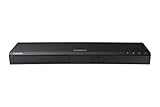
- Play 4K Ultra HD movies at 4x the resolution of full 1080p HD, letting you watch your favorite scenes with a level of detail and clarity like never before.1
- HDR allows for a greater range of color contrast and brightness, enhancing details. The player recognizes HDR content and automatically optimizes settings.2
- Rating voltage is AC110-120V ~50/60Hz with a operating voltage of 22W and stand-by power consumption of 0.3W
- Sync and stream all your favorite TV shows, games, apps, and more with built-in wireless.3
- Wi-Fi: 2x2 Dual
What to verify before buying an older Samsung player
Because current stock, pricing, seller quality and app compatibility have not been established, check the specific listing and unit rather than relying on a model name alone. For a used player, ask the seller to confirm playback with the disc types you need and review return rights.
- Model and region: Match the full model code and suffix to your market and verify disc compatibility for your collection.
- Disc requirement: Confirm that the listing explicitly supports Ultra HD Blu-ray if you plan to play UHD discs; “Blu-ray” alone is not enough.
- TV and connections: Check the television’s 4K and HDR support, available HDMI inputs, and whether you need the M9500’s second HDMI output or Ethernet connection.
- Condition and package: Check the return policy, remote, power cable and any other included accessories. A listing’s contents can vary.
- Smart functions: Verify any app or network feature you rely on directly for your region and model; historical documentation is not evidence of current service availability.
For general background on player categories, the Blu-ray Disc Association maintains a hardware catalog.
Quick Recap
Best Value

- Full HD 1080p Playback via HDMI - This Blu-ray player supports full HD 1080p Blu-ray disc playback from its HDMI output
- Built-In Wi-Fi - With built-in Wi-Fi, you can access all your Smart Blu-ray features and apps wirelessly. Sync and stream content to other devices as well, such as PCs, smartphones, tablets and cameras using Samsung AllShare content sharing technology
- DVD Upscaling to Near HD Quality - With HD Upconversion, non-HD video is automatically enhanced to bring it to near-HD quality. You can watch your favorite DVD movies with greater detail and clarity
- HDMI - Connect your TV and audio systems for high quality audio and an enhanced entertainment experience when watching your favorite movies, shows and sports
Rank #4

- Wired Internet connection
- Play 4K Ultra HD movies at 4x the Resolution of Full 1080p HD, letting you watch your favorite scenes with a level of detail and clarity
- HDR allows for a greater range of color contrast and brightness, Enhancing details
- Turn your TV into the ultimate home entertainment Hub. Seamlessly access your favorite apps, including 4K streaming apps, content, and sports with Samsung Smart Hub
Product prices and availability are accurate as of the date/time indicated and are subject to change. Any price and availability information displayed on Amazon at the time of purchase will apply.

