Quick wins for a faster PC:
Repair Windows errors before they cause bigger problemsFix Now →Fix the driver behind crashes, sound loss and screen glitchesFind Drivers →The best Spotify running playlist depends on the run: Power Running is a strong all-around starting point, while Workout & Running suits EDM fans and RUNNING Music Hits 2026 leans toward current dance-pop. For a personalized workout, Spotify Running Mode offers configurable music to eligible Premium users on iOS in selected countries. Playlist catalogs and availability can change, so check each linked page before a run.
Best Spotify running playlists at a glance
| Playlist | Creator | Best for | Observed length | Style and tempo |
|---|---|---|---|---|
| Power Running | Power Music Workout | A varied, general-purpose run | About five hours; 80 tracks when indexed in August 2026 | Mixed pop, dance, hip-hop and workout remixes; track labels span roughly 128–180 BPM |
| Workout & Running | Spinnin’ Records | EDM fans and long sessions | About 13 hours; 265 tracks when indexed in August 2026 | Electronic and dance music; no single consistent tempo established |
| RUNNING Music Hits 2026 | OneSevenMusic | Contemporary dance-pop | About 4 hours 45 minutes; 101 tracks when indexed in August 2026 | Current dance-oriented tracks and remixes; no single tempo established |
| Running 2026 | Storm Music Group | High-energy cardio and outdoor running | About 6.5 hours; 150 tracks when indexed in August 2026 | High-tempo EDM and cardio house; not a calibrated training soundtrack |
| Best Running Songs Mix 150–160 BPM | Individual Spotify user | Testing a moderate-to-fast rhythmic range | About 4.5 hours; 105 tracks when indexed in August 2026 | Advertised as 150–160 BPM; track feel may differ from listed tempo |
| RUNNING MUSIC 170 BPM 2026 | Individual Spotify user | Fast-cadence experiments and short speed sessions | About 4.5 hours; 105 tracks when indexed in August 2026 | Advertised as 170 BPM; potentially too intense for easy running |
Track counts and durations are observations from playlist pages indexed in August 2026, not fixed specifications. Save counts are omitted because they change and do not measure how well a playlist fits your run.
Which playlist fits your run?
For an easy run or a first press-play choice
Power Running is the most flexible default in this shortlist: it has a broad mix of genres and tempos, and enough music to cover a typical run without quick repetition. That variety is also its trade-off. Its tempo can change substantially from track to track, and it is not arranged as a coached warm-up, steady section and cooldown.
For an EDM-heavy long run or treadmill session
Workout & Running by Spinnin’ Records has the largest observed track pool here. Its stated uses include running and other workouts, and its electronic identity is clear. A large catalog helps limit repetition across sessions, but its length does not guarantee a carefully paced sequence for one workout.
Do these 3 things before closing this tab:
1Scan for outdated or missing drivers - takes under a minute2Clear out junk files and repair common Windows errors3Fix the driver behind crashes, sound loss and screen glitches#1 Best Overall

- Unparalleled Audio and Premium sound - Dual drivers combine the clear highs of Bone Conduction Tech with the deep bass of Air Conduction Tech for 12 hours of powerful, 3D audio.Perfect for musical motivation during workouts and runs.
- Open-Ear Awareness - SHOKZ's signature open-ear design helps you power through your workouts while keeping you safely aware of your surroundings. Leak-free listening ensures your audio remains for your ears only
- Secure Stable, Lightweight Fit - The weight-optimized design of this unibody frame integrates a Ni-Ti alloy memory wire and ergonomic ear hooks. The result is a secure, comfortable fit that defies slips and shift even during gym sessions or cycling.
- Dedicated EQ Modes - Customize your audio experience with our dedicated EQ modes on the Shokz App. Enjoy pure bone conduction sound with the newly launched Classic Mode, or boost your audio in noisy environments with Volume Boost Mode.
- Crystal-Clear Calls - Strategically positioned dual wind-resistant microphones and an AI noise reduction algorithm filter out 96.5% of background noise, including wind at speeds of up to 15 miles per hour.
Running 2026 by Storm Music Group is another running-focused EDM option, with high-energy positioning and about six and a half hours of music when indexed. Choose it when that intensity is welcome; it may be a poor match for a recovery run or an easy conversational effort.
For current dance-pop
RUNNING Music Hits 2026 by OneSevenMusic offers a contemporary dance-oriented mix. Its observed save count was high when indexed, but popularity is not a guarantee that every song suits your taste, cadence or workout. The title and track list can change, so use the live playlist rather than relying on a remembered song list.
For hard intervals
EDM Beast Mode 2026 | Training Hits by Fitness Beats is presented for intense training and has about four hours and 15 minutes of music across 91 tracks when indexed. Its aggressive workout framing makes it an optional pick for hard intervals, not a default soundtrack for beginners or easy days. A high-energy mood should not dictate your pace.
For cadence experiments
The user-created 150–160 BPM mix and 170 BPM mix make tempo an explicit selection criterion. Treat their labels as a way to explore music, not as prescriptions. The 170 BPM option may be a poor fit for easy running, and a faster beat can tempt you to work harder than intended.
Rank #2

- Ultra-Comfort with Open-Ear Design: Experience matchless comfort even for all-day wear with these non-intrusive, open-ear Bluetooth earbuds.
- Enhanced Situational Awareness: V20i open-ear wireless earbuds let you stay connected to the world while enjoying pristine playback. Ideal for both urban life and outdoor ventures.
- Four Adjustable Positions for a Secure, Comfy Fit: Easily rotate to find the sweet spot for your ears with these bluetooth earbuds, boosting stability and comfort. Listen and move freely with V20i open-ear earbuds throughout the day.
- Powerful Sound with 16mm Drivers: Immerse in rich, resonant bass fueled by V20i's advanced 16mm drivers—featured in these wireless earbuds—with titanium-coated domes and soundcore's proprietary BassUp technology.
- Clear Calls with 4 Mics and AI Enhancement: Equipped with four mics and an AI algorithm, V20i open-ear Bluetooth earbuds ensure crisp and clear calls wherever you are.
How BPM, cadence and pace differ
- Song tempo is the number of musical beats per minute.
- Running cadence is the number of steps you take per minute.
- Pace is how quickly you cover distance, such as minutes per mile or kilometer.
- Perceived effort is how hard the run feels to you.
A 160 BPM song does not automatically mean 160 steps per minute. You might match one step to each beat, hear the beat in half-time or double-time, or find that its rhythm does not suit your stride at all. Terrain, fitness, stride and musical preference all affect what feels comfortable.
Use BPM as a search and trial tool. Try a tempo-oriented playlist during a run when you can focus on comfort and form; if the music makes you speed up unintentionally, switch tracks or use a more relaxed mix. There is no universal BPM target established here for every runner or workout.
Spotify Running Mode or a regular playlist?
Spotify announced Running Mode on July 30, 2026. According to Spotify’s announcement, its initial availability is for Premium users on iOS in the United States, Canada, the United Kingdom, Ireland, Australia, New Zealand and Sweden. It offers 25 running presets and lets users customize workout type, duration, BPM and genre, with optional English-language spoken cues. Availability and interface details may change as the feature rolls out.
Choose Running Mode when
- You are an eligible Premium iPhone user and want music shaped around workout type or duration.
- You want to try its presets or optional spoken cues rather than build a fixed sequence yourself.
- You are comfortable testing a personalized experience before relying on it for an important workout.
Choose a static playlist when
- You want a track list you can review for genre, explicit lyrics and energy changes.
- You prefer the same music each time, or the feature is not available on your account, device or in your country.
- You do not want optional spoken cues or personalized sequencing.
Running Mode is a music feature, not a substitute for a coach or a training plan. If you dislike interruptions, turn off optional cues if the controls allow it, or use a regular playlist.
The Tool Desk
Outbyte Driver Updater FREEScan for outdated or missing drivers - takes under a minuteDriver Scan →Outbyte PC Repair FREERepair Windows errors before they cause bigger problemsFix Now →Rank #3
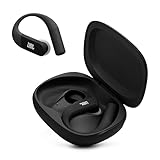
- Adaptive Noise Cancelling with Smart Ambient: Enjoy the soundtrack of your life. Four noise-sensing mics minimize distractions and maximize audio quality, while Smart Ambient keeps you fully aware of your surroundings and helps you talk with the people around you without taking out your headphones. Use the JBL Headphones app to set your custom levels.
- IP68 water and dust proof: Sweat, rain, salt water, and sand? Sounds like a great time. JBL Endurance Peak 4 earbuds carry an IP68 waterproof and dustproof rating, so they can withstand it all. Not to mention high temperatures, high humidity, or long-distance drops.
- Secure fit with TwistLock design: You might even forget you're wearing them. JBL OvalTubes with TwistLock stay in your ears all day without discomfort. The liquid silicone ear hook with memory wire is comfortable and adaptable to different sizes.
- JBL Pure Bass with Spatial Sound: Enjoy rich, clear JBL Pure Bass sound from our 10mm dynamic driver, delivering powerful stereo sound with deep bass for an immersive audio experience. Customize your sound to the way you are with Personi-fi 3.0. Take a quick earing test and adapt your audio to your personal features.
- 6 mics for perfect calls: Three mics per ear effectively capture your voice while suppressing noise from other sources. Meanwhile, the beamforming algorithm minimizes unwanted ambient noise, making your authentic voice more intelligible. The windproof design significantly reduces distortion from air friction and gives you a crystal-clear call experience—even in the middle of an outdoor run on a breezy day.
Build a running playlist that fits the workout
- Decide what the session should feel like. Pick easy, steady, tempo or interval running before searching by BPM or genre. Match the music to the workout rather than letting a high-energy mix set the effort.
- Choose music you will want to hear. Familiar favorites can motivate some runners; others prefer new tracks. Genre fit matters more than a playlist’s popularity.
- Arrange the energy if sequence matters. Put warm-up songs first, keep the main section reasonably consistent, and reserve a cooldown for the end. Add one or two personal favorites for a difficult stretch.
- Review the transitions. Remove tracks that prompt an unwanted pace change or feel jarring beside neighboring songs. A long playlist may prevent repetition but have less deliberate sequencing; a short one is easier to curate but can repeat on a long run.
- Check for explicit tracks. Look for Spotify’s explicit-content label and choose clean versions if you need them for a race, shared space or personal preference.
- Pick enough music for the session. As a practical buffer, aim for a playlist 10–20 minutes longer than your expected workout. For example, a 10-kilometer run at 6:00 per kilometer takes about an hour, so a little extra music allows for a slower finish or warm-up; that is a planning example, not a performance standard.
Shuffle can add variety, but it may place a low-energy song in the middle of a hard section. If you care about a build or cooldown, play the sequence in order and test it before race day.
Find and check a playlist in Spotify
- Open the Spotify playlist link in this article, or open Spotify and tap Search.
- Search the exact playlist title and creator, then confirm both on the result. Similar names can lead to different lists.
- Review the current track count, recent updates, explicit labels and track order before saving.
- Save the playlist to your library, then play it or add selected tracks to a personal running list.
Spotify layouts vary between mobile and desktop, so the available controls may not appear in the same place on every device.
Download music before running without reliable reception
Spotify’s U.S. Premium support materials say Premium users can download playlists for offline listening. Spotify lists a maximum of 10,000 downloaded tracks across up to five devices on that benefits page; these terms are specific to the cited U.S. support information and may vary with plan, market or policy. See Spotify Premium benefits and its offline-download page. Spotify’s product page recommends at least 1 GB of free space; the actual space needed depends on audio quality and content.
- While connected to the internet, open the playlist you want available offline.
- Select Download and wait for it to finish before leaving coverage.
- Test one or two tracks with Wi-Fi and cellular data turned off, or use airplane mode if appropriate for your device.
- Keep a backup downloaded playlist or album for a trail, tunnel or crowded event where streaming could fail.
A playlist visible in your library is not necessarily downloaded. Incomplete downloads, low storage, account changes and edits to the playlist can all affect what is available offline. Check Spotify’s current offline policy if you need to know how often the app must reconnect to verify your account.
Quick Recap
Product prices and availability are accurate as of the date/time indicated and are subject to change. Any price and availability information displayed on Amazon at the time of purchase will apply.




