There is no single best PS5 setup for Gran Turismo 7: choose Prioritize Frame Rate for responsive motion, or Prioritize Ray Tracing/Resolution for image quality where supported. A 120 Hz mode also depends on a compatible display and PS5 output setting, and HDR needs both a compatible screen and the right console setting. The practical baseline is to set graphics around your priority, confirm what your display supports, then calibrate the image and controls to suit your setup.
Choose the graphics priority that matches your goal
On PS5, Gran Turismo 7 offers two graphics priorities rather than one universally superior preset. The Gran Turismo 7 Online Manual: Options describes the trade-off: frame-rate priority favors the highest possible frame rate, while ray-tracing/resolution priority favors visual detail. Some demanding effects, including ray tracing, are disabled or simplified when frame rate is prioritized.
As an Amazon Associate I earn from qualifying purchases.
| Setting | Choose it when | What to expect |
|---|---|---|
| Prioritize Frame Rate | You value responsive motion and driving input. | The game aims for the highest possible frame rate across play, with some demanding effects disabled or simplified. |
| Prioritize Ray Tracing/Resolution | You prefer visual detail and ray tracing where supported. | Ray tracing is used in replays and 3D scenes, but not in sections where response time matters. The manual also notes ray tracing during races on PS5 Pro with this priority. |
To change the option, open Options > Global Options > Display Settings in GT7 and select the priority you want. If your main concern is steering responsiveness, begin with frame-rate priority; if presentation matters more and the supported scenes are your focus, try ray-tracing/resolution priority.
Enable 120 Hz only when the whole setup supports it
120 Hz output is conditional: the PS5 must be configured for it, the connected display must support it, and GT7’s own 120 Hz option must be enabled. In the console menus, go to Settings > Screen and Video > Video Output > 120 Hz Output and set it to Automatic. PlayStation’s PS5 resolution and video output guide explains how to check the connected HDMI device’s supported resolution, HDR, VRR and 120 Hz capabilities.
#1 Best Overall

- With the return of classic cars, iconic tracks, and fan-favourite modes like GT Simulation and Sport Mode - Gran Turismo 7 is the complete Real Driving Simulator, 25 years in the making.
- Find your line. Whether you're a racer, collector, tuner, designer, photographer or arcade fan - immerse yourself in the facets of automotive culture that matter most to you.
- Connect and compete. Join an international community of drivers to share race strategies, tuning tips, livery designs and photos, before taking to the track to go head-to-head.
GT7’s manual states: “When outputting to 120 Hz, the rendering resolution and quality of effects will adjust according to the graphics priority and VRR (variable refresh rate) settings that have been applied.” The Display Settings Assistant specifically says 120 Hz output lowers resolution with Frame Rate priority. At 120 Hz, ray tracing is not used for races and replays; the manual says resolution is maintained when Ray Tracing/Resolution priority is selected. Do not assume that selecting 120 Hz preserves every image-quality feature: the result depends on graphics priority and VRR as well as the display and console configuration.
Set HDR and calibrate the image for your screen
GT7 uses HDR or SDR according to the PS5 system setting and whether the connected television supports HDR. The game’s guide says HDR is used when the display is HDR-capable and the PS5 HDR setting is Always On or On When Supported. For the game’s setup process, use the Display Settings Assistant: face the center of the display directly, then adjust exposure and saturation against the images shown.
Rank #2

- Catch sight of the driver in your rear-view mirror and watch the sun glint against the curves of your car's body, with support for 4K and HDR at a targeted 60fps framerate. You can also take stunningly realistic photos with the power of ray tracing on PS5
- The PS5 console's ultra-high-speed SSD lets you quickly start race events, gather in lobbies, browse your garage and seamlessly navigate GT7's modes and menus.
- Feel the vibration from the anti-lock brake system and wheel spins, and variation in the braking resistance of each different car, all through the adaptive triggers of your DualSense wireless controller.
- From the subtle bumps of the tarmac to the grooves of the kerb, feel your position on the road through immersive haptic feedback.
- Sense the position of other cars and drivers on the road with unparalleled clarity through the PS5 console's 3D Audio
There is no universal exposure or saturation number to recommend. The assistant provides a calibration process, not one value that suits every display, room and viewing position.
Adjust controller sensitivity and wheel force feedback
GT7’s pre-race Quick Menu includes Controller Settings. Steering sensitivity changes how quickly the tires respond: lower values make response slower and steering smoother; higher values make it faster and more sensitive. You can also change button assignments and vibration through the controller options. The Controller Settings manual explains the available adjustments, but does not establish a best numeric sensitivity for every player.
Rank #3

- Catch sight of the driver in your rear-view mirror and watch the sun glint against the curves of your car’s body, with support for 4K and HDR at a targeted 60fps framerate.You can also take stunningly realistic photos with the power of ray tracing on PS5
- The PS5 console’s ultra-high-speed SSD lets you quickly start race events, gather in lobbies, browse your garage and seamlessly navigate GT7’s modes and menus
- Feel the vibration from the anti-lock brake system and wheel spins, and variation in the braking resistance of each different car, all through the adaptive triggers of your DualSense wireless controller
- From the subtle bumps of the tarmac to the grooves of the kerb, feel your position on the road through immersive haptic feedback
- Sense the position of other cars and drivers on the road with unparalleled clarity through the PS5 console’s 3D Audio
For a steering wheel, calibrate the connected steering controller and adjust Force Feedback Max. Torque and Force Feedback Sensitivity. The manual names Fanatec Gran Turismo DD Pro / DD Extreme and Thrustmaster T-GT / T300RS options. Make small changes and compare how the car feels; the appropriate values depend on personal preference and the connected wheel.
Make the race display readable for your use
Use GT7’s Race Display settings to control race information, driver lists, car-name indicators, online driver names and the best-lap ghost. These are visibility and practice preferences; the manual documents the options but does not establish a particular layout as a competitive advantage. Turn on the information you actively use and hide what obstructs your view.
Rank #4

- 1183237
Check the display before troubleshooting a missing feature
A PS5 can support a feature that the connected display or current configuration does not. Before changing game settings repeatedly, check the HDMI device capabilities in the PS5 video output information and confirm resolution, HDR, 120 Hz and VRR support for your setup. PlayStation’s video output guide covers where to inspect this information.
Quick Recap
Best Value
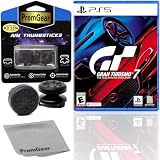
- Included is the following: Gran Turismo 7 for PlayStatio 5 PS5, 2 pack of PremGear 2 Sizes Thumbsticks made to increase accuracy and comfort (1 High-Rise, 1 Mid-Rise), PremGear Quality Cleaning Cloth
- With the return of classic cars, iconic tracks, and fan-favourite modes like GT Simulation and Sport Mode - Gran Turismo 7 is the complete Real Driving Simulator, 25 years in the making
- BUILD YOUR DREAM GARAGE: Collect, tune, race and customize hundreds of cars and create your dream garage collection. Over 100 cars have been added since launch, including the Chevrolet Corvette CX.R Vision GT Concept, NISMO R34 GT-R Z-tune ’05 and McLaren MP4/4 ’88
- HIT THE ROAD: Race across 37 tracks with 110 layouts in both real-life locations and Gran Turismo originals, including 'Trial Mountain' and 'Deep Forest'. Find your line with Circuit Experiences, chase lap times in Time Trials and take part in themed events
- CAPTURE THE MOMENT IN SCAPES: Create stunningly realistic photos of your car collection in breathtaking locations around the world, from Yosemite National Park to Kadokawa Culture Museum in Japan
- If 120 Hz is unavailable, verify the display capability and that Settings > Screen and Video > Video Output > 120 Hz Output is set to Automatic, then check GT7’s 120 Hz option.
- If HDR is not active, confirm that the display supports HDR and that the PS5 HDR setting is Always On or On When Supported.
- If the image looks too bright, dim or saturated, rerun GT7’s Display Settings Assistant rather than applying a number intended for another screen.
Product prices and availability are accurate as of the date/time indicated and are subject to change. Any price and availability information displayed on Amazon at the time of purchase will apply.

