Before buying a protective case or lanyard, check whether you have standard AirPods 4 or AirPods 4 ANC: Apple says their charging cases are not interchangeable. Choose an accessory explicitly made for your exact model, then verify that it leaves the case’s status light, charging areas, and functions accessible.
This guide explains what to check in a case and tether, including USB-C access and the ANC case’s wireless-charging options. No third-party cases or lanyards were independently tested or ranked for this guide, so use the checklist to assess a specific listing rather than treating any style as a tested “best.”
As an Amazon Associate I earn from qualifying purchases.
If you already bought an accessory and it does not fit or charge as expected, use the fit checks and troubleshooting guidance below.
Free tools Windows power users keep installed
One-click scans. No signup required.
Why AirPods 4 need a protective case (and when a lanyard actually helps)
A cover can help reduce scuffs and may provide some impact protection, but the result depends on its material and thickness. Apple cautions that a cover may affect radio-frequency and wireless-charging performance; it does not establish how protective any particular third-party cover is.
#1 Best Overall

- Perfect Fit: Made for AirPods 4 & AirPods 5 (including Active Noise Cancellation models), this case fits snugly, stays securely closed, and offers precise cutouts for the speaker and LED indicator. Ideal for stylish young professionals, fitness enthusiasts, and students
- Premium Protection: This shockproof silicone case protects your AirPods 4th 2024 & AirPods 5th 2026 from drops, scratches, and wear. Whether your AirPods are dropped during a hectic commute or tossed into a gym bag with keys, the case keeps them fresh and stylish every day
- On-the-Go Convenience: The lanyard and keychain let you carry your AirPods as a chic accessory or securely attach it to your backpack or belt loop, with a durable attachment point for lasting use. Perfect for your trail runs, backpacking, or commutes
- Effortless Charging & Easy Installation: Charge your AirPods with USB‑C or wireless options—no need to remove the case! while the soft silicone ensures easy installation, removal, and one-handed opening
- Sleek Feel & Fashionable: Made of lightweight premium silicone, it feels great in your hand. Available in modern, vibrant colors, it enhances your everyday style
A lanyard can help keep the charging case close at hand when you carry it outside a dedicated pocket. Whether it suits your routine depends on how you carry and store the case. Check that its attachment point is designed for the cover and does not interfere with the lid or charging.
Quick compatibility checklist for AirPods 4 cases and lanyards
First identify the charging case model. Apple lists model A3058 for the AirPods 4 charging case and A3059 for the AirPods 4 ANC wireless charging case, and says each case works only with its corresponding earbuds. The cases share the same listed dimensions, but that does not make covers interchangeable. See Apple’s AirPods identification guide.
- Correct model labeling: choose a listing that explicitly names AirPods 4 or AirPods 4 ANC, whichever you own. Do not assume that a cover for one fits the other.
- Size reference: Apple lists both charging cases as 46.2 mm high × 50.1 mm wide × 21.2 mm deep. Compare a listing’s model claim and fit details; matching dimensions alone do not confirm cutout alignment.
- Lid and feature access: check that the lid moves freely and the status light, setup or pairing controls, and other case features remain accessible. The ANC case has a speaker opening to consider.
- Charging access: check the USB-C opening. The ANC case also supports Qi-certified wireless charging and Apple Watch charging, so confirm those work with the cover installed if you use them.
- Strap attachment: look for an intentional loop or attachment point, and make sure the strap does not tug on the hinge or cover openings.
Apple’s dimensional drawing warns that covers may affect RF and wireless-charging performance and pairing or factory reset; for the ANC wireless charging case, it also mentions serial-number lookup. Apple says the impact depends substantially on material and thickness. It also says not to obstruct the LED, recommends minimizing material thickness for Qi charging, and advises against metal. For Apple Watch charging, it recommends leaving no material between the back of the device and the charger. See Apple’s AirPods 4 charging-case dimensional drawing.
What to look for in a protective case
Compare the cover’s construction and fit, rather than relying on a general “protective” label. No product-specific drop-test results are available in this research, so do not treat a style or material as proof of a particular level of protection.
- Material and construction: check what the cover is made of and how it is assembled. Apple notes that material and thickness can affect wireless charging and RF performance.
- Feature access: check lid movement, LED visibility, setup or pairing access, and any model-specific openings.
- Charging cutouts: confirm that a USB-C cable can connect without obstruction. If you have ANC, check wireless charging with the cover installed if relevant to you.
- Fit and removal: look for model-specific fit information and consider whether the cover can be removed for cleaning or troubleshooting.
- Protection claims: treat drop-protection claims as unverified unless the maker provides a test method and results for the exact model.
Best materials by use case
Material choice affects the cover’s feel and thickness, which can matter for usability and charging. The following are general construction trade-offs, not results from comparative product testing.
| Material or construction | Potential advantages | Trade-offs to check |
|---|---|---|
| TPU or soft silicone | May offer a grippy feel and flexibility | Check thickness, fit, and whether the material attracts lint or stretches |
| PC or hard polycarbonate | Rigid shell construction | Check edge fit, surface grip, and charging performance with the cover on |
| Hybrid PC and TPU | Combines rigid and flexible parts | Check added bulk, seams, and model-specific openings |
| Leather or faux leather | Offers a different surface and appearance | Check the underlying construction, thickness, and charging access |
| Rugged-style shell | May use thicker or reinforced construction | Check bulk, feature access, and any substantiated protection testing |
Choose based on the fit, charging, and access requirements for your exact case. A material label by itself does not establish drop protection or charging compatibility.
Lanyard types that work with AirPods 4 (and what to avoid)
Compare how a lanyard attaches to the cover. The research does not establish the strength of any lanyard or attachment, so treat security claims as unverified unless the maker documents them.
Built-in loop and strap
Some covers include a loop and strap. Check that the loop is part of a cover explicitly designed for your AirPods 4 case and that it does not obstruct openings or affect lid movement.
Clip-on lanyard
A clip-on tether needs a suitable attachment point on the cover. Avoid attaching it to a hinge or an unintended seam, and check that the clip does not cover charging access.
Elastic cord lanyard
An elastic cord is another attachment style to compare. Check how it connects to the cover and whether it snags on clothing or bag hardware during ordinary use.
Rank #2

- Compatibility: only for AirPods 5/4 (2026/2024) (USB-C); earbuds and charging case not included
- Compatible with MagSafe: strong magnets in the back of the case ensure a secure lock on MagSafe chargers, letting you enjoy tap-and-go wireless charging for your earbuds; wireless charging is only for AirPods 5th/4th gen with Active Noise Cancellation
- Hybrid Drop Protection: double the defense with an ultra-hard shell and flexible, shock-absorbing core to keep your charging case well-protected and looking brand new
- Easy-Carry Strap: braided cord wraps around your wrist or easily attaches to your bag or belt, offering a convenient and secure way to carry your earbuds
- Speaker Cutouts: specially positioned apertures on the base let you hear the Find My app alerts loud and clear, so you’ll always know where your earbuds are
What to avoid
- Unintended attachment points: do not hook a tether through a thin seam or hinge area that the maker has not designated for attachment.
- Blocked openings: avoid hardware that covers the USB-C port, LED, or model-specific features.
- Unverified strength claims: do not assume a clip or loop is secure without documented, model-specific evidence.
- Metal near wireless charging: Apple recommends avoiding metal in covers and minimizing material thickness for Qi charging.
How to choose the right lanyard for your case
Check that the tether works with the cover and does not interfere with case functions or charging.
- Confirm the model: match the cover and tether to AirPods 4 or AirPods 4 ANC, as applicable.
- Check the attachment point: use a loop or point provided for the tether rather than a hinge or improvised seam.
- Consider length and hardware: decide how you intend to carry it and check that the strap and clip do not snag or obstruct the case.
- Check charging compatibility: make sure the USB-C opening remains accessible. If you have ANC and use Qi or Apple Watch charging, verify the cover supports your charging setup.
- Test lid and feature access: open and close the lid, check the status light and case controls, and make sure the strap does not pull on the cover.
If the cover has no intended attachment point, do not assume a universal clip can be attached safely.
Top case styles for AirPods 4
These are common construction styles, not tested or ranked products. No specific third-party model, price, or hands-on result was established for this guide. For any style, verify exact-model compatibility and charging and feature access.
Slim TPU cover
Consider this style if you prefer a flexible, potentially grippy cover. Check its thickness and openings, especially if you use wireless charging with the ANC case.
Hybrid shell
Hybrid covers combine materials. Compare their construction and fit, and look for documented, model-specific evidence before relying on drop-protection claims.
The Tool Desk
Outbyte Driver Updater FREEFix the driver behind crashes, sound loss and screen glitchesFind Drivers →Outbyte PC Repair FREERepair Windows errors before they cause bigger problemsFix Now →Hard-shell cover
Check that the shell fits the exact charging-case model, leaves openings aligned, and does not interfere with lid movement or charging.
Leather or faux-leather cover
Check the cover’s underlying construction and thickness. Appearance or material alone does not establish impact protection or charging compatibility.
Rugged-style cover
Thicker construction may add bulk. Confirm access to the LED and case functions, and look for a disclosed test method and model-specific results before relying on any drop-test claim.
Step-by-step: install and fit-check (case and lanyard)
Use these checks to catch fit, access, and charging issues before relying on the accessory.
Windows Errors? Fix Them Before They Spread
Repair common Windows errors and clear accumulated junk for a smoother, more stable PC - no reinstall needed.Free scan · no reinstallOutdated Drivers Are Slowing You Down
One free scan finds every outdated or missing driver and matches the right update for your exact hardware.Free scan · exact hardware match1) Check the cover on its own
- Confirm that the cover is labeled for your exact model: AirPods 4 or AirPods 4 ANC.
- Fit the charging case into the cover according to the maker’s instructions.
- Open and close the lid, and check that the status light and case features remain accessible.
- Connect a USB-C cable and confirm that it fits without forcing it or being blocked by the cover.
- If you have ANC, test your intended Qi or Apple Watch charging setup with the cover installed, following Apple’s cautions about material, thickness, metal, and the unobstructed back for Watch charging.
2) Attach the lanyard
- Locate the cover’s designated loop or attachment point.
- Attach the strap without covering openings or placing pressure on the hinge.
- Open and close the lid again, and check that the tether does not pull on the cover or interfere with case functions.
3) Check everyday use
- Snag check: check whether the strap catches on clothing or bag hardware.
- Charging check: confirm that your usual charging method still works with the cover and tether in place.
- Carry check: make sure the cover and strap are practical for the way you carry the case.
Real-world scenarios: which setup to consider
Use these scenarios as a way to compare features, not as tested product recommendations.
Rank #3
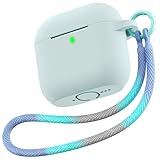
- Perfect Fit: Made for AirPods 4 & AirPods 5 (including Active Noise Cancellation models), this case fits snugly, stays securely closed, and offers precise cutouts for the speaker and LED indicator. Ideal for stylish young women, professional women, fitness enthusiasts, and students
- Premium Protection: This shockproof silicone case protects your AirPods 4th 2024 & AirPods 5th 2026 from drops, scratches, and wear. Whether your AirPods are dropped during a hectic commute or tossed into a gym bag with keys, the case keeps them fresh and stylish every day
- On-the-Go Convenience: The lanyard and keychain let you carry your AirPods as a chic accessory or securely attach it to your backpack or belt loop, with a durable attachment point for lasting use. Perfect for your trail runs, backpacking, or commutes
- Effortless Charging & Easy Installation: Charge your AirPods with USB‑C or wireless options—no need to remove the case! while the soft silicone ensures easy installation, removal, and one-handed opening
- Sleek Feel & Fashionable: Made of lightweight premium silicone, it feels great in your hand. Available in modern, vibrant colors, it enhances your everyday style
Commute and crowded bags
Compare covers with a suitable attachment point and openings that remain accessible. Check the tether’s fit and the cover’s model labeling.
Gym days
Consider whether a grippy surface and tether suit your routine. Do not infer that a cover is waterproof from the AirPods’ rating: Apple’s IP54 rating applies to the AirPods 4 products, not to third-party covers.
Travel
Check that the cover stays fitted, the tether attaches to an intended point, and your charging method remains available.
What’s actually slowing this PC down?
Pick the symptom - the matching free tool is one click away.
Office desk
If you mainly want to keep track of the case, compare a tethered cover with a cover alone and choose based on your carrying habits.
Children or teens
Check fit and attachment carefully. Do not rely on a “rugged” label without test details for the exact cover and model.
Common problems and troubleshooting
If a cover interferes with the charging case, confirm the model and follow the cover maker’s fitting instructions. Remove it if it prevents safe access or normal operation.
Lid does not open freely
- Check fit: remove and reinstall the cover according to its instructions.
- Check model compatibility: confirm that it is made for your exact case.
- Stop if it still interferes: do not force the lid; contact the seller or choose a compatible cover.
Pairing or reset access is affected
- Check the relevant opening or control: make sure the cover is aligned and does not block access.
- Remove the cover to troubleshoot: Apple warns that covers may affect pairing or factory reset.
- Consider a different cover: choose one that preserves access to case functions.
Charging cable does not fit
- Check the USB-C opening: confirm that the cover does not obstruct the port.
- Remove the cover and retry: this helps determine whether the cover is causing the problem.
- Do not force the connector: use a compatible cover with adequate port access.
Wireless charging does not work as expected
- Confirm the case version: the ANC case supports Qi-certified charging; the standard case specifications list USB-C charging.
- Check the cover: Apple says material and thickness can affect wireless charging and recommends avoiding metal and minimizing material thickness.
- For Apple Watch charging: Apple recommends leaving no material between the back of the device and the charger.
The cover feels loose or comes off
- Check the model label: make sure the cover is designed for your exact charging case.
- Follow fitting instructions: reinstall it as directed by the maker.
- Stop using a poor fit: do not rely on an accessory that does not stay in place.
The status light is obscured
- Check the opening: Apple’s dimensional drawing says, “DO NOT OBSTRUCT LED.”
- Reposition or remove the cover: if the light remains blocked, use a different compatible cover.
Alternatives if you do not want straps or covers
If you prefer not to use a cover or tether, choose storage and carrying habits that suit your routine. These options are not substitutes for verified protection testing.
Quick wins for a faster PC:
Scan for outdated or missing drivers - takes under a minuteDriver Scan →Repair Windows errors before they cause bigger problemsFix Now →Carry the case without a cover
If you choose this, keep the case in a consistent place and avoid carrying it loose with items that could scratch it.
Store it in a designated place
A consistent storage spot can help prevent leaving the case behind. Check that any stand or storage accessory is designed for your use and does not obstruct charging.
Use a padded pouch
A pouch may separate the charging case from other items in a bag. It does not establish a specific level of impact protection; check its fit and construction.
Rank #4
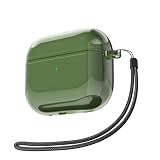
- ✅ Compatible with Airpods 4/ 5th Charging Case USB C.
- Military-Grade Shockproof: This Translucent Air Pods case with Lanyard delivers 371° all-around protection against everyday drops, scratches, and impacts, featuring a precisely cut charging port.
- Crystal Clear & Anti-Yellowing: Crafted from premium soft TPU material. Its crystal-clear finish perfectly showcases original aesthetic. Smooth surface, easy to clean, anti-fingerprint & dustproof.
- Front LED Visible: 1.17mm thickness. Optimal thickness compatible with wireless chargers. Front LED indicator remains visible during charging.
- Elegant & Lightweight: Trendy & Aesthetic Design with lanyard lets you easily attach it to your wrist, backpack, wallet or other items. It makes an ideal gift for women girls men boys friends children, and teenagers.
FAQ
Does an AirPods 4 case fit AirPods 4 ANC?
Do not assume it does. Apple identifies separate charging cases for AirPods 4 and AirPods 4 ANC and says each is compatible only with its corresponding earbuds. Buy a cover explicitly labeled for your exact model.
Do these 3 things before closing this tab:
1Repair Windows errors before they cause bigger problems2Fix the driver behind crashes, sound loss and screen glitches3Clear out junk files and repair common Windows errorsWhat are the AirPods 4 charging-case dimensions?
Apple lists both charging cases as 46.2 mm high × 50.1 mm wide × 21.2 mm deep. These dimensions are a reference, not proof that a particular cover fits.
Can a cover affect AirPods 4 wireless charging?
Apple says protective covers may affect wireless-charging and RF performance, with the effect depending substantially on material and thickness. The ANC case supports Qi-certified charging; check a cover with your charging setup.
Can I use Apple Watch charging with an AirPods 4 ANC cover?
The ANC charging case supports Apple Watch charging. Apple’s dimensional drawing recommends placing no material between the back of the device and the Apple Watch charger, so check the cover arrangement before using it.
Does an AirPods 4 cover make the case waterproof?
No waterproof rating for third-party covers is established here. Apple’s IP54 dust, sweat, and water resistance rating is for the AirPods 4 products, not for a separate cover.
Are universal lanyards compatible?
Compatibility depends on whether the cover has a suitable attachment point that does not block openings or interfere with the lid. Do not attach a tether to an unintended seam or hinge.
Do I need both a cover and a lanyard?
No. Choose based on how you carry the case and what the accessory is designed to do. Check exact-model fit and make sure any chosen accessory preserves access to case functions and charging.
Bottom line
Start by identifying whether you have standard AirPods 4 or AirPods 4 ANC; Apple says their charging cases are not interchangeable. Choose a cover labeled for that exact model and check the status light, case functions, lid movement, and charging access.
A lanyard is optional. If you choose one, use a cover’s intended attachment point and verify that it does not interfere with the lid or charging. Do not rely on unverified protection or strength claims.
Recommended Free Tools
Quick Recap
Product prices and availability are accurate as of the date/time indicated and are subject to change. Any price and availability information displayed on Amazon at the time of purchase will apply.

