The Tool Desk
Outbyte PC Repair FREERepair Windows errors before they cause bigger problemsFix Now →Outbyte Driver Updater FREEScan for outdated or missing drivers - takes under a minuteDriver Scan →There is no single best presence sensor. Choose Wi‑Fi sensing when compatible smart lights can determine movement without another device, a PIR motion sensor when lights should react to movement, and 60–64 GHz mmWave radar when an automation must recognize slight movement from a seated person or divide a room into zones. Those are use-case matches based on manufacturer documentation, not an independent performance ranking.
Quick answer: which approach fits your automation?
Start with the automation, not the sensor label. “Wi‑Fi” can describe a device’s network connection or a sensing method, and those are different things. The dedicated radar device discussed here uses Wi‑Fi for networking but 60–64 GHz radar for sensing. WiZ SpaceSense uses the Wi‑Fi connections of compatible lights to determine movement. A PIR-oriented motion sensor uses a separate detector and is designed around movement-triggered lighting.
As an Amazon Associate I earn from qualifying purchases.
| Approach | What it senses or uses | Best fit to investigate | Main constraints |
|---|---|---|---|
| Wi‑Fi sensing (WiZ SpaceSense) | The Wi‑Fi connection of compatible WiZ lights is used to determine movement. | Movement-triggered lighting when you already use compatible WiZ lights and want to avoid a standalone sensor. | It is ecosystem- and device-dependent. Compatibility, including Bluetooth support in the lights, must be checked for the exact models. |
| mmWave radar (Aqara Presence Sensor FP2) | 60–64 GHz radar for sensing; 2.4 GHz Wi‑Fi for network connectivity. | Automations that should remain active while someone makes only slight movements, plus room-zone control. | USB‑C power, 2.4 GHz Wi‑Fi, placement, calibration and platform support matter. Wall mounting is needed for the vendor’s zone-positioning and multi-person setup. |
| PIR-oriented motion sensor (Philips Hue Motion Sensor) | Motion-triggered sensing with Bluetooth and Zigbee communication; Philips says it works without Wi‑Fi. | Simple, movement-triggered lighting in a supported Hue or compatible smart-lighting setup. | It is documented as a motion sensor, so do not assume it will maintain an occupied state when a person is sitting still. Ecosystem and bridge/platform requirements still need checking. |
Manufacturers describe the capabilities above, but the available documentation does not establish comparative false-positive rates, missed detections, response times, pet handling, performance through obstacles or a universal detection range. Treat placement and configuration as part of the result.
What’s actually slowing this PC down?
Pick the symptom - the matching free tool is one click away.
Presence, motion and Wi‑Fi: the terms that cause confusion
Presence is an automation outcome
In a smart-home rule, “presence” usually means the room should be treated as occupied. That could keep a desk lamp on while somebody reads, prevent a ventilation rule from switching off, or allow separate behavior in a seating area. A device may advertise presence detection, but the useful question is what it can reliably expose to your automation platform and under what installation conditions.
#1 Best Overall

- [Precise AI-Powered Presence Sensor] Powered by advanced AI, PIR, and 60GHz mmWave radar, the FP300 accurately detects human presence even when you’re still. Its adaptive AI learning continuously optimizes sensitivity to reduce false triggers, ensuring lights and devices stay on even when you’re lounging on the couch, and off when they need to be.
- [Broad Compatibility] Supports Matter over Thread and Zigbee for seamless integration with major ecosystems. Works with Apple Home, Home Assistant, Alexa, Google Home, SmartThings, and Homey via Matter for flexible, reliable automation. (* For third-party Matter ecosystems, a corresponding Thread Border Router and Matter Controller are required. * For Aqara, a Zigbee 3.0 or Matter hub like M2/M3/G410/etc, except G2H, with the latest firmware is needed.)
- [5-in-1 Multi-Sensor] Combines 60GHz mmWave, PIR, light, temperature, and humidity sensors into one compact device. This all-in-one design enables precise detection of presence and environmental conditions, helping automate lighting, climate control, and security systems for a smarter and more energy-efficient home.
- [Long Battery Life & Energy Efficiency] Powered by two replaceable CR2450 batteries, the FP300 offers up to 3 years of battery life in Zigbee mode or 2 years in Thread mode. Optional sensor deactivation helps conserve energy, ensuring consistent and long-lasting performance. What's Included: FP300 Multi-Sensor × 1, Sticker × 1, User Manual × 1
- [Wire-Free & Flexible Installation] Completely wireless with a multi-axis adjustable mount for easy wall, ceiling, or corner setup. No wiring required—relocate anytime for optimal detection and coverage. Featuring a 120° field of view and up to 6 m (20 ft) of detection range, the FP300 can effectively monitor various room layouts. Its minimalist design blends seamlessly into any modern interior, delivering powerful functionality without visual clutter.
Motion is a different trigger
Motion-triggered lighting reacts when a person moves through the sensor’s field. If the person then remains still, the automation has to rely on its timeout and retrigger behavior. A PIR product page should therefore be read as a movement specification, not proof of continuous occupancy detection.
Wi‑Fi can mean networking or sensing
The FP2 specification lists Wi‑Fi as its network protocol while listing 60–64 GHz radar as its sensing technology (Aqara FP2 specifications). SpaceSense is different: WiZ says compatible lights use their Wi‑Fi connection to determine movement (WiZ SpaceSense help). Calling both systems “Wi‑Fi sensors” without this distinction can lead to buying the wrong hardware.
Wi‑Fi sensing with WiZ SpaceSense
What the feature is
SpaceSense is a feature of compatible WiZ lighting rather than a separate sensor product. The lights’ Wi‑Fi connection is used to determine movement, allowing a movement-triggered lighting automation without adding a dedicated motion unit. That makes it most attractive when the room already contains supported WiZ lights and the desired action is “turn on when movement is detected.”
Do these 3 things before closing this tab:
1Clear out junk files and repair common Windows errors2Scan for outdated or missing drivers - takes under a minute3Repair Windows errors before they cause bigger problemsWhat you need before enabling it
- Compatible WiZ lights in the room and a setup that supports SpaceSense.
- Bluetooth support in the compatible lights, which WiZ lists as a requirement in its help documentation.
- A WiZ app and account configuration appropriate to the light generation and region.
- A clear understanding that compatibility can vary by exact light model and generation; confirm the individual product before planning an installation.
Practical setup sequence
- List the WiZ lights that will participate and check each model against the current SpaceSense compatibility information.
- Update and pair the lights in the WiZ app using the manufacturer’s normal setup process. Do not assume that two lights with similar names support the same feature.
- Locate the SpaceSense option in the app and enable it for the intended room or group. App labels and available controls can change with the light generation.
- Test the actual automation at the walking paths that matter: entering the room, crossing it and approaching the switch or doorway.
- Set lighting timers and fallback behavior so a missed movement event does not leave a room in an unsafe or inconvenient state.
Where it fits—and where it does not
SpaceSense is a reasonable first option for hallway, utility-room or entry lighting when supported WiZ lights are already installed. It avoids mounting and powering another sensor. It is not a universal replacement for occupancy sensing: the documented feature is movement detection, and the result depends on the participating lights and their compatibility. If a room must remain “occupied” while someone sits nearly motionless, investigate a presence-oriented radar device instead.
mmWave radar: the Aqara Presence Sensor FP2
What radar adds
Aqara describes the FP2 as detecting presence with slight movement and supporting zone positioning. Its April 20, 2023 announcement says: “The mmWave-based FP2 Presence Sensor takes a leap forward from the PIR motion sensors as the former detects a person’s presence with even the slightest movement such as the act of breathing.” That is Aqara’s product claim, not an independent laboratory result (Aqara announcement).
Rank #2

- 【Home Assistant Required】Works only with Home Assistant, an open-source smart home platform for local control and automation. Home Assistant must already be installed and running on a computer. Basic familiarity required.
- 【Advanced Radar Sensing】Uses millimeter-wave radar to detect both moving and stationary objects up to 20 ft (6 m) indoors. Offers higher precision and more flexible automation than traditional PIR sensors, while covering a larger area with fewer units.
- 【Compact, Plug-and-Play Design】Built with the HLK-LD2410B radar module and Seeed C3 controller featuring an external Wi-Fi antenna. Powered by USB-C - no batteries required.
- 【Easy Integration with Home Assistant - No ESPHome Setup Needed】Pre-flashed with ready-to-use ESPHome firmware. Simply connect to the device’s hotspot and enter Wi-Fi credentials - no manual configuration or flashing required.
- 【Certified Components】All main components (HLK-LD2410B and Seeed C3) are FCC-certified, ensuring compliance and reliable operation.
Zone support lets a room be divided into named areas for automations such as “turn on the desk light when the desk zone is occupied” or “switch off a floor lamp when the seating zone is empty.” The usefulness of those rules depends on mounting position, room geometry and the platform integration you select.
FP2 specifications and installation requirements
| Item | Documented value or requirement |
|---|---|
| Sensing technology | 60–64 GHz radar |
| Network | 2.4 GHz Wi‑Fi |
| Power input | USB‑C, 5 V / 1 A |
| Dimensions | 64 × 64 × 29.5 mm |
| Aqara hub | Aqara says no Aqara hub is required. |
| Mounting for advanced features | Aqara says wall mounting is needed for zone positioning and multi-person detection. |
These figures come from Aqara’s model specifications, not from an independent test (FP2 specifications). The product page also describes presence and zone capabilities (FP2 product page).
Step-by-step FP2 planning
- Confirm that the intended smart-home platform exposes the FP2’s presence and zone entities. “No Aqara hub required” does not mean every platform uses the same setup path.
- Provide a stable USB‑C supply rated for the documented 5 V / 1 A input.
- Put the device on the required 2.4 GHz Wi‑Fi network. A 5 GHz-only network will not satisfy that specification.
- Choose a wall location before defining zones. A position that sees the room broadly is more useful for zone mapping than an improvised location behind furniture.
- Complete the manufacturer’s room and zone configuration, naming areas in terms your automation platform can use.
- Walk through each zone, then sit still in the locations where occupancy must persist. Adjust placement or zone boundaries if the exposed states do not match the room’s actual use.
- Create automations with a deliberate clear condition. For example, use “zone unoccupied” for an off action rather than an immediate timer that could interrupt a seated person.
Offline and hub expectations
Aqara says FP2 local automations can work without internet in specified compatible setups and says an Aqara hub is not required. Those are product- and integration-specific statements; verify the exact platform, firmware and automation path before assuming an entirely local installation. Do not generalize them to Wi‑Fi sensing or radar products from other manufacturers.
PIR-oriented motion sensing with Philips Hue
What the Hue Motion Sensor is designed to do
Philips describes its indoor Motion Sensor for motion-triggered smart-light control. The product documentation lists Bluetooth and Zigbee communication and says the device works without Wi‑Fi (Philips Hue Motion Sensor documentation). That combination can be convenient when your lighting system already supports the required Hue communication path.
How to deploy it
- Confirm whether your lights and chosen controller use the sensor through Bluetooth, Zigbee or a bridge-based setup.
- Install the sensor where movement enters the room rather than where a single seated occupant might remain motionless.
- Pair it using the controller’s sensor-add workflow, then assign the desired room and lighting behavior.
- Walk the normal routes and adjust the automation’s on and off timing. The product page does not establish a universal detection range or comparative response-time advantage, so tune the real installation rather than relying on a generic number.
- Check the stillness case separately. If the lights must stay on while someone works or watches television without moving, a PIR-only rule may need a different sensor or an additional occupancy signal.
Why PIR remains a sensible choice
For a stairway, bathroom or entrance where movement is the event that matters, a dedicated motion sensor is easy to reason about: motion starts the light automation and a timeout ends it. It is also independent of the room’s Wi‑Fi sensing feature. The trade-off is that the manufacturer describes this product as a motion sensor, not as a radar-style still-presence detector.
Rank #3

- 【mmWave Radar Detection】 Features the HLK-LD2401 24GHz mmWave radar, capable of detecting both motion and stationary objects up to 20 ft (6 m) indoors. The compact Seeed XIAO ESP32-C3 and external antenna provide reliable Wi-Fi connectivity with improved range and stability.
- 【Home Assistant Required】 Works exclusively with Home Assistant, an open-source platform for local smart home control and automation. Requires an existing Home Assistant installation. Basic familiarity is recommended.
- 【Integrated Ambient Light Sensor】 LITOS v3 includes an integrated VEML7700 light sensor, as many automations rely on both presence and lighting conditions. Its sensitivity closely matches the human eye, allowing accurate ambient light readings — ideal for rules such as turning lights on only when someone is present and the room is dark.
- 【Refined, Light-Permeable Front Design】 The front panel is made from high-quality 3D-printing filament, allowing ambient light to pass through naturally. This ensures accurate light measurements and adds a subtle, modern aesthetic.
- 【Ready-to-Use ESPHome Firmware】 LITOS v3 comes pre-flashed with ESPHome, making setup straightforward. No manual flashing or additional configuration is required.
Compare the three approaches by real automation
| Automation goal | Most logical approach to investigate | Reason | What to verify first |
|---|---|---|---|
| Turn lights on when someone enters a hallway | PIR motion sensor or compatible WiZ SpaceSense | Both are framed around movement-triggered lighting. | Whether the chosen lighting ecosystem supports the sensor or SpaceSense feature. |
| Keep a desk light active while a person reads or works | mmWave radar | The FP2 is described as detecting presence with slight movement, unlike a product documented only as a motion sensor. | Mounting position, 2.4 GHz Wi‑Fi, platform entities and zone behavior. |
| Control separate lights in desk, sofa and doorway areas | mmWave radar with zones | The FP2 documentation describes zone positioning and named areas. | Wall mounting and whether the intended platform exposes each zone. |
| Add movement detection without installing another device | WiZ SpaceSense | Compatible WiZ lights provide the sensing feature. | Exact light-model compatibility and Bluetooth support. |
| Operate lighting without Wi‑Fi networking | Philips Hue Motion Sensor, subject to the supported Hue setup | Philips says its sensor works without Wi‑Fi and lists Bluetooth and Zigbee. | Whether Bluetooth, Zigbee or a bridge is required in your particular installation. |
A decision framework that avoids the wrong purchase
Choose Wi‑Fi sensing first when the ecosystem is already fixed
Use SpaceSense as the first candidate if compatible WiZ lights are already in the room, the automation is movement-triggered and avoiding another powered device is important. The key risk is not radar performance; it is discovering after purchase that a particular light generation cannot participate.
Quick wins for a faster PC:
Scan for outdated or missing drivers - takes under a minuteDriver Scan →Repair Windows errors before they cause bigger problemsFix Now →Fix the driver behind crashes, sound loss and screen glitchesFind Drivers →Choose PIR when “movement happened” is enough
A PIR-oriented sensor is the simpler mental model for short occupancy intervals. It is a good fit for lights that should react to a person walking in, washing hands or passing a landing. Do not select it solely because it is called a presence sensor in a retailer category; read the manufacturer’s capability description and design the timeout around movement.
Choose radar when stillness or zones are central
Investigate the FP2 when seated occupancy, slight movement or room partitions are requirements rather than nice-to-have features. Budget for USB‑C power, a wall location and configuration work. A radar device can expose richer states, but those states are only useful if your controller receives them and the room is mapped correctly.
Use the platform as a tie-breaker
Before buying, write down the exact entities your automation needs: motion, presence, zone occupancy, person count or an equivalent state. Then check that the intended ecosystem exposes those entities. A technically capable sensor that cannot provide the needed state to your controller is a poor fit.
Placement, calibration and automation safeguards
- Map the room first. Mark doors, desks, sofas and areas where a person may remain still. This is especially important for radar zones.
- Keep the sensing path intentional. Furniture, walls and the sensor’s angle can change what a device sees. The supplied product material does not establish universal obstacle or geometry performance, so validate the actual room.
- Test both movement and stillness. Walk in, stop, sit and leave. A rule that works only while walking is not a still-presence automation.
- Separate trigger and clear logic. Use movement or zone occupancy to turn something on, then use an appropriate unoccupied state or timeout to turn it off. Avoid a short fixed timer where someone may remain seated.
- Provide a manual fallback. A wall switch or app control can recover from a missed event, an unavailable network or a changed room layout.
- Document the ecosystem dependency. Record the light models, controller, firmware and sensor placement so future troubleshooting starts with known assumptions.
Troubleshooting by symptom
The feature cannot be enabled
For SpaceSense, recheck the exact WiZ light model, generation and Bluetooth requirement. For FP2, check 2.4 GHz Wi‑Fi, USB‑C power and the platform’s integration path. For Hue, verify whether the controller expects Bluetooth, Zigbee or a bridge. These checks address compatibility before you change automation logic.
Free tools Windows power users keep installed
One-click scans. No signup required.
Rank #4
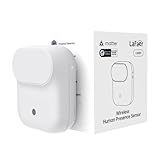
- NOTE:Requires iOS/iPadOS 16.4 (or later) or Android 8.1 (or later) plus a hub of your chosen platform: -Apple Home: Apple TV 4K (2nd gen / 3rd gen 128 GB), HomePod (2nd gen), HomePod mini -Amazon Alexa: Echo (4th gen), Echo Hub, Echo Plus (2nd gen), Echo Show 8 (3rd gen), Echo Show 10 (3rd gen), Echo Studio, eero Pro 6E/Pro 6/6+/6/PoE 6/PoE gateway/Max 7 -Google Home: Nest Hub (2nd gen), Nest Hub Max, Nest Wifi Pro (Wi-Fi 6E), Google TV Streamer (4K) -Homey:Homey Pro (Early 2023)/Pro Mini -Samsung SmartThings: SmartThings Hub v3/Station
- 【Detects Human Presence 】Powered by mmWave Radar Technology, the LWR01 offers exceptional sensitivity, detects even subtle movement and stillness (up to 3.5m/11.48ft for standstill, 6m/19.68ft for movement), meaning it detects you even when you’re binge-watching without moving.
- 【Designed for Daily Life - Splashproof】With an IPX3 water resistance rating, it is ideal for various daily scenarios, including use in bathrooms and other moisture-prone environments.
- 【Battery Powered with Optional Wired Support】Enjoy over 1 year of battery life for a truly wireless experience. For continuous high-performance use, you can also power it via a Type-C DC connection.
- 【Light-Aware Automation】Built-in ambient light sensor opens up new possibilities for smart home automation. Smart daylight detection prevents lights from turning on when natural light is sufficient—cutting energy bills without lifting a finger.
The room turns lights off while someone is present
Determine whether the automation is using a movement event or a presence/zone state. A PIR-style rule may clear after inactivity by design. With FP2, review wall placement, zone boundaries and the platform entity being used. With SpaceSense, verify that the participating lights and their arrangement still meet the feature’s compatibility assumptions.
Only part of the room responds
For radar, inspect zone mapping and wall position. For a motion sensor, move the unit toward the actual entry path and retest; do not infer a universal range from an unrelated installation. For SpaceSense, confirm that every light intended to contribute is supported and correctly paired.
The sensor works in the app but not in an automation
Check that the automation references the correct room, zone or state and that the controller has permission to use it. Product capability and platform exposure are separate questions. A vendor’s statement that a feature exists does not guarantee identical entity names or controls in every ecosystem.
What the documentation does—and does not—prove
The manufacturer pages establish the product distinctions and setup requirements described here. They do not provide an independent head-to-head ranking. No named statistic in the available material measures false negatives, false positives, response time, pet behavior, obstacle penetration or reliability across different room geometries. For that reason, the safest recommendation is conditional: match the sensor to the automation, then validate the installation in the room where it will run.
Recommended Free Tools
Quick Recap
Product prices and availability are accurate as of the date/time indicated and are subject to change. Any price and availability information displayed on Amazon at the time of purchase will apply.

