The most useful game-specific accessory is Nintendo’s Leg Strap, but only for players who want leg-motion controls in Soccer Shoot-Out. It holds a compatible Joy-Con on your thigh; a Joy-Con 2 cannot be used with it, and the controller is sold separately.
For every other sport, accessories are mainly determined by your controller inventory, number of local players, and play space. Extra Joy-Con controllers can enable multiplayer, while wrist straps and adequate clearance are safety essentials rather than performance upgrades.
As an Amazon Associate I earn from qualifying purchases.
Quick picks: which Nintendo Switch Sports accessories matter?
| Accessory path | Best use | What to know before buying |
|---|---|---|
| Nintendo Leg Strap | Leg-motion control in Soccer Shoot-Out | Requires a compatible Joy-Con. Nintendo says Joy-Con 2 controllers do not work with the strap. The listed strap does not include a Joy-Con and is sold separately for some buyers. |
| Additional Joy-Con controllers | Local multiplayer when your household lacks enough controllers | The number required depends on the sport, player count and controllers you already own. Nintendo notes that additional accessories may be required for multiplayer. |
| Joy-Con wrist straps | Safer detached-controller motion play | Nintendo recommends using wrist straps and leaving adequate room around each player. They do not add a special accuracy mode. |
| Third-party racket shells or grips | Cosmetic or ergonomic experimentation | No official evidence in the available Nintendo material establishes better accuracy, tracking or control from these add-ons. |
Nintendo Switch Sports includes Basketball, Golf, Soccer, Volleyball, Bowling, Tennis, Badminton and Chambara. The official Nintendo Switch Sports game page presents the Leg Strap as a Soccer accessory, not as a requirement for the complete game.
Recommended Free Tools
What you actually need to play
A compatible console and display
Nintendo Support states that Nintendo Switch Sports does not support Handheld Mode. For the intended experience, use TV Mode with a Nintendo Switch, Nintendo Switch OLED Model or Nintendo Switch 2. The Nintendo store listing describes Switch 2 compatibility as supported, with game behavior consistent with Nintendo Switch.
#1 Best Overall
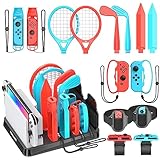
- All-in-One Storage Solution: Upgraded with a dedicated organizer station, this kit keeps all your Switch Sports accessories in order, with designated slots (marked with accessory names) for easy access and display, eliminating desktop clutter. Nintendo Switch Interactive Gaming Figures
- Full Game Compatibility: Includes 2 Joy-Con shared grips, 2 golf clubs, 2 tennis/badminton rackets, 2 wrist straps, 2 leg straps, 2 swords, 2 bowling grips, and fits Switch/OLED console & 2 game cards (console, Joy-Cons and game cards not included), covering all Switch Sports games like golf, tennis, badminton, soccer, volleyball, bowling and chambara.Nintendo Switch Interactive Gaming Figures
- Fitness & Fun Combined: Turn game time into workout sessions! Enjoy immersive sports gameplay while staying active at home, no need for outdoor exercise. Nintendo Switch Interactive Gaming Figures
- Easy to Use & Ergonomic: Accessories snap seamlessly onto Joy-Cons without force; adjustable velcro design for soccer leg straps and volleyball wristbands; lightweight, ergonomic build delivers realistic gaming feel. Nintendo Switch Interactive Gaming Figures
- Perfect for Family & Friends: Boosts game realism and competitive fun, making it ideal for family gatherings and friend hangouts, a must-have for Switch enthusiasts! Nintendo Switch Interactive Gaming Figures
This limitation affects accessory planning: detached Joy-Con motion play needs room in front of the television, and a handheld console cannot provide the same setup. Put the console on its dock, pair the controllers you plan to use, and position the screen where every player can see the game feedback.
At least one usable Joy-Con for motion sports
Different sports use paired Joy-Con, a single Joy-Con, or a Joy-Con combined with the Leg Strap. Your existing controllers may therefore be enough for one person, but not for a group. A Nintendo Switch Pro Controller is not compatible with Nintendo Switch Sports, so it cannot substitute for the Joy-Con required by these play modes.
Space and a wrist strap
Nintendo advises players to wear wrist straps and leave adequate room around them. Remove coffee tables, pets, loose cables and fragile objects from the movement area. Keep players far enough apart that an extended arm or racket-like swing cannot contact another person, the television or furniture.
Free tools Windows power users keep installed
One-click scans. No signup required.
Nintendo Leg Strap: the strongest game-specific choice
What it does
Nintendo describes the accessory this way: “The Leg Strap accessory and Joy-Con™ (L) controller work together to help turn your real-world leg movements into in-game motions, like kicking the ball in Soccer.” In practical terms, the strap gives Soccer Shoot-Out a leg-motion input option instead of relying only on a handheld Joy-Con swing.
The strap is designed for Ring Fit Adventure and Nintendo Switch Sports. Its Switch Sports role is specifically tied to Soccer play. It is not a universal upgrade for Golf, Volleyball, Bowling, Tennis, Badminton, Basketball or Chambara.
Compatibility rules that can prevent a wasted purchase
- A compatible standard Joy-Con is required. The controller is not included with the separately listed strap.
- Nintendo explicitly says Joy-Con 2 controllers do not work with the Leg Strap.
- Nintendo Switch Pro Controllers are not compatible with Switch Sports at all.
- The strap can be purchased separately, including for owners of the digital game or players who want a second strap for same-system Soccer sessions.
Check which generation of controllers you own before ordering. Having a Switch 2 console does not make a Joy-Con 2 suitable for the strap; the console and controller generations are separate compatibility questions.
Rank #2

- 【Switch Sports Accessories Bundle】Switch sports accessories bundle compatibles with Switch 1/ OLED Sport Games. It includes all you need: 2 x Tennis/Badminton Rackets, 2 x Golf Clubs, 2 x Chambara Swords, 2 x Bowling Grips, 2 x Wrist Straps, 2 x Leg Straps, 2 x SharedGrips and 1 x Storage Box. Have a great gaming experience.
- 【Wonderful Gift for Family and Friends】When you are still thinking about a gift for your family or friends, it will be an excellent choice! Perfect for Switch and Switch OLED family fun and Improve the family interactive game experience.
- 【Enjoying Games and Sports at Home】The switch accessories set are made of durable ABS plastic material, comfortable and lightweight to hold. Enjoy real sports with a swing of the club, giving you a sense of simulation game experience!
- 【Easy to Use】The switch sports accessories kit has push-up design, easily put in and take out. With lightweight ergonomic design, no need to worry about Your Joycon crushing or falling out.
- 【Service】If you have any problems, please contact us at any time, and we will solve them as soon as possible. Get started now! Your pre-ordered Switch Sports Accessories Bundle will arrive soon.
See Nintendo’s Leg Strap product page for the official product description. That page confirms the accessory is a real, separately purchasable Nintendo product, but it does not establish a current price, stock status or marketplace availability.
Quick wins for a faster PC:
Repair Windows errors before they cause bigger problemsFix Now →Fix the driver behind crashes, sound loss and screen glitchesFind Drivers →How to attach and wear the Leg Strap
Use these physical setup steps before entering a Soccer match:
- Use the left Joy-Con that is compatible with the strap. Insert it firmly into the Leg Strap pocket with the control stick facing outward.
- Place the strap at the center of the thigh on the leg you intend to use. Keep the controller oriented consistently rather than rotating it sideways.
- Fasten the strap so it stays in position while standing. It should be secure without being painfully tight.
- Stand up and make a few controlled practice movements. If the strap slides or feels loose, retighten it before starting a match.
- Keep the wrist strap available for any Joy-Con being used away from the Leg Strap, and clear the surrounding area before playing.
Nintendo’s attachment guidance emphasizes that the strap should not slip and should be retightened if it loosens while you are standing. A stable fit matters more than maximum tightness: over-tightening can make the session uncomfortable without improving the input.
Turn on Leg-Strap Mode for Soccer Shoot-Out
The strap does not automatically change every Soccer activity. In Nintendo Switch Sports, open Soccer and use the mode selector to choose Leg-Strap Mode when you want kicking input from the thigh-mounted Joy-Con. Follow the on-screen prompts to confirm the controller and strap are ready before the match begins.
Use the regular Soccer control option when you are not wearing the strap or when another player is using a different controller arrangement. A player can therefore own the accessory without requiring every participant to use it in every session.
When the strap is worth it
- You specifically enjoy Soccer Shoot-Out and want a kicking-style motion rather than only hand-held controls.
- You already own a compatible left Joy-Con, so the separate strap is the only missing component.
- You host same-system Soccer sessions and want a second strap so two players can use leg controls, subject to having the required compatible Joy-Con controllers.
When to skip it
- You mainly play Golf, Bowling, Tennis, Badminton, Volleyball, Basketball or Chambara.
- Your available controllers are Joy-Con 2 models. Nintendo says they are incompatible with the strap.
- You play Soccer rarely and do not want a separate setup and fitting step.
How many additional Joy-Con controllers do you need?
There is no single controller quantity that fits every household. Nintendo says additional accessories may be required for multiplayer, so count players and identify the controller arrangement for the sport you plan to play before buying anything.
Rank #3

- 🎁 13 in 1 Nintendo Switch Sports Bundle - The Orzly Nintendo Switch Sports Accessory Bundle Kit is perfect for Nintendo Switch and Switch OLED family fun. All Joy-Con gaming accessories are durable and ergonomic for immersive gaming, perfect for Birthdays or Christmas. Also includes a handy drawstring bag to conveniently keep everything together.
- ⛳️ Golf Clubs x2 & Chambara Swords x2 - Our Sword grips are specially designed for Nintendo Switch Sports: Chambara (Swordplay). Perfect fit for Switch/Switch OLED Joy-con. Instead of just using the Joy-Cons, the golf clubs can bring the simulation game experience to a whole new level, Made of durable ABS plastic material, lightweight, comfortable to hold, giving you a sense of simulation game experience!
- 🎾 Tennis & Badminton Rackets x2 - Simulates a real Tennis & Badminton Racket swing thanks to the ergonomic size and shape. Experience Nintendo Switch Sports Badminton, Nintendo Switch Sports Tennis & Mario Tennis Aces with 2 rackets included for a competitive match with friends and/or family
- ⚽️ Football & Volleyball Straps x2 - The leg strap is specially designed for Nintendo Switch Sports Football & Volleyball and Ring Fit Adventure, which increases the game experience and is the best gift for game lovers. The strap can stabilise your joy-con and will not loosen during use.
- 🎮 Joy-con Wrist Straps x2 - The Strap attaches to your Joy Con for additional security when playing motion-based games like Bowling on Switch Sports or Dancing on Just Dance. It also improves the SL and SR buttons, making them much easier to press. By attaching the Joy-Con strap to your wrist when you play, you can hold the Joy-Con more easily and control games more comfortably.
| Your situation | Likely accessory decision | Reason |
|---|---|---|
| One player, motion sports | Use the compatible Joy-Con set you already have; add the Leg Strap only for Soccer Shoot-Out leg play. | The strap is a Soccer option, not a requirement for the game. |
| Two players with only one usable Joy-Con set | Consider additional compatible Joy-Con controllers. | Local multiplayer may require each player to have the controller arrangement specified for the chosen sport. |
| Several players rotating through sports | Inventory controllers before the gathering and buy only the shortfall. | Requirements change by sport and by whether a player uses one Joy-Con, paired Joy-Con or a Leg Strap. |
| Two Soccer players wanting leg controls | Plan for two compatible Joy-Con units and, if needed, a second separately purchased strap. | Nintendo identifies the strap as a separately purchasable option for same-system Soccer sessions; Joy-Con 2 remains incompatible. |
Do not count a Pro Controller toward this total. Nintendo’s support FAQ says Pro Controllers are not compatible with Nintendo Switch Sports, even if one is paired with the console for other games.
Wrist straps and safe motion play
A Joy-Con wrist strap is a sensible part of every detached-controller setup because it helps keep the controller secured to the player’s wrist. Nintendo’s recommendation is about safe play, not improved tracking or accuracy.
Prepare the room
- Allow enough clearance for a full arm swing in every direction each player may move.
- Move the television, dock and charging cables out of the immediate swing path.
- Keep players separated so their arms, controllers and legs cannot collide.
- Use the strap’s locking slider to keep a wrist strap fitted to the wrist rather than hanging loosely.
- Stop if the Leg Strap slips, a wrist strap loosens or the player feels pain or dizziness; refit the equipment before continuing.
These precautions are particularly important for Soccer leg movements, where a player may kick or shift weight unexpectedly. No accessory makes an unsafe room safe, and decorative shells or grips should never be treated as protective equipment.
What about racket shells, grips and other third-party add-ons?
Racket-shaped shells and grips can change how a Joy-Con feels in the hand or make a session look more like a physical racket game. However, the official Nintendo material available for this guide does not establish that they improve accuracy, control, tracking or competitive results.
Treat such products as optional comfort or appearance accessories. Check that a shell does not block buttons, interfere with a wrist strap or make it harder to release the Joy-Con quickly. If a listing claims a measurable performance improvement, look for independent testing specific to Switch Sports rather than assuming the shape changes the game’s motion detection.
Switch 2, Joy-Con 2 and the compatibility trap
Switch Sports is supported on Nintendo Switch 2, and Nintendo describes the game behavior as consistent with Nintendo Switch. That does not extend every accessory to every controller generation.
Rank #4

- Swing, kick, spike, and bowl your way to victory in 7 sports
- Play Golf, Soccer, Volleyball, Bowling, Tennis, Badminton and Chambara (swordplay)
- Motion controls will get you moving and help turn your real-world actions into in-game movements
- Use the Leg Strap accessory to kick the ball in Soccer
- Play with friends and family locally or online—in some sports, you and a friend can even team up on the same system to take on other teams online
| Hardware | Switch Sports status | Leg Strap status |
|---|---|---|
| Nintendo Switch or Nintendo Switch OLED Model with compatible Joy-Con | Supported in TV Mode | Supported when the compatible Joy-Con is inserted correctly |
| Nintendo Switch 2 with compatible legacy Joy-Con | Supported in TV Mode | Use the legacy compatible Joy-Con; verify the controller itself before setup |
| Joy-Con 2 | The console-generation question is separate from strap compatibility | Nintendo says Joy-Con 2 is not compatible with the Leg Strap |
| Nintendo Switch Pro Controller | Not compatible with Switch Sports | Cannot replace the required Joy-Con |
When buying for a Switch 2 household, identify the exact Joy-Con model in the box or on the controller before choosing the strap. The phrase “works with Switch 2” does not, by itself, mean that a Joy-Con 2 fits the Leg Strap.
What’s actually slowing this PC down?
Pick the symptom - the matching free tool is one click away.
Sport-by-sport accessory planning
Soccer
Soccer is the only sport in the supplied Nintendo guidance with a dedicated Leg Strap use case. Buy the strap when you want Leg-Strap Mode in Soccer Shoot-Out; otherwise, use the standard supported Joy-Con arrangement.
Basketball, Golf and Volleyball
These sports use the game’s supported Joy-Con motion arrangements rather than the Leg Strap. Your priority is having enough compatible controllers for the players who will participate and a clear TV-mode play area.
Bowling
Bowling sessions are controller- and space-dependent. Wrist straps remain relevant because players release their arms in a bowling-like motion, but no separate bowling accessory is identified by Nintendo’s official material.
Tennis and Badminton
Racket-shaped third-party shells may be tempting for these sports, but no reviewed official evidence shows that they improve control. Consider them only after you have the necessary Joy-Con quantity and safe clearance.
Crashes, No Sound, or Screen Glitches?
Random freezes, missing sound and display glitches usually trace back to one bad driver. Find and replace yours safely.Free scan · under a minuteWindows Errors? Fix Them Before They Spread
Repair common Windows errors and clear accumulated junk for a smoother, more stable PC - no reinstall needed.Free scan · no reinstallChambara
Chambara does not require the Soccer Leg Strap. A compatible Joy-Con arrangement and enough room for sword-like arm movements are the practical priorities.
Best Value

- Compatible with Nintendo Switch, Nintendo Switch OLED console, and joy con controllers,for Switch Sports-soccer, volleyball, bowling, tennis, badminton, and the Chambara,Just dance 2024 2023 2022 2021,Mario Kart 8,Tennis Aces,Zumba,and more games
- Arisll Switch Sports Accessories: Designed to enhance your experience in Switch sports, Just Dance, and racing games. This kit includes everything you need to make your game time more immersive and enjoyable
- Switch Accessories Sports 14-Piece Set: Includes 2 racing wheel grips, 2 tennis rackets, 2 boxing grips, 2 golf grips, 2 wrist straps, 2 sword grips, 1 leg strap, and a 24-in-1 game cartridge case
- Ultimate Family Fun: the Arisll switch sports accessories kit ensures everyone stays engaged and entertained in family game nights, and adds a competitive endless fun.Enjoy battling it out in a soccer match or challenging each other in a tennis game
- Enhanced Competition and Realism: Step beyond traditional video gaming and immerse yourself in a genuine sports experience. These switch sports accessories bring your favorite games to life, offering a more interactive and competitive play style
Buying checklist
- Choose the sport you expect to play most. If it is Soccer Shoot-Out with kicking motions, put the Leg Strap first; otherwise begin with controller quantity and safety equipment.
- Count players for your usual local session and compare that number with the compatible Joy-Con controllers you already own.
- Exclude Pro Controllers from the count because Nintendo says they do not work with Switch Sports.
- Check whether any controller you plan to mount is a Joy-Con 2. If so, it cannot be used with the Leg Strap.
- Confirm that your console will be used in TV Mode; Nintendo says Handheld Mode is unsupported.
- Plan wrist straps and clear floor space before inviting additional players.
- Buy third-party shells or grips only for appearance or personal feel, not on an unverified promise of better accuracy.
- Check Nintendo’s product and support pages for the latest compatibility information before ordering. Current prices, stock and seller conditions are not established here.
Troubleshooting common accessory problems
The Leg Strap is not registering kicks
- Confirm that the left Joy-Con is inserted firmly with the control stick facing outward.
- Check that the strap is centered on the thigh and has not rotated or slipped.
- Verify that Soccer is set to Leg-Strap Mode rather than the standard control option.
- Make sure the controller is a compatible Joy-Con, not a Joy-Con 2.
- Stand still while checking the fit, then retighten without making the strap painfully tight.
The game will not respond to a Pro Controller
This is a compatibility limitation, not a pairing failure. Nintendo says Pro Controllers are not compatible with Nintendo Switch Sports, so use the supported Joy-Con arrangement instead.
There are not enough controllers for a group
Reduce the number of simultaneous players, rotate players between rounds or obtain additional compatible Joy-Con controllers. Do not assume that buying a second Leg Strap alone solves the problem; each participant still needs the controller arrangement required by the selected sport.
Players keep hitting furniture or one another
Stop the session and enlarge the play area. Move furniture and cables, separate players, secure wrist straps and restart only when each person has adequate clearance. An accessory cannot compensate for insufficient room.
The Tool Desk
Outbyte Driver Updater FREEScan for outdated or missing drivers - takes under a minuteDriver Scan →Outbyte PC Repair FREERepair Windows errors before they cause bigger problemsFix Now →Where to verify Nintendo’s requirements
Nintendo’s Switch Sports support FAQ covers controller compatibility, Handheld Mode and Soccer setup guidance. The Leg Strap product page describes the separate accessory and its Joy-Con requirement. The official game page lists the sports and Nintendo’s play-space guidance. These pages are the appropriate references when Nintendo changes console, controller or accessory support.
The Bottom Line
Buy the Nintendo Leg Strap only when Soccer Shoot-Out leg controls are the reason you want an accessory. For everyone else, prioritize enough compatible Joy-Con controllers, wrist straps and a clear TV-mode play area; remember that Joy-Con 2 and Pro Controllers cannot provide the Leg Strap or Switch Sports controls Nintendo specifies.
Quick Recap
Product prices and availability are accurate as of the date/time indicated and are subject to change. Any price and availability information displayed on Amazon at the time of purchase will apply.

