Free tools Windows power users keep installed
One-click scans. No signup required.
For frequent work away from Wi-Fi, the Lenovo ThinkPad X13 Gen 6 Intel is the strongest lightweight LTE candidate identified in current manufacturer specifications: it offers optional 4G LTE CAT6 or 5G WWAN, weighs from about 2.05 pounds, and has a business-focused port selection. The catch is important: LTE is an order-time option, not standard on every X13. Check the exact configuration, modem, SIM support, carrier compatibility, and data plan before buying.
What LTE in a laptop means
Laptop LTE is cellular internet built into the computer, typically through a WWAN modem and internal antennas. It lets the laptop connect to a mobile network without a nearby Wi-Fi network or phone hotspot. Manufacturers may label the feature “4G LTE,” “WWAN,” “mobile broadband,” or “Connected PC.” Dell describes a 4G LTE mobile-broadband laptop as a computer equipped with a mobile-broadband card that connects to cellular data similarly to a phone (Dell’s LTE laptop category).
- LTE or 4G LTE: A widely used cellular standard that remains practical where its coverage is good.
- 5G WWAN: Newer cellular hardware, but its benefits depend on local coverage, the modem, and a compatible plan.
- WWAN: The hardware category for a laptop’s cellular connection.
- SIM or eSIM: The method used to activate cellular service; availability differs by model and region.
A Wi-Fi-only laptop cannot gain built-in LTE through software. An external hotspot or phone tethering can provide internet, but it is not the same as an internal cellular modem.
Best LTE laptop choices by use case
| Use case | Model to consider | Cellular configuration | Key qualification |
|---|---|---|---|
| Lightweight productivity | Lenovo ThinkPad X13 Gen 6 Intel | Optional 4G LTE CAT6 or 5G CAT19 WWAN | WWAN varies by region and must be selected at purchase; cited configuration has soldered memory. |
| Value-oriented 14-inch business laptop | Lenovo ThinkPad L14 Gen 4 Intel | Optional 4G WWAN | Older generation; verify new-stock availability, warranty, and the exact WWAN SKU. |
| Convertible and pen-oriented work | Lenovo ThinkPad X13 2-in-1 Gen 5 Intel | Optional 4G LTE | Check whether the modem, pen, and keyboard are included in the package. |
| Larger-screen Dell business system | Dell Pro or Latitude LTE configuration | Depends on the selected system and configuration | Dell’s catalog identifies LTE-capable business systems, but no single modem, model, or price applies to the whole category. |
| ARM connected-PC alternative | Lenovo ThinkPad X13s | Optional 5G | Check application, driver, VPN, and enterprise-tool compatibility on ARM. |
These are configuration-led recommendations, not claims of comparative hands-on testing. The Dell option is a shopping route rather than a fixed model recommendation because its exact hardware depends on the selected configuration.
What’s actually slowing this PC down?
Pick the symptom - the matching free tool is one click away.
#1 Best Overall

- The adapter can't work if you only plug in the sim card. Please insert WWAN card and SIM card together. The adapter can't work for WLAN card without LTE moudle. Also can't work for SSD.
- Ideal for testing the WWAN cards. You don't need to break or open your laptop to test your WWAN modules.Has integrated with a SIM card slot and WWAN slot It can work with most of Key-B WWAN modules.Very easy to use. Don't need extra drivers.
- Just make sure you have installed the drivers software for your WWAN card.
- Suitable for MU736/ME936/ ME906V, ME906C, ME906E, ME906J, Sierra Wireless Airprime EM7305 EM7345 EM7355 EM7430 and other NGFF interface communication module.
- This adapter only with one PCBA converts signals, not include LTE module, antenna and SIM card. It requires adapter + LTE module + SIM card to work together.
Best lightweight pick: Lenovo ThinkPad X13 Gen 6 Intel
The X13 Gen 6 is the clearest fit for someone who carries a laptop every day and wants cellular hardware without giving up a conventional Windows business platform. Lenovo lists Intel Core Ultra options, optional 4G LTE CAT6 or 5G CAT19 WWAN, and an optional Nano SIM. Its starting weight is approximately 933 grams (2.05 pounds), and listed display options include a 13.3-inch WUXGA 1920×1200 anti-glare IPS panel. One listed option is rated at 400 nits and 100% sRGB; the exact panel depends on configuration.
Lenovo’s cited specifications also list two Thunderbolt 4 USB-C ports, USB-A, HDMI 2.1, and a headset jack, a useful mix for working between client sites, meeting rooms, and travel. The cited configuration uses 16GB LPDDR5X memory soldered to the system, so choose capacity with future workload in mind. Lenovo lists SSD options up to 1TB. See the product page and ThinkPad X13 Gen 6 Intel specifications for configuration details.
The WWAN options are not included automatically. Lenovo says availability varies by region and the option must be configured at purchase; cellular service from a network provider is also required. Lenovo’s 5G category showed X13 Gen 6 listings around $1,244 and $1,529 on August 16, 2026, depending on configuration. Those are list-page price signals, not guaranteed prices for an LTE model or a particular buyer’s region (Lenovo 5G ThinkPad listings).
Rank #2
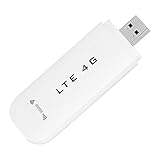
- HIGH SPEED: Simply plug the adapter into your computer's USB port to connect wirelessly to the network or create a hotspot. With a connection speed of up to 100Mbps, you can enjoy web experiences such as web browsing, chatting or playing videos online. (without SIM card)
- SUPERIOR COVERAGE: Built in 4G/3G+ antenna for optimal coverage and reliability, increased strength, allowing you to enjoy connectivity anytime, anywhere.
- SHARING FUNCTION: Share up to 8 users on the Internet connection and enjoy sharing fun with family and friends.
- LARGE MEMORY: Supports small memory card expansion up to 32GB (not included).
- NOTE: Before purchasing, please call the SIM operator to inquire about the SIM card frequency band and whether the local frequency band is supported. If the device fails to recognize the SIM card, please check in the phone Settings - Security Settings whether the SIM card lock (PIN code verification) is enabled. After disabling it, try again (if you forget the PIN code, please call the SIM operator).
Value option: Lenovo ThinkPad L14 Gen 4 Intel
The L14 Gen 4 Intel is worth checking when you want a conventional 14-inch business laptop and find a genuine LTE-equipped configuration at a compelling price. Lenovo lists optional 4G WWAN and Wi-Fi 6E options, and describes the model as a business system with mobile connectivity. Its age is the main reason to treat it as an availability-dependent value choice rather than the default recommendation: compare its warranty, support, configuration, and price with newer alternatives before ordering. Check the L14 Gen 4 product page and Lenovo’s L14 configuration page for the exact offer.
Convertible option: Lenovo ThinkPad X13 2-in-1 Gen 5 Intel
The X13 2-in-1 Gen 5 is the better form factor if you annotate documents, present from a tablet-like device, or regularly switch between laptop and tablet modes. Lenovo lists optional 4G LTE on the product page. Confirm whether the selected package includes its pen and keyboard as well as the WWAN modem; accessory and cellular inclusion can vary.
Dell LTE laptops: select the configuration, not just the family
Dell maintains a business-laptop LTE catalog and a broader LTE catalog, alongside information about Connected PCs. Dell Pro and Latitude systems may be suitable for buyers who prefer Dell’s business purchasing and support options, but the category itself does not establish one universal model, modem, or price. Open the configurator and verify those details on the actual order.
Rank #3

- Plug and play: As long as there is electricity, you can easily access the Internet, very convenient.
- High speed: Simply plug the adapter into your computer's USB port to connect wirelessly to the network or create a hotspot. With a connection speed of up to 150Mbps, you can enjoy web experiences such as web browsing, chatting or playing videos
- Excellent coverage: Built‑in 4G / 3G + antenna for optimal coverage and reliability, enhanced signal strength, allowing you to enjoy connectivity anytime, anywhere.
- Sharing function: Share up to 10 users through Internet connection and enjoy sharing fun with family and friends.
- Lightweight and portable: The compact and convenient design makes it easy to carry around and enjoy an internet connection anytime, anywhere.
Dell’s Connected PC information has also advertised a promotional three-month offer tied to activating a Dell Connected PC through its device-management console on a Verizon Business Unlimited Start Laptop Plan. The offer may change and can have eligibility or geographic restrictions; check its current terms at Dell’s Connected PC offer page rather than treating it as standard service pricing.
LTE or 5G: choose for coverage and ownership, not the label
For email, documents, spreadsheets, web apps, messaging, and video calls, LTE can be sufficient if the network is dependable where you work. Choose LTE when the configuration is materially cheaper, your existing data arrangement supports it, or you expect to replace the laptop within a relatively short business cycle. Consider 5G when you will keep the machine for several years, work in places with useful 5G coverage, move large files or rely heavily on cloud services, and the price difference is modest.
The Tool Desk
Outbyte PC Repair FREEClear out junk files and repair common Windows errorsFree Scan →Outbyte Driver Updater FREEScan for outdated or missing drivers - takes under a minuteDriver Scan →Do not assume 5G will always be faster in your actual work locations. Performance depends on carrier, coverage, spectrum, congestion, modem category, and plan. The X13 Gen 6 lists both an LTE CAT6 option and a 5G CAT19 option; those modem labels do not guarantee a particular real-world speed. Lenovo’s X13 Gen 6 specifications identify the available choices, while local carrier conditions determine what you can use.
Rank #4
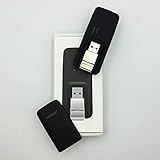
- Easy to adjust; The USB connector folds into your modem for a quick and convenient way to carry it in your laptop bag, backpack or pocket; Make connecting a breeze with a swivel designed to adjust to any USB port orientation
- SIM card is Not included
- Easy to adjust The USB connector folds into your modem for a quick and convenient way to carry it in your laptop bag, backpack or pocket; Make connecting a breeze with a swivel designed to adjust to any USB port orientation
- SIM CARD IS NOT INCLUDED
Built-in WWAN or a phone hotspot?
| Your pattern of use | Usually the more practical choice | Why |
|---|---|---|
| Mobile internet only occasionally | Phone hotspot | May avoid a modem upgrade and separate service when your phone plan already includes suitable hotspot data. |
| Work away from Wi-Fi most days | Built-in WWAN | The laptop connects independently, without repeatedly enabling a phone hotspot. |
| Business fleet with managed devices | Built-in WWAN, subject to IT and carrier policy | Can standardize connectivity and avoid dependence on each employee’s phone. |
| Heavy data use or video meetings | Compare plans before choosing | Meetings, updates, and cloud sync can consume data quickly; a restrictive plan may outweigh the hardware convenience. |
Built-in WWAN can be convenient for field visits, travel between offices, commuting, temporary work sites, or backup connectivity during an internet outage. It can also avoid joining public Wi-Fi when you prefer cellular service. That is not a guarantee that LTE is faster than Wi-Fi or inherently secure: performance depends on signal and network conditions, and normal endpoint protection, software updates, account security, and any required VPN policy still matter. A phone hotspot may be cheaper for occasional use; compare the modem cost, activation, monthly plan, and possible overages.
How to verify the exact LTE configuration before buying
- Open the exact model and configuration. Do not rely on a family name or search result that says a range has LTE options.
- Check connectivity or wireless selections. Confirm the final configuration explicitly lists “4G LTE,” “WWAN,” or “5G WWAN.”
- Identify the modem. A SIM slot by itself does not prove that the system includes the modem and antennas.
- Verify SIM support. Check whether the exact SKU supports Nano SIM, eSIM, or both, and how activation works in your region.
- Check carrier compatibility. Ask the intended carrier to confirm supported bands, certification, provisioning, and whether it will activate that device. A modem may support LTE yet still not work with a particular carrier or plan.
- Confirm regional availability. WWAN hardware may be unavailable in some markets or configurations.
- Check operating system and business requirements. Confirm the Windows edition and management features required by your organization.
- Review memory, warranty, and returns. Decide on RAM before purchase if it is soldered, and compare support terms—especially for older stock.
- Budget for service. Check whether you need a laptop data plan, shared-data add-on, business line, physical SIM, or eSIM activation. There is no universal monthly price across carriers and regions.
- Save the final configuration summary. Keep the order details showing the WWAN modem and service-relevant options.
For the X13 Gen 6 specifically, Lenovo lists the Quectel EM061K-GL 4G LTE CAT6 modem and Rolling Wireless RW350R-GL 5G CAT19 option, plus an optional Nano SIM. Lenovo’s specification material also references embedded eSIM functionality for the Quectel modem; confirm the precise SKU and local activation support in the official specifications. A SIM or eSIM feature does not replace the need for carrier-compatible modem hardware and service.
Independent reader supportYour contribution helps us test, update, and keep practical guides available for everyone.Other specifications that matter for mobile productivity
Memory and storage
For current productivity work, 16GB RAM is a practical starting point; prefer 32GB for heavy multitasking, virtual machines, large datasets, or longer ownership. A 512GB SSD is a sensible general-work baseline, while 1TB suits larger local files, media, and development environments. Check upgradeability before buying: the cited X13 Gen 6 configuration has 16GB soldered LPDDR5X memory, rather than a conventional memory upgrade path.
PC Slower Than It Used to Be?
A free scan shows the junk files, broken settings and background clutter dragging Windows down - then fixes them in one click.Free scan · Windows 10 & 11Outdated Drivers Are Slowing You Down
One free scan finds every outdated or missing driver and matches the right update for your exact hardware.Free scan · exact hardware matchBest Value

- WIDE GLOBAL NETWORK COMPATIBILITY: It supports a wide range of LTE 4G FDD and TDD bands including, but not limited to, B1 to B66, as well as UMTS Band B1 to B8, ensuring dependable connectivity in most countries and regions.
- HIGH SPEED DATA The module supports downlink speeds of up to 450 Mbps (FDD) and 347 Mbps (TDD), and uplink speeds of up to 50 Mbps (FDD) and 30 Mbps (TDD), which meets the demand for high speed data and provides a smooth online experience.
- M.2 INTERFACE: In the form of an M.2 interface for easy integration into modern devices, both laptops and industrial grade devices can easily install it and take full advantage of its powerful capabilities.
- 7360 LTE MODEM: Equipped with the high performance 7360 LTE modem, it ensures stable communicating performance and excellent signal processing capability, maintaining good connection quality even in complex network environments.
- FLEXIBLE APPLICATION SCENARIOS: Suitable for a wide range of application scenarios, whether in the field of mobile office, remote monitoring or car networking, it is able to provide stable connectivity solutions.
Screen and portability
A 16:10 1920×1200 display gives more vertical workspace than a 16:9 1080p panel, which helps with documents and web pages. For travel or bright environments, anti-glare treatment and brightness may matter more than a resolution bump alone. A two-to-three-pound laptop is generally easier to carry frequently, but the lightest designs may trade away upgradeability, battery capacity, ports, or thermal headroom. Account for the charger as well as the laptop’s listed weight.
Processor and software compatibility
For ordinary productivity, prioritize responsive performance and compatibility over a processor badge. Intel is the lower-risk choice for users who depend on older Windows software, specialist applications, VPN clients, peripheral drivers, virtual machines, or established enterprise tools. ARM laptops can suit browser- and office-led work, but verify each essential application and device driver before choosing one. Lenovo presents the Snapdragon-based X13s as a connected 5G alternative, not the primary LTE pick; see the ThinkPad X13s product page.
When an LTE laptop is not worth buying
- You work mainly in places with reliable Wi-Fi and rarely need cellular access.
- Your phone plan already offers generous hotspot data and tethering is not inconvenient.
- The laptop’s WWAN upgrade and a separate data plan cost more than the value of the convenience to you.
- Your work depends on software, drivers, or management tools that are not supported by the chosen platform.
- Your regular work locations have weak or no compatible cellular coverage; an internal modem cannot fix a coverage gap.
Cellular can also reduce battery endurance when the modem is working to find signal, especially in weak-coverage areas. Do not treat a manufacturer battery claim as a promise of runtime during cellular use. For data control, Windows users can mark a cellular connection as metered, set data-usage limits, and pause nonessential synchronization or large downloads. Coverage remains the deciding constraint in underground spaces, on some aircraft, in remote terrain, and inside buildings with poor reception.
Quick Recap
Product prices and availability are accurate as of the date/time indicated and are subject to change. Any price and availability information displayed on Amazon at the time of purchase will apply.




