For ordinary Android apps, a Chromebook with confirmed Google Play support is the simplest choice. Choose a Windows laptop when you need Android Studio, desktop software, or a third-party emulator; choose macOS when Android development is part of a broader Apple desktop workflow. Regardless of platform, start with 16 GB of RAM, an SSD, hardware virtualization, and a 1920×1080 display. Move to 32 GB of RAM and a discrete GPU if you will run several emulators or demanding 3D apps.
Choose the route before choosing the laptop
“Running Android apps” can mean three different things: installing consumer apps directly on ChromeOS, testing an app in Android Studio’s emulator, or using a third-party emulator on a conventional desktop operating system. Those routes have different requirements, so a laptop that is excellent for one may be a poor purchase for another.

As an Amazon Associate I earn from qualifying purchases.
ChromeOS with Google Play
A Chromebook with Google Play support gives the most appliance-like experience. You install compatible Android apps from the Play Store without creating a virtual device or configuring a development environment. It is a good fit for messaging, streaming, education, light productivity and games that have a ChromeOS-compatible Android release.
Support is not universal. Chromium documents Android-app support as device-specific and says that, unless a listing specifies otherwise, devices launched in or after 2019 support Android apps. Treat that as a starting rule, not a guarantee: verify the exact model, its ChromeOS channel and whether Google Play is available before buying. A model family can contain revisions with different support.
#1 Best Overall
Windows for desktop work or Android Studio
Windows is the flexible option when Android apps are only one part of a desktop workflow. It supports Android Studio, developer tools, desktop browsers and third-party emulators on the same machine. However, Microsoft’s former first-party Android-app route is no longer a buying benefit: Microsoft says that, starting March 5, 2025, Windows Subsystem for Android and the Amazon Appstore are not available in the Microsoft Store. Existing or unofficial installations are outside Microsoft’s current supported distribution path, so do not buy a new Windows 11 laptop expecting a supported catalog from that service.
macOS for development workflows
macOS is most relevant when Android Studio must coexist with other macOS software or an existing Apple desktop setup. The same practical priorities still apply—memory, SSD capacity, a recent processor, cooling and a suitable display—but the Windows-specific requirements in this guide, such as Virtual Machine Platform and Windows Hypervisor Platform, do not apply to macOS. Check the current Android Studio requirements for the particular macOS version and processor architecture before ordering.
Baseline specifications that make sense
Vendor requirements are a useful floor, not a performance guarantee. Android Studio lists 16 GB of RAM as the minimum for Studio plus one emulator and 32 GB as the recommended amount. Microsoft’s Windows mobile-app documentation also lists 16 GB as recommended. In practical buying terms, 16 GB is the sensible minimum for ordinary app use and a single development emulator; 32 GB prevents browser tabs, an IDE, build tools and multiple virtual devices from competing for memory.
Crashes, No Sound, or Screen Glitches?
Random freezes, missing sound and display glitches usually trace back to one bad driver. Find and replace yours safely.Free scan · under a minutePC Slower Than It Used to Be?
A free scan shows the junk files, broken settings and background clutter dragging Windows down - then fixes them in one click.Free scan · Windows 10 & 11| Component | Practical minimum | Better choice for development or multiple emulators | Why it matters |
|---|---|---|---|
| RAM | 16 GB | 32 GB | Android Studio and an emulator consume substantially more memory than a single consumer app. Extra capacity keeps the operating system and other applications responsive. |
| Storage | SSD with room beyond the operating system | 512 GB SSD or larger | Android Studio recommends an SSD with at least 32 GB free for the recommended setup. SDK packages, system images, snapshots, projects and personal files need additional space. |
| Processor | Recent x64 or ARM64 processor with virtualization support | Higher-tier recent Intel Core or AMD Ryzen class processor | Compiling, installing packages and running a virtual device create sustained CPU load. Virtualization support is required for accelerated emulation. |
| Graphics | Integrated graphics for light testing | Discrete GPU with at least 4 GB VRAM; 8 GB recommended for heavier emulator use | Android Studio alone does not require a GPU, but emulator rendering—especially 3D workloads—benefits from dedicated graphics. |
| Display | 1920×1080 | Larger 1080p or higher-resolution panel | Android Studio’s recommended display target is 1920×1080, which leaves room for the editor, project tree and emulator window. |
| Cooling and power | Active cooling and a charger for long sessions | Well-reviewed cooling design with a substantial power adapter | Emulators can keep the CPU busy. Vendor requirements do not establish a universal temperature, battery-life or fan-noise threshold, so these are model-specific review questions. |
RAM: decide by workload, not by the app name
16 GB for normal use and one emulator
Sixteen gigabytes is the most defensible starting point for a Windows or macOS laptop used for Android apps. It covers ordinary Android-app use and meets Android Studio’s stated minimum for Studio plus Emulator. It also gives a browser, messaging client and documentation some room to run alongside the IDE.
32 GB for serious development
Choose 32 GB when you expect to keep multiple emulators open, compile large projects, use an emulator while running design or database tools, or keep many browser tabs and desktop applications active. Android Studio identifies 32 GB as its recommended memory level. If a laptop has soldered memory, select the capacity you will need at purchase; do not assume a later upgrade is possible.
Rank #2

- Wireless Bluetooth Printer: Portable thermal printer compatible with iPhone, Android phones, iPad and tablet computers via Bluetooth. For smartphones, please download the "Nada Print" App. You can also connect to laptops and computers for printing using a USB-C cable. (Note: Laptops and computers can only be connected via USB and require the installation of a driver first. Bluetooth connection is not supported.)
- No-ink printing: Only supports US Letter and A4 size thermal paper.(Doesn't support regular paper) The no-ink portable thermal printer uses direct thermal technology, requiring no ink, toner or ribbons, making it environmentally friendly, cost-effective and time-saving. The thermal printer package comes with a roll of US Letter thermal printing paper. Note: When installing the paper, remember to switch the paper size switch on APP
- Clear Print: NDYIN N80 portable thermal printer adopts high-definition printing technology, with a 203DPI resolution to provide you with clear printing results. This mobile printer is compatible with roll paper, folded paper and tattoo transfer paper, supporting printing from your mobile phone PDF, Word, pictures and web pages anytime and anywhere. It is recommended to use our NDYIN thermal paper to achieve good printing quality
- Portable wireless printer for travel: The thermal printer is equipped with a built-in 1500mAh rechargeable battery, which can print 160 sheets of 8.5" x 11" thermal paper after being fully charged. It weighs only 1.5 pounds and is compact in size. This ink-free portable printer can be easily carried in a backpack or briefcase! It is perfect for business travel, cars, small offices, construction sites, schools and homes. You can print documents, contracts, invoices and boarding passes anytime and anywhere
- The N80 thermal printer has a wide range of uses. The package includes the N80 printer, a roll of US Letter paper(7m/roll), a user manual, a guide card, a type-C soft cable and a type C adapter. Note: The charging adapter is not included. Special thermal paper is required for use; ordinary paper cannot be used. This ink-free portable thermal printer is suitable for various scenarios such as home, school, travel, office, and outdoor, meeting the printing needs of different groups of people. This tattoo template printer is also compatible with tattoo transfer paper, making it an ideal choice for tattoo art
Why 8 GB is a compromise
An 8 GB machine may launch a light Android app or a small test project, but it leaves little headroom once the operating system, browser, IDE, emulator and build tools are open. It is a poor choice for a new purchase intended to last through several years of app updates. If the machine is otherwise attractive, confirm whether memory can be replaced and budget for an upgrade, but treat 16 GB as the safer floor.
Storage: an SSD is part of the requirement
Use an SSD rather than a hard disk. Android Studio recommends an SSD and at least 32 GB of free space for the recommended Studio-plus-Emulator configuration. That free-space figure is not the laptop’s total capacity: the operating system, Android SDK components, emulator system images, snapshots, project files and user data all consume additional space.
What’s actually slowing this PC down?
Pick the symptom - the matching free tool is one click away.
A 512 GB SSD is a practical starting point for development-oriented buyers. It leaves room for the operating system and applications while preserving working space for several system images and projects. A 256 GB drive can work for light use if you actively manage files, but it can become cramped quickly. Check whether the SSD is replaceable; some thin laptops use soldered storage, making the original capacity a permanent limit.
CPU architecture and virtualization checks
x64 or ARM64
Microsoft lists x64 and ARM64 processor architectures for its Windows mobile-app path. For broad compatibility with desktop tools and emulators, a recent Intel Core or AMD Ryzen processor with a conventional x64 Windows installation is the least surprising choice. ARM64 Windows laptops can be efficient, but verify that the exact Android Studio, emulator images and other tools you need support the architecture before purchase.
BIOS or UEFI virtualization
Android Studio requires hardware virtualization: Intel VT-x or AMD-V must be available and enabled in BIOS or UEFI. A product listing may state “virtualization support,” but it may not say whether the firmware switch is enabled by default. Look for a manufacturer manual or support page that shows how to enable it. If the firmware is locked down, the emulator may fall back to slower operation or fail to start.
Rank #3

- 2-in-1 Android Tablet - Our versatile tablet effortlessly transforms from a tablet to a portable laptop with the included mouse and keyboard, you can use it easily for productivity while on the move or switch to tablet mode to enjoy entertainment.
- Android 15 Tablet with GMS Certification - The tablet is powered by the latest Android 15 operating system. It offers an easy-to-use interface and access to a wide range of apps, games and services through Google Play Store. You can keep up with the latest features and experience a seamless and simple user experience.
- 10.1 Inch HD Screen - Immerse yourself in breathtaking visuals on the expansive 10.1 inch high definition IPS display. Featuring a resolution of 1280*800, every image and video bursts with vibrant hues and pristine clarity.
- 12GB RAM & 64GB ROM - Allow you to multitask and store important data, pictures and videos,you can even add a 1TB Micro SD card for more storage.
- Dual Cameras and more - ECOPAD android tablet features a 2MP front camera and an 8MP rear camera, supporting 2.4GHz WiFi / WiFi 6 and Bluetooth 5.0. It has a built-in 6000mAh lithium battery for reliable all-day performance.
Windows virtualization layers
Microsoft’s Windows mobile-app requirements include Virtual Machine Platform. Google recommends Windows Hypervisor Platform for Windows emulator acceleration. These are Windows features, not extra hardware purchases, but they can be disabled by company policy or conflicting virtualization software. On a personal laptop, confirm that you can enable the relevant optional Windows features and reboot after changing them.
Graphics and 3D expectations
Android Studio by itself does not require a dedicated GPU. Integrated graphics are adequate for editing code, building an application and testing simple interfaces. Google’s requirements specify a GPU with at least 4 GB of VRAM for Studio plus Emulator, with 8 GB as the recommended tier. Those figures matter most when the virtual device renders 3D scenes or when you test graphics-heavy games.
Choose a discrete GPU if 3D performance is a core requirement, you intend to run several graphics-intensive virtual devices, or the laptop will also be used for native PC games or creative applications. A discrete GPU increases cost, weight, heat and power consumption. For ordinary app compatibility testing, spending that budget on 32 GB of RAM, a larger SSD and better cooling usually provides more useful headroom.
Display, keyboard and thermals are productivity features
Android Studio’s recommended resolution is 1920×1080. At that resolution, a 14-inch screen offers portability while a 15- or 16-inch model gives the editor and emulator more breathing room. A higher-resolution panel can be useful, but make sure the operating system’s scaling leaves text and controls comfortable.
Long emulator sessions can sustain CPU use. Prefer a laptop with a full-size charger, unobstructed intake vents and a keyboard you can use for hours. Do not rely on a universal temperature, battery-life or fan-noise promise: the cited requirements do not publish one. Read model-specific reviews for sustained performance, fan behavior, throttling and battery life under a plugged-in development workload.
Rank #4
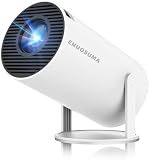
- 【Built-In Streaming Apps】Stream instantly, no extra devices needed,Eenjoy seamless streaming with popular apps like Prime Video, and YouTube built directly into the projector. No need for additional streaming sticks—simply connect to Wi-Fi and start watching your favorite movies and shows right away. Enjoy instant and uninterrupted entertainment from the comfort of your home.
- 【WIFI 6 & Bluetooth 5.4】Experience significantly reduced buffering with Wi-Fi 6 connectivity,stable streaming with Minimal Latency, maintaining consistently smooth playback for films and games. Seamlessly pair wireless speakers via Bluetooth or utilise the integrated stereo sound system for enhanced audio immersion. Ideal for cinematic viewing, gaming sessions or ceiling-mounted installations.
- 【Full HD 1080P & 4K Support 】Even Detail, Sharper Picture, Featuring an upgraded 2026 LED optical engine, this mini projector supports Full HD 1080P for a more uniform image with enhanced clarity and balanced brightness. With a 0.9:1 short-throw ratio, it supports a 30–200" display.
- 【Bright & Built-In Sound】With 200 ANSI lumens brightness and an 8000:1 contrast ratio, this mini projector provides sufficient brightness for casual movie watching or kids' shows. The integrated 5W SoundBase Speaker provides rich audio, completing your experience—no external speakers needed.
- 【Auto Keystone & 210°Rotation】This video projector has auto keystone correction to smoothly adjust the screen. The home projector has a 210°rotatable design, you can rotate the projector to adjust the projection angle,whether on a table, bedside, wall-mounted, or even the ceiling—providing flexible viewing options for any space,Adjust the focus through the focus wheels to quickly get the clearest picture.
Chromebook buying checklist
Chromebooks are the simplest route only when the exact device supports Google Play. Before paying, work through this list:
- Confirm the exact model number, not just the series name.
- Check Chromium’s Chrome OS systems list or the manufacturer’s specifications for Android-app support.
- Confirm that the intended ChromeOS channel and update policy still provide Google Play.
- Prefer 8 GB or 16 GB of RAM for ordinary apps; choose 16 GB or more if Linux tools or development workloads will share the machine.
- Choose an SSD or fast solid-state storage with enough free capacity for apps and offline files.
- Check app compatibility individually. An Android phone app may have a different layout, input model or availability on ChromeOS.
- Verify the device’s support life, warranty and port selection, because a low price is less useful if updates or accessories are ending soon.
For Android Studio on ChromeOS, verify that the model supports the required Linux development environment and that its memory and storage exceed the basic consumer-app needs. A Chromebook selected only for Play Store apps should not be assumed to be a full replacement for a development laptop.
Windows buying and setup checklist
Search results such as “Windows 11 laptop 16GB RAM SSD virtualization” can narrow a list, but the phrase is not proof of compatibility. Open the specification sheet and confirm each item:
- Confirm Windows 11, 16 GB RAM or more, and an SSD. For Android Studio, 32 GB RAM and a 512 GB SSD provide more usable headroom.
- Confirm an x64 or ARM64 processor and identify the exact processor model.
- Verify Intel VT-x or AMD-V support and find the BIOS or UEFI instructions for enabling it.
- Check that Windows allows Virtual Machine Platform and Windows Hypervisor Platform to be enabled.
- Decide whether integrated graphics are enough. For demanding 3D emulation, look for at least 4 GB of dedicated VRAM; 8 GB is Google’s recommended tier.
- Read sustained-load reviews for cooling, fan noise, throttling and battery behavior rather than relying on idle specifications.
After setup, enable hardware virtualization in firmware, install Android Studio, create an emulator image that matches the Android version you need, and select hardware acceleration through Windows Hypervisor Platform where offered. Google says the Android Emulator hypervisor driver will be sunset on December 31, 2026; plan to transition to Windows Hypervisor Platform by the end of 2026 instead of building a new workflow around the retiring driver.
The Tool Desk
Outbyte PC Repair FREEClear out junk files and repair common Windows errorsFree Scan →Outbyte Driver Updater FREEScan for outdated or missing drivers - takes under a minuteDriver Scan →Android Studio laptop requirements in context
Android Studio’s published figures describe a recommended configuration, not a benchmark of a particular laptop. The important distinction is free space and simultaneous load. A laptop can technically meet 16 GB of RAM and 32 GB of free SSD space yet feel constrained if the operating system, IDE, emulator, browser and build cache all run together.
Best Value

- [Wireless Presentation]Wireless presentation remote with 10m range for flawless PowerPoint/Google Slides control
- [Multiple Application Scenarios]More than just a presentation remote, this multifunctional device doubles as your entertainment hub,ideal for browsing TikTok, reading Kindle books, and capturing photos or videos on the go
- [Ergonomic Design for Extended Use]At just 0.783 oz (22.2g), this ultra-light remote features a non-slip grip and wrist strap to reduce fatigue during long presentations. Its ambidextrous design fits comfortably in either hand
- [High Compatibility]Compatible with all major platforms iOS, Android, Windows, and macOS devices for flawless performance
- [Battery Life]Featuring a quick 90-minute charge and 500+ battery cycles, this air mouse ensures extended, reliable use
- Minimum memory for Studio plus Emulator: 16 GB.
- Recommended memory: 32 GB.
- Recommended free SSD space: 32 GB or more for the Studio-plus-Emulator setup, in addition to space for the operating system and personal files.
- Virtualization: hardware support must be enabled; on Windows, use the supported hypervisor path.
- Graphics: no GPU is required for Studio alone; Google specifies at least 4 GB of VRAM for Studio plus Emulator and recommends 8 GB.
- Display: 1920×1080 is the recommended resolution.
Common failure modes and fixes
The Play Store is missing on a Chromebook
The most likely cause is device-specific support, not a hidden setting. Recheck the exact model and ChromeOS channel. If the model is not on the supported list, a later update should not be assumed to add Android apps.
The emulator says acceleration is unavailable
Enter BIOS or UEFI and enable Intel VT-x or AMD-V, then confirm that Windows Hypervisor Platform is enabled when using Windows. Corporate policies, another hypervisor and outdated firmware can also block acceleration. Restart after changing Windows features or firmware settings.
The emulator is slow despite a fast processor
Check memory pressure, free SSD space, graphics allocation and thermal throttling. Close unused virtual devices, keep adequate free space for snapshots and use a plugged-in power profile. Integrated graphics may be sufficient for basic interfaces but can struggle with 3D scenes.
Android apps are unavailable on a new Windows laptop
Do not treat Windows 11 alone as evidence of a supported Android-app catalog. Microsoft ended availability of Windows Subsystem for Android and the Amazon Appstore in the Microsoft Store on March 5, 2025. Use Android Studio or another currently supported route instead, and evaluate unofficial installations as unsupported.
The laptop becomes hot or loud
Emulation is a sustained workload. Use the supplied charger, keep vents clear and compare long-load reviews for the exact chassis. There is no vendor-wide temperature or fan-noise threshold that can reliably predict every model’s behavior.
A platform decision table
| Need | Best starting platform | What to verify |
|---|---|---|
| Install everyday Android apps with minimal setup | ChromeOS Chromebook | Exact model has Google Play support; confirm ChromeOS channel and update life. |
| Use Android Studio and ordinary desktop software | Windows laptop | 16 GB RAM minimum, 32 GB preferred, SSD, hardware virtualization, Virtual Machine Platform and Windows Hypervisor Platform. |
| Run several emulators or large projects | Higher-spec Windows or macOS laptop | 32 GB RAM, 512 GB or larger SSD, strong cooling and enough graphics capability for the target workload. |
| Test demanding 3D Android apps | Windows or macOS with discrete graphics | At least 4 GB VRAM for the stated Studio-plus-Emulator requirement; 8 GB is the recommended tier. |
| Buy the lightest inexpensive device for occasional apps | Supported Chromebook | Play Store availability, app compatibility, storage and remaining update support. |
How to evaluate a listing in five minutes
- Identify the route. Decide whether you need Play Store apps, Android Studio, or both. Eliminate laptops that cannot support that route.
- Read the exact configuration. Record RAM, SSD capacity, processor model, graphics hardware and display resolution; do not rely on a family name.
- Check upgrade limits. Find out whether RAM and storage are replaceable. Soldered 8 GB memory or a small non-replaceable SSD can become the limiting factor.
- Verify virtualization. Confirm VT-x or AMD-V support, BIOS access and the Windows virtualization features required by your software.
- Check sustained behavior and support. Read reviews for long workloads, then verify warranty, update policy, ports, charger and return terms.
What not to overpay for
A gaming-class GPU is unnecessary for Android Studio’s editor and build tools. Likewise, a very high-resolution display does not compensate for insufficient RAM or a small SSD. Put the budget in this order: 16 GB RAM, SSD storage with generous free space, virtualization-capable processor, reliable cooling and a 1080p-or-better display. Add 32 GB RAM and a discrete GPU only when your workload justifies them.
Bottom line
Buy a Chromebook only after confirming Google Play support for the exact model. For Android Studio or a mixed desktop workflow, choose a Windows or macOS laptop with at least 16 GB of RAM, an SSD and hardware virtualization; 32 GB of RAM and a 512 GB SSD are the more comfortable development target. Integrated graphics suit light testing, while 4 GB of VRAM is the stated minimum and 8 GB the recommended tier for heavier Studio-plus-Emulator use. Finally, treat Windows’ former Android-app catalog as unavailable for new supported installs and plan Windows emulator work around Windows Hypervisor Platform before the Android Emulator hypervisor driver sunset on December 31, 2026.
Free tools Windows power users keep installed
One-click scans. No signup required.
Quick Recap
Product prices and availability are accurate as of the date/time indicated and are subject to change. Any price and availability information displayed on Amazon at the time of purchase will apply.

