Recommended Free Tools
For most new Apple Home installations, start with a HomePod mini, then add Matter-over-Thread devices where they fit. Nanoleaf Essentials Matter bulbs are the simplest lighting expansion, Eve Energy adds a plug and power meter, Philips Hue is better for a large multi-room lighting system, and ecobee, Aqara, Yale, Level, Logitech, and Eve cover climate, security, locks, cameras, and sensors. The right choice depends on whether you want direct Matter pairing, a vendor bridge, local control, Apple Home Key, or the widest range of accessories.
Best picks at a glance
| Use case | Best starting choice | Why it fits an Apple Home setup | Main qualification |
|---|---|---|---|
| Home hub and Thread network | Apple HomePod mini | Acts as a home hub for remote access, shared control, automations, and Thread border routing. | Thread Matter accessories still require a compatible Thread-enabled hub. |
| Simple smart lighting | Nanoleaf Essentials Matter A19 Smart Bulb | Direct Apple Home control with Matter and Thread support. | Confirm the exact Matter model and regional electrical specification. |
| Large lighting installation | Philips Hue Starter Kit | Mature bridge-based ecosystem with room scenes and broad fixture options. | Matter operation depends on Matter-enabled bulbs and the required Hue bridge and Thread border router path. |
| Plug and energy monitoring | Eve Energy (Matter) | Provides Apple Home switching plus power-consumption data. | Check regional plug format, load rating, and Thread hub requirements. |
| Thermostat | ecobee Smart Thermostat Premium | Apple Home and Siri support, remote sensors, and built-in air-quality monitoring. | HVAC wiring and system compatibility must be checked before installation. |
| Apple Home Key lock | Yale Assure Lock 2 Plus | Supports Apple Home Key for compatible Apple devices. | Door preparation, cylinder fit, power, and regional model availability vary. |
| Matter lock alternative | Level Lock Pro with Matter | Uses Matter while exposing lock controls to Apple Home. | Verify the supported Matter transport and the hardware fit for your door. |
| Security and occupancy | Aqara devices | The Apple catalog includes locks, doorbells, cameras, and a presence sensor. | Individual models may need an Aqara hub and may expose different Apple Home features. |
| Apple-focused camera | Logitech Circle View | Designed for Apple Home camera workflows. | Check HomeKit Secure Video requirements, recording options, and indoor/outdoor suitability. |
How Apple Home, Matter, and Thread fit together
Apple Home is the control layer: the Home app organizes rooms, scenes, automations, and accessory controls, while Siri can operate compatible lights, doors, thermostats, and other devices from an iPhone, iPad, Apple Watch, HomePod, or Mac. “HomeKit-compatible” is now commonly described as working with Apple Home; newer products may use Matter while older accessories use Apple’s HomeKit protocols.
As an Amazon Associate I earn from qualifying purchases.
Matter is an interoperability standard, not a guarantee that every feature appears in every platform. A Matter product can work with Apple Home and other ecosystems, but you still need to confirm the device category, firmware, transport, and local availability. Some Matter accessories use Wi-Fi, while low-power sensors and plugs often use Thread.
PC Slower Than It Used to Be?
A free scan shows the junk files, broken settings and background clutter dragging Windows down - then fixes them in one click.Free scan · Windows 10 & 11Outdated Drivers Are Slowing You Down
One free scan finds every outdated or missing driver and matches the right update for your exact hardware.Free scan · exact hardware matchThread is a low-power mesh network. It is not the same as Wi-Fi and does not replace a home hub. Apple says Thread-enabled Matter accessories require a Thread-enabled home hub, such as HomePod mini or Apple TV 4K (3rd generation) Wi-Fi + Ethernet, or a supported third-party Thread border router. A Thread border router connects the Thread mesh to your home network so Apple Home can commission and control those accessories.
#1 Best Overall

- [Multi-Protocol Hub with Matter Bridge] The M3 is a versatile hub supporting Aqara Zigbee and Thread devices. It integrates third-party devices into the Aqara Home app. Supports advanced Matter bridge functionality, enabling Aqara-exclusive scenes and signals to sync with Matter ecosystems such as Home Assistant for seamless integration. Supports up to 127 Aqara Zigbee devices (** Not third-party Zigbee devices) and 127 Thread devices (Repeaters are needed).
- [Edge Compatibilities and Local Automations] The M3 serves as an Edge Hub, prioritizing local control and automation. Upon integration, it supersedes existing Aqara hubs, shifting the automations among them to local operation (Some cloud-based notifications still require internet). Upgrade-friendly, it supports migrating Zigbee devices from older Aqara hubs.
- [Smart IR Blaster with Feedback and Learning] The 360°IR blaster not only sends commands but also provides accurate status updates by detecting traditional remote use. It connects IR air conditioning units to Matter, functioning as an AC thermostat when paired with an Aqara Temperature and Humidity Sensor. (Note: Only one AC device can be exposed to Matter. Functionality may vary based on the Matter integration app. For Apple Home exposure, use Matter integration instead of HomeKit.)
- [Optimal Wired and Wireless Connectivity] Offering both wired and wireless solutions, the smart home hub M3 provides dual-band Wi-Fi (2.4/5 GHz) with advanced WPA3 security, and a Power over Ethernet (PoE) port. The addition of a USB-C port allows for mini-UPS and power bank connections, delivering unparalleled stability. (2A USB power adapter is not included. ) . Note: To ensure a stable connection, place the Hub M3 between 6 to 19 feet from the router.
- [Privacy-Focused with Encrypted Storage, Easy Setup and Versatile Placement] The M3 prioritizes privacy by excluding microphone or camera components. It boasts 8GB end-to-end encrypted local storage, for device lists, configuration parameters, and automation configuration data. Additionally, it includes a mount and screws for flexible placement on flat surfaces, walls, or ceilings. Magic Pair technology ensures effortless detection by the Aqara Home app upon power-up.
Build the foundation before buying accessories
HomePod mini: the simplest Apple-first starting point
HomePod mini is the clearest first purchase for a new Apple Home installation. It can serve as the home hub that keeps remote access, household sharing, and automations available when your iPhone is away. It also provides Thread border-router capability for compatible Matter-over-Thread products.
Place the HomePod mini where it has a stable Wi-Fi connection and reasonable coverage of the rooms containing Thread devices. You can add more than one Apple home hub later for resilience and better coverage; the Home app manages the hub role automatically.
Supported Apple TV
A supported Apple TV can provide home-hub functions. For Thread Matter accessories, Apple specifically identifies the Apple TV 4K (3rd-generation) Wi-Fi + Ethernet model as an example of a Thread-enabled hub. Do not assume that every Apple TV configuration includes Thread hardware; check the exact generation and network variant.
Free tools Windows power users keep installed
One-click scans. No signup required.
When a vendor bridge is unavoidable
Some products reach Apple Home through a manufacturer bridge rather than pairing directly to the home hub. Philips Hue lighting commonly uses its Hue bridge, and Aqara products may require an Aqara hub depending on the model. A bridge can add mature device management and specialized features, but it adds another powered device, a network dependency, and a separate firmware-update path.
Device comparison by installation and ownership trade-off
| Product or category | Apple Home exposure | Connectivity path | Hub or bridge | Installation difficulty | Privacy and subscription questions | Best-fit buyer |
|---|---|---|---|---|---|---|
| HomePod mini | Home hub, Siri, automations, shared control | Wi-Fi plus Thread border router | It is the hub | Low: add it in the Home app and assign a room | Remote access and automations depend on the home hub; review Apple account and household permissions | Anyone starting an Apple-first system |
| Nanoleaf Essentials Matter A19 | Light, color, scenes, and automations | Matter over Thread | Thread-enabled home hub | Low to moderate: bulb replacement and Matter commissioning | Direct Matter control can reduce reliance on a vendor cloud; verify firmware support | Room-by-room bulb expansion |
| Philips Hue Starter Kit | Lights, scenes, and room controls | Hue ecosystem with bridge; Matter support on eligible products | Hue bridge; Thread border router for the documented Matter path | Moderate: install bridge, bulbs, and account | Bridge and cloud features are separate from basic local lighting; check exact SKU and Matter logo | Multi-room scenes and a broad lighting range |
| Eve Energy (Matter) | Switching, schedules, and energy readings | Matter over Thread | Thread Border Router-capable home hub such as HomePod mini | Low: plug in, scan Matter code, assign room | Review whether energy history is stored locally or through optional services; no subscription assumption should be made | Lamps, appliances, and consumption monitoring |
| ecobee Smart Thermostat Premium | Thermostat controls and Siri support | Networked thermostat integration | Follow ecobee installation requirements; Apple home hub is needed for remote Apple Home control | Moderate to high: HVAC wiring and setup | Air-quality and remote-sensor data require a clear privacy policy review | Homes needing room sensors and air-quality information |
| Aqara locks, cameras, doorbells, and FP300 sensor | Varies by model and exposed feature | Often vendor hub plus Apple Home integration; verify each model | May require Aqara hub | Low for sensors, moderate for cameras and locks | Check local recording, cloud requirements, account dependency, and data retention | One vendor covering several security categories |
| Yale Assure Lock 2 Plus | Lock control and Apple Home Key | Model-specific wireless protocol | Use the required module and Apple home hub for remote control | Moderate: mechanical installation and calibration | Confirm offline unlocking behavior, guest access, and battery warnings | Apple Home Key on a compatible deadbolt |
| Level Lock Pro with Matter | Lock control through Matter | Matter; verify transport for the exact model | Compatible Apple home hub for remote control | Moderate: deadbolt fit and calibration | Ask how local operation behaves during network or cloud outages | A Matter-based lock that preserves Apple Home control |
| Logitech Circle View and Eve cameras | Camera live view and supported Home features | Network camera integration | Apple home hub for remote access and automations | Low to moderate | Check HomeKit Secure Video eligibility, iCloud plan requirements, recording retention, and camera placement | Apple-centered camera management |
Best Apple Home lighting
Nanoleaf Essentials Matter A19 Smart Bulb
Nanoleaf Essentials Matter A19 is the straightforward choice when you want to add individual bulbs without committing to a separate lighting bridge. Apple lists it as both Matter- and Thread-enabled. Pair it through the Home app, assign it to a room, and use it in scenes such as “movie,” “away,” or “good night.”
Its direct Matter path is attractive for a small installation, but Thread commissioning depends on the home hub. If your hub is only Wi-Fi and lacks Thread support, choose a Wi-Fi Matter product or add a Thread-capable hub before buying several bulbs.
Rank #2

- LOCAL PROCESSING FOR INSTANT RESPONSE: The Hubitat Elevation C-8 Pro runs automations directly on the hub, not on remote servers, so lights, locks, thermostats, and routines keep working even when your internet goes down; this local-first architecture delivers near-instant response to every trigger without relying on remote servers to process commands; compatible with 1,000+ devices across 100+ brands, and device data stays at home for enhanced privacy
- WORKS WITH ALEXA, GOOGLE HOME, AND APPLE HOMEKIT: Connect your preferred voice assistant and start controlling your smart home from day 1; the C-8 Pro is compatible with Amazon Alexa, Google Home, and Apple HomeKit, so your existing ecosystem works alongside the hub without compromise; Ring camera integration adds a concrete layer of security awareness; approachable setup is supported by step-by-step documentation and an active online community ready to guide you through every stage
- MULTI-PROTOCOL SUPPORT WITH EXTENDED RANGE: A single hub covers Matter 1.5, Z-Wave 800 Series with Long Range, Zigbee 3.0, and Bluetooth, so existing devices stay compatible without extra bridges or adapters; 800 Series Z-Wave and Zigbee 3.0 deliver improved reliability and mesh stability, backed by Z-Wave Alliance membership; 2 dedicated external antennas, one for Z-Wave and one for Zigbee, extend wireless reach in larger homes and device-dense environments where signal consistency is critical
- AI-ASSISTED AUTOMATION AND ADVANCED RULE ENGINE: The AI-assisted routine builder suggests and builds automations based on your connected devices, no programming required; Rule Machine enables multi-condition logic across lighting scenes, geofenced arrivals, layered security responses, and whole-home scheduling; when your family arrives after dark, the hub can unlock the door, activate pathway lights, and adjust the thermostat, turning complex sequences into reliable hands-free routines
- NO SUBSCRIPTION REQUIRED AND CONTINUOUS UPDATES: Full platform functionality needs no recurring subscription; every automation, integration, and advanced feature is available from setup; continuous platform updates since 2018 have expanded compatibility without requiring new hardware; an active community of tech-savvy homeowners and DIY smart home builders shares custom apps, drivers, and automation blueprints for ongoing value; compact at 3.23 x 2.95 x 0.67 in and just 0.16 lb, it fits anywhere
Philips Hue Starter Kit
Hue is the better fit when lighting is the main project: multiple rooms, color scenes, dimmers, and a wide range of lamps and fixtures. The bridge-based design can be more predictable at scale than pairing every bulb directly to Wi-Fi.
Do these 3 things before closing this tab:
1Repair Windows errors before they cause bigger problems2Scan for outdated or missing drivers - takes under a minute3Clear out junk files and repair common Windows errorsPhilips Hue documents Matter integration for Matter-enabled Hue bulbs and a Thread Border Router such as HomePod mini. Verify the Matter logo and bridge requirements for the exact starter kit or replacement bulb. Older or region-specific packages may not expose the same Matter path.
Best smart plug and energy monitor
Eve Energy (Matter)
Eve Energy combines an Apple Home smart plug with power-use measurement, making it useful for lamps, chargers, fans, and appliances whose consumption you want to observe. Eve’s Matter guidance requires a Thread Border Router-capable home hub for its Thread-based Matter setup.
Before installation, check the plug format for your country and the maximum electrical load printed for that regional model. Do not use a smart plug with an appliance whose startup or continuous load exceeds that rating. For heaters, pumps, and other high-load devices, follow the appliance and electrical-safety guidance rather than treating the plug as a universal switch.
Best Apple Home thermostat
ecobee Smart Thermostat Premium
The ecobee Smart Thermostat Premium appears in Apple’s catalog with Siri support and a built-in air-quality monitor. Its remote sensors can help represent rooms that a hallway thermostat does not measure well, while Apple Home scenes can coordinate temperature with occupancy or arrival routines.
The Tool Desk
Outbyte PC Repair FREERepair Windows errors before they cause bigger problemsFix Now →Outbyte Driver Updater FREEFix the driver behind crashes, sound loss and screen glitchesFind Drivers →Compatibility is installation-specific. Identify whether your system is conventional furnace-and-air-conditioning, heat pump, multi-stage, boiler, or another configuration. Check the terminal labels, required C-wire or alternate power method, accessory wiring, and regional availability before removing the existing thermostat. If the wiring diagram is unclear, use a qualified HVAC installer; a software-compatible thermostat can still be electrically incompatible with your system.
Rank #3
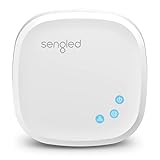
- Connect your Home: The brains of the Sengled system, the hub enables you to control up to 64 Sengled Smart lights and accessories with the hub. A hub is necessary to use a voice assistant, like Alexa, Google Assistant and HomeKit
- Easy to Install: Connect the Sengled Smart Hub to your router using the included Ethernet cable and use the in-app guide to set up
- Home Automation: Easily extend your smart home system across every room by connecting Sengled Smart LEDs and accessories to the hub, then automate
- Voice control: Connect the hub to Alexa, Google Assistant or HomeKit-enabled devices and use your voice to control your Sengled Smart LEDs and accessories
- One simple app: Control all your Sengled smart devices using the Sengled Home app (iOS/Android. ) Set schedules, group devices and more to control all of your home's Sengled smart products
Locks, doorbells, cameras, and occupancy sensors
Aqara security range
Apple’s catalog includes the Aqara Smart Lock U400, Aqara G410 Doorbell Camera Hub, Aqara G100 Indoor Camera, Aqara G5 Pro Outdoor Camera Hub, and Aqara Presence Multi-Sensor FP300. This breadth is useful if you want one security vendor across entry, video, and occupancy.
Do not treat the product family as one uniform integration. Check whether the specific model needs an Aqara hub, which controls and sensor events are exposed to Apple Home, whether recording is local or cloud-based, and whether the model is sold in your country. Outdoor cameras also require a suitable weather rating, power route, and mounting position.
Apple Home Key and Matter locks
Yale Assure Lock 2 Plus is the Apple Home Key-oriented option in this list. Home Key can make an iPhone or Apple Watch a convenient credential, but the door must physically accept the lock and its cylinder or deadbolt format. Confirm whether your door is single-cylinder, double-cylinder, or another configuration, and understand how mechanical keys, batteries, and emergency power work.
Level Lock Pro with Matter is the alternative for buyers who want a Matter-based lock. Verify the model’s Matter transport, hub requirement for remote operation, and offline behavior. For either lock, test calibration, create a guest access plan, and decide what should happen when the battery is low or the network is unavailable.
Apple-focused cameras
Logitech Circle View and Eve cameras are listed in Apple’s catalog. When comparing them with Aqara cameras, prioritize the features that affect ongoing ownership: local recording, subscription terms, HomeKit Secure Video support, retention period, field of view, night vision, microphone controls, and indoor or outdoor rating.
Apple Home camera features can depend on the home hub and an eligible iCloud plan. Verify the current requirements for the exact camera and your Apple account before assuming that continuous recording or activity history is included.
Rank #4

- Multi-Protocol Smart Hub with Matter Bridge – The M100 is a versatile smart hub compatible with Thread devices and Aqara Zigbee (** Not third-party Zigbee devices), supporting up to 20 Aqara Zigbee devices and 20 Thread devices. As a Matter Bridge, it connects Aqara Zigbee products to other smart home ecosystems, compatible with Apple Home, Amazon Alexa, Home Assistant, etc. Note: Use a 5V⎓0.5A power adapter (not included) and keep the product continuously powered during use.
- Advanced Matter Bridging for Seamless Smart Home Integration – The M100 enables Aqara’s unique features, such as facial recognition and complex automation, to work across Home Assistant and other Matter ecosystems. Expand your smart home with Aqara or third-party Matter devices (requires a Matter-enabled hub). Currently supports lights, thermostats, plugs, switches, buttons, and various sensors (motion, light, door/window, temperature/humidity), with more devices to be added in the future.
- Local Automation for Reliable Performance – Supports local execution of automations for Zigbee and Matter devices, ensuring smooth operation even without Wi-Fi or cloud access. Enjoy millisecond-level response times for a more stable and reliable smart home experience. (Some automation, such as cloud push notification, will still require the cloud connection to be executed.)
- Flexible Power & Small Size – Features a universal USB-A port for power and data, allowing connection to power banks, wall outlets, PCs, or routers for a simple and quick setup. The Hub M100's shaft can be adjusted within a 210-degree range, making its placement extremely flexible.
- 2.4GHz Wi-Fi 6 for Faster & Security—This product supports a 2.4GHz Wi-Fi 6 wireless network connection, which enables more efficient connections with advanced WPA3 security. Wi-Fi 6 ensures smoother performance even in high-traffic environments, allowing multiple devices to connect without compromising speed or reliability. Note: To ensure a stable connection, place the Hub M100 between 6 to 19 feet from the router.
Privacy and local-control decisions
- Prefer direct Matter or Thread when simplicity matters. A direct accessory-to-Apple Home path can remove a vendor bridge and reduce the number of accounts involved.
- Accept a bridge when the ecosystem is the advantage. Hue’s bridge supports a broad lighting range; Aqara’s hub may be the practical route to its security devices.
- Separate control from cloud extras. Basic switching or sensing may work locally while remote history, notifications, voice processing, or video storage use online services.
- Review permissions. Shared household members, guest lock credentials, camera viewers, and automations should be assigned deliberately.
- Plan for outages. Test what still works without internet, without the vendor cloud, and with a depleted battery. A physical switch, key, or reset procedure should remain available.
Step-by-step setup sequence
- Inventory the home. Note Wi-Fi coverage, electrical standards, door dimensions, HVAC terminals, camera mounting points, and the rooms where Thread devices will be installed.
- Choose the hub. Add HomePod mini or a supported Apple TV in the Home app. Confirm that it appears as a home hub before buying Thread Matter accessories.
- Verify every model number. Look for the Works with Apple Home or Matter marking and distinguish regional, generation, and bundle variations.
- Install bridges first. If using Hue or Aqara, connect and update the required bridge or hub before pairing its accessories to Apple Home.
- Pair close to the hub. For Matter or Thread devices, follow the manufacturer’s QR-code or setup-code flow while the accessory is powered and within reliable range.
- Assign rooms and names. Use names Siri can distinguish, such as “Desk lamp” and “Hallway lamp,” rather than repeating identical labels.
- Update firmware. Apply accessory, bridge, and hub updates before building automations. Matter feature exposure can change with firmware.
- Build one automation at a time. Test a simple scene manually, then add schedules, occupancy triggers, or arrival conditions.
- Test remote control. Leave home with the iPhone and confirm that locks, lights, thermostat, and camera access behave as expected.
- Document recovery. Keep setup codes, reset instructions, mechanical keys, HVAC wiring photos, and battery types in a secure place.
Common problems and fixes
The Matter accessory will not pair
- Confirm that the exact product is Matter-certified and that its firmware is current.
- Check whether it uses Thread and, if so, whether a Thread-enabled home hub is present.
- Move the accessory near the hub during commissioning, then return it to its intended location.
- Remove an incomplete pairing from the vendor app or Home app before trying the setup code again.
The device works at home but not remotely
Remote control requires a functioning home hub and a stable network path. Check the hub’s status in the Home app, confirm that the accessory is not bridge-dependent, and verify that the Apple account has permission to control the home.
Thread devices are unreliable in one room
Thread is a mesh, so placement matters. Keep powered Thread accessories distributed rather than grouping every device at one edge of the home. Avoid placing the hub inside a metal cabinet or behind dense equipment, and allow time for the mesh to settle after adding powered routers.
A lock, thermostat, or camera is “compatible” but missing features
Compatibility does not mean feature parity. Apple Home may expose basic lock, temperature, or video controls while advanced vendor functions remain in the manufacturer app. Check the exact model’s Apple Home feature list, firmware, hub path, and regional edition.
How to budget an Apple Home system
The total cost is more than the first accessory. Include the home hub, any vendor bridge, replacement batteries, electrical or HVAC installation, mounting hardware, and possible cloud-storage or advanced-recording plans. The supplied product information does not establish universal prices, and stock and regional listings change, so compare current local pricing for the exact model rather than relying on a bundle price from another country.
For a low-complexity start, one HomePod mini, a few Nanoleaf Matter bulbs, and an Eve Energy plug demonstrate lighting, scenes, Thread, and energy monitoring without committing to a large ecosystem. A multi-room Hue installation costs more in hardware because of the bridge and specialized fixtures but can be easier to expand consistently. Security projects often have the highest installation complexity because locks, HVAC, doorbells, and outdoor cameras must fit the physical home.
What’s actually slowing this PC down?
Pick the symptom - the matching free tool is one click away.
Final recommendation
Choose HomePod mini as the Apple Home foundation unless you already own a compatible Apple TV. Use Nanoleaf Essentials Matter bulbs and Eve Energy for direct, Thread-based expansion; choose Philips Hue when a bridge-based, multi-room lighting system is the priority. Select ecobee Premium only after confirming HVAC wiring. For security, compare Aqara’s model-specific hub and feature requirements with Yale Home Key, Level Matter, Logitech Circle View, and Eve cameras based on physical fit, local operation, recording, and guest access—not the logo on the box. Finally, verify the exact model, firmware, hub, electrical or mechanical requirements, and regional availability before ordering.
Quick Recap
Product prices and availability are accurate as of the date/time indicated and are subject to change. Any price and availability information displayed on Amazon at the time of purchase will apply.

