Best overall setup: pair Samsung’s Slim Magnet Case with the Qi2 25W Wireless Magnet Charger for a low-bulk desk setup, add the 60W Power Adapter when you need the fastest listed wired charging, and choose Samsung’s anti-reflecting film or a tempered-glass protector according to whether glare reduction or impact resistance matters more.
The Galaxy S26 Ultra already includes its S Pen, so accessories should solve a specific problem: protection, charging speed, screen visibility, portability or grip. This guide explains the trade-offs and gives a practical buying path without assuming that one case or protector suits everyone.
As an Amazon Associate I earn from qualifying purchases.
Quick recommendations by need
| Need | Best-fit accessory | Why it fits | Important qualification |
|---|---|---|---|
| Lowest bulk with magnetic accessories | Samsung Slim Magnet Case | Designed for a thin profile while supporting magnetic accessories | Samsung lists up to 25W wireless charging for its magnet-case range; actual charging depends on the phone, charger and conditions. |
| Maximum protection in Samsung’s lineup | Samsung Rugged Magnet Case | Prioritizes shock absorption over the thinnest profile | Expect more bulk than a slim or clear case. |
| Showing the phone’s finish | Samsung Clear Magnet Case | Transparent construction with magnetic-accessory support | Clear materials can show fingerprints and may change appearance over time. |
| Fastest listed wired charging | Samsung 60W Power Adapter | Highest output among Samsung’s listed S26 Ultra adapters | The phone determines how much power it actually accepts; a higher-rated adapter does not force a higher rate. |
| Desk charging with magnetic alignment | Samsung Qi2 25W Wireless Magnet Charger | Magnetic placement and the highest wireless output listed by Samsung | Use a compatible magnetic case or an unobstructed phone back for reliable alignment. |
| Portable top-ups | Samsung Qi2 15W Battery Pack | Combines 15W wireless charging with 25W wired charging | Wireless and wired modes have different maximums; capacity and runtime are not stated in the supplied specifications. |
| Least glare and preserved ultrasonic-fingerprint use | Samsung anti-reflecting film | Manufacturer-matched film intended to reduce glare, fingerprints and scratches | Film generally offers less impact protection than tempered glass. |
| Glass impact protection | Spigen AluminaCore Glas.tR EZ Fit | Named by Android Central as its overall screen-protector pick | This is an editorial comparison, not an independent durability test in the available material. |
Prices, stock and regional compatibility were not established in the available specifications, so check the seller’s current listing before ordering.
How to choose a Galaxy S26 Ultra case
Start with the protection-to-bulk decision
A case cannot be both the thinnest possible shell and the most protective option in every drop scenario. Decide what you are protecting against: scratches and everyday scuffs, occasional desk-height drops, or repeated exposure to rough environments.
#1 Best Overall

- PRECISION FIT - for Samsung Galaxy S26 Ultra and engineered for a snug, form‑fitting profile.
- RUGGED MULTI‑LAYER IMPACT SHIELD - Dual‑layer protection combines a rigid shell with a rubber interior for 3X military‑standard durability for Samsung Galaxy.
- SECURE GRIP PROTECTION – The trusted Commuter Series for Samsung Galaxy features rubber‑grip edges that provide a confident hold, while the slim design delivers trusted OtterBox durability and protection for Samsung Galaxy.
- MAGNETIC FAST CHARGE – Built‑in magnets align perfectly for reliable Fast Charge performance, keeping your Samsung Galaxy powered at all times, with ease.
- TRUSTED OTTERBOX QUALITY – As America’s most trusted phone case brand, OtterBox pioneered military‑grade phone case protection and continues to raise the bar. With OtterBox every design is built for real‑world reliability and everyday readiness.
- Slim: choose Samsung’s Slim Magnet Case when preserving the phone’s feel and pocketability matters most.
- Rugged: choose Samsung’s Rugged Magnet Case when shock absorption and a more substantial grip outweigh added thickness.
- Clear: choose Samsung’s Clear Magnet Case when you want the handset’s design visible while retaining magnetic-accessory support.
- Silicone: Samsung also lists a Silicone Case for a softer hand feel and everyday scratch protection.
Independent comparisons from Android Central identify Pitaka’s thin magnetic case and Thinborne’s aramid-fiber case as alternatives for buyers focused on thinness and scratch resistance. Those descriptions are comparison findings, not a quantified drop-test rating. If a listing claims a specific protection standard, verify that the claim applies to the exact S26 Ultra model and case variant.
Check magnetic and Qi2 compatibility before buying
Samsung’s official magnet cases are designed to work with magnetic accessories and are listed for up to 25W wireless charging. A generic magnetic ring or a case made for another phone may hold an accessory but still interfere with coil alignment, camera clearance or the S Pen’s operation. Look for an explicit S26 Ultra fit and a stated Qi2 or magnetic-attachment design.
Magnetic attachment and wireless power are separate questions. A case can hold a wallet or stand yet charge inefficiently if the coils are not aligned. Conversely, a case can support wireless charging without providing a strong magnetic mount. Test the case with the exact charger and accessory combination you intend to use.
Do these 3 things before closing this tab:
1Repair Windows errors before they cause bigger problems2Scan for outdated or missing drivers - takes under a minute3Clear out junk files and repair common Windows errorsUnderstand what a case can and cannot protect
Cases primarily protect the rear glass, frame and corners. They do not prevent every display crack, and a raised edge can be defeated when the phone lands on a protruding object. A screen protector, careful handling and a grip accessory address different risks. Camera-lens covers can affect image quality and are not part of Samsung’s listed case lineup, so treat them as a separate compatibility decision.
Rank #2
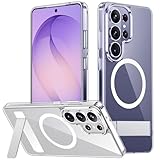
- [Compatibility] SPIDERCASE designed for Samsung Galaxy S26 Ultra 6.9-inch, does Not fit for Galaxy S26/S26 Plus please check your phone model before buying. Precise hole cutting and sensitive buttons ensures easier access to every button and function.
- [Invisible Stand] The stand of the Samsung Galaxy S26 ultra case is foldable, sturdy and built to last, with built-in handy stand made by light and solid Aerospace-grade aluminum offering a sturdy and flexible portrait, landscape or conference call mode experience. It allows you to get a more comfortable viewing angle. Reduce the frequency of looking down at the phone screen to avoid hurting your back and neck.
- [Magnetic] This s26 ultra case is With a built-in magnetic ring that aligns perfectly with magnetic chargers, this case offers a stronger attachment and faster charging speed. Compatible with all magnetic accessories and wireless chargers (such as car wireless charger, wireless power banks, magnetic wallets, etc).
- [Shockproof]Passed Military Drop Tested up to 12FT, it has a tough PC brushed back and soft flexible rubber bumpers that provide strong cushioning for everyday drops. Built-in 360°all-around powerful impact-dispersing airbag and 4-corner impact-resistant corner technology. The tiny design of 1.5 mm lips over the camera and 1.5 mm bezels over the screen prevent the screen and camera from dust and scratches.
- [Slim Design] This slim Samsung Galaxy S26 ultra case brings you greater portability and firmer grip, easy to stay clean, anti-fingerprint and brings the exceptional silky touch feeling, with no bulk and no skidding to fit in pocket easily.
Samsung’s case lineup compared
| Case | Primary design goal | Magnetic accessories | Wireless charging statement | Trade-off |
|---|---|---|---|---|
| Silicone Case | Soft-touch everyday coverage | Not stated for the standard silicone model | Not stated for the standard silicone model | Less information is provided about magnetic use than for the magnet models. |
| Slim Magnet Case | Low bulk | Supported | Up to 25W, according to Samsung’s listing for magnet cases | Less material is available for impact absorption than in a rugged design. |
| Rugged Magnet Case | Shock absorption | Supported | Up to 25W, according to Samsung’s listing for magnet cases | More thickness and weight are the expected cost of protection. |
| Clear Magnet Case | Visible phone finish | Supported | Up to 25W, according to Samsung’s listing for magnet cases | Transparency tends to reveal fingerprints and wear. |
Samsung’s listing does not establish prices, drop-test ratings, dimensions or weights for these models in the supplied material. Do not infer those values from the product names.
Chargers: wired speed, Qi2 convenience and travel power
Choose the 60W adapter for the fastest listed wired option
Samsung lists a 60W Power Adapter and a 45W adapter for the S26 Ultra. The 60W unit is the highest-output wired option in that lineup. That does not mean the phone will continuously draw 60W: charging is negotiated between the handset, adapter, cable and battery-management system, and the phone may reduce power as the battery fills or temperatures rise.
Use the 60W adapter when you also charge other USB-C devices, want headroom for accessories, or simply want Samsung’s highest-rated option. The 45W model is a rational choice when it is more convenient or less expensive in your region and you do not need the extra output for another device. The supplied specifications do not establish a measured time-to-full difference between the two adapters.
Use the Qi2 25W Wireless Magnet Charger at a desk
Samsung’s Qi2 25W Wireless Magnet Charger is the desk-oriented choice. Magnetic alignment makes it easier to place the phone consistently than a flat charging pad, especially when the phone is in a compatible magnet case. Wireless charging creates more heat than a cable in many situations, so leave ventilation around the charger and avoid covering the phone with insulating material while charging.
Rank #3
![Spigen for Galaxy S26 Ultra Case, Tough Armor MagFit [Kickstand] [Compatible with MagSafe] [Military-Grade Protection] - Black](https://m.media-amazon.com/images/I/41rIp2SylSL._SL160_.jpg)
- Hybrid PC and TPU structure with Air Cushion Technology to achieve a slim but durable design
- Raised edges for screen and camera protection Military-grade via Extreme Protection Tech
- All-new revamped design with built-in kickstand for hands-free viewing
- Compatible with Magsafe accessories and fast wireless charging
- Spigen Tough Armor MagFit Compatible with Samsung Galaxy S26 Ultra
For reliable results, place the phone so the magnetic connection is fully seated, remove cards or metal objects from between the phone and charger, and confirm that the charging indicator appears. If charging starts and stops, test without the case; if the problem disappears, the case or an accessory is misaligning the coils.
Take the Qi2 15W Battery Pack on the road
Samsung’s Qi2 15W Battery Pack supports 15W wireless charging and 25W wired charging. The two figures describe different modes: wireless attachment is more convenient, while a USB-C cable can deliver the pack’s higher listed output. Use wireless charging while walking or when the port must remain accessible; use the cable when you need the quickest top-up available from the pack.
The supplied specifications do not state the pack’s battery capacity, dimensions, weight or number of recharges. Check those details in the regional listing if they determine whether it fits your travel kit.
Quick wins for a faster PC:
Scan for outdated or missing drivers - takes under a minuteDriver Scan →Repair Windows errors before they cause bigger problemsFix Now →Fix the driver behind crashes, sound loss and screen glitchesFind Drivers →Wired versus wireless: a practical choice
| Situation | Prefer | Reason | What to verify |
|---|---|---|---|
| Fastest routine charging | 60W wired adapter | Highest output listed by Samsung | Use a suitable USB-C cable and a compatible power source. |
| Bedside or desk use | Qi2 25W Wireless Magnet Charger | Easy magnetic placement without plugging in repeatedly | Case magnet alignment and adequate ventilation. |
| Charging while mobile | Qi2 15W Battery Pack | Wireless attachment keeps the phone usable | Pack capacity, weight and case compatibility. |
| Charging another USB-C device | 60W adapter or battery-pack cable mode | More output headroom than the battery pack’s wireless mode | Port availability and the cable’s rating. |
Screen protection: anti-reflecting film or tempered glass?
Samsung anti-reflecting film
Samsung’s anti-reflecting screen film is designed to reduce glare, fingerprints and scratches while preserving ultrasonic-fingerprint recognition. It is the manufacturer-matched option for readers who often use the S26 Ultra under bright lights, near windows or outdoors and who value the original display texture.
Rank #4

- Compatibility & Secure Grip: This clear case is only designed for Galaxy S26 Ultra 6.9 inch. Precise cut and design allow easy access to all ports, buttons, cameras, sensors, and other features. The clear case can totally achieve a great grip feeling
- Strong Magnetic Attraction: Compatible for magnetic chargers and other Qi Wireless chargers without signal influence. The Samsung Galaxy S26 Ultra magnetic case has built-in 38 super N52 magnets. Its magnetic attraction reaches 2400 gf
- Crystal Clear & Never Yellow: Using high-grade material ultra-clear TPU and PC material, allowing you to admire the original sublime beauty for S26 Ultra while won't get oily when used. The Nano antioxidant layer effectively resists stains and sweat
- 10FT Military Grade Protection: Passed Military Drop Tested up to 10 FT. This S26 Ultra clear case backplane is made with rigid polycarbonate and flexible shockproof TPU bumpers around the edge and features 4 built-in corner Airbags to absorb impact
- Raised Camera & Screen Protection: The tiny design of 2.5 mm lips over the camera, 1.5 mm bezels over the screen, and 0.5 mm raised corner lips on the back provides extra and comprehensive protection, even if the phone is dropped, can minimize and reduce scratches and bumps on the phone. Molded strictly to the original phone, all ports, lenses, and side button openings have been measured and calibrated countless times, and each button is sensitive and easily accessible.
Film is thin and usually maintains touch sensitivity well, but it is not equivalent to a thick glass layer when the phone lands on a sharp object. Choose it when optical clarity, low reflections and fingerprint behavior are more important than maximum impact protection.
Tempered-glass alternatives
Android Central’s comparison names several alternatives with different priorities. Spigen AluminaCore Glas.tR EZ Fit is the overall pick; ESR Accessory Glass is presented as a multipack; Ringke Easy Slide emphasizes installation; ZAGG Glass XTR5 adds anti-reflective and blue-light features; and ArmorSuit MilitaryShield Matte targets a paper-like matte finish. These are editorial comparisons, and the available material does not provide laboratory breakage rates or independent fingerprint measurements.
| Protector | Distinguishing feature in the comparison | Best for | Trade-off to consider |
|---|---|---|---|
| Samsung anti-reflecting film | Glare, fingerprint and scratch reduction with ultrasonic-fingerprint compatibility | Bright environments and a film-like feel | Less impact protection than tempered glass |
| Spigen AluminaCore Glas.tR EZ Fit | Overall pick | Buyers wanting a conventional glass protector with a guided installation approach | Glass can add edge thickness and reflections compared with film. |
| ESR Accessory Glass | Multipack | Keeping a replacement available | Bundle size and regional contents should be confirmed. |
| Ringke Easy Slide | Installation-focused design | First-time installers | Verify the supplied alignment hardware and S26 Ultra fit. |
| ZAGG Glass XTR5 | Anti-reflective and blue-light features | Readers prioritizing those features in a glass protector | Feature performance and included accessories vary by listing. |
| ArmorSuit MilitaryShield Matte | Paper-like matte texture | Writing and reduced-gloss use | Matte surfaces can soften perceived sharpness compared with clear protectors. |
How to preserve ultrasonic-fingerprint performance
- Enroll fingerprints after installing the protector rather than relying only on registrations made on bare glass.
- Clean the display and your fingertip; oil, dust and bubbles can cause failures that look like sensor incompatibility.
- Press firmly in the fingerprint area during enrollment and unlock attempts.
- If recognition remains unreliable, remove any misaligned or damaged protector and test the bare screen before replacing it.
Samsung specifically states that its film is designed to preserve ultrasonic-fingerprint recognition. For third-party glass, confirm that the seller explicitly supports the S26 Ultra’s ultrasonic sensor instead of assuming every protector will behave the same way.
Do you need a screen protector?
The S26 Ultra can be used without one if you accept cosmetic scratches and handle it carefully. A protector is sensible when the phone shares a pocket with keys, is used on work sites, travels frequently or will be resold in excellent cosmetic condition. Select film for glare control and low visual change; select glass for a sacrificial layer against sharper impacts; select matte material when writing texture matters more than maximum clarity.
Best Value

- PRECISION FIT - for Samsung Galaxy S26 Ultra and engineered for a snug, form‑fitting profile.
- 7X MILITARY‑STANDARD DEFENSE – Tested to withstand 7X as many drops as MIL‑STD‑810G 516.6 for top‑tier Samsung Galaxy durability.
- SLIM & TOUGH - The perfect balance of a slim profile that comfortably fits in your pocket, coupled with the strength of OtterBox. Made with 50% recycled plastic, this case stands for both eco-conscious durability and uncompromised toughness.
- MAGNETIC FAST CHARGE – Built‑in magnets align perfectly for reliable Fast Charge performance, keeping your Samsung Galaxy powered at all times, with ease.
- TRUSTED OTTERBOX QUALITY – As America’s most trusted phone case brand, OtterBox pioneered military‑grade phone case protection and continues to raise the bar. With OtterBox every design is built for real‑world reliability and everyday readiness.
Neither type makes the display unbreakable. A case with a raised front edge and a protector address different parts of a drop, so using both provides broader coverage than relying on either alone.
The S Pen and accessories you can skip
The S Pen is included and pre-installed in the designated slot of the Galaxy S26 Ultra, according to Samsung’s official statement. A replacement stylus is therefore optional rather than a required purchase.
Samsung documents 4,096 pressure levels and IP68 water resistance for the S Pen. Bluetooth Low Energy and Air Actions are unavailable, so do not buy a stylus or accessory on the assumption that remote gesture controls will work. The practical accessories are a case that leaves the stylus slot accessible and a storage or carrying solution if you regularly remove the pen.
When evaluating a replacement, check that its tip, dimensions and writing behavior are specified for the S26 Ultra. Generic capacitive pens may operate as touch tools but do not necessarily reproduce S Pen pressure sensitivity or fit the internal slot.
Accessory setups for common routines
Desk and office
- Install a compatible Samsung magnet case or another case that explicitly supports Qi2 alignment.
- Place the Qi2 25W Wireless Magnet Charger where the cable will not pull the phone sideways.
- Keep the 60W adapter available for occasions when wireless heat or speed is a concern.
- Use the anti-reflecting film if overhead lighting makes the display difficult to read.
Travel and commuting
- Use the case style that matches your risk: slim for pockets and bags, rugged for outdoor work.
- Carry the Qi2 15W Battery Pack for cable-free top-ups.
- Pack a USB-C cable so the battery pack can use its higher wired output when time matters.
- Keep the S Pen in its designated slot and avoid placing metal cards between the phone and magnetic charger.
Outdoor or high-risk environments
- Choose the Rugged Magnet Case rather than the thinnest shell.
- Use tempered glass if impact protection is more important than glare reduction.
- Inspect the protector and case edges regularly; a lifted corner can admit dust and reduce protection.
- Use wired charging when the phone is enclosed in a hot vehicle or exposed to direct sun, because reducing additional wireless heat is prudent.
Installation and first-use checklist
For film or glass
- Work in a clean, low-dust room and wash and dry your hands.
- Remove the case before installation so its edge does not push the protector upward.
- Clean the display with the supplied wipe, then remove lint with the dust-removal sticker.
- Align the protector with the speaker, corners and display edges before exposing the adhesive.
- Apply from one edge and push bubbles outward with the supplied tool or a soft card.
- Wait for adhesive bubbles to settle only if the manufacturer allows it; do not press hard enough to damage the panel.
- Reinstall the case and check that no edge lifts.
- Enroll fingerprints again and test touch, S Pen writing and the front camera.
For a magnetic case and charger
- Confirm the case is labeled for the Galaxy S26 Ultra, not a similarly sized model.
- Attach the phone to the charger without cards, rings or metal plates between the coils.
- Check that the magnetic hold is centered and that charging begins.
- Move the phone slightly; if charging stops at certain positions, the case or accessory may not align correctly.
- Test the same setup with the case removed to isolate a case-related issue.
Common problems and fixes
Wireless charging starts and stops
- Remove wallets, cards and metal objects from the back of the phone.
- Re-seat the phone so the magnetic connection is centered.
- Test without the case, then with only the case and no other accessory.
- Try a different cable or power source for the charger.
- If the charger remains unstable while bare, use wired charging and contact the seller or manufacturer.
The phone feels too hot on a wireless charger
- Move it out of direct sunlight and remove insulating material from the back.
- Stop demanding tasks such as gaming or navigation while charging.
- Use a wired adapter when you need speed with less wireless heat.
- Do not continue if the phone displays a temperature warning.
Fingerprint unlock became unreliable
- Clean the display and fingertip.
- Re-register fingerprints after the protector is installed.
- Check for bubbles, dust or a misaligned fingerprint cutout.
- Test without the protector to distinguish installation trouble from a sensor or software issue.
The case interferes with the S Pen
- Remove magnetic wallets, rings or other attachments and test the pen near the display.
- Confirm that the case is intended for the S26 Ultra and leaves the pen slot unobstructed.
- If writing works with the case removed but not installed, replace the case rather than the stylus.
What to verify before ordering
- Exact model: the listing must name the Galaxy S26 Ultra, not another Galaxy S26 variant.
- Magnetic standard: look for explicit magnetic or Qi2 support if you plan to use a mount, wallet or charger.
- Charging mode: distinguish wired output from wireless output; the figures are not interchangeable.
- Protector fit: verify ultrasonic-fingerprint compatibility and case-friendly dimensions.
- Package contents: confirm whether an adapter, cable, alignment tray, cleaning kit or replacement protector is included.
- Warranty and replacement: check the current regional policy, especially for multipacks and installation failures.
- Regional listing: prices, stock, plug type and availability can vary by country and change over time.
For most owners, the balanced purchase is a magnetic case matched to the chosen charger, one screen protector selected for the environment, and a wired adapter sized to actual charging needs. Add the battery pack only if portable power is a regular requirement, and skip a replacement S Pen unless the included one is lost or damaged.
Quick Recap
Product prices and availability are accurate as of the date/time indicated and are subject to change. Any price and availability information displayed on Amazon at the time of purchase will apply.

