Windows Errors? Fix Them Before They Spread
Repair common Windows errors and clear accumulated junk for a smoother, more stable PC - no reinstall needed.Free scan · no reinstallCrashes, No Sound, or Screen Glitches?
Random freezes, missing sound and display glitches usually trace back to one bad driver. Find and replace yours safely.Free scan · under a minuteThe best compact multiport USB-C charger is the one that still gives your laptop enough power after your phone is plugged in. On the documented specifications available for current models, Belkin’s BoostCharge Pro 3-Port 70W is the clearest choice when you need a published two-device power split; UGREEN’s Nexode Pro 100W 3-Port is the stronger option for a higher-demand laptop or several devices; and the Nexode Pro 65W 3-Port is the smaller, lower-output alternative. Anker also has current 67W, 70W and 100W three-port families, but an exact model must be checked before comparing it.
These are a specification-based shortlist, not a laboratory ranking. No physical head-to-head test established a single winner, so use the allocation tables and compatibility checks below rather than choosing by the largest number on a box.
As an Amazon Associate I earn from qualifying purchases.
Quick picks
| Charger | Ports | Documented headline output | Published size | Best fit | Important qualification |
|---|---|---|---|---|---|
| Belkin BoostCharge Pro 3-Port GaN Wall Charger 70W | 2 USB-C, 1 USB-A | Up to 70W from one USB-C; 45W + 25W from two USB-C; 45W + 22.5W from USB-C + USB-A | 42 × 38 × 54 mm | People who want a clearly documented laptop-and-phone split | Belkin says three-port use is up to 69W combined; foldable pins, cable and pouch depend on the SKU |
| UGREEN Nexode Pro 65W 3-Port GaN Mini Fast Charger | 2 USB-C, 1 USB-A | 65W total | 5.3 × 4.0 × 3.2 cm | A compact everyday laptop-and-phone kit | The retrieved comparison table does not state the exact output split when multiple ports are used |
| UGREEN Nexode Pro 100W 3-Port GaN Mini Fast Charger | 2 USB-C, 1 USB-A | 100W total | 71 × 43 × 33 mm | More demanding laptops or several connected devices | Confirm the allocation for the exact regional configuration before buying |
| Anker current multiport charger family | Model-dependent; current collection includes three-port versions | 67W, 70W and 100W three-port families are listed | Not stated for the collection as a whole | Readers willing to select and verify a specific model | A collection page is not enough to establish port-by-port output, size or package contents |
“Best” therefore means best match for your laptop’s input requirement, your phone’s charging protocol and the number of devices you use—not necessarily the highest total wattage.
Recommended Free Tools
Why shared output matters more than the number on the front
A multiport charger has one power budget. Its headline wattage normally describes the maximum total or the maximum from one port under a particular configuration. Connecting a second device can change the first port’s output, sometimes substantially.
#1 Best Overall

- 【8 in 1 USB C Charging Station】100W x 2 USB C and 30Wx3 USB C+30Wx3 USB A (380W Total), Equipped with 4 USB-C cables, includes a 100W Braided Charging Cable.The fast charger type c charger power supply has an input voltage of 100-240 volts, when you connect 8 devices, the power will be distributed the ports to ensure you get the best charger.
- 【Fast Charging GaN Charger】Ediliow USB C Charger adapted GaN III generation chip technology. Built-in multi-protection system and premium microchips, reduces the size and weight of the usb c charger block and With higher energy efficiency, upgraded heat dissipation, Gallium Nitride (GaN) makes our chargers smaller and safer, greatly increase the charging efficiency.
- 【Upgraded 100W Laptops Charger】Ediliow usb charging station has 2*100w fast charger ports to charge 2 or more laptops at the sametime.the usb-c power adapter compatible with MacBook Pro/Air, Microsoft Surface, Dell XPS, Samsung Galaxy, iPad Pro, Steam Deck, iPhone, Google Pixel, covering a whole family needs and save money&space.
- 【Charging Station Universal Compatibility】USB-C port and USB-A port charger block for iPhone17/16/15/14/13/12/11/X/Pro Max /Mini Plus/ XS Max/ XS/ X/ XR/ 8 Plus/ 8, iPad Pro Air Mini, AirPods Pro, Samsung Galaxy S23/S23+/S23 Ultra/ S22/ S22+/ S22 Ultra/ S21/S21+/S21 Ultra/ S21+ 5G, S20/ S20 Ultra/ S20+/ S20 FE, Note 10/ Note 10 5G, Note 20/ 20 Ultra 5G/ S10 5G, Galaxy Z Fold 3 5g, A90 5G, A80, A70, Book S, Tab S7/S7+/S8/S8+/S8 Ultra, and switch, speaker, lamp, etc.
- 【Compact and Portable】 Package includes: 1* 8-in-1 charging block, 1*3.3ft 100W USB C Braided cable ,2*3.3 ft USB C to C cable,1*6.6ft USB C to C cable, 1* 5ft power cord, 1*User Manual.This 8-in-1 charging station will reduce your accessories burden and help you create an organized and clean desktop. Perfectly for home, office, travel.
Belkin’s published example
Belkin documents the 70W model’s allocations explicitly:
- One USB-C port: up to 70W.
- Two USB-C ports: 45W from one USB-C port plus 25W from the other.
- USB-C plus USB-A: 45W from USB-C plus 22.5W from USB-A.
Belkin also describes three-port operation as up to 69W combined. That is not three simultaneous maximums. If your laptop is connected to the 45W port while your phone uses the second port, the laptop will not receive the single-port 70W rate.
How to read a competing specification
For any charger, find four separate figures: the single-port maximum, the two-port allocation, the three-port allocation and the identity of the preferred laptop port. If a listing gives only “100W total,” it has not answered the question that matters during simultaneous use. Treat an unstated split as unknown rather than assuming the first USB-C port keeps the full rating.
What each shortlisted charger actually offers
Belkin BoostCharge Pro 3-Port GaN Wall Charger 70W
This is the easiest model to evaluate because its manufacturer publishes practical combinations rather than only a total. It has two USB-C ports and one USB-A port, supports USB Power Delivery 3.1 and PPS, and measures 42 × 38 × 54 mm. The single-port USB-C ceiling is 70W, while the documented two-device figures are 45W + 25W over USB-C and 45W + 22.5W over USB-C and USB-A.
Choose it when your laptop can operate satisfactorily at 45W while the phone charges, or when you value a known allocation more than maximum headroom. It is also useful when you still own USB-A accessories. Check the exact regional SKU: Belkin says foldable pins and an included cable or pouch apply only to select versions, and plug shape differs by market.
UGREEN Nexode Pro 65W 3-Port GaN Mini Fast Charger
The 65W model is listed with two USB-C ports, one USB-A port and dimensions of 5.3 × 4.0 × 3.2 cm (53 × 40 × 32 mm). That makes it the smaller-output member of this comparison and a sensible size-first candidate for a lightweight laptop, phone and accessory kit.
Rank #2

- Fast Charging for Four Devices: Enjoy the convenience of powering four devices simultaneously with our advanced GaN technology for optimal performance.Dimensions: 2.72 × 2.72 × 1.42 in; Weight: 9.7 oz.
- Dual High-Speed USB-C Ports: Rapidly charge your 15-inch MacBook Air to 50% in just 30 minutes with either of the two USB-C ports, each offering a maximum output of 140W.
- Superior Safety: The advanced Activeshield 4.0 system monitors device temperatures over 10 Million times a day for enhanced safety.
- Monitor with Ease and Clarity: The high-definition color display provides a detailed view of the charging status, temperature, and port details, keeping you fully informed.
- What You Get: Anker Charger (140W, 4-Port, PD 3.1, Non-battery), 5 ft 240W USB-C to USB-C cable, user manual, 18-month warranty, and our friendly customer service.
The available comparison table establishes the 65W total but does not provide the exact multiport allocation. Before purchase, locate the model-specific output chart and confirm what the laptop’s USB-C port receives when the phone is connected. Do not infer that the first USB-C port gets 65W in every combination.
UGREEN Nexode Pro 100W 3-Port GaN Mini Fast Charger
The 100W model has two USB-C ports and one USB-A port, a 100–240V input range at 50/60Hz, and a listed size of 71 × 43 × 33 mm. UGREEN lists USB Power Delivery 3.0 and PPS for both USB-C ports, along with additional charging protocols. Its larger power budget gives more margin for a laptop that needs a higher input or for a laptop-and-phone-plus-accessory load.
The 100W figure is total output. The page does not establish that every port can deliver its individual maximum simultaneously, so confirm the allocation table for the exact regional SKU. The cited dimensions and specifications come from UGREEN’s European storefront; North American and other regional versions should be checked separately for plug design, certification and packaging.
Anker’s current multiport family
Anker’s current collection lists 67W three-port, 70W three-port, 100W three-port, and 100W three-port models with a display, as well as higher-power products. This makes the family useful for comparison, but a collection page is not a complete specification sheet. Select an exact model number, then verify its port map, simultaneous-output table, dimensions, regional plug and included cable before treating it as an alternative to the documented Belkin or UGREEN models.
Collection prices are volatile and should be checked at the time of purchase. A displayed price alone does not establish better value because the cable bundle, output split and warranty package may differ.
Two compact chargers that are not multiport choices
UGREEN Nexode Air 65W
UGREEN describes the Nexode Air as a 65W GaN charger and publishes dimensions and compatibility claims, but the available evidence does not show it to be multiport. It can be a useful single-port size reference, not a solution for charging a laptop and phone at the same time.
Rank #3

- [One Charger. Less to Carry] Nearly 30% smaller than Apple’s 70W charger, it stays snug without blocking nearby outlets. Charge 3 devices at once; foldable prongs tuck away to prevent snags and scratches.
- [65W Laptop-Ready Power] Charge a 14" MacBook Pro to 52%, iPhone 17 Pro to 67%, or Galaxy S26 Ultra to 78% in 30 min. Ready for cameras, drones, handhelds, and more.
- [A Complete Pro Charging Kit] Includes a 5ft 100W nylon-braided USB-C cable built for everyday bends and pulls, with extra reach for desks, bedsides, hotels, and travel.
- [Smart Power, Port by Port] USB-C1 delivers 65W solo; C1+C2 gives 45W+20W, C1+A 45W+18W, C2+A shares up to 15W, and all 3 run at 45W + 15W shared.
- [Stable Power, Without the Guesswork] TempGuard checks heat 1,000×/sec to help reduce heat-related slowdowns and interruptions, limiting excess heat exposure for more battery-friendly charging.
Belkin BoostCharge Compact USB-C 30W
This model has one USB-C port, measures 32.8 × 32.6 × 35.5 mm, weighs 41.2g and supports PD 3.1 and PPS. Its bundle includes a 2m cable rated up to 60W. The very small body illustrates the size trade-off, but one port means it cannot charge a laptop and phone simultaneously.
Match the charger to your laptop and phone
1. Find the laptop’s required input
Read the laptop manufacturer’s charger label, technical documentation or USB-C charging specification. Record the required wattage and whether charging is supported through USB-C Power Delivery. A USB-C connector by itself does not prove that the laptop accepts charging, or that it will negotiate the maximum rate from a particular charger.
2. Calculate the connected-device case
Use the allocation for the exact combination you expect to use. For example, with Belkin’s 70W charger, laptop plus phone over the two USB-C ports means 45W + 25W, not 70W to the laptop and 25W to the phone. If that 45W laptop allocation is below the computer’s requirement, select a charger with a higher documented laptop allocation or use the laptop’s original adapter.
Do these 3 things before closing this tab:
1Fix the driver behind crashes, sound loss and screen glitches2Repair Windows errors before they cause bigger problems3Scan for outdated or missing drivers - takes under a minute3. Check the phone’s charging requirements
Confirm whether the phone benefits from USB PD or PPS and whether its fastest mode requires a proprietary protocol. Belkin lists PD 3.1 and PPS on the 70W charger; UGREEN lists PD 3.0 and PPS on both USB-C ports of the 100W model. Those protocol lists improve compatibility, but they do not guarantee maximum speed for every phone. The phone manufacturer’s input specification controls.
4. Choose the port deliberately
Put the laptop on the USB-C port identified as the primary or highest-output port in the model’s manual. Use the second USB-C port for the phone when the allocation is documented, and reserve USB-A for accessories unless its output is sufficient for your device. Recheck the table after plugging in a third device because the charger may adopt a different power profile.
Port-allocation scenarios to plan for
| Your load | What to verify | Why it matters |
|---|---|---|
| Laptop only | Single USB-C maximum and PD profile | This is where a charger’s headline laptop wattage usually applies |
| Laptop + phone on two USB-C ports | Exact USB-C + USB-C split | The laptop may receive much less than the single-port maximum |
| Laptop + phone using USB-C + USB-A | USB-C and USB-A split and USB-A protocol support | Belkin documents 45W + 22.5W in this arrangement; other models differ |
| Laptop + phone + earbuds, watch or other accessory | Three-port combined output and per-port floors | The total can be lower than the sum of the advertised port maxima |
| Phone or tablet only | PPS or the device maker’s required protocol | Port fit does not guarantee the device’s fastest charging mode |
Size, plug design and outlet fit
Compactness is not just a smaller measurement. Compare the charger’s three dimensions, the direction in which it projects from the wall, and whether its plug folds. Belkin’s 42 × 38 × 54 mm body and UGREEN’s 71 × 43 × 33 mm body have different proportions even though both are compact GaN designs. A longer body can block an adjacent outlet on a crowded power strip, while a wider body can interfere with a neighboring plug.
Rank #4
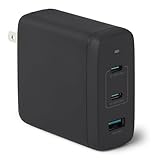
- FAST CHARGING: GaN USB-C wall charger (Nano 120-watt) in Black for charging devices. (Output in details: Single port max. output: Single USB A: 18W, Single USB C1/C2: 100W; Dual ports simultaneous use max. output: C1+C2: 60W+60W, C1/C2+A: 100W+12W, 3 ports simultaneous use max. output: C1+C2+A: 60W+45W+12W, C1 port is at the edge close to LED indicator and C2 port is in the middle.)
- 3 PORTS: 2 USB-C ports and 1 USB-A port for charging 3 devices at once; single USB-C port delivers up to 100 watts COMPATIBILITY: phones, tablets, USB-C laptops, including iPhone, Samsung, iPad/Ipad Pro, MacBook Air and more
- RELIABLE SAFETY: Protects connected devices from overcharge, over-voltage, overcurrent, and short circuit
- TRAVEL FRIENDLY: Small, ultra-compact size with foldable plug; supports universal input voltage of 100-240 volts
- WHAT'S IN THE BOX: Amazon Basics 120W Wall Charger Only. Charging cable sold seperately PRODUCT DIMENSIONS: 2.7 x 2.7 x 1.3 inches (LxWxH)
Regional plug versions are distinct SKUs. Confirm the plug type and electrical certification for your country rather than importing a visually similar listing. UGREEN’s 100W specification states 100–240V, 50/60Hz input, but that does not make every plug version interchangeable or automatically compliant with local requirements.
Cables and package contents
The charger is only one part of the power path. A USB-C cable must be rated for the power you intend to draw and must support the relevant USB PD negotiation. Check whether the chosen SKU includes a cable and its rating. Belkin’s 30W single-port bundle demonstrates why this matters: its included 2m cable is rated up to 60W, while the 70W multiport page says a cable and pouch are included only with select SKUs.
If no suitable cable is included, use a certified USB-C cable whose marked rating meets or exceeds the laptop’s requirement. A cable that physically fits may still limit charging or fail to support the desired mode.
Protocols: what PD and PPS do—and do not do
USB Power Delivery lets the charger and device negotiate an appropriate voltage and current rather than applying one fixed output. Programmable Power Supply (PPS) allows finer-grained adjustments for compatible phones. Belkin documents PD 3.1 and PPS on its 70W charger; UGREEN lists PD 3.0 and PPS on both USB-C ports of the 100W model.
Protocol support is a compatibility signal, not a speed guarantee. The device, cable and charger must all support the same required mode, and the charger’s active port allocation must leave enough power available. A phone may charge safely but more slowly if its preferred protocol is unavailable, while a laptop may accept USB-C power but reduce performance when the negotiated wattage is lower than its normal adapter.
Quick wins for a faster PC:
Scan for outdated or missing drivers - takes under a minuteDriver Scan →Clear out junk files and repair common Windows errorsFree Scan →A practical buying checklist
- Write down the laptop requirement: include the wattage and whether USB-C PD charging is supported.
- Price the simultaneous use case: use the laptop-plus-phone allocation, not the single-port headline.
- Count ports by type: decide whether you need two USB-C ports, USB-A, or both.
- Verify protocols: check PD generation, PPS and any device-specific requirement.
- Compare dimensions: include plug orientation and clearance around adjacent outlets.
- Check the regional SKU: confirm plug, input specification, certification and warranty.
- Check the box: verify cable length, power rating and whether a pouch or foldable pins are included.
- Find the allocation chart: if it is missing, treat simultaneous output as unknown.
- Keep the original adapter available: especially when the laptop’s requirement exceeds the charger’s documented multiport allocation.
How to set it up safely
- Connect the charger directly to a suitable wall outlet or a properly rated power strip.
- Plug the laptop into the charger’s documented highest-output USB-C port.
- Connect the phone to the second USB-C port and observe the laptop’s charging status.
- If adding a USB-A accessory, check whether the charger changes the laptop’s negotiated wattage.
- After connecting all devices, confirm that the laptop is charging rather than merely maintaining its battery level.
- Keep ventilation openings clear and avoid enclosing the charger in bedding, bags or other heat-trapping material.
A warm charger under load is not automatically defective, but an unexpectedly hot body, repeated charging interruptions or a plug that is loose in the outlet warrants disconnecting it and checking the manufacturer’s support guidance.
Best Value

- 【4 USB-C & 4 USB-A Ports Independently Charging 8 Devices at Once】We USB C Charger Block Unlike most chargers with false advertising and outputs that slow down when multiple ports are used, We USB C charging stations feature 8 independent output ports, ensuring all devices can charge simultaneously at full speed without power sharing and disconnection. this 8-in-1 charging station will reduce your accessories burden and help you create an organized and clean desktop.
- 【Latest GAN III Chip Technology Charger Station】The USB C charger adapted GaN III generation chip technology, built-in multi-protection system and premium microchips. With higher energy efficiency, higher resistance to radiation and upgraded heat dissipation, Gallium Nitride (GaN) makes our chargers smaller and safer without sacrificing a drop of power
- 【Upgraded 65W boost Macbook Pro up to 55% in 30 Mins】With the inspiring 65W and 30W outputs, GKUTW's USB-C charger block can super-fast charge 1 laptop, 2 phones/tablets and 5 others at once,from large to small, the usb-c power adapter compatible with 1000+ devices include MacBook Pro/Air, Microsoft Surface, Dell XPS, Samsung Galaxy, iPad Pro, Steam Deck, iPhone, Google Pixel, covering a whole family needs and save money&space.
- 【Universal Compatibility smartphones / tablets ect】USB-C port and USB-A port charger block for iPhone 15/14/13/12/11/X/Pro Max /Mini Plus/ XS Max/ XS/ X/ XR/ 8 Plus/ 8, iPad Pro Air Mini, AirPods Pro, Samsung Galaxy S23/S23+/S23 Ultra/ S22/ S22+/ S22 Ultra/ S21/S21+/S21 Ultra/ S21+ 5G, S20/ S20 Ultra/ S20+/ S20 FE, Note 10/ Note 10 5G, Note 20/ 20 Ultra 5G/ S10 5G, Galaxy Z Fold 3 5g, A90 5G, A80, A70, Book S, Tab S7/S7+/S8/S8+/S8 Ultra, and switch, speaker, lamp, etc.
- 【Portable USB C Charging Station Compact and Portable】Multiport USB C Charger Station perfectly charges multiple devices for home, office and travel. Small size saves you 50% space and fits easily into pockets, handbags, travel cases. The 5ft/1.5m power cord for this multiple fast charger station can be extended to the desktop, bedside, counter, nightstand, service desk, etc.
Troubleshooting common failures
The laptop charges alone but not with the phone connected
That usually indicates a shared-output limit or an incorrect port choice. Disconnect the phone, confirm the laptop resumes charging, then consult the model’s two-port allocation. Move the laptop to the designated high-output USB-C port if the documentation identifies one.
The phone says “slow charging”
Check the phone’s required protocol, the cable rating and the active port allocation. Try the second USB-C port if the first is assigned to a higher-power profile, then test with only the phone connected. If the phone still charges slowly, the charger may not support the phone’s proprietary fast-charge mode.
The charger stops when a third device is added
Remove the third device and inspect the three-port table. Some chargers redistribute power when all ports are occupied. If the laptop’s negotiated power falls below its operating requirement, use a higher-output model with a documented three-device profile or keep the laptop on its original adapter.
Free tools Windows power users keep installed
One-click scans. No signup required.
The charger does not fit the outlet or blocks another plug
Do not use an unsafe adapter or force the plug. Confirm that you bought the correct regional SKU and compare the body orientation with your outlet or power strip. Foldable pins, where offered, can improve storage but are not universal across product bundles.
What independent testing can tell you
Manufacturer specifications establish rated output, protocols and dimensions; they do not establish sustained performance in every environment. Tom’s Hardware’s charger guide, updated 28 August 2026, says it tested 20 chargers and evaluates sustained output, thermal behavior, efficiency, idle draw and dollar-per-watt. Those are the right measurements for judging a charger beyond its label.
The available material does not establish comparative Tom’s Hardware results for the specific Belkin, UGREEN and Anker candidates listed here. Consequently, this guide does not claim a laboratory winner, a thermal ranking or a measured efficiency advantage. Look for model-specific test data before paying a premium for any unverified performance claim.
Which charger should you buy?
Choose the Belkin BoostCharge Pro 3-Port 70W when the documented 45W laptop allocation with a phone connected meets your computer’s requirement and you want a clear USB-C/USB-A split. Choose the UGREEN Nexode Pro 100W 3-Port when your laptop or accessory load needs more total headroom, while confirming the exact regional allocation first. Choose the UGREEN Nexode Pro 65W 3-Port when minimizing size is more important than maximum output and the model-specific split satisfies your laptop. Consider an Anker three-port model only after checking its exact specification page rather than relying on the family collection.
The Tool Desk
Outbyte PC Repair FREEClear out junk files and repair common Windows errorsFree Scan →Outbyte Driver Updater FREEFix the driver behind crashes, sound loss and screen glitchesFind Drivers →The decisive specification is the power your laptop receives while the phone is charging. Once that number, the port map, protocol support, cable rating and regional plug all match your equipment, compactness becomes a useful tie-breaker instead of a source of surprises.
Quick Recap
Product prices and availability are accurate as of the date/time indicated and are subject to change. Any price and availability information displayed on Amazon at the time of purchase will apply.

