For most actors, a recent iPhone, Google Pixel, or Samsung Galaxy on a tripod is enough for a strong self-tape. If you want a dedicated camera, the Canon EOS R50 V is the best all-round choice: it combines dependable face autofocus, a vari-angle screen for solo framing, 4K recording, USB webcam support, and video-oriented controls. The less expensive Canon EOS R50 is the better value if you also want a general-purpose stills camera.
Whichever camera you choose, clear dialogue, flattering light, eye-level placement, reliable focus, and an easy upload workflow matter more to a casting viewer than 6K, 8K, log profiles, or extreme background blur.
Quick picks
| Use case | Best direction | Why it fits | Watch-out |
|---|---|---|---|
| Best dedicated camera | Canon EOS R50 V | Video-first controls, face/eye autofocus, vari-angle screen, 4K, UVC/UAC webcam support | You still need a lens, tripod, light, storage and possibly a microphone |
| Best value dedicated camera | Canon EOS R50 | 24.2MP APS-C sensor, Dual Pixel CMOS AF II, vari-angle screen and 6K-oversampled uncropped 4K up to 30 fps | Less video-specific than the R50 V; availability and pricing vary |
| Best budget setup | Existing recent smartphone | Fast setup, strong automatic processing and easy sharing | Rear-camera monitoring and phone storage or battery limits |
| Best computer workflow | Logitech C922-class webcam | Large-screen preview and direct browser or computer recording | Usually 1080p with limited lens, audio and room-control flexibility |
| Premium upgrade | Mirrorless system chosen for broader video work | More lens, low-light, audio and monitoring options | More cost and setup complexity than most auditions need |
| Used-market strategy | Older Sony a6000-series, Canon EOS M, Panasonic G-series or similar | Potentially good image quality for less money | Check autofocus, batteries, firmware, recording limits and lens support before buying |
Does a self-tape require a dedicated camera?
Usually, no. The SAG-AFTRA Foundation’s 2025 virtual-training equipment recommendations specifically identify Google Pixel, iPhone and Samsung Galaxy phones as capable of excellent results and recommend a tripod adapter: SAG-AFTRA Foundation equipment recommendations.
A camera is only one part of the recording chain. A technically expensive body cannot fix echo, a blown-out window, a camera below eye level, a wide lens placed too close, focus hunting, a shaky tripod, distracting HDR processing or an upload file the casting platform rejects. A dependable, natural-looking performance is the goal.
Free tools Windows power users keep installed
One-click scans. No signup required.
#1 Best Overall

- 4K DIGITAL CAMERA WITH AUTOFOCUS: The newest 4K digital camera for photography captures videos in 4K resolution and snaps ultra HD 48MP images. With Autofocus and 16X digital zoom, every detail is crisp, clear, and vibrant even captured from a distance.
- 180° FLIP SCREEN AND PORTABLE: Our 4k camera for photography offers a 3.0-inch IPS 180° flip screen, ideal for selfie enthusiasts and vlogging creation. Designed for travel and everyday use, this compact travel camera for pictures is built to last. Its small size and durable construction make it a reliable companion for capturing memories on the go.
- MULTIFUNCTIONAL PHOTOGRAPHY CAMERA: The 4K digital video camera features a date stamp, exposure compensation (-3.0 to +3.0), video pause and playback, time-lapse, slow-motion, giving your videos a creative edge. Additional features like a fill light, Anti-shake, 3 continuous shooting, smile & face detection, beauty face, self-timer, and various filters encourage you to stretch your creative boundaries.
- WEBCAM AND EASY TRANSFER: This 4K vlogging camera for YouTube doubles as a webcam, perfect for live streaming, video chats, and vlogging. You can connect the photo camera to your computer via an USB cable for easy file download, sharing your experiences with friends instantly. With 2 spare rechareable batteries, never worry about power shortage.
- A PERFECT GIFT WITH A HASSLE-FREE WARRANTY: User-friendly and versatile, this portable digital camera for teens is an ideal gift for beginners, amateurs, teens, and seniors, fulfilling daily shooting needs easily. Enjoy our worry-free 18-month replacement and refund warranty. Our prompt customer support team is ready to assist you in under 12 hours!
Why the Canon EOS R50 V is the best dedicated choice
The R50 V is an editorial best overall, not a universal guarantee. Its APS-C sensor, Canon Dual Pixel CMOS AF II, vari-angle touchscreen, 4K recording and UVC/UAC webcam compatibility line up unusually well with solo audition work. Canon’s product information and specifications are available at Canon’s launch announcement and Canon’s technical page.
Why it works for actors
- Face and eye tracking can keep a solo performer sharp when they move within the frame.
- The fully articulating screen helps you check a self-framed shot without repeatedly walking to the camera.
- Video-oriented controls and USB webcam support simplify remote auditions and coaching sessions.
- 4K gives useful room to crop or reframe before exporting an HD submission.
Lens and total cost
Canon announced a U.S. price of $649.99 body-only and $849.99 with the RF-S14-30mm F4-6.3 IS STM PZ lens in March 2025; those were launch prices, not a permanent retail promise. Canon’s U.S. store showed promotional prices of $569.99 for the body and $799.99 for the lens kit when crawled in August 2026. Recheck the Canon video-camera store page before purchasing.
The lens kit is practical in a small room, but do not place its widest setting close to a face. Move the camera farther back and use a moderate focal length whenever space allows. Budget separately for a tripod, memory card, spare battery or USB power, light and audio.
Audio, power and webcam caveats
Creator-kit configurations list microphone and wireless-remote options; see Canon’s vlogging creator kit and video creator kit. Test any lavalier or directional microphone in the actual room: a badly placed mic can sound worse than a phone’s built-in microphones.
Outdated Drivers Are Slowing You Down
One free scan finds every outdated or missing driver and matches the right update for your exact hardware.Free scan · exact hardware matchWindows Errors? Fix Them Before They Spread
Repair common Windows errors and clear accumulated junk for a smoother, more stable PC - no reinstall needed.Free scan · no reinstallUSB webcam operation is convenient, but internal recording is normally the safest route for a submitted tape. USB may impose a lower resolution or application-specific controls; HDMI capture adds a capture device, cable and power requirements. Canon also says the R50 V supports UVC/UAC compatibility.
Canon EOS R50: the value alternative
The EOS R50 is a strong choice for someone who wants both still photography and video. Canon lists a 24.2-megapixel APS-C sensor, Dual Pixel CMOS AF II, a vari-angle touchscreen, uncropped 4K up to 30 fps and UVC/UAC webcam functionality on its product page. Canon describes autofocus coverage as virtually the full image area with subject tracking.
It lacks some of the R50 V’s video-first design, but that difference may not matter for a straightforward medium shot. Canon’s pages showed changing prices and availability, including an unavailable body configuration, in August 2026; compare current listings rather than relying on an old quote. The R50 page also states that the optional USB Power Adapter PD-E1 can charge the battery while the camera is off and supply power while it is on, subject to the camera’s operating conditions.
When a phone is the smarter camera
Choose your existing phone when you record infrequently, need a setup under roughly $150–$250, submit through a phone-friendly platform or work alone without camera knowledge. Spend first on a stable mount, eye-level tripod, quiet room and light.
Rear camera versus front camera
The rear camera generally delivers better image quality, but it is harder to monitor. A second phone or tablet, Apple Watch or compatible remote, mirror, monitoring app or a carefully checked test frame can solve that problem. Use the front camera when reliable self-framing matters more than the last increment of image quality.
Rank #2

- 【Video Camera as Webcam】: The video camera is useful to take the beautiful photos and share it in your Youtube. It can be used as webcam when the camera connect the computer. Please operate the camera button to choose the “PC CAM” mode.When the “AMCAP ” window is opened,from which shooting object through the camera will be showed on this window. You can have a video call with your families or friends. Please download the software “AMCAP ” before use the webcam function.
- 【Multifunction Camcorder】: 1080P(15fps) Video Resolution, 24M(6000x4500) Image Resolution, image format (JPEG), video format(AVI), 16X digital zoom, camcorder with fill light, 3.0 inch LCD and supports 270°rotation, Anti-shake, Face Capture, Beauty Function, Self-timer and Webcam function, Pause function, USB 2.0, TV Output, Setting Date and Time.
- 【Pause Function】: This video camera supports Pause function,so you can pause the recording when you need,then continue recording again without starting a new one, which makes it easier for you to edit and upload the videos. This video camera included a USB cable,you can connect it directly to the computer to upload videos. This video camera included a AV cable,you can connect it directly to the TV to playback the videos.
- 【Recording While Charging】: The camcorder come with two NP-FV5 batteries. It allows you to keep recording around 60 to 90 minutes when it's fully charged. For the first time use need to charge more than 8 hours. The camcorder support the recording while charging,good to record long videos anytime.
- 【Small and Compact Camcorder】: The camcorder supports SD/SDHC card up to 128GB (not included), just remember to format the SD card before use the camcorder first time. The camcorder support the tripod(not included) connection and the hole is standard size.
Phone settings that prevent avoidable problems
- Use the ordinary video mode, not portrait video, cinematic mode or artificial background blur.
- Tap and hold on the face to lock focus and exposure when the phone supports it; practical self-tape guidance describes this workflow at GetActress.
- Disable notifications, check storage and charge the battery before recording.
- Record horizontally unless the casting notice specifies vertical video.
When a webcam makes sense
A webcam is appropriate when you record directly into a computer, use browser-based audition software or need a large preview more than interchangeable lenses. The SAG-AFTRA Foundation lists the Logitech C922 Pro Stream Webcam as a basic 1080p option in its equipment document. Current price, software support and availability should be checked on the retailer’s or manufacturer’s page before purchase.
Place a webcam farther away than you would for a video call if possible. A close webcam exaggerates facial features and produces an unflattering wide perspective. For a natural medium shot, a phone or camera on a tripod usually gives you more control.
Features that matter more than resolution
- Reliable face or eye focus: use tracking for movement, but test it with glasses, gestures and an off-camera reader. Lock focus or switch to manual when you will stay on a marked position.
- Self-monitoring: a vari-angle screen is useful, but a second monitor or a partner can serve the same purpose.
- Natural perspective: camera distance and focal length determine whether the face looks normal or stretched.
- Exposure and skin tones: even light is more valuable than an extreme picture profile.
- Clean dialogue: test headphones for HVAC, traffic, clothing rustle and room echo.
- Stable support: use a standard tripod mount and mark the floor.
- Simple files: confirm that your computer and submission platform handle the chosen format.
- Power and storage: verify battery life, card capacity and whether USB power works during recording.
Lens, distance and framing
For an APS-C camera, roughly 23–35mm is a useful starting range for a medium shot, but no focal length works in every room. In a small bedroom, place the camera as far back as practical and zoom slightly if the lens permits. In a larger living room, increase distance rather than moving a wide lens close to the actor.
Set the lens around eye level, leave modest space above the head and keep the background quiet. Use a wider view only for a full-body slate or movement when the instructions require it. A fast prime can help in dim light, but excessive background blur makes focus less forgiving and is not automatically desirable for an audition.
4K, 1080p and frame rate
Record in 4K when your device handles it reliably, you may need to crop or reframe, storage is ample and the final platform accepts the exported file. Choose 1080p when uploads must be quick, the platform requests HD, the device overheats or the shot will not be cropped. Export to the casting notice’s specifications rather than uploading a huge original file by default.
Use ordinary 24, 25 or 30 fps video unless instructions say otherwise. High-frame-rate 60 or 120 fps, slow motion, cinematic modes and aggressive HDR add file size or processing without improving a normal audition.
Audio and lighting setup
Audio
- Record in the quietest room available and listen to a ten-second test through headphones.
- Move away from bare walls; curtains, rugs, cushions and clothing reduce reflections.
- Keep a built-in microphone reasonably close, or use a compatible lavalier or directional mic.
- Check refrigerators, HVAC, traffic and computer fans before the take.
Lighting
- Face a window or soft light rather than placing a bright window behind you.
- Diffuse a harsh LED and keep color temperature consistent.
- Watch the eyes and forehead for clipping; a correctly exposed face matters more than a dramatic background.
Budget by complete setup
| Budget | Best allocation |
|---|---|
| Under $100 | Existing phone, basic clamp or tripod and window light |
| $100–$300 | Stable tripod, phone mount, small LED and microphone only if the room needs it |
| $500–$900 | Entry-level body and lens, plus card, tripod, light, power and audio; the camera body is not the complete system |
| $1,000+ | Choose a premium mirrorless system only if you also need low-light work, multiple lenses, longer sessions or professional content production |
Common failure modes and fixes
Autofocus hunts
Add light, simplify the background, remove reflective objects near the face, select face/eye detection and test the actual blocking. Lock focus or use manual focus if your position is fixed.
The frame cannot be checked alone
Use a second device or remote monitor, mark the floor and record a short test. A mirror beside the camera can provide a rough check when no app is available.
Dialogue is echoey
Move away from bare walls, add soft furnishings, place the microphone closer and eliminate HVAC or traffic noise. Always listen before recording the full scene.
Rank #3
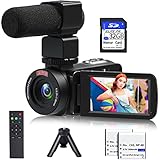
- 【Video Camera Camcorder】--This 30FPS video camera recorder movies in 1080P resolution.It includes remote control, microphone, mini tripod, 2 batteries and 32GB SD card.The camcorder great for beginners,you can start your story right away.Ideal gift for amateurs and beginners,suit for recording weddings, school projects, meeting records, skiing, camping, parties, birthdays, competitions
- 【IR Night Vision Camcorder & Remote】--The vlogging camera for YouTube has an infrared night vision, even in low light and dark environments, you also can shoot clear white/black photos or videos. This camera also support remote control. Therefore, all the controls can be accessed through physical or remote controller buttons, no members are excluded from the group photo
- 【Small Video Camera Convenient Design】--Remote allows you to control the vlogging video camera with any angle, ideal for selfie, group shots or shooting at a distance.Prevent shaking and stabilize shooting with mini tripod,and more portable than the large tripod, just fit it in your pocket when travel
- 【1080P Camcorder as Webcam PC Camera & HMDI Output】--The YouTube camera can be used as pc cam to provide excellent quality video streaming on social media,also perfect for daily video calling.This camcorder can be connected to TV by HDMI cable,share your files with families and friends.Item not include HDMI cable, any mini HDMI cable will work with this camera. (Tips: When you use PC Cam mode, the camera is in sleep state, you can only use it on the computer or mobile phone)
- 【Multifunctional Vlogging Camera】--Supports video pause(continue the recording in the same File without restarting a new one),time-lapse,slow motion,continuous shooting,self-timer,3.0in 270° rotation screen,up to 128GB SD card,with hot shoe and external mic jack,support external LED Light and tripod(Light not included)
The camera overheats or stops
Check the model’s clip limit, 4K restrictions, ambient-temperature guidance, USB-power behavior and heat warnings. A short audition is unlikely to stress most cameras, but repeated takes and long monologues can.
Pre-recording checklist
- Read the casting instructions and confirm horizontal or vertical orientation.
- Set the camera at eye level on a stable tripod.
- Clean the lens and check the medium-shot framing.
- Test face focus, exposure and the actual movement.
- Record and listen to a short audio sample.
- Silence notifications and confirm battery, power and storage.
- Make sure the reader is audible but remains off camera.
- Review one complete take before exporting and uploading.
Should you buy new, premium or used?
Buy new when dependable support, current batteries and simple warranty coverage matter. A premium full-frame or cinema-oriented body is justified for broader production work, not merely for making an audition look more cinematic. APS-C is often the better balance because it is less expensive and makes it easier to keep the face sharp.
Do these 3 things before closing this tab:
1Fix the driver behind crashes, sound loss and screen glitches2Repair Windows errors before they cause bigger problems3Scan for outdated or missing drivers - takes under a minuteA used camera can be excellent value, but inspect autofocus behavior, battery health, firmware, maximum clip length, clean HDMI or USB support, lens-mount availability and included accessories. Earlier SAG-AFTRA Foundation material mentioned models such as the Sony a6400, Canon EOS M50 and Logitech C922; treat those as examples to evaluate, not automatically current recommendations: 2022 equipment document.
Frequently Asked Questions
Is an iPhone good enough for self-tapes?
Yes. A recent iPhone, Pixel or Galaxy can produce a highly usable audition when it is mounted at eye level, evenly lit, focused reliably and paired with clear sound.
Do I need 4K for an audition?
No. Use 4K for cropping or reframing when your workflow supports it; otherwise dependable 1080p is sufficient unless the casting instructions specify another format.
Should I use autofocus?
Use face or eye tracking when you move or record alone, but test it first. Lock focus or switch to manual focus for a fixed mark if tracking hunts.
What’s actually slowing this PC down?
Pick the symptom - the matching free tool is one click away.
Do I need an external microphone?
Not always. A phone or camera can work in a quiet room, but an external mic is useful when the built-in audio is distant or the room is reverberant. Test and monitor before committing.
What is the best camera for a full-body audition?
Use whichever camera can be placed far enough away for the required framing without a distorted wide-angle perspective. A phone, R50 or R50 V can all work; room distance and lens choice matter more than the badge.
Quick Recap
Product prices and availability are accurate as of the date/time indicated and are subject to change. Any price and availability information displayed on Amazon at the time of purchase will apply.




