For most people, start with uBlock Origin. It uses broad, maintained filter lists and gives you detailed per-site controls. Choose Privacy Badger if you want automatic, behavior-based blocking with minimal configuration. Choose Ghostery if you want to see which trackers a page contains and decide how aggressively to block them. A browser’s built-in protection can help, but strict settings may interfere with video playback or sign-in.
What a video-tracker blocker actually does
A video page can contact many parties besides the service hosting the video. Advertising scripts, analytics beacons, social widgets, cookies, fingerprinting code and embedded-player requests may all transmit information about a visit. A tracker-blocking extension examines those requests and either prevents them, limits them, or asks you to approve a component before it loads.
As an Amazon Associate I earn from qualifying purchases.
Blocking tracking is not the same as blocking every advertisement, and neither guarantees anonymous viewing. A player can still receive data from the site you intentionally visit, and an extension may allow a request when it is needed for playback, login or another site function. The practical goal is to reduce unnecessary third-party communication without making the video unusable.
Quick comparison
| Option | Primary method | Best fit | Video-site trade-off | Visibility and control |
|---|---|---|---|---|
| uBlock Origin | Curated filter lists, including EasyPrivacy, with granular rules | Users who want broad blocking and detailed controls | A filter can stop a script, beacon, cookie or media request that a player also needs | Extensive per-site controls and temporary or permanent exceptions |
| Privacy Badger | Heuristic, behavior-based detection focused on consent and tracking | Users who prefer automatic decisions over maintaining lists | Some video widgets can appear as click-to-activate placeholders until you approve them | Automatic blocking with controls for individual third parties |
| Ghostery | Blocklists with tracker identification and configurable blocking | Users who want to see detected trackers and choose a policy | More aggressive blocking can require a site exception when a player depends on a third party | Can display trackers or block them silently, according to your settings |
| Browser built-in protection | Browser-managed tracking prevention | People who do not want to install an extension | In Microsoft Edge, Strict prevention can affect video playback or sign-in and does not block every tracker or advertisement | Fewer extension-specific controls; settings are managed by the browser |
No current, apples-to-apples test of these choices across the same collection of video sites establishes a universal winner. Filter lists, browser engines, extension versions and site code change, so treat the table as a decision guide rather than a measured ranking.
#1 Best Overall

- USB Blocker NO LOOPHOLES: Safety should be your first choice.You don't have to choose how to operate it, just plug in the data blocker of USKYT to physically block data transfer / syncing,Only provide charging function for mobile devices, 100% so as to prevent any hacker from invading.
- USB PERFECT COMPATIBILITY:3rd Gen design chip automatically switches between Apple, Universal and Samsung LG standards to ensure compatibility with your device and charge at up to 2.4A
- SAFE AND LOVELY:Advanced 3rd Gen design with multiple security features . MINI Version The appearance material is Aluminum alloy metal , Beautiful, fashionable and generous,rugged design and durability
- Data Blocker USB PROTECTIVE SHIELD: USB Data Blocker are used by the governments of the USA, Canada, UK and New Zealand as well as 100s of corporations around the world to secure their devices,100% guarantee against hacker attack. It's a simple and easy method to keep your phone away from data breach.
- METAL QUALITY, PLEASE REST ASSURED:We make the best quality.if you have any questions, we will resolve your issue within 24 hours.Own it, be your data protector.(This link is only available for USB A interface)
How the blocking approaches differ
List-based filtering
uBlock Origin and similar tools compare network requests with curated lists of advertising, tracking and malware domains or URL patterns. This approach is predictable: when a request matches a rule, it is blocked or modified. It also explains why these extensions can expose advanced controls. You can inspect a page’s requests, add a narrow exception and keep the rest of the rules active.
The weakness is maintenance and context. A list may identify a tracking endpoint correctly but cannot always know whether the same endpoint is essential to a particular player. A site can also change its hostnames or delivery method before a list update catches up.
Heuristic or behavioral detection
Privacy Badger evaluates how third parties behave across sites rather than relying only on a prewritten domain list. Its purpose is to stop advertisers and third-party trackers; it does not automatically block an advertisement when that advertisement is not tracking you. This can produce fewer cosmetic changes while still limiting cross-site tracking, but the decision may be less obvious than a simple list match.
The Tool Desk
Outbyte Driver Updater FREEScan for outdated or missing drivers - takes under a minuteDriver Scan →Outbyte PC Repair FREEClear out junk files and repair common Windows errorsFree Scan →Tracker identification and configurable policies
Ghostery emphasizes visibility. It can show the trackers found on a page or block them in the background, allowing you to choose how much information the interface exposes and how strict the policy is. Its technical documentation places it among blocklist-oriented tools, while Privacy Badger is described as an algorithmic or heuristic system.
uBlock Origin: the strongest default for broad control
What it blocks
The project describes uBlock Origin as a broad content blocker that can block advertisements, trackers, coin miners, popups, anti-blocker scripts and malware sites. Its default configuration includes multiple lists, including EasyPrivacy. That combination makes it the most suitable starting point when your priority is reducing as many known third-party requests as practical.
Why it suits video sites
Video pages often combine advertising, analytics and embedded-player code. A list-based blocker lets you preserve the page while changing one rule at a time. If the player stops loading, you can temporarily relax protection for that site, reload, and then narrow the exception instead of disabling every privacy feature everywhere.
What to expect
- Some pages may detect that filtering is active and display an anti-blocker message.
- A request that looks like a tracker may also deliver player configuration, captions or authentication data.
- Rules can change as lists are updated, so a site that worked yesterday may need a new exception after a site redesign.
Use the extension’s per-site control rather than turning off all filtering globally. That keeps your normal protection intact on unrelated pages.
What’s actually slowing this PC down?
Pick the symptom - the matching free tool is one click away.
Privacy Badger: automatic, consent-oriented blocking
How its behavior differs
Privacy Badger is designed for people who do not want to curate filter lists. It detects third parties that appear to track users and blocks or limits those parties. The extension’s stated focus is advertisers and third-party trackers, not blanket ad removal; an ad that does not track you may remain visible.
Rank #2
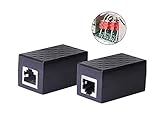
- PROTECTION EQUIPMENT - The Network Surge Protector Suppressors protects against network surges.Insert a Network Surge Protector in your network cables, to prevent network surging.This is a good insurance policy for your expensive router and outdoor POE antenna.
- EXTENSION - Use this RJ45 Coupler to connect two network cables into one longer network cable. When your network cable is too short and needs to be extended, using this dual-pass is a very good solution.Data transmission rate:100Mbps
- SURGE PROTECTION - Built-in 8 TVS anti-detonator, prevent lightning and other abnormal current through the network cable damage to your computer equipment.
- HIGH QUALITY - Fixed interface shielding external EML,RFL and other electromagnetic interference.Effectively prevent network signal damage.Using PC flame retardant raw materials, fire rating 100V0.
- EASY TO USE - Plug and play.There is no ""In"" or ""Out"" cable side of this device, both sides are identical RJ-45 Interface.Regardless of whether your protected device is behind any particular side, it can work properly by connecting the correct cables.
Click-to-activate video widgets
Privacy Badger documents click-to-activate placeholders for potentially useful video players and other widgets. Instead of loading the third-party component immediately, the page can show a placeholder that you activate when you want the content. This reduces unsolicited connections but adds a deliberate step before playback.
When to choose it
- Choose it when automatic, behavior-based decisions are more important than maximum cosmetic ad removal.
- Expect occasional user activation for embedded players, social videos or other third-party widgets.
- If a required player does not load, activate the placeholder or use the site-specific control to permit the minimum component needed.
Ghostery: tracker visibility with configurable blocking
Seeing what a page contacts
Ghostery can report trackers detected on a page or block them silently. That makes it useful when you want to understand why a video page connects to analytics, advertising or social-media companies before deciding what to allow.
Policy and data disclosures
Ghostery’s privacy policy describes the data it processes to operate the extension as non-personal. Its FAQ says that blocking a configured company interrupts that company’s communication from leaving the browser. These are the vendor’s documented policy statements, not an independent audit or a measurement of every version in every browser.
When to choose it
Use Ghostery when the explanation matters as much as the block. You can begin with tracker reporting, observe which categories appear on your regular video sites, and then move to background blocking or site-specific rules. If a player fails, permit only the component associated with that player and retest.
Built-in browser protection: useful, but not a full substitute
A browser’s native tracking prevention avoids an installation and is often easier to manage on a work or family computer. Microsoft warns that Edge’s Strict tracking prevention can affect video playback or sign-in. It also does not block every tracker or advertisement, so a page can still contact services that the built-in rules allow.
Use a less strict setting if a site repeatedly loses login state or the player will not start. If you need detailed request-level controls, per-site exceptions or tracker lists, an extension provides a more explicit interface.
How to install and limit an extension’s access
Review permissions in Chrome
Chrome lets you set an extension’s site access to selected sites, specific sites or all sites. Choose the narrowest option that supports the video sites you actually use.
Recommended Free Tools
- Install the extension from the browser’s official extension store.
- Open the extensions menu and select the extension’s three-dot menu.
- Choose This can read and change site data, then select On specific sites, On all sites or the available limited-access option.
- Start with the specific video domains you need. Add another domain only when a player or login requires it.
- Return to the extension details page after installation and review its permissions again after major updates.
Organizations can block extensions on managed computers. If an installation option is missing or access cannot be changed, an administrator policy may be responsible rather than a fault in the extension.
Rank #3

- LIFETIME PRIVATE BROWSING INCLUDED: Built-in decentralized VPN service delivers always-on privacy without subscriptions, masking your IP and encrypting traffic as you roam with this portable wifi and vpn router, ideal for privacy-conscious travelers and remote workers.
- LIGHT DAILY CONNECTIVITY TIER: Designed as a low-overhead portable router mode for light browsing and messaging, this setting trims background chatter and quietly blocks intrusive ads to stretch limited hotel or café bandwidth, helping privacy-minded users keep everyday email, social feeds, and cloud notes responsive without burning through data or battery on the go.
- OPTIMIZED POCKET ROUTER CAPACITY: Tuned as a compact portable wifi router for 1–3 small devices, this pocket router balances speed and stability so your phone, tablet, or laptop stay reliably connected without slowdowns, ideal for focused solo work sessions or minimalist travel setups.
- SMART CONTENT FILTERING CONTROL: Intelligent traffic management automatically prioritizes video and music streams while enabling smart ad blocking and simple parental controls, helping this portable wifi router keep casual entertainment smooth and family browsing more focused without extra apps or complex setup, ideal for relaxed evenings or kid-friendly screen time.
- ENTERPRISE-GRADE THREAT DEFENSE: Enterprise-grade firewall hardening, tracker blocking, and DNS-layer malware shielding work together on this portable wifi router to quietly stop suspicious sites and risky connections before they load, reducing phishing and data-theft exposure for privacy-first users who treat every network like a hostile one.
A safe setup for YouTube and other video sites
- Install one blocker first. Running several blockers with overlapping rules can make failures harder to diagnose. Begin with uBlock Origin, Privacy Badger or Ghostery according to the control model you prefer.
- Open a normal video page. Test a public video, a signed-in page if you use one, and an embedded player on another site. These can use different third-party requests.
- Check the extension’s site indicator. Note whether requests are being blocked and whether the player, captions, comments or login state changes.
- Allow the smallest exception. Use the per-site control or click-to-activate prompt for the required player. Avoid a permanent global allow rule when one site-specific rule is enough.
- Reload and test again. Confirm playback, seeking, audio, captions and sign-in before deciding that the exception is sufficient.
- Document unusual sites. If a service needs a special setting, record the domain and the reason. This makes it easier to remove the exception when the site fixes its integration.
Fixing playback, login and embedding problems
The video never starts
- Reload after changing the site control; many players read their configuration only during the initial page load.
- Check for a blocked third-party script, media request or cookie that the player needs.
- With Privacy Badger, look for a click-to-activate placeholder and activate it deliberately.
- Temporarily relax protection for that site, test once, and then restore protection while allowing only the necessary resource if the extension exposes that control.
The player loads but captions, comments or quality controls are missing
Those features may be delivered by separate requests from the main video stream. Re-enable the minimum blocked component associated with the missing feature, reload, and test again. Do not assume that allowing every third party is necessary.
Sign-in loops or the account disappears
Strict tracking prevention or a blocker may be restricting a cookie or authentication request. Confirm the site’s login domain is allowed, then test in a fresh tab. Edge specifically warns that Strict prevention can affect sign-in.
An anti-blocker message appears
Use the site-specific control rather than disabling the extension for all sites. Some anti-blocker scripts are themselves blocked by list rules; allowing one required script may restore the page, while allowing advertising and tracking domains is a separate choice.
Free tools Windows power users keep installed
One-click scans. No signup required.
An embedded video is blank on another site
Embedded players commonly depend on a third-party frame. Privacy Badger may show a placeholder until you click to activate it. With list-based tools, permit the embedded player’s required component for that site and verify that the surrounding page remains protected.
Privacy checks before and after installation
- Permission scope: Prefer selected or specific sites in Chrome unless all-site access is necessary for your use.
- Disclosure: Read the extension’s privacy policy and the permissions screen, not only the store description.
- Visibility: Decide whether you want a visible tracker report, silent blocking or automatic behavioral decisions.
- Exceptions: Keep a short list of sites where you have relaxed protection and remove entries you no longer need.
- Managed devices: If an organization controls the browser, its policy may determine which extensions can be installed or which settings can be changed.
Ghostery’s statements about non-personal data processing and interrupting a configured company’s communication describe its stated operation. They should be read as policy claims rather than proof that every possible data flow is eliminated.
What no extension can promise
- No option blocks every tracker on every video site.
- A site you intentionally visit can still receive information needed to deliver the page or account service.
- Blocking a third-party request can break playback, sign-in, captions or another feature.
- Filter lists, browser APIs, extension behavior and store availability are version-sensitive.
- There is no established common benchmark that ranks these extensions on identical video sites and conditions.
These limits are why a site-specific exception and a quick playback retest are safer than switching protection off globally.
Which one should you install?
- Pick uBlock Origin if you want the broadest list-based blocking and granular controls.
- Pick Privacy Badger if you want automatic, consent-oriented anti-tracking and accept that some widgets may require a click before loading.
- Pick Ghostery if seeing detected trackers and choosing between reporting and silent blocking is central to your decision.
- Use built-in Edge protection if you want no extension, but avoid Strict mode when it disrupts playback or sign-in.
Whichever option you choose, begin with limited site access, test the video functions you use, and make the smallest exception that restores a broken feature.
Quick Recap
Product prices and availability are accurate as of the date/time indicated and are subject to change. Any price and availability information displayed on Amazon at the time of purchase will apply.

