There is no universally best Street Fighter 6 controller. The right choice is the one that matches your platform, preferred input style, hand comfort, budget and willingness to practice. For PS5 and PC, start with the HORI Fighting Stick Alpha, Qanba Obsidian 2, Razer Kitsune or PlayStation version of the NACON Daija. For Xbox and PC, shortlist the Xbox NACON Daija and 8BitDo Arcade Stick for Xbox. Confirm the exact platform edition on the manufacturer’s product page before ordering.
Quick picks by platform and playing style
Street Fighter 6 launched on June 2, 2023, for PlayStation 5, PlayStation 4, Xbox Series X|S and PC. The console version of an arcade controller matters: a stick licensed for PlayStation is not automatically licensed for Xbox, and vice versa. Use this table as a starting point, then verify the current product page and regional availability.
As an Amazon Associate I earn from qualifying purchases.
| Controller | Primary platforms in the supplied documentation | Input format | Best fit | Connection, portability and other notes |
|---|---|---|---|---|
| HORI Fighting Stick Alpha | PlayStation 5 and Xbox versions; PC support depends on the edition and mode | Conventional lever and buttons | Players who want a mid-range traditional arcade layout | Console editions are platform-specific; wired arcade-stick format; customization details vary by edition |
| Qanba Obsidian 2 | PlayStation-focused model in the supplied comparison | Conventional lever and buttons | Premium-stick buyers who value arcade-style parts and a tournament-lock function | Built for a full-size arcade feel; portability and connection details are not stated in the supplied material |
| Razer Kitsune | PlayStation 5 and PC, with a PS5/PC compatibility switch | Leverless, all-button | Players willing to learn a low-profile button layout and who want SOCD-cleaning options | Low-profile design; no joystick; wired or wireless status is not stated in the supplied material |
| NACON Daija (PlayStation) | PlayStation 5, PlayStation 4 and Windows PC | Conventional lever and buttons | PlayStation and PC players who want one officially documented stick across those systems | The PlayStation manual explicitly lists these systems; console licensing is edition-specific |
| NACON Daija (Xbox) | Xbox Series X|S, Xbox One and Windows PC | Conventional lever and buttons | Xbox players who also use PC and prefer a lever stick | The Xbox manual lists these systems; do not substitute the PlayStation edition on Xbox |
| 8BitDo Arcade Stick for Xbox | Xbox and PC | Conventional lever and buttons | Xbox/PC buyers seeking a lower-cost alternative to the Xbox Daija | TechRadar positions it as cheaper than the Nacon Daija; current price and stock are not stated |
“Best” here means best match, not a claim that one controller produces better results for every player. Street Fighter 6 does not require a particular controller type, and no authoritative statistic establishes a tournament-win-rate advantage for leverless controllers, lever sticks or pads.
Windows Errors? Fix Them Before They Spread
Repair common Windows errors and clear accumulated junk for a smoother, more stable PC - no reinstall needed.Free scan · no reinstallCrashes, No Sound, or Screen Glitches?
Random freezes, missing sound and display glitches usually trace back to one bad driver. Find and replace yours safely.Free scan · under a minuteConfirm platform licensing before you buy
PlayStation 5 and PlayStation 4
For PS5, the practical shortlist is the PS5 edition of the HORI Fighting Stick Alpha, Qanba Obsidian 2, Razer Kitsune or PlayStation NACON Daija. The Daija’s PlayStation manual states that the DAIJA Arcade Stick by NACON works with games on PlayStation 5 consoles, PlayStation 4 consoles and Windows PC. That is a statement about the PlayStation model, not every Daija sold under the same family name.
#1 Best Overall
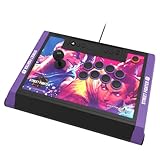
- High-end tournament ready fight stick, compatible with PlayStation 5, PlayStation 4, and PC
- Opens for easy customization & maintenance
- Includes link to 18 downloadable hi-res images of your favorite Street Fighter 6 characters for top-panel customization
- Features HORI’s proprietary HAYABUSA buttons and HAYABUSA joystick
- Officially Licensed by Sony and Capcom
PS4 compatibility can be useful if you play older fighting games, but it does not remove the need to check PS5 support. A product may connect to a PC yet lack the authentication or mode required by a console. Look for an explicit PS5 listing, not a retailer’s generic “PlayStation” label.
Xbox Series X|S and Xbox One
Xbox buyers should select an Xbox-licensed model. The Xbox NACON Daija manual lists Xbox Series X|S, Xbox One and Windows PC. The 8BitDo Arcade Stick for Xbox is also documented for Xbox and PC. A PlayStation Daija, PlayStation HORI edition or PS5-focused leverless model should not be assumed to work on Xbox simply because it uses USB.
Windows PC
PC is the broadest platform, but “works on PC” still requires the right operating mode, cable and game detection. Both Daija editions list Windows PC, and the Razer Kitsune has a PS5/PC compatibility switch. Xbox and PlayStation versions of other sticks may use different firmware, buttons or authentication. Before buying, check the exact model number, included cable and operating-system notes on the official product page.
Choose the input style before comparing models
Conventional arcade stick: lever plus buttons
A traditional stick uses an eight-way lever for movement and separate face buttons for attacks. It reproduces the spacing and hand positions associated with an arcade cabinet. The lever gives tactile feedback as you move from neutral to a direction, while the buttons make simultaneous or rapid attacks easy to place with individual fingers.
The trade-off is size and adjustment time. A full-size case occupies more desk or lap space than a pad, and a new player must learn to return the lever to neutral cleanly. Diagonal inputs, charge motions and half-circle motions can feel unfamiliar even when ordinary movement is comfortable.
Leverless, all-button controller
A leverless controller replaces the joystick with directional buttons. The Razer Kitsune is a low-profile all-button design and includes SOCD-cleaning options. SOCD means simultaneous opposite cardinal directions, such as left plus right; cleaning determines which input the game receives. Tournament rules can differ, so check the event’s current regulations before attending.
Rank #2

- Compatible with Switch/Switch 2, PS4, PS3, Xbox Series S/X, Xbox One, Xbox 360, PC Windows, macOS, Steam Deck, Android.
- Compatible with Sanwa Denshi buttons and joystick that is perfect for customization
- Supports the XINPUT and DINPUT when being used on PC
- Supports the Turbo functions with different speed settings.
- F300 is compatible with PS5 by MAYFLASH Magic-S Ultimate adapter or MagicBoots-S5 Converter.
Leverless layouts can make some directional transitions precise and reduce the physical travel of a joystick. They also demand practice: your thumb, index, middle and ring fingers share movement duties, and the layout can initially feel unlike both a pad and an arcade stick. Hand size, finger reach and wrist comfort matter more than internet arguments about which format is “faster.”
Recommended Free Tools
Six-button or standard gamepad
A pad is compact, familiar and often the least expensive way to start. It can be a strong choice if you already perform reliably on its directional pad and buttons. The smaller controls may suit players who travel or play from a sofa, while the shorter spacing can cause accidental inputs for others.
Do not change input styles solely because a competitor uses one. Street Fighter 6’s modern and classic control schemes can both be practiced on any of these formats. Your execution, comfort and consistency over long sessions are more important than the controller’s category.
What to compare beyond the brand name
Layout and button feel
Check the distance between movement and attack controls, the number of attack buttons, button size and resistance, and whether your palm has a stable resting area. A layout that feels excellent for a ten-minute trial can become tiring during a long training session. If possible, test the hand position at a local event or with a friend’s controller before committing.
Portability and desk space
Conventional sticks and leverless cases are wider and heavier than pads. Measure the space in front of your monitor, the shelf where you store the controller and the bag you use for events. A controller that stays at home because it is awkward to carry is less useful than a smaller one you consistently practice with.
Customization and maintenance
Traditional arcade hardware may allow parts or artwork to be changed, but the supplied information does not establish identical customization options for every model or edition. Treat “customizable” as a feature to verify, not a guarantee. Confirm whether replacement parts are supported, whether opening the case affects warranty coverage and whether the manufacturer provides firmware or configuration software.
Rank #3

- STREET FIGHTER 6 JURI EDITION: Officially licensed by Sony, this Qanba Sapphire S1 leverless arcade controller features exclusive Street Fighter 6 Juri artwork for a bold, tournament-ready look.
- 18 ADJUSTABLE THROW DISTANCE BUTTONS: Equipped with 18 Qanba adjustable throw distance buttons compatible with Cherry MX switch series, allowing buttons and micro-switches to be installed and replaced to match your personal preferences.
- CUSTOMIZABLE BUTTON MAPPING: Features a button map profile switch that lets you remap buttons and save multiple configuration files, giving you a competitive edge tailored to your playstyle.
- COMFORT AND PORTABILITY: Includes a detachable memory foam wrist rest for extended play sessions, a detachable shoulder strap for easy transport, and a built-in storage compartment for accessories.
- BROAD COMPATIBILITY AND CONNECTIVITY: Compatible with PlayStation 5, PlayStation 4, and PC, and includes a 3.5mm headphone jack for audio convenience during intense gaming sessions.
Wired versus wireless operation
The supplied product notes do not establish wireless capability for these models. Do not infer it from a detachable cable or a PC connection. For competitive play, a wired connection is common because it avoids battery management and wireless pairing, but you still need to verify the actual cable length, connector and console mode.
Tournament features
The Qanba Obsidian 2 is described as having arcade-perfect parts and a tournament-lock function. A tournament lock can disable nonessential buttons so a stray press does not open a console menu or pause the match. It does not make the controller legal at every event; organizers may impose separate rules on SOCD behavior, turbo functions, remapping and case modifications.
Controller-by-controller guide
HORI Fighting Stick Alpha for PS5 or Xbox
Dexerto places the Fighting Stick Alpha in the mid-range and says it is available for PS5 and Xbox. Treat those as separate console versions. This is the straightforward recommendation for a player who wants a conventional lever, arcade-style button spacing and a price tier below premium models without moving to a leverless layout.
Free tools Windows power users keep installed
One-click scans. No signup required.
Choose the PS5 edition for PlayStation and the Xbox edition for Xbox. On PC, use the mode and connection instructions for the edition you own. It is a sensible first stick if you want to learn traditional motions, but it is not automatically the best fit for a player whose hands prefer directional buttons or a compact pad.
Qanba Obsidian 2
The Obsidian 2 is the premium conventional-stick candidate in this shortlist. Dexerto describes it as using arcade-perfect parts and having a tournament-lock function. Those attributes appeal to players who want a substantial arcade feel and who attend events where accidental menu presses are a concern.
Its premium positioning does not remove the need to verify platform edition, connection behavior and current regional stock. Buy it for the lever experience and build-oriented features, not because a higher price guarantees better execution.
Rank #4

- Retro Arcade Cabinet: Celebrate the legacy of Street Fighter with a 9/10 scale home arcade machine that captures the look, feel, and excitement of the iconic 90s arcade experience.
- Authentic Arcade Controls: Responsive joysticks and buttons let you perform your favorite combos with the precise, arcade-style control that fans know and love from the 90s.
- 15+ Capcom Games: Choose from more than 15 classic Capcom titles, including Street Fighter favorites, for endless hours of competitive and nostalgic gameplay with friends.
- Modern Retro Performance: Officially powered by Raspberry Pi 5 hardware with a vivid 19.5 inch viewable screen, lighted marquee, lit faux coin door, and HDMI Out for streaming or recording.
- Online Multiplayer Fun: Assembly is easy, and the feature-rich online multiplayer system lets you plug in and challenge friends in competitive showdowns from your game room or den.
Razer Kitsune leverless controller
The Kitsune is the option for a player who has deliberately chosen all-button input. TechRadar documents a PS5/PC compatibility switch and SOCD-cleaning options. Its low-profile design can reduce the reach required for directional changes, but you must invest practice time to build new finger patterns.
What’s actually slowing this PC down?
Pick the symptom - the matching free tool is one click away.
Before an event, learn which SOCD setting is active and whether it complies with that event’s rules. On PS5, confirm the switch is in the console position; on PC, select the PC position and verify that Street Fighter 6 recognizes the controller before entering a match.
NACON Daija PS5 arcade stick
The PlayStation Daija is the clearest documented one-stick route for PS5, PS4 and Windows PC. Its manual explicitly lists those platforms, making it useful for players who move between a current PlayStation console, an older system and a computer.
It remains a conventional lever stick, so select it when you want arcade-style movement rather than an all-button layout. Confirm that the product listing says PlayStation; the Xbox Daija is a different licensed edition.
NACON Daija for Xbox
The Xbox Daija manual lists Xbox Series X|S, Xbox One and Windows PC. It is the direct Daija choice for an Xbox household that also plays on PC. Do not rely on the physical appearance of the PlayStation and Xbox models to distinguish them; read the platform label and model details before ordering.
The Tool Desk
Outbyte Driver Updater FREEScan for outdated or missing drivers - takes under a minuteDriver Scan →Outbyte PC Repair FREEClear out junk files and repair common Windows errorsFree Scan →8BitDo Arcade Stick for Xbox
TechRadar lists the 8BitDo Arcade Stick for Xbox as compatible with Xbox and PC and positions it as cheaper than the Nacon Daija. That makes it the budget-oriented Xbox/PC shortlist entry, but “cheaper” is a relative position, not a current price. Check the live retailer listing immediately before purchase because prices, stock and regional availability change.
Best Value

- Compatible with PlayStation5, PlayStation4, and PC
- Officially licensed Sony peripheral
- Authentic Qanba buttons and lever
- Full control panel, touch pad, Qanba 30-mm B30 buttons, and Qanba OV7 OMRON switch joystick
- 3.5-mm microphone input with mute button control
Decision guide for common players
You play on PS5 and have never owned a stick
- Decide whether you want a lever or all-button movement.
- For a lever, compare the HORI Fighting Stick Alpha and PlayStation NACON Daija; consider the Qanba Obsidian 2 if premium parts and tournament lock justify its cost.
- For leverless, shortlist the Razer Kitsune and plan a deliberate practice period.
- Confirm PS5 compatibility on the exact product page before paying.
You play on Xbox and PC
- Choose an Xbox edition, not a PlayStation edition.
- Pick the Xbox NACON Daija for the documented lever-stick route or the 8BitDo Arcade Stick for Xbox for a lower-cost alternative.
- Connect it to PC using the manufacturer’s stated mode, then test every direction and attack button in Training mode.
You already use a pad successfully
Switch only if the pad limits your comfort, control or enjoyment. Spend at least several sessions in Training mode before deciding that a stick is worse; unfamiliar lever or button spacing can temporarily reduce execution. If your pad remains comfortable and reliable, there is no requirement to upgrade.
You travel to tournaments
Prioritize the platform license, case size, cable storage and tournament rules. A tournament-lock function is useful on the Qanba Obsidian 2, while a leverless controller requires an event-compliant SOCD setting. Contact the organizer when rules are unclear rather than assuming a controller is legal.
Setup checklist for Street Fighter 6
- Verify the edition: Match the controller label to PS5, Xbox Series X|S or PC. For Daija, the PlayStation and Xbox manuals specify different console families.
- Set the platform mode: Put the Razer Kitsune’s switch in PS5 or PC position as appropriate. Use the mode specified by your controller’s manual for other models.
- Connect before launching the game: Plug in the controller, allow the console or PC to identify it, and then start Street Fighter 6.
- Check every input: In Training mode, test neutral, all four cardinal directions, diagonals, each attack button, Drive Impact, Parry and throw inputs.
- Configure controls: Select Modern or Classic controls, assign buttons, and confirm that no auxiliary button can open a system menu during a match.
- Test edge cases: Practice charge moves, double-quarter-circle motions, dash inputs and simultaneous-button commands. On leverless hardware, verify the active SOCD behavior.
- Save your settings: Record your control layout and platform mode so you can restore them after a firmware update or when moving between systems.
How long should you practice a new controller?
Expect an adjustment period whenever movement hardware changes. Start with ten to fifteen minutes of slow directional drills: hold each direction, return to neutral, then perform quarter-circle and dragon-punch motions without attacking. Add normal attacks only after the motion is repeatable. Next, practice a simple hit-confirm, anti-air and drive-rush sequence on both player sides.
Do these 3 things before closing this tab:
1Fix the driver behind crashes, sound loss and screen glitches2Repair Windows errors before they cause bigger problems3Scan for outdated or missing drivers - takes under a minuteUse the same character and control scheme for several sessions. Changing controller, character and controls at the same time makes it impossible to identify the source of mistakes. Keep the controller in the position you will use in matches, and stop if your wrist or fingers become painful; comfort is a selection criterion, not an endurance test.
Troubleshooting common problems
The console does not recognize the controller
- Confirm that you bought the correct console edition.
- Reconnect the cable directly to the console rather than through an unpowered hub.
- Set the controller’s platform switch correctly, if it has one.
- Restart the console with the controller connected and check the manufacturer’s current firmware instructions.
Inputs appear missing or repeated
- Open Training mode’s input display and watch for neutral, diagonal and simultaneous inputs.
- Check that the lever returns to neutral and that no button is physically held down.
- On the Kitsune, inspect the selected SOCD-cleaning option and compare it with the game or event’s rules.
- Test a different USB port or cable if the problem occurs only intermittently.
The controller feels worse than a pad
That is normal during transition. Reduce the motion speed, practice one input at a time and keep the same layout for several sessions. If discomfort persists or your fingers cannot reach the buttons naturally, choose a different input style rather than forcing the controller.
Buying and availability cautions
Prices, inventory and regional editions are not fixed in the supplied information, so do not treat a remembered price or a retailer’s “in stock” label as current. Check the merchant and manufacturer immediately before purchase. Confirm the exact console version, included accessories, return policy and warranty terms. A lower advertised price can reflect an older platform edition that does not meet your needs.
Bottom line
Start with input style and layout, then confirm platform compatibility on the official product page before purchasing. PS5/PC players can choose among the HORI Fighting Stick Alpha, Qanba Obsidian 2, Razer Kitsune and PlayStation NACON Daija according to lever-versus-leverless preference and budget. Xbox/PC players should compare the Xbox NACON Daija with the 8BitDo Arcade Stick for Xbox. Your best Street Fighter 6 controller is the one you can use comfortably, configure legally for your platform and practice consistently.
Quick wins for a faster PC:
Repair Windows errors before they cause bigger problemsFix Now →Fix the driver behind crashes, sound loss and screen glitchesFind Drivers →Clear out junk files and repair common Windows errorsFree Scan →Quick Recap
Product prices and availability are accurate as of the date/time indicated and are subject to change. Any price and availability information displayed on Amazon at the time of purchase will apply.

