Recommended Free Tools
If an all-in-one AI study app feels busy or distracting, replace only the part you need—not the whole study routine. Start with your phone’s built-in Focus controls for interruptions; choose a dedicated blocker if you need to restrict sites or apps; use flashcards only if review is the task. These tools have different jobs, and available feature descriptions do not establish that one improves learning more than another.
Choose the tool by the distraction or task you want to handle
Study apps often bundle separate jobs: silencing interruptions, blocking tempting apps or websites, keeping notes, organising tasks, and reviewing material. The University of Queensland’s guide to student apps groups tools by functions such as concentration, productivity, note-taking, mindfulness, and flashcards. Its practical implication is simple: try only a tool that solves a real problem for you.
As an Amazon Associate I earn from qualifying purchases.
- Notifications interrupt you: begin with Apple Focus or Android Focus mode.
- You want a visible timer and a gentle nudge: consider Forest.
- You need websites and apps blocked on several devices: consider Freedom.
- You want a harder-to-bypass desktop block: consider Cold Turkey Blocker.
- You need to practise recall: use a flashcard tool such as Anki or Quizlet; they are not distraction blockers.
Try your device’s built-in controls first
iPhone: Focus
Apple Focus lets you choose which people and apps can send notifications and schedule a Focus to switch on automatically. Apple’s iPhone Focus instructions also describe filters for some apps and device features. This is a reasonable first step if the main problem is alerts rather than access to distracting sites.
PC Slower Than It Used to Be?
A free scan shows the junk files, broken settings and background clutter dragging Windows down - then fixes them in one click.Free scan · Windows 10 & 11Outdated Drivers Are Slowing You Down
One free scan finds every outdated or missing driver and matches the right update for your exact hardware.Free scan · exact hardware matchAndroid: Focus mode
With Android Focus mode, you choose apps to pause. Google says that while it is active, “you can’t use these apps and won’t get notifications from them.” You can schedule it and take a limited break. Menus and available features can vary by device; see Google’s Digital Wellbeing instructions.
#1 Best Overall
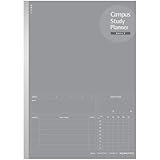
- Daily Study Planner: Allows you to schedule your study plan before the test or examination everyday, total 63 days in one notebook. Table 2 shows the details of how to use it.
- Kokuyo Original Base Paper: Making sure you have a comfortable and satisfying writing experience, and it's acid-free and resistant to bleeding, which is suitable for long-term storage.
- Wireless Binding: Solidifies your back with glue instead of thread, so it can be opened flat and not easy to fall apart. This makes every page easy to write and read.
- Tearing Resistant: The spine cloth is made with a special film laminated to the surface of the paper so it is resistant to tearing and abrasion.
- Unique Design: The cover is made with a shiny varnish, and inner paper desined with item columns are filled in the same color of the cover. It's dark gray ruled lines that doesn't interfere with writing.
Pick a dedicated tool only if built-in controls are not enough
Forest: a visual focus timer
Forest makes a focus session visible: a virtual tree grows while you work. Its official product page describes a timer, app blocking, scheduled screen-time controls, analytics, group focus, and support for iOS, Android, and browser. Forest says its core timer and Deep Focus app blocking are available on the free tier; Plus adds options including a custom app allowlist, multiple-app or site Time Guard, and expanded analytics. Core focus works offline, according to the company. Plans and features can change, so check the current product page before choosing a tier.
Forest is a cue and timer as well as a blocker, so it suits someone who likes a visual reward more than someone seeking the strictest possible lockout. Forest explicitly says it is not a medical treatment for ADHD; it should not be treated as one.
Rank #2

- Daily Study Planner: Allows you to schedule your study plan before the test or examination everyday, total 63 days in one notebook. Table 2 shows the details of how to use it.
- Kokuyo Original Base Paper: Making sure you have a comfortable and satisfying writing experience, and it's acid-free and resistant to bleeding, which is suitable for long-term storage.
- Wireless Binding: Solidifies your back with glue instead of thread, so it can be opened flat and not easy to fall apart. This makes every page easy to write and read.
- Tearing Resistant: The spine cloth is made with a special film laminated to the surface of the paper so it is resistant to tearing and abrasion.
- Unique Design: The cover is made with a shiny varnish, and inner paper desined with item columns are filled in the same color of the cover. It's dark gray ruled lines that doesn't interfere with writing.
Freedom: blocking across devices
Freedom focuses on blocking distracting websites and apps, with sessions that can be scheduled in advance. Its student page lists Mac, Windows, Android, and iOS support. That makes it worth considering if switching from phone to computer is part of the problem. The vendor’s feature description does not establish that every function works identically on every operating system.
The Tool Desk
Outbyte PC Repair FREERepair Windows errors before they cause bigger problemsFix Now →Outbyte Driver Updater FREEScan for outdated or missing drivers - takes under a minuteDriver Scan →Cold Turkey Blocker: stricter desktop restrictions
Cold Turkey Blocker can block websites, applications, or internet access, with exceptions. Its official site describes an option to lock an active block, making it almost impossible to stop. Installation instructions cover Windows or macOS and browser extensions. This is a better fit for someone who wants friction against bypassing a desktop session than for someone who only wants a gentle timer. The company says settings and statistics are stored locally and describes the app as a one-time purchase; the current price is not established here.
Rank #3

- Shows a week's study schedule. Loose leaf for study schedule
Keep flashcard review separate from distraction blocking
Anki
Anki is a dedicated flashcard program, not a focus blocker. Its official site says AnkiWeb synchronisation is free and supports media in cards. It labels the desktop version free, identifies AnkiMobile as the official iOS app, and lists AnkiDroid as a free Android app developed by contributors. Check the app identity carefully: the University of Queensland warns that similarly named apps exist.
Quizlet
The University of Queensland describes Quizlet as a way to turn class notes into digital flashcards and practise with tests, essay prompts, and games. That makes it a review option, not a tool for silencing notifications or blocking websites. The guide’s store prices and ratings were updated in November 2025, so they should not be treated as current 2026 pricing.
Rank #4

- Believe time tracker spiral dateless study planner by PAPERIAN
- Helping organize your studies to help in obtaining better grades, can check your study time every 10 minutes
- PP cover protects this diary from stain and tear
- Perfect for students of all ages and subject
- Designed & Made in South Korea
Compare the options by what they actually control
| Option | Main job | Devices or scope stated by source | Session control and cost notes |
|---|---|---|---|
| Apple Focus | Manage allowed notifications and schedules | iPhone | Built-in control; Apple describes automatic schedules and filters. |
| Android Focus mode | Pause selected apps and withhold their notifications | Android phone | Built-in control; scheduling and limited breaks are supported, with device variation. |
| Forest | Visual timer with app blocking | iOS, Android, browser | Vendor says core timer and Deep Focus blocking are free; Plus adds options. Core focus works offline. |
| Freedom | Block distracting sites and apps | Mac, Windows, Android, iOS | Scheduled sessions; the cited student page promotes free entry and a paid plan but does not establish a stable price. |
| Cold Turkey Blocker | Block sites, applications, or internet access | Windows or macOS with browser extensions | Locked active blocks are designed to be difficult to stop; vendor describes a one-time purchase, but current price is not stated. |
| Anki | Flashcard study and sync | Desktop, iOS, Android, and AnkiWeb | Not a blocker. Desktop and AnkiDroid are identified as free; AnkiWeb sync is free. Check the official site for the current iOS offering. |
| Quizlet | Flashcards and practice activities | Not stated in the cited UQ guide | Not a blocker; November 2025 store prices and ratings are not current pricing evidence. |
These are feature distinctions, not a ranking of effectiveness. The cited sources do not provide a controlled comparison showing that a particular app improves concentration, retention, or grades more than another.
Quick Recap
Best Value

- Mr. Pen sticky note set contains a total of 410 pieces – including 60 Ruled (4"x5.8’’), 40 Dotted Notes (3"x3.8’’), 40 Blank (2.6"x3.8’’), 60 yellow and Pink, as well as 150 color index tabs, all neatly packaged within a beautiful notebook cover for portability and storage.
- The paper of our sticky note set is extra high quality and thick with a strong adhesive that perfectly sticks onto paper, walls, monitors, bulletin boards, and more.
- The colorful index tabs are great for easier organization when used for planning, journaling, Bible study, or calendar management.
- Mr. Pen sticky note set is available in various fun colors to choose from. This pastel sticky note set is the perfect way to get organized or decorate your planner with vibrant colors!
- Our sticky notes are perfect for leaving messages, making to-do lists, or just keeping track of things. These notes can be attached to almost any surface, and the adhesive backing makes them easy to remove when you're done.
Use the smallest setup that covers the problem
- Identify the interruption. Decide whether you need fewer notifications, a block on particular sites or apps, or a structured way to review material.
- Try the built-in setting first. Set up iPhone Focus or Android Focus mode if notifications or selected phone apps are the issue.
- Add one dedicated tool only for the remaining gap. Choose Forest for a visual timer, Freedom for cross-device blocking, or Cold Turkey for a stricter desktop block.
- Keep review tools in their lane. Add Anki or Quizlet if flashcard practice is useful; do not expect either to block distractions.
- Check rules before installing on school equipment. UQ advises students to check school policy before downloading apps on school computers. That advice concerns installation policy, not a comparison of these apps’ privacy or data-retention practices.
Product prices and availability are accurate as of the date/time indicated and are subject to change. Any price and availability information displayed on Amazon at the time of purchase will apply.

