The Tool Desk
Outbyte Driver Updater FREEFix the driver behind crashes, sound loss and screen glitchesFind Drivers →Outbyte PC Repair FREERepair Windows errors before they cause bigger problemsFix Now →There is no single best AI appointment scheduler for every business in 2026. Choose Calendly when your main problem is coordinating meetings, routing people to the right teammate, and managing team availability. Choose Acuity Scheduling when customers must select a service, optional add-ons, a staff calendar, an appointment time, and payment in one booking flow. If you need both workflows, pilot each with your real calendars, intake forms, payment rules, and cancellation policy before migrating.
What “AI appointment scheduler” means in practice
Scheduling products use the term AI for different jobs. One category helps people coordinate a meeting through an email conversation. Another guides a customer through a service catalogue and checkout. Treating those as the same workflow leads to a poor fit even when both products can show available times.
As an Amazon Associate I earn from qualifying purchases.
- Meeting coordination: an assistant interprets an email thread, finds a mutually available time, and handles rescheduling or meeting details.
- Service booking: a visitor identifies a service, chooses add-ons, selects a location or staff calendar, supplies intake details, and may pay before the appointment is confirmed.
The right choice depends on what happens before a time slot is booked, not on which product uses the most AI terminology.
Quick comparison: Calendly and Acuity Scheduling
| Decision factor | Calendly | Acuity Scheduling |
|---|---|---|
| Primary workflow | External meeting coordination, scheduling links, routing and team availability | Client-led service selection, appointment booking and checkout |
| AI feature covered here | Callie, announced as a beta assistant for complex scheduling; access and usage aligned to plan level | Booking Assistant, available only on Powerhouse or Premium plans |
| AI response languages | Callie was initially enabled in English-language accounts | Accepts messages in any language but responds in English or Spanish |
| Calendar and team tools | One-to-one and multi-host event templates, availability rules, routing forms, team permissions and calendar connections | Calendars across staff and locations, syncing intended to help avoid double booking, reminders and booking embeds |
| Customer checkout | Payments are listed among its broader scheduling capabilities; the meeting workflow is the central use case | Service, add-on, calendar, time, intake and payment details can be configured in the booking flow |
| Booking exclusions stated by vendor | Callie’s announcement does not establish service-booking capabilities | Booking Assistant cannot schedule classes or sell packages, gift certificates or subscriptions |
| Other AI-related feature | Notetaker can join Zoom, Google Meet and Microsoft Teams calls for recordings, transcripts, recaps and action items | No equivalent capability is established in the cited product material |
| Privacy statements | Calendly says it does not sell customer data or use it to train AI models, and that providers receive the minimum data required by a feature | Acuity says Booking Assistant conversation transcripts are deleted after 21 days and that the assistant does not request personal information |
| Current price comparison | Not established by the available evidence. Verify live prices, limits, trials and AI access before purchase. | |
When Calendly is the better shortlist candidate
Calendly is the more natural starting point when your business arranges conversations rather than sell fixed services. Its official product material describes calendar availability rules, one-to-one and multi-host event templates, automated email and text reminders, website embeds, routing forms, team permissions, payments and more than 150 integrations.
#1 Best Overall

- LARGE 8.5x11 PLANNER: January 2027 to December 2027 daily planner perfect for office, business, or professionals. Generous size accommodates detailed notes and appointments.
- 15-MINUTE HOURLY PLANNER SCHEDULE: Precise appointment booking 8am-8pm weekdays, 30-min weekends. Visual week-at-a-glance with 3-month reference for busy professionals.
- COMPLETE TIME MANAGEMENT: quick-access to reinforced laminated monthly tabs, durable poly movable bookmark for quick navigation, yearly overview & important dates section for efficient daily planning.
- COMPREHENSIVE ORGANIZATION: 15 note pages, contacts section, storage pockets for loose paper, holiday reference & USA time zones map. Everything needed for work, office and personal life.
- PREMIUM DURABILITY: Thick paper prevents ink bleed-through, sturdy flexible poly covers easy to clean, fits in bags or backpacks, spiral bound, lies flat when open. Built to last all year.
Use it for email-heavy coordination
Calendly announced Callie on August 19, 2026 as a beta AI assistant that can be added to an email thread to coordinate meetings. The announcement positions Callie for complex scheduling while retaining links as an option for straightforward bookings. That makes it relevant when a prospect, candidate, client or partner is already exchanging messages and nobody wants to copy availability back and forth.
Availability is date-sensitive. Calendly said options to enable Callie and Notetaker would begin appearing on August 19, initially in English-language accounts, with access and usage aligned to plan level. Confirm that the feature is enabled for your account and understand any usage allowance before committing to a rollout.
Use routing when different people handle different requests
Routing forms and team controls matter when the first available person is not always the correct person. You can screen or categorize a visitor, then direct that person toward an appropriate event type or teammate. This is useful for sales qualification, recruiting, customer consultations and internal request queues where calendars and ownership rules are more complicated than a single booking link.
Consider Notetaker separately from scheduling
The same August 2026 announcement says Notetaker can join Zoom, Google Meet and Microsoft Teams calls and provide recordings, transcripts, recaps and action items. That is a meeting follow-up workflow, not an appointment-booking capability. Treat it as an adjacent feature and check consent, recording notices and organizational policy before enabling it.
Calendly’s announcement includes customer comments about time savings. Those are vendor-reported testimonials, not an independent measurement, so they should not be used as a guaranteed productivity or return-on-investment estimate.
Calendly limitations to account for
- Callie was described as beta, so behavior, access and limits may change.
- The initial availability statement referred to English-language accounts; do not assume equivalent support in another language.
- Plan-level access and usage rules can determine whether the AI assistant is available to your team.
- The product evidence establishes meeting coordination, not a complete service-menu-to-checkout experience.
When Acuity Scheduling is the better shortlist candidate
Acuity Scheduling is designed around appointments as purchasable or configurable services. Its Booking Assistant can recommend services and available times from a customer’s stated preferences, then move that customer through the booking steps configured by the business.
Its booking flow is service-first
A typical Acuity flow can include service selection, optional add-ons, a calendar, available times, an appointment review, contact information, configured intake forms and payment details. That sequence suits salons, clinics, consultants, lessons and other appointment businesses where the customer must choose what they are buying before choosing when they will attend.
Rank #2

- Full Year 2027, Hour by Hour – A dated planner from November 2026 to December 2027 with weekly and monthly views and 30 minute time slots from 7am to 8pm, so every appointment has a line of its own.
- Your Week on Two Pages – Each week opens flat to a two-page hourly schedule with a notes column, the layout busy day planners reach for when a phone calendar keeps burying things.
- Monthly Views for the Long Game – Big month-per-spread pages for deadlines and term dates, a natural teacher planner and work schedule book, with 2027-2028 reference calendars for planning ahead.
- Thick Paper, Lies Flat – Extra-thick pages keep ink where you wrote it instead of bleeding through, and the softcover with twin-wire binding opens flat on any desk.
- Goals Pages Built In – Two-page goal spreads give the year a direction, in a simple design for productivity for students, nurses, business owners and busy professionals whose days are booked solid.
The business controls which services, calendars, questions and payment details appear. Map your real customer journey before enabling the assistant: a recommendation is only useful if the underlying service durations, buffers, staff availability, locations and prices are configured correctly.
Booking Assistant plan and language limits
Acuity’s help documentation states that Booking Assistant is available only on the Powerhouse or Premium plans. It can accept messages in any language, but it responds only in English or Spanish. If your customers expect another response language, test the experience yourself and provide a non-AI booking path.
Booking types it cannot handle
The same documentation says Booking Assistant cannot schedule classes or sell packages, gift certificates or subscriptions. Those exclusions are significant for fitness, education, membership and prepaid-service businesses. You may still use Acuity’s other booking functions for those products, but do not promise that the conversational assistant will complete them.
Staff, locations and double-booking controls
Acuity’s feature material describes calendar management across staff and locations, syncing intended to help avoid double booking, mobile scheduling, reminders and booking embeds. These are operational controls rather than AI features, but they often decide whether a service business can run the system reliably. Verify how your staff calendars, time zones, buffers, rooms and location rules behave in a test account.
What’s actually slowing this PC down?
Pick the symptom - the matching free tool is one click away.
Acuity describes a seven-day trial and plan tiers aimed at solo operators, growing businesses and larger organizations with more complex needs. Plan names, limits and prices can change, so check the current offer before budgeting.
Choose by business workflow, not by the word “AI”
Solo consultant or professional-services practice
Start with Calendly if most appointments begin as an email exchange and the customer simply needs a meeting type and available time. Start with Acuity if clients must choose among named services with different durations, prices, forms or payment requirements.
Sales or recruiting team
Calendly’s routing forms, team permissions, multi-host events and calendar connections are directly relevant when requests must reach the right representative. Pilot Callie only after confirming beta access, language availability and plan-level usage.
Rank #3

- 2027 Professional Planner - Cover from January 2027 to December 2027, Features 12 months of monthly and weekly pages, and also inclueds 3 extra monthly pages for October to December 2026 and 12-monthly tabs, with Lay-flat capability for all your planning and scheduling needs, and measures 8.5" x 11".
- Monthly View - Each date box provides ample writing space and includes the previous and next month's reference, ruled daily blocks with popular holidays, and Julian Dates for easy long-term project and appointment scheduling.
- Weekly View - 2-page weekly layout from Monday to Sunday, 15-minute time slots in increments from 7:00 a.m. to 8:45 p.m. on weekdays, and 7:00 a.m. to 8:30 p.m. on weekends, 3-month reference previews, allowing you to manage time and track appointments easily.
- Fight Ink-bleeding Thick Paper - Made with premium heavyweight paper to prevent ink bleed. The 8.5x11" size offers enough space for organization and scheduling. This sturdy appointment book withstands frequent transfers in and out of backpacks, briefcases, and cars.
- Additional Features - The weekly planner includes 2027-2029 calendars, year schedule for full year 2027, holiday lists, contact pages, notes pages, important dates, and US time zone map. Rainbow monthly tabs simplify navigation and add a stylish, playful element to the planner's aesthetic.
Salon, clinic or appointment-based local business
Acuity’s service, add-on, staff-calendar and checkout sequence is the closer match. Confirm that every service has the right duration, preparation time, cancellation rule, intake question and payment behavior.
Classes, memberships or prepaid packages
Do not select Acuity on the assumption that Booking Assistant will sell these items; its documented exclusions include classes, packages, gift certificates and subscriptions. If those products are central, test the non-assistant booking tools and compare the resulting customer experience with another system before migrating.
Business with both meeting and service bookings
Keep both tools on the shortlist and separate the workflows. For example, a firm might use a meeting-oriented system for discovery calls while using a service-oriented system for paid consultations. Before adopting two systems, verify ownership of calendars, reminders, payments, customer records and cancellation policies so that a client cannot be double-booked or receive conflicting instructions.
Integration checklist before you commit
Integration fit is more important than a feature count. Document the systems that must exchange data, then test each one with a real booking.
- Calendars: list every personal, shared, staff and room calendar. Check read/write behavior, time zones, buffers and conflict handling.
- Website and channels: test embedded booking pages, links, social booking entry points and mobile layouts. Confirm that the booking path works without an account if that is your policy.
- Payments: identify the processor and payment events you need. Acuity’s integration materials mention Stripe, Square and PayPal, but current availability should be verified in its live directory.
- Customer records: map intake answers, contact fields, consent records and appointment status into your CRM or other system. Confirm which system is authoritative when a client changes a booking.
- Communication: test confirmation, reminder, reschedule and cancellation messages by email and text. Check sender identity, language, timing and time-zone display.
- Video meetings: if meetings are remote, verify how conferencing details are created and updated. Calendly’s announcement specifically names Zoom, Google Meet and Microsoft Teams for Notetaker participation.
- Automation and reporting: test webhooks, API or workflow automations, analytics and marketing hand-offs. Acuity’s help materials list these categories, but an older integration article was last updated October 14, 2024, so confirm each connector in the current directory.
Privacy and data controls to review
Privacy statements below are vendor descriptions, not independent audits. Read the current terms, data-processing documents and administrator controls for your region and industry.
Recommended Free Tools
Calendly’s stated AI data position
Calendly’s AI help material says customer data is not sold or used to train AI models. It also says AI providers receive the minimum data required for a feature and that Calendly currently uses OpenAI large language models while allowing for additional vetted providers. Treat these as Calendly’s stated practices and confirm the current terms before putting sensitive information into an AI-assisted workflow.
Acuity’s stated transcript retention
Acuity says Booking Assistant conversation transcripts are deleted after 21 days and that the assistant does not request personal information. This is a product detail about the assistant, not a blanket security guarantee for every record, integration or payment system connected to your account.
Rank #4

- Weekly Appointment Book - Our 2027 planner is from January 2027 to December 2027. It measures 9" x 11" and includes 30 minutes of appointments per day, making it the perfect tool to make your life more productive
- 2027 Monthly Page - Each month of this 2027 appointment book has two full pages for your arrangement and you can write down all kinds of tasks every day in the daily blocks. Priorities, Julian dates, holidays, past and future reference calendar can help you keep your life organized and are perfect for staying focused and achieving your goals
- 2027 Daily/Hourly Page - One vertical column per day, one week per two pages. With 30-minute intervals from 8 a.m. to 5:30 p.m., Monday through Sunday, you can organize your day and make good use of writing space. Besides, priorities on each page, 4-month reference calendars and holiday reminders will help you better organize your life
- Functional Details - 9" x 11" Planning Pages + Quick Reference Information + 2 Contacts Pages + 2027 Yearly Planning Page + 2027-2028 Yearly Overview + 2027-2029 Holidays + Future Planning Pages + 3 Notes Pages + Twin-Wire Binding + Julian Date + Premium Paper + Colorful Monthly Tabs + Flexible Cover + Inner Pocket
- Improve Your Life - This weekly appointment book will help you organize your time, plan your life, improve the quality of your life, be more productive in fragmented time and create unlimited possibilities in limited time
Operational controls for either product
- Decide whether staff may enable AI features without administrator approval.
- Limit intake forms to information needed to provide the appointment.
- Publish recording or transcription notices where required before using meeting assistants.
- Define who can export, delete or review appointment and conversation records.
- Check retention, subprocessors, regional hosting and breach-notification terms against your legal and regulatory requirements.
Cost and plan fit in 2026
The available evidence does not support a fair current price ranking. Do not rely on an old comparison article or a headline starting price. Confirm the live price for your country, billing interval, number of users, calendars, locations, appointment types, transaction features, trial terms and AI usage.
| Cost question | Why it changes the decision |
|---|---|
| Is the AI feature included? | Callie access and usage were described as plan-aligned; Acuity Booking Assistant requires Powerhouse or Premium. |
| How many staff or calendars are needed? | Team scheduling, locations and shared resources can move you into a higher tier even when one-person pricing looks affordable. |
| Are payments or add-ons required? | Service businesses may need checkout, add-ons and intake controls that are irrelevant to a meeting-only workflow. |
| What happens after a trial? | Acuity describes a seven-day trial; confirm current eligibility, renewal price and feature limits. Verify equivalent conditions for any Calendly plan under consideration. |
| What is the cost of two systems? | Businesses with mixed workflows may pay for separate meeting and service tools, plus integration or automation fees. |
What the available market data does—and does not—show
The 2026 T3/Inside Information Software Survey reports results from financial-advisor respondents, not all businesses. In that audience, the reported scheduling-app figures were:
Quick wins for a faster PC:
Fix the driver behind crashes, sound loss and screen glitchesFind Drivers →Repair Windows errors before they cause bigger problemsFix Now →| Product | Reported share among surveyed advisors | Average rating |
|---|---|---|
| Calendly | 26.88% | 8.41 |
| Microsoft Bookings | 3.10% | 7.26 |
| Acuity Scheduling | 1.51% | 8.02 |
These figures are a narrow signal from an advisor-specific sample. They are not overall market shares, independent quality scores for every type of business, or measures of AI capability. They should not be used to declare a universal winner.
A practical pilot before migration
- Capture five real booking scenarios: include a simple meeting, a reschedule, a multi-person meeting, a service with an add-on and a payment or intake case.
- Use production-like calendars: include working hours, time zones, buffers, holidays, staff absences and shared resources.
- Test the customer language: try the languages your clients actually use. For Acuity, verify that responses remain acceptable when a message is not in English or Spanish.
- Test failure paths: remove availability, create a conflict, abandon checkout, cancel late and change a service after booking.
- Audit the hand-offs: confirm that the website, CRM, payment processor, conferencing tool, reminders and reporting system receive the expected data.
- Measure operational outcomes: record completion, routing accuracy, staff corrections, failed payments, duplicate bookings and support contacts. Do not assume savings or conversion improvements until your own pilot demonstrates them.
- Document a fallback: keep a conventional booking link or staff-assisted process available while an AI feature is beta, unavailable in a language or unable to handle an excluded booking type.
Decision summary
- Shortlist Calendly for external meetings, email coordination, routing, team availability and meeting follow-up. Treat Callie as a date-sensitive beta feature with plan and language constraints.
- Shortlist Acuity Scheduling for service businesses that need clients to select services, add-ons, staff calendars, times, intake details and payment. Confirm the Powerhouse or Premium requirement and the assistant’s excluded booking types.
- Compare both in a pilot when your business handles both meeting coordination and service checkout, or when integration, privacy and language requirements are unusual.
Frequently asked questions
Can an AI assistant book appointments for my clients?
Yes, within defined workflows. Calendly’s Callie is intended to coordinate meetings in an email thread, while Acuity’s Booking Assistant can guide a customer through service and time selection and, when configured, intake and checkout. Neither should be treated as an unrestricted agent: access, languages and supported booking types are limited.
Which is better for a small business?
A small business should choose by booking model. Use Calendly for straightforward meetings and routing to people. Use Acuity when customers must choose a service, add-ons, staff calendar and payment details.
Does Acuity’s assistant support every language?
It can accept messages in any language, but Acuity states that it responds only in English or Spanish.
Do these 3 things before closing this tab:
1Fix the driver behind crashes, sound loss and screen glitches2Repair Windows errors before they cause bigger problems3Scan for outdated or missing drivers - takes under a minuteCan Acuity Booking Assistant sell packages or gift certificates?
No. Acuity states that Booking Assistant cannot schedule classes or sell packages, gift certificates or subscriptions.
Best Value
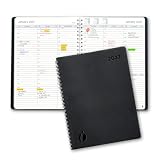
- Full Year 2027, Hour by Hour – A dated planner from November 2026 to December 2027 with weekly and monthly views and 30 minute time slots from 7am to 8pm, so every appointment has a line of its own.
- Your Week on Two Pages – Each week opens flat to a two-page hourly schedule with a notes column, the layout busy day planners reach for when a phone calendar keeps burying things.
- Monthly Views for the Long Game – Big month-per-spread pages for deadlines and term dates, a natural teacher planner and work schedule book, with 2027-2028 reference calendars for planning ahead.
- Thick Paper, Lies Flat – Extra-thick pages keep ink where you wrote it instead of bleeding through, and the softcover with twin-wire binding opens flat on any desk.
- Goals Pages Built In – Two-page goal spreads give the year a direction, in a simple design for productivity for students, nurses, business owners and busy professionals whose days are booked solid.
Is Calendly Callie available to every account?
Not necessarily. Calendly announced Callie as a beta feature and said access and usage would align to plan level, with initial enablement in English-language accounts. Check the feature and limits in your account.
Are the privacy claims independently verified?
No independent audit is established here. Calendly’s statements about data use and Acuity’s 21-day transcript deletion are vendor-documented practices that should be checked against current terms and your own compliance requirements.
Frequently Asked Questions
Can an AI assistant book appointments for my clients?
Yes, within defined workflows. Calendly’s Callie coordinates meetings in email threads, while Acuity’s Booking Assistant guides customers through service and time selection and, when configured, intake and checkout. Access, languages and supported booking types are limited.
Free tools Windows power users keep installed
One-click scans. No signup required.
Which scheduler is better for a small business?
Choose by booking model: Calendly for meetings and routing; Acuity for service selection, staff calendars, add-ons and payment.
Does Acuity Booking Assistant support every language?
It accepts messages in any language but responds only in English or Spanish.
Can Acuity Booking Assistant sell packages or gift certificates?
No. Acuity states that it cannot schedule classes or sell packages, gift certificates or subscriptions.
Is Calendly Callie available to every account?
Not necessarily. It was announced as a beta feature with plan-aligned access and initial enablement in English-language accounts.
PC Slower Than It Used to Be?
A free scan shows the junk files, broken settings and background clutter dragging Windows down - then fixes them in one click.Free scan · Windows 10 & 11Crashes, No Sound, or Screen Glitches?
Random freezes, missing sound and display glitches usually trace back to one bad driver. Find and replace yours safely.Free scan · under a minuteAre the privacy claims independently verified?
No. They are vendor-documented practices and should be checked against current terms and your compliance requirements.
Quick Recap
Product prices and availability are accurate as of the date/time indicated and are subject to change. Any price and availability information displayed on Amazon at the time of purchase will apply.

