The Tool Desk
Outbyte PC Repair FREERepair Windows errors before they cause bigger problemsFix Now →Outbyte Driver Updater FREEFix the driver behind crashes, sound loss and screen glitchesFind Drivers →The ASRock Fatal1ty AB350 Gaming K4 was a strong-value AM4 motherboard at its roughly $90 review price in 2018: it offered one PCIe 3.0 x4 M.2 socket, a second SATA M.2 socket, six SATA ports, four memory slots and Ryzen overclocking. In 2026, it is a used, discontinued-era board—not a blanket recommendation. Consider one only if the price is low, the board is tested, and its BIOS supports your exact CPU.
What the AB350 Gaming K4 was—and what $90 meant
The Fatal1ty AB350 Gaming K4 is an ATX motherboard for AMD’s AM4 socket, built around the B350 chipset. It targeted early Ryzen and Bristol Ridge systems, with a feature-rich layout for a budget board rather than premium-class components. AnandTech reviewed it on April 9, 2018, at $90; TweakTown’s earlier May 2017 review listed $104.99. Those are historical review prices, not current used-market valuations. AnandTech’s review and TweakTown’s review both judged it favorably for its price and capabilities.
As an Amazon Associate I earn from qualifying purchases.
B350 sits below X370 in platform resources, but that did not prevent the Gaming K4 from delivering competitive performance in contemporary testing. Its clearest differentiator was storage: two M.2 sockets, though they are not equivalent and have resource-sharing caveats.
Specifications at a glance
| Feature | Detail |
|---|---|
| Form factor | ATX, 30.5 × 22.4 cm |
| Socket and chipset | AMD AM4; B350 (Promontory B350) |
| Memory | Four DDR4 DIMM slots, dual-channel, up to 64 GB; rated speeds depend on CPU, BIOS and memory configuration |
| Expansion | One primary PCIe 3.0 x16 graphics slot; a second full-length slot runs at reduced bandwidth |
| M.2 | One PCIe Gen3 x4 Ultra M.2 socket and one SATA M.2 socket |
| SATA | Six SATA 6 Gb/s ports, including two from an ASMedia controller |
| Rear USB | Five USB 3.x Type-A, one USB Type-C and two USB 2.0 ports |
| Networking and audio | Realtek RTL8111GR Gigabit Ethernet; Realtek ALC892 audio |
| Video outputs | HDMI 1.4, DVI-D and D-Sub; usable only with a compatible APU |
| Fan headers | One CPU header and three system-fan headers, per AnandTech |
| Warranty at review | Three years |
Specifications are drawn from AnandTech’s board inspection and ASRock’s product page. The original warranty is historical and does not imply coverage for a used board today.
#1 Best Overall
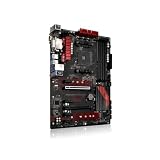
- Stable Power Delivery – Optimized circuit layout paired with digital regulation technology, complemented by filtering and energy storage components, delivers consistent, steady current output for core hardware.
- Efficient Thermal Performance – Built with a systematic thermal solution to enhance heat conduction and dissipation efficiency, maintaining a reasonable operating temperature even under high load.
- Broad Compatibility – Works with mainstream hardware specifications and reserves ample expansion ports, supporting various PC build configurations and future hardware upgrades.
- Reliable & Durable Build – Selected high-standard components with multiple circuit protection layers offer strong anti-interference capability for long-term stable operation.
- Hassle-Free Installation – Universal form factor with clearly labeled ports simplifies assembly and setup, making it easy to handle even for first-time builders.
Dual M.2: useful, but not two NVMe sockets
Top socket: PCIe/NVMe-capable
The upper Ultra M.2 socket supports PCIe Gen3 x4 storage, making it the board’s high-speed NVMe-capable position. Populating it affects resources available to the secondary full-length PCIe slot; the exact behavior depends on the platform configuration.
Lower socket: SATA M.2
The lower M.2 socket is SATA-based, not a second PCIe/NVMe socket. It shares resources with a SATA port, so using it can make that port unavailable. Check the board’s documented lane-sharing arrangement and manual before planning drives around every connector.
A straightforward setup is one NVMe boot drive in the upper socket, with additional SATA drives connected after checking port availability. A SATA M.2 drive in the lower socket may cost you a SATA connection. If you are considering two graphics cards alongside M.2 storage, the reduced secondary-slot bandwidth and sharing make this a poor fit; the board’s CrossFire support does not make it equivalent to a modern multi-GPU platform.
Free tools Windows power users keep installed
One-click scans. No signup required.
Rank #2
- Continuous Optimization: Our Motherboard has undergone continuous upgrades, enhancing its durability and reliability without affecting its normal performance and functions.
- Color Variation Notice: Please note that the color of the slot bottom plate on each batch of this Motherboard may vary, but it does not impact the quality or effectiveness of the product.
- The battery in the motherboard photo will be removed before shipping, because it is forbidden to use the battery in the CN terminal and customization.
- We guarantee that all products are tested before shipment!
- We recommend that you need certain background knowledge to install this product separately, otherwise, please let a professional install it.
Expansion, rear I/O and the compromises
The primary x16 slot is the practical graphics slot for a single-GPU system. The second full-length slot is bandwidth-limited; TweakTown described it as PCIe 2.0 x4 and noted resource sharing with the second M.2 position. B350 does not offer X370’s platform resources, and contemporary coverage did not treat this board as an SLI-capable choice.
For a low-cost board, rear connectivity was respectable: USB Type-C, five USB 3.x Type-A ports, two USB 2.0 ports, Gigabit Ethernet, PS/2, three analog audio jacks and display outputs for a suitable APU. The limitations are equally relevant today: no USB 3.1 Gen 2 implementation, no integrated Wi-Fi, a budget ALC892 codec, only three rear audio jacks and a modest fan-header count. It also lacks modern platform features such as PCIe 4.0 and USB4. These are era and price-class limitations, not evidence that it was unusually deficient in 2018.
The HDMI, DVI-D and D-Sub outputs do not provide video with a conventional Ryzen CPU that lacks integrated graphics. They are for compatible APUs; ASRock lists HDMI output limits up to 4K at 24 or 30 Hz depending on mode. ASRock’s specifications should be checked for the APU and display mode in question.
Rank #3

- Socket AM4, Digi Power design, 9 Power Phase design, Supports 105W Water Cooling (Pinnacle Ridge); Supports 95W Water Cooling (Summit Ridge); Supports 65W Water Cooling (Raven Ridge)
- Chipset: AMD Promontory B450
- Memory: 4x DDR4-3200+(OC)/2933/2667/2400/2133 DIMM Slots, Dual Channel, ECC, Non-ECC, Unbuffered, Max Capacity of 64GB (AMD Ryzen series CPUs (Pinnacle Ridge))
- Slots: 6x PCI Express 3.0 x16 Slots (two run at x8; two run at x4; one runs at x2); 4x PCI Express 2.0 x1 Slots
- SATA: 4x SATA3 Ports, Support RAID 0, 1, 10, NCQ, AHCI and Hot Plug; 2x SATA3 Ports by AS Media ASM1061, Support NCQ, AHCI and Hot Plug
VRM and overclocking: capable, not a high-end power stage
AnandTech identified an Intersil ISL95712 PWM controller, doubled CPU-side phases and Sinopower MOSFETs. It considered the power delivery adequate for an eight-core Ryzen with a modest overclock and reported running a Ryzen 7 1700 at 3.9 GHz. TweakTown described an 8+3-phase arrangement and reported a Ryzen 7 1800X reaching 4 GHz, while cautioning that the VRM was not especially strong. These are results from separate review systems, not clocks guaranteed for another CPU or board.
Recommended Free Tools
For an overclocked or higher-power CPU, provide airflow around the socket and VRM heatsinks. A tower air cooler often moves some air across this area; an AIO can reduce that airflow, so case fans may need to compensate. AnandTech also noted that the heatsinks use plastic push pins rather than screw mounting. Do not treat the reviewers’ clock results as proof that an old, used board can sustain the same load with unknown thermal history.
What reviewers found in testing
AnandTech’s results
AnandTech tested power with a GTX 980 system and Thermaltake 1200 W PSU, along with POST time, audio, DPC latency, processor, memory, system and gaming workloads. In that setup, idle power was very low among the tested AM4 boards, while load power was broadly comparable with other ATX boards. DPC latency stayed below 150 microseconds, and gaming performance was not meaningfully held back by B350 in its test suite. ALC892 audio results were below boards using ALC1220, consistent with the lower-tier codec. These findings describe AnandTech’s particular test configuration, not all systems built on the board. AnandTech’s test results
Rank #4

- Robust Power Solution: high-quality alloy chokes, and durable capacitors to support multi-core processors
- Optimized Thermal Design: Massive heatsinks with strategically cut airflow channels and high conductivity thermal pads
TweakTown’s results
TweakTown’s configuration used a Ryzen 7 1800X, Corsair H110i, 16 GB Corsair Vengeance DDR4-3000, GeForce GTX 980, Windows 10 and BIOS 2.2. It reported performance comparable with X370 boards and a 4 GHz CPU overclock, advising airflow for the VRM when using an AIO. That is one reviewer’s result with that CPU, firmware and cooling setup—not a universal overclocking guarantee. TweakTown’s test details
Independent reader supportYour contribution helps us test, update, and keep practical guides available for everyone.BIOS, memory and CPU support require checking
Early AM4 firmware and memory compatibility were less mature than later platform revisions. BIOS updates improved memory support, and AnandTech listed support up to DDR4-3200; that is not a plug-and-play promise for every CPU, kit or DIMM arrangement. TweakTown reached DDR4-3200 with a Ryzen 5 1600X but not with its Ryzen 7 1800X setup. Four DIMMs, dual-rank modules, CPU memory controllers and BIOS versions can all affect achievable speed. A two-DIMM kit is the simpler choice when building around an early AM4 board.
Crashes, No Sound, or Screen Glitches?
Random freezes, missing sound and display glitches usually trace back to one bad driver. Find and replace yours safely.Free scan · under a minutePC Slower Than It Used to Be?
A free scan shows the junk files, broken settings and background clutter dragging Windows down - then fixes them in one click.Free scan · Windows 10 & 11ASRock’s historical FAQ says manual Ryzen voltage adjustment required BIOS L1.43 or later, while an older technical reference lists CPU multiplier support from L1.40. These are minimums for specific historical features, not a recommendation to install a particular version today. ASRock’s FAQ
Best Value

- Supports AMD AM4 Socket Ryzen 3000, 4000 G-Series and 5000 Series Desktop Processors
- 8 Phase, Digi Power, Dr. MOS
- Supports DDR4 4733+ (OC)
- 1 PCIe 4.0 x16 Slot, 1 PCIe 3.0 x16 Slots, 1 PCIe 3.0 x1 Slot, 1 M.2 Key E for Wi-Fi
- Graphics Outputs: 1 HDMI, 1 DisplayPort
ASRock’s product support information lists Summit Ridge, Raven Ridge, Pinnacle Ridge, Picasso, Matisse and Bristol Ridge processor families. That does not mean every CPU in those families works with every installed BIOS. Confirm the exact processor in ASRock’s CPU support information and note the required BIOS before buying. Do not infer Ryzen 5000 support from the AM4 socket alone. ASRock CPU support reference
A used board may have an old BIOS, and do not assume it can update firmware without a supported CPU already installed. ASRock’s BIOS page includes CPU-family warnings for particular updates; read the notes for the exact version and processor before flashing rather than blindly installing the newest entry. Settings may reset to defaults after an update. For a BIOS operation that could affect BitLocker, retain the recovery key first. ASRock BIOS downloads and notes
ASRock lists Windows 10 and Windows 11 64-bit support on the product page but specifically says Bristol Ridge and Summit Ridge do not officially support Windows 11. That distinction matters: motherboard support does not override the operating system’s CPU requirements. ASRock product information
Should you buy one used in 2026?
It can still make sense as a low-cost AM4 repair or budget build when you already have compatible DDR4 and a supported CPU. Its historical strengths—two differently implemented M.2 sockets, six SATA ports, four DIMM slots and adequate basic connectivity—remain useful. But the original $90 price is not a current deal benchmark, and ASRock says availability may vary by region. Compare the full cost with a tested newer AM4 board, including the return policy and any missing parts. ASRock product page
Quick Recap
Before paying, verify
- The exact CPU model and the minimum BIOS version it requires.
- The installed BIOS version, and whether the seller can demonstrate a successful POST with your intended CPU.
- That both M.2 sockets work, and which SATA port or secondary PCIe resources your intended drive layout will use.
- Socket condition, DIMM slots, primary PCIe slot, VRM heatsinks, USB ports and Ethernet; look for bent pins, corrosion, damage or signs of overheating.
- Whether the M.2 screw and I/O shield are included, whether the board is tested or untested, and whether returns are accepted.
- Whether a newer B450 or other tested AM4 board costs only slightly more, or whether your needs require PCIe 4.0, Wi-Fi, USB 3.2 Gen 2 or stronger power delivery.
Choose it—or pass—based on the system
- Already own one: Keep using it if stable and compatible with your CPU; there is no need to replace it solely because it is old.
- Buying for a cheap single-GPU AM4 build: Consider it only at a suitably low used price, with working-condition evidence and BIOS compatibility confirmed.
- Building new or needing modern connectivity: Compare newer boards on total platform cost, BIOS support, storage layout, warranty and PCIe generation; do not pay a premium for this board’s dual-M.2 label.
- Planning aggressive sustained overclocking or multi-GPU: Choose a board with stronger power delivery and more suitable expansion instead.
Product prices and availability are accurate as of the date/time indicated and are subject to change. Any price and availability information displayed on Amazon at the time of purchase will apply.

