Freedom251 › Keyboard and Mouse Customization Software
ZMouse
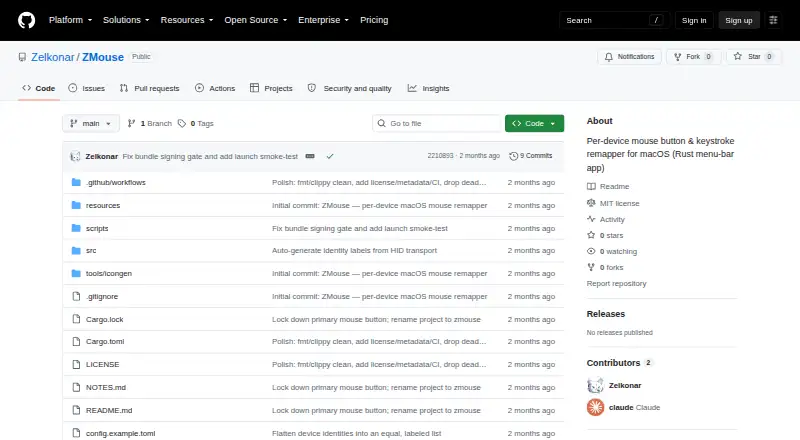
What ZMouse is
ZMouse is a free, open-source macOS utility for assigning separate mouse-button and MMO thumb-button mappings to each physical mouse. It identifies devices by USB vendor and product IDs, with mappings designed to persist after reconnects, reboots and switching a wireless mouse between dongle and Bluetooth. Multiple identities from one mouse can share mappings. Buttons can send modified keystrokes, act as another mouse button or be disabled. Scroll controls can filter reverse ticks or strengthen weak ticks, while trackpads are not changed. ZMouse runs as a native menu-bar app with a graphical editor and live updates. Apple’s built-in trackpad and keyboard are excluded from discovery. A command-line interface can launch the app or editor, apply mappings without the GUI, list mice and probe HID, event-tap and scroll data. It requires macOS on Apple Silicon or Intel, and first launch needs Accessibility and Input Monitoring permissions.
Who it suits
ZMouse suits macOS users who need per-device mouse remapping, including MMO-style thumb buttons. It is intended for Apple Silicon or Intel Macs and may have rough edges.
What it does well
- Per-device mappings use stable USB IDs
- Mappings survive reconnects and reboots
- Buttons support keystrokes or remapping
- Live graphical editor
- Command-line controls included
What to know first
- macOS only
- Requires Accessibility and Input Monitoring permissions
- Personal project may have rough edges
- Build and installation use source instructions
Verdict
ZMouse offers detailed per-mouse remapping with persistent device identities, a live GUI and CLI tools. It is a focused macOS project whose setup requires system permissions and may be uneven on hardware beyond the author’s.
Facts from ZMouse's own pages
- Availability
- The README describes ZMouse as a personal, macOS-only project that works on the author’s hardware and may have rough edges. · github.com, 5 Oct 2026
- Build and install
- The README documents building from source with Rust or bundling a self-signed .app for installation in /Applications. · github.com, 5 Oct 2026
- Button actions
- A button can send a keystroke with modifiers, map to another mouse button, or be disabled. · github.com, 12 Oct 2026
- CLI
- The command-line interface can launch the app, edit or apply mappings, list mice, inspect HID and event-tap streams, and diagnose scroll-wheel deltas. · github.com, 12 Oct 2026
- Configuration
- Configuration is stored at ~/Library/Application Support/zmouse/config.toml. · github.com, 5 Oct 2026
- Device grouping
- The app can group multiple identities for one physical mouse so they share one set of mappings. · github.com, 12 Oct 2026
- Device mappings
- Mappings use USB vendor and product IDs and are designed to survive reconnects, reboots, and switching between a wireless mouse’s dongle and Bluetooth. · github.com, 5 Oct 2026
- Install and platform
- The stated requirement is macOS on Apple Silicon or Intel; the README describes building and installing from source with Rust. · github.com, 12 Oct 2026
- Interface
- ZMouse includes a native menu-bar app and an egui configuration editor, and edits apply live. · github.com, 12 Oct 2026
- Keystroke buttons
- MMO thumb buttons that emit keys such as 1–9, 0, - and = can be remapped per device without remapping a real keyboard. · github.com, 12 Oct 2026
- License
- The GitHub repository identifies its license as MIT. · github.com, 12 Oct 2026
- Per-device mappings
- Mappings use stable USB vendor and product IDs and are designed to persist across reconnects, reboots, and switching a wireless mouse between its dongle and Bluetooth. · github.com, 12 Oct 2026
- Permissions
- The app requires Accessibility and Input Monitoring permissions on first launch. · github.com, 12 Oct 2026
- Project status
- The maker describes ZMouse as a personal project that works on the author's hardware and may have rough edges. · github.com, 12 Oct 2026
- Purpose
- ZMouse is a per-device mouse button and keystroke remapper for macOS, written in Rust. · github.com, 12 Oct 2026
- Safety
- The built-in Apple trackpad and keyboard are excluded from device discovery. · github.com, 5 Oct 2026
- Safety behavior
- The built-in Apple trackpad and keyboard are excluded from device discovery. · github.com, 12 Oct 2026
- Scroll controls
- Scroll-wheel options include a jitter filter and a weak-tick boost, and the app says it never touches trackpads. · github.com, 12 Oct 2026
- Supported operating systems
- macos · github.com, 22 Sept 2026