Zen
What Zen is
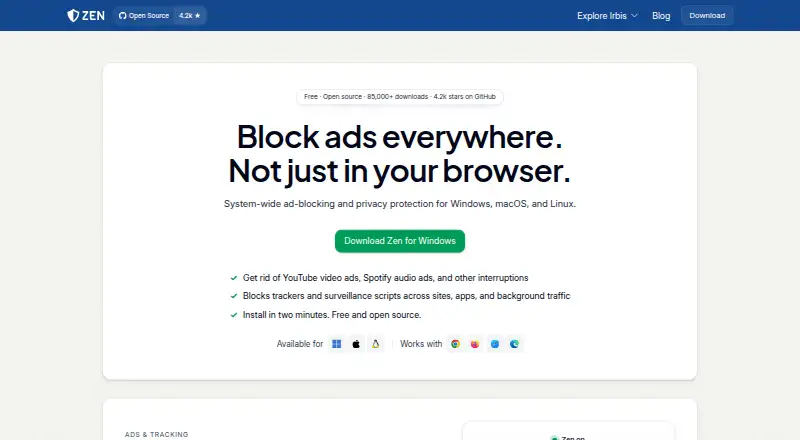
Zen is a free desktop app for Linux, macOS, and Windows that filters ads, trackers, and malware in browsers and desktop apps. It runs a proxy on the computer and routes system traffic through it, checking requests against filter lists. Zen can hide blank ad spaces and run page scripts intended to disable ads and tracking. Cookie popup blocking is also supported.
Its lists cover ads, trackers, and malware, with 35 regional lists included. Users can add ad-block or hosts lists and create their own rules. Irbis names Chrome, Firefox, Safari, Edge, Opera, and Brave as supported browsers. Apps that use their own networking stack or certificate pinning may get around filtering or require an exclusion in settings.
Zen processes traffic on the user’s device and says it does not collect browsing data or send it to the maker or third parties. It creates its local root certificate on the device, keeping the private key there. Debug logs remain local, redact hostnames, and can be deleted. Zen works with any VPN on Windows and Linux, and most VPNs on macOS. Irbis describes itself as a small independent organization developing Zen; bug reports go through GitHub and help is available on Discord.
Who it suits
Zen suits desktop users who want system wide filtering across browsers and other apps, with options to add lists or write custom rules. It may also suit users who want filtering to run locally and who use a VPN on Windows, Linux, or macOS.
What it does well
- Free desktop app for Linux, macOS, and Windows.
- Filters ads, trackers, and malware across browsers and desktop apps.
- Includes 35 regional lists and supports custom rules.
- Supports cookie popup blocking.
- Browsing data and debug logs stay on the device.
What to know first
- Some apps can bypass filtering or need an exclusion.
- VPN support on macOS covers most VPNs, not all.
Limits
Apps with their own networking stack or certificate pinning may bypass Zen or need to be excluded in settings.
Plans
| Plan | Billed and limits | Price |
|---|---|---|
| Zen | Windows, macOS, and Linux desktop app · apps with their own networking stack or certificate pinning may bypass it | Free |
As irbis.sh lists them, read 11 Oct 2026. The maker's own page has the final word.
Getting started
- Visit https://irbis.sh/zen.
- Choose the desktop app for Windows, macOS, or Linux.
- Set Zen's local proxy as the system proxy.
- Use the included filter lists or add lists and custom rules.
Verdict
Choose Zen if you want free, device based filtering with custom lists and rules across desktop browsers and apps. Look elsewhere if you need every app to be filterable, since apps with their own networking stack or certificate pinning may bypass it or need an exclusion.
Questions
How much does Zen cost?
Zen is free, at no cost plan.
Which computers and browsers does Zen support?
It is a desktop app for Linux, macOS, and Windows. Irbis names Chrome, Firefox, Safari, Edge, Opera, and Brave as supported browsers.
Can I add my own filters?
Yes. Zen lets users add ad-block or hosts lists and write their own rules.
Does Zen send browsing data to its maker?
Zen says it runs on the user’s device and does not collect browsing data or send it to the maker or third parties. Debug logs also stay local and can be deleted.
Does Zen work with VPNs?
It works with any VPN on Windows and Linux, and most VPNs on macOS.
Who develops Zen, and where can I get help?
Irbis describes itself as a small independent organization developing Zen. Users can report bugs through GitHub or ask for help on Discord.
Facts from Zen's own pages
- Browsers
- The maker lists Chrome, Firefox, Safari, Edge, Opera, and Brave as supported browsers. · irbis.sh, 11 Oct 2026
- Browser support
- major-browsers · irbis.sh, 20 Sept 2026
- Build integrity
- The maker says Zen builds are reproducible and attested using GitHub Actions' artifact attestation system. · irbis.sh, 11 Oct 2026
- Compatibility limit
- Apps with their own networking stack or certificate pinning can bypass Zen or need to be excluded in its settings. · irbis.sh, 11 Oct 2026
- Custom filter lists
- Yes · irbis.sh, 20 Sept 2026
- Custom rules
- Zen includes ad, tracker, and malware filter lists, including 35 regional lists, and lets users add ad-block or hosts lists or write their own rules. · irbis.sh, 11 Oct 2026
- Device coverage
- desktop · irbis.sh, 20 Sept 2026
- Filtering
- Zen checks requests against filter lists and can hide empty ad slots and run scripts to disable ads and tracking on web pages. · irbis.sh, 11 Oct 2026
- Free plan
- Yes · irbis.sh, 20 Sept 2026
- How it works
- Zen runs a proxy on the user's computer and sets it as the system proxy to filter traffic. · irbis.sh, 11 Oct 2026
- HTTPS security
- Zen generates its local root certificate on the device, and its private key never leaves the device. · irbis.sh, 11 Oct 2026
- Logs
- Zen stores debug logs locally with hostnames redacted; users can delete them, and the logs are not sent to the maker or third parties. · irbis.sh, 11 Oct 2026
- Organization
- Irbis describes itself as a small independent organization developing Zen. · irbis.sh, 11 Oct 2026
- Privacy
- Zen runs on the user's device and does not collect browsing data or send it to the maker or third parties. · irbis.sh, 11 Oct 2026
- Purpose
- Zen blocks ads, trackers, and malware across browsers and desktop apps. · irbis.sh, 11 Oct 2026
- Support
- Users can report bugs through GitHub and ask for help on Discord. · irbis.sh, 11 Oct 2026
- Update security
- The maker says updates are served through a private Cloudflare R2 bucket and that a verifiable, cryptographically signed update system is in development. · irbis.sh, 11 Oct 2026
- VPN compatibility
- Zen works with any VPN on Windows and Linux, and with most VPNs on macOS. · irbis.sh, 11 Oct 2026
Where Zen stands on Freedom251
- Ad blockers#16 of 48