Freedom251 › Musical Tuner Apps
Chroma Ad-Blocker
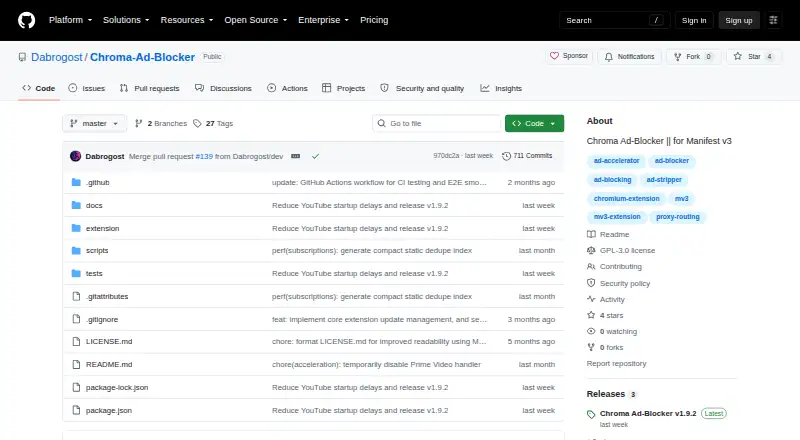
What Chroma Ad-Blocker is
Chroma Ad-Blocker is a free, open-source browser extension for local ad blocking in Chrome and Chromium-based browsers. It uses Chromium declarative network request rules and includes exactly 300,000 static rules. Filter options include Hagezi Pro Mini, EasyList, Fanboy Annoyance, Chroma’s scriptlet library, and lists added by the user. It can remove ad-related metadata from YouTube JSON payloads and redirect known Spotify web-player ad media to a packaged silent clip. Selected media domains can be routed through HTTP, HTTPS, SOCKS4, or SOCKS5 proxies while other browser traffic stays direct. Chroma says its settings, diagnostics, proxy details, statistics, and logs remain on the device, and that it does not run telemetry, analytics, or tracking servers. A local log may hold the newest 500 matched requests, including full URLs and rule metadata. HTTP and HTTPS proxy credentials are obfuscated locally, but the privacy policy says this is not strong encryption. Installation involves downloading a GitHub release, extracting the ZIP, and loading the unpacked extension in Chrome or Edge.
Who it suits
Chroma suits Chrome or Chromium users who want local filtering and configurable lists, including selected media proxy routing. Its local logging and user-added scripts may matter to people reviewing privacy and security tradeoffs.
What it does well
- Includes exactly 300,000 static rules.
- Supports several named filter lists and custom lists.
- Can route selected media domains through multiple proxy types.
- Free and open source.
What to know first
- Ad acceleration supports YouTube, not Prime Video or Twitch.
- Proxy credentials use obfuscation, not strong encryption.
- User-added scriptlets run in pages without auditing or sandboxing.
Limits
The free plan is available indefinitely. Remote filter lists are subject to size and rule-budget limits, and supported scriptlets are limited to Chroma's shipped implementations.
Plans
| Plan | Billed and limits | Price |
|---|---|---|
| Free | Free for everyone, forever | Free |
As github.com lists them, read 9 Oct 2026. The maker's own page has the final word.
Getting started
- Open the Chroma Ad-Blocker GitHub releases page.
- Download and extract a release ZIP.
- Load the unpacked extension in Chrome or Edge.
- Choose supported filters and add any user filter lists you need.
Chroma Ad-Blocker is a free, open-source Manifest V3 extension for Chrome and other Chromium browsers. It is best for technically comfortable users who want local filtering, editable lists, and selective proxy routing rather than a packaged consumer app. Its strongest case is control; its weakest points are the unpacked installation and important privacy caveats around logs, proxy credentials, and user scripts.
Overview
Chroma blocks requests locally through Chromium's declarative network request system and ships exactly 300,000 static rules. That gives it a substantial baseline without sending browsing activity to a vendor service. The extension says it runs no telemetry, analytics, or tracking servers, while settings, diagnostics, subscriptions, proxy configuration, statistics, and logs stay on the device.
Installation is less convenient than a store install: releases come from GitHub, and users must extract a ZIP and load the unpacked extension in Chrome or Edge. This suits users comfortable managing extensions, but is a poor fit for anyone seeking a maintenance-free setup.
Key features
Supported lists include Hagezi Pro Mini, EasyList, Fanboy Annoyance, Chroma's bundled scriptlets, and user-added filter lists. An element picker helps remove individual page elements, and multiple-browser support covers Chrome and Chromium-based browsers. Remote lists are fetched over HTTPS and parsed locally, but list size and rule-budget limits prevent treating the system as unlimited.
Media handling is specific rather than universal. Chroma removes ad-related metadata from YouTube JSON responses and redirects known Spotify web-player advertising media to a packaged silent clip. Its ad-acceleration feature supports YouTube, not Amazon Prime Video or Twitch, so users focused on those services should choose another blocker.
Selected media domains can use HTTP, HTTPS, SOCKS4, or SOCKS5 proxies while unrelated browser traffic stays direct. This split routing is useful when only particular services need a proxy, without forcing every tab through it.
When Chrome exposes matched-rule feedback, Chroma records the newest 500 reported matches locally. Entries can contain complete request URLs and rule metadata, making the log useful for troubleshooting but potentially sensitive on a shared or compromised computer. HTTP and HTTPS proxy credentials are stored locally in obfuscated form with a bundled extension key; the policy explicitly says this is not strong encryption. User-added scriptlet resources execute as JavaScript in the page's MAIN world, and Chroma does not audit or sandbox their intent, so custom scripts require real trust in their author.
Pricing
Free — free (free for everyone, forever). There is no trial because the entire product is free. This plan includes the extension, bundled rules, custom lists, element picking, media-specific handling, and proxy routing. It is compelling for individuals who accept manual installation and local administration; there is no paid tier to provide a more managed deployment or stronger credential protection.
Platforms
Chroma is an extension for Linux, macOS, and Windows, with browser-only device coverage. It targets Chrome and Chromium-based browsers, rather than offering a native system-wide blocker. The browser-only scope is suitable for desktop web use but does not cover non-browser applications.
Who it's for
Choose Chroma if you want open-source local blocking, control over filter subscriptions, an element picker, or proxying for selected media domains. It also suits users who prefer keeping diagnostics and configuration on their own machine.
Look elsewhere if you need a conventional store installation, protection for other applications, supported ad acceleration on Prime Video or Twitch, or a safer boundary for untrusted custom scripts and proxy secrets.
Pros and cons
Pros
- Local-first operation: no stated telemetry, analytics, or tracking servers, with core data retained on the device.
- Configurable filtering: established lists, bundled scriptlets, user lists, and an element picker give advanced users several ways to tune coverage.
- Selective proxy routing: four proxy protocols can be applied to chosen media domains while other traffic remains direct.
- Useful media measures: YouTube metadata filtering and Spotify ad-media redirection address specific web-player patterns.
Cons
- Manual deployment: loading an unpacked GitHub release demands more technical work than a browser-store extension.
- Privacy trade-offs: the local 500-entry request log may retain full URLs, and proxy credentials are not strongly encrypted.
- Script risk: user-added scriptlets run in the page's MAIN world without auditing or sandboxing.
- Fixed scope: the 300,000-rule package and remote-list budgets constrain expansion, while Prime Video and Twitch lack ad acceleration.
Alternatives
For a broader starting point, browse the Ad blockers list. If you are actually seeking a tuner rather than a blocker, GuitarTuner.io is a free web tuner with Android, iOS, macOS, and Windows apps, while Bandmate Chromatic Tuner is free on Android, iOS, and the web with no third-party ads. Centerline offers free chromatic tuning on Apple platforms with a one-time paid upgrade, and ChromTuner provides free browser and iPhone options. Cifra Club Tuner and Pro Guitar Tuner are alternatives for Android, iOS, and web users; GuitarTunePro keeps its core tuner free without signup or ads. JustATuner is a free Linux, macOS, and Windows option.
Verdict
Chroma Ad-Blocker is a strong choice for desktop Chromium users who value open-source local filtering and fine-grained list and proxy control, and who can handle an unpacked installation. Choose another blocker if you need broad video-service coverage, a simpler install, or stronger safeguards around stored credentials, request history, and executable user scripts.
Verdict
Chroma offers local filtering, list controls, and selective proxy routing for Chromium browsers. Readers should weigh its local request logging and the stated limits on credential protection and user-added scripts.
Questions
How much does Chroma Ad-Blocker cost?
The Free plan costs nothing and is free for everyone, forever.
Is there a free trial?
No free trial is offered; the product has a free plan.
Which browsers does it support?
It is a browser extension for Chrome and Chromium-based browsers. It is distributed through GitHub releases and loaded unpacked in Chrome or Edge.
Is Chroma open source?
Yes. It is an open-source extension, and the repository credits Dabrogost as a solo project.
What should I know about its local logs and proxy credentials?
When Chrome exposes matched-rule feedback, the local log stores up to the newest 500 reported matches and may include full request URLs and rule metadata. HTTP and HTTPS proxy credentials are stored locally in obfuscated form with a bundled key; the privacy policy says this is not strong encryption.
Facts from Chroma Ad-Blocker's own pages
- Browser support
- multiple-browsers · github.com, 20 Sept 2026
- Custom filter lists
- Yes · github.com, 20 Sept 2026
- Device coverage
- browser-only · github.com, 20 Sept 2026
- Element picker
- Yes · github.com, 20 Sept 2026
- Filtering
- It supports Hagezi Pro Mini, EasyList, Fanboy Annoyance, its bundled scriptlet library, and user-added filter lists. · github.com, 9 Oct 2026
- Free plan
- Yes · github.com, 20 Sept 2026
- Installation
- Chroma is distributed through GitHub releases, and installation involves extracting a ZIP and loading the unpacked extension in Chrome or Edge. · github.com, 9 Oct 2026
- Local request log
- When Chrome exposes matched-rule feedback, Chroma stores a local log of the newest 500 reported matches, which can include full request URLs and rule metadata. · github.com, 9 Oct 2026
- Maker
- The repository describes Chroma as a solo project and credits Dabrogost. · github.com, 9 Oct 2026
- Network blocking
- It uses Chromium declarative network request rules and packages exactly 300,000 static rules. · github.com, 9 Oct 2026
- Platform limitation
- Ad acceleration supports YouTube and is not available for Amazon Prime Video or Twitch. · github.com, 9 Oct 2026
- Privacy
- The extension says it does not operate telemetry, analytics, or tracking servers, and keeps core settings, diagnostics, subscriptions, proxy settings, statistics, and logs on the user's device. · github.com, 9 Oct 2026
- Product
- Chroma is a free, open-source Manifest V3 browser extension for local ad blocking in Chrome and Chromium-based browsers. · github.com, 9 Oct 2026
- Proxy credentials
- HTTP/HTTPS proxy credentials are stored locally in obfuscated form with a bundled extension key, which the privacy policy says is not strong encryption. · github.com, 9 Oct 2026
- Proxy routing
- It can route selected media domains through HTTP, HTTPS, SOCKS4, or SOCKS5 proxies while keeping unrelated browser traffic direct. · github.com, 9 Oct 2026
- Remote lists
- Remote filter lists are fetched over HTTPS, parsed locally, and subject to size and rule-budget limits; supported scriptlets are limited to Chroma's shipped implementations. · github.com, 9 Oct 2026
- Support
- The privacy policy directs questions to [email protected]. · github.com, 9 Oct 2026
- User scripts
- Advanced user-added scriptlet resources run as executable JavaScript in the page's MAIN world, and Chroma says it does not audit or sandbox their intent. · github.com, 9 Oct 2026
- Video and music
- It strips ad-related metadata from YouTube JSON payloads and redirects known Spotify web-player ad media to a packaged silent clip. · github.com, 9 Oct 2026
Where Chroma Ad-Blocker stands on Freedom251
- Musical Tuner Apps#2 of 32
- Ad blockers#14 of 48