Freedom251 › AI Video Caption Generators
ZapCap
What ZapCap is
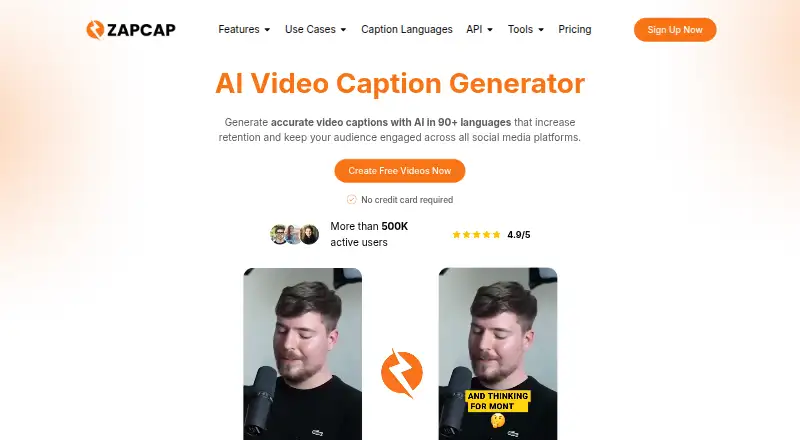
ZapCap creates AI captions for videos and provides editing tools for social media content. Users can upload a video or paste a YouTube, TikTok, or Instagram link, then export an MP4 or download subtitles in SRT, VTT, or TXT. Upload support includes MP4, MOV, MKV, and more than 60 formats, up to 4K. Captions can be styled and burned into video. The homepage describes caption generation in 90+ languages; its workflow page lists speech transcription in 100+ languages. Editing options include B-rolls, transitions, automatic descriptions and hashtags, sound effects, background music, and emoji caption templates. Pro and Agency+ include dubbing that replaces speech with a voice-cloned voiceover in one of 29 languages and adjusts captions, but does not change the picture for lip sync. ZapCap also offers an API that can return captioned video, transparent overlays, or green-screen layers and supports webhook workflows. A free plan allows three videos per month, up to 1 minute 30 seconds each. Paid plans start at $8 a month, billed annually.
Who it suits
ZapCap suits emerging creators and people who want captioning and video-editing tools without editing experience. Its API also serves teams building captioning into workflows.
What it does well
- Supports uploads in 60+ formats, up to 4K.
- Exports MP4, SRT, VTT, and TXT.
- Captions are available in 90+ languages.
- Offers styling, burn-in captions, and editing tools.
- Free plan includes three videos monthly.
What to know first
- Free videos are limited to 1 minute 30 seconds.
- Starter limits videos to 2 minutes.
- Dubbing costs 2 AI credits per second.
- Dubbing does not alter pictures for lip sync.
Limits
The Free plan allows 3 videos per month, up to 1 minute 30 seconds each, and has no custom templates. Starter allows 15 projects per month and 2-minute videos; Pro allows 50 projects per month and 5-minute videos; Agency+ allows 200 projects per month and 10-minute videos. Enterprise offers custom video duration.
Plans
| Plan | Billed and limits | Price |
|---|---|---|
| Free | 3 videos / month · 1min 30s / video · no custom templates · AI descriptions and hooks | Free |
| Starter | $96/year, billed annually · 15 projects / month · 2min / video · 3 custom templates · no watermark · AI descriptions and hooks | $8 a month |
| Pro | $192/year, billed annually · 50 projects / month · 5min / video · 5 custom templates · up to 2x faster processing · premium templates · API access (credits sold separately) | $16 a month |
| Agency+ | $384/year, billed annually · 200 projects / month · 10min / video · 10 custom templates · up to 4x faster processing · premium templates · API access (credits sold separately) | $32 a month |
| Enterprise | Contact us · Enterprise-level support · payment via invoice · custom duration per video | On request |
As zapcap.ai lists them, read 9 Oct 2026. The maker's own page has the final word.
Getting started
- Visit https://zapcap.ai/.
- Choose the Free plan or a paid plan; paid plans start at $8 a month, billed annually.
- Upload a video or paste a YouTube, TikTok, or Instagram link.
- Style and edit the captions, then export an MP4 or download SRT, VTT, or TXT subtitles.
Verdict
ZapCap combines caption generation, styling, and social-video editing, with separate API and dubbing options. The free tier is limited in video length, while paid plans raise project and duration allowances.
Questions
Is ZapCap free?
Yes. Its Free plan costs nothing and allows 3 videos per month, each up to 1 minute 30 seconds.
How much do paid plans cost?
Starter is $8 a month, billed $96/year; Pro is $16 a month, billed $192/year; Agency+ is $32 a month, billed $384/year. Enterprise pricing is available by contacting the company.
Which platforms does ZapCap support?
The listed platforms are Android, API, iOS, and web.
What subtitle formats can I download?
You can download SRT, VTT, or TXT subtitles, or export the video as MP4.
How does AI dubbing work, and which plans include it?
It replaces spoken audio with a voice-cloned voiceover in one of 29 target languages and rebuilds captions to match. It is included with Pro and Agency+, uses 2 AI credits per second of video, and does not change the picture for lip sync.
What does the captioning API return?
It can return rendered captioned video, transparent overlays, or green-screen layers, and supports webhook workflows. API access on Pro and Agency+ requires separately sold credits.
Facts from ZapCap's own pages
- API
- Its captioning API accepts video and returns rendered captioned video, transparent overlays, or green-screen layers, and supports webhook workflows. · zapcap.ai, 9 Oct 2026
- API pricing
- The API page lists usage pricing of $0.10 per rendered video minute, with volume credits and dedicated capacity available. · zapcap.ai, 9 Oct 2026
- Audience
- ZapCap describes its intended users as emerging creators and says its tools are meant to make video editing accessible to people without editing experience. · zapcap.ai, 9 Oct 2026
- Burn-in captions
- Yes · zapcap.ai, 22 Sept 2026
- Caption styling
- Yes · zapcap.ai, 22 Sept 2026
- Dubbing
- AI dubbing replaces spoken audio with a voice-cloned voiceover in one of 29 target languages and rebuilds captions to match. · zapcap.ai, 9 Oct 2026
- Dubbing limits
- AI dubbing is included with Pro and Agency+, costs 2 AI credits per second of video, and does not change the picture for lip sync. · zapcap.ai, 9 Oct 2026
- Editing features
- The homepage lists B-rolls, transitions, automatic descriptions and hashtags, sound effects, background music, and caption templates with emojis. · zapcap.ai, 9 Oct 2026
- File support
- The homepage says uploads support MP4, MOV, MKV, and 60+ formats up to 4K. · zapcap.ai, 9 Oct 2026
- Free plan
- Yes · zapcap.ai, 22 Sept 2026
- Languages
- The homepage says ZapCap generates captions in 90+ languages, and its workflow page says speech transcription supports 100+ languages. · zapcap.ai, 9 Oct 2026
- Max video length
- 2 · zapcap.ai, 22 Sept 2026
- Platforms
- ZapCap runs in a modern browser and can be used from desktop, iPhone, or Android without an app download or plugin. · zapcap.ai, 9 Oct 2026
- Privacy and security
- The privacy policy says personal information is stored or processed in the United States, protected by commercially acceptable measures, and may be shared with listed service providers including Google Cloud Platform and Sentry. · zapcap.ai, 9 Oct 2026
- Product
- ZapCap generates AI captions for videos, with animated styles and editing tools for social media content. · zapcap.ai, 9 Oct 2026
- Paid from
- 8 · zapcap.ai, 22 Sept 2026
- Subtitle export
- other formats · zapcap.ai, 22 Sept 2026
- Support
- The pricing page offers enterprise-level support for the Enterprise plan. · zapcap.ai, 9 Oct 2026
- Video input and output
- Users can upload video or paste a YouTube, TikTok, or Instagram link, then export MP4 or download SRT, VTT, or TXT. · zapcap.ai, 9 Oct 2026
Where ZapCap stands on Freedom251
- AI Video Caption Generators#8 of 99