Freedom251 › Photo Calendar Software

WTPBiz Photo Calendar Designer
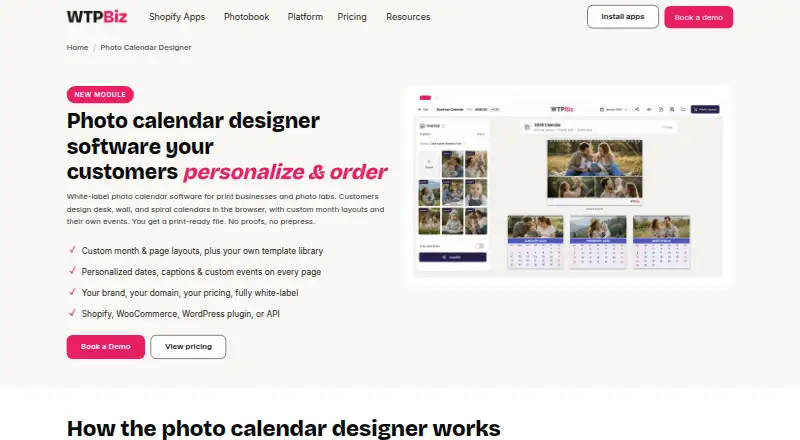
What WTPBiz Photo Calendar Designer is
WTPBiz Photo Calendar Designer is white-label software that lets print businesses and photo labs offer browser-based design and ordering for desk, wall, spiral and wall-hang calendars. Customers can select a start month, add events and captions, adjust date and month colors, and upload multiple photos. The editor provides a live preview, draft saving, filters, pattern overlays and text art, along with AI-assisted layout suggestions, one-click translation and right-to-left editing.
Each order produces a print-ready file sized for its calendar format, with bleed, cut and safe margins applied automatically. The product can connect with Shopify, WooCommerce, Magento, a WordPress plugin, custom APIs, and Cloudprinter or Gelato fulfillment. It can also connect to a management information system or accounting software. The service operates under the customer's brand and domain, with the customer's pricing; shoppers do not see WTPBiz. WTPBiz says setup is handled for the customer and typically takes 4–5 business days. Pricing is confirmed during a demo, and there is no free plan or free trial. The maker offers a free 15–30 minute demo.
Who it suits
It suits calendar and print businesses, photo labs, and businesses or realtors that order branded calendars in bulk. It is a fit for sellers who want customers to design calendars online while orders produce print-ready files for fulfillment.
What it does well
- Supports desk, wall, spiral and wall-hang calendar layouts.
- Print files include automatic bleed, cut and safe margins.
- Customers can personalize dates, events, captions and colors.
- Connects to ecommerce platforms, APIs and fulfillment services.
- Runs under the customer's brand, domain and pricing.
What to know first
- There is no free plan or free trial.
- Pricing is confirmed during a demo rather than listed.
- Setup typically takes 4–5 business days.
Limits
There is no free plan or free trial. The add-on module has separate setup and pricing confirmed during a demo.
Plans
| Plan | Billed and limits | Price |
|---|---|---|
| Photo Calendar Designer add-on | Setup and pricing confirmed during a demo · Separate add-on module · Own setup and pricing | On request |
As wtpbiz.com lists them, read 8 Oct 2026. The maker's own page has the final word.
Getting started
- Visit the WTPBiz Photo Calendar Designer website.
- Request the free 15–30 minute product demo.
- Confirm setup and pricing during the demo.
- Arrange the customer-branded setup, which WTPBiz says typically takes 4–5 business days.
- Connect the relevant ecommerce, API, management or fulfillment services.
Verdict
Choose WTPBiz Photo Calendar Designer if you need a branded browser calendar designer with print-ready output and ecommerce or fulfillment connections. Its paid pricing is confirmed during a demo, so businesses looking for a published price or free trial should look elsewhere.
Questions
How much does WTPBiz Photo Calendar Designer cost?
Pricing is on request and confirmed during a demo. The add-on module has its own setup and pricing.
Is there a free plan or trial?
No free plan or free trial is listed. WTPBiz offers a free 15–30 minute product demo.
Which platforms does it support?
The listed platforms are web and API.
Which calendar formats can customers design?
The designer supports desk, wall, spiral and wall-hang calendars.
What integrations are listed?
The product page names Shopify, WooCommerce, a WordPress plugin, Magento, custom API connections, Cloudprinter and Gelato. It can also connect with management information or accounting software.
Who makes the product?
WTPBiz makes the product. Its About page identifies founder Rohan Roy.
Facts from WTPBiz Photo Calendar Designer's own pages
- AI and language support
- The page lists AI-assisted layout suggestions, one-click AI translation, and right-to-left editor support. · wtpbiz.com, 8 Oct 2026
- Branding
- The product runs under the customer's brand and domain, with their own pricing; the page says shoppers never see WTPBiz. · wtpbiz.com, 8 Oct 2026
- Calendar formats
- The designer supports desk, wall, spiral, and wall-hang calendar layouts. · wtpbiz.com, 8 Oct 2026
- Company information
- WTPBiz identifies its founder as Rohan Roy, but its About page does not provide a founding year or a specific headquarters statement. · wtpbiz.com, 8 Oct 2026
- Editor tools
- The browser editor includes real-time preview, draft saving, multi-photo upload, filters, pattern overlays, and text art. · wtpbiz.com, 8 Oct 2026
- Headquarters
- Pune, Maharashtra, India · wtpbiz.com, 23 Sept 2026
- Integrations
- The product page lists Shopify, WooCommerce, a WordPress plugin, Magento, custom API connections, and Cloudprinter and Gelato fulfillment. · wtpbiz.com, 8 Oct 2026
- Intended customers
- The page describes the product for calendar businesses, print businesses, photo labs, and businesses or realtors ordering branded calendars in bulk. · wtpbiz.com, 8 Oct 2026
- Payment handling
- WTPBiz says payments go through the customer's chosen payment gateway directly to their account and that WTPBiz does not process or store card data. · wtpbiz.com, 8 Oct 2026
- Personalization
- Customers can choose a start month, add events and captions, and change colors for dates and months. · wtpbiz.com, 8 Oct 2026
- Print output
- Each order generates a print-ready file sized for the calendar format, with bleed, cut, and safe margins handled automatically. · wtpbiz.com, 8 Oct 2026
- Purpose
- White-label photo calendar software for print businesses and photo labs lets customers design desk, wall, and spiral calendars in a browser. · wtpbiz.com, 8 Oct 2026
- Security
- WTPBiz says its solutions run on protected AWS and Render.com hosting, use HTTPS/SSL, and encrypt customer designs and details in transit. · wtpbiz.com, 8 Oct 2026
- Setup time
- WTPBiz says typical setup takes 4–5 business days and is done for the customer. · wtpbiz.com, 8 Oct 2026
- Support and demo
- The maker offers a free 15–30 minute product demo; the contact page says technical support is included with every plan. · wtpbiz.com, 8 Oct 2026
- Workflow integration
- The designer can connect with a management information system or accounting software. · wtpbiz.com, 8 Oct 2026
Where WTPBiz Photo Calendar Designer stands on Freedom251
- Photo Calendar Software#25 of 26