Freedom251 › Sign Design Software
WrapStudio AI
What WrapStudio AI is
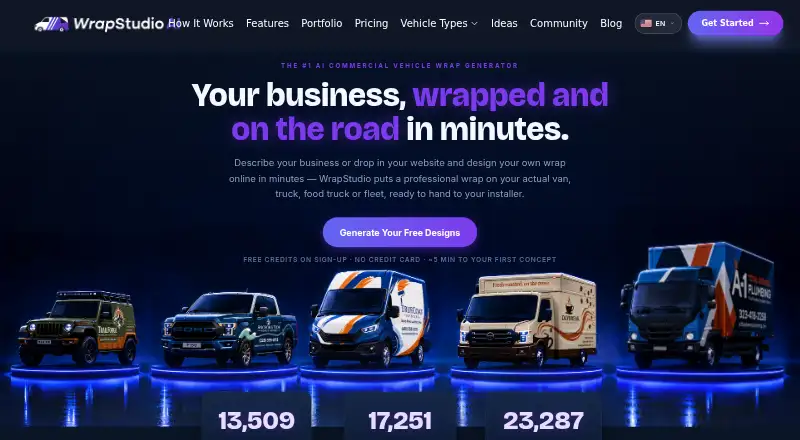
WrapStudio AI is a browser-based studio for creating vehicle-wrap concepts from a business description or website. It is presented for commercial vans, trucks, food trucks and fleets, and also supports personal vehicle wraps. Users can upload a vehicle photo, select a model from the library or search for a specific make and model. Website import reads a business name, services, brand colors and logo, then creates a concept on a matched vehicle. Designs can be refined with notes, outlined areas, reference images or plain-language instructions, with help from an AI design assistant. The site says it checks design text against the brief, redraws errors and does not invent contact information missing from the brief. Exports include SVG, PNG and JPG; users can share a public design board or download a PDF for a wrap shop. The studio also creates short design videos from presets or a described scene. The free plan grants credits at registration. Basic costs $19.99, paid once for 100 credits; Pro costs $49.99, paid once for 300 credits. The terms describe designs as mockups, not production-ready guarantees.
Who it suits
It suits businesses and individuals who want to develop vehicle-wrap concepts in a browser, including commercial fleets and personal vehicles. Wrap shops may receive shared designs or a PDF brief, but installers should verify the concept before printing.
What it does well
- Accepts vehicle photos, library models or make-and-model searches.
- Imports business details and branding from a website.
- Exports SVG, PNG and JPG files.
- Provides shareable boards and wrap-shop PDFs.
What to know first
- Designs are mockups; physical colors, scale and alignment may differ.
- Uploaded photos and prompts may be stored and sent to AI providers.
- Used credits are non-refundable, except the company invites contact if its side goes wrong.
Limits
The free plan grants credits at registration, but no quantity is stated. Basic costs 19.99 USD once for 100 credits and includes up to 25 mockups or 33 flat designs and up to 50 refinements; Pro costs 49.99 USD once for 300 credits and includes up to 75 mockups or 100 flat designs and up to 150 refinements. Designs are concepts, so the terms advise installer verification before printing.
Plans
| Plan | Billed and limits | Price |
|---|---|---|
| Free | credits on sign-up · Free credits granted at registration · auto-design from URL or photo · accuracy checks · no credit card required | Free |
| Basic | 100 credits · Watermark-free images · PNG, JPG and print-ready SVG downloads · shareable links and Wrap-Brief PDF · up to 25 mockups or 33 flat designs · up to 50 refinements | $19.99, paid once |
| Pro | 300 credits · Everything in Basic · up to 75 mockups or 100 flat designs · up to 150 refinements · priority generation | $49.99, paid once |
As wrapstudio.ai lists them, read 5 Oct 2026. The maker's own page has the final word.
Getting started
- Open https://wrapstudio.ai/ in a web browser; nothing needs to be installed.
- Start with the free plan, which grants credits at registration and requires no credit card.
- Upload a vehicle photo, choose a library model or search for a make and model.
- Create a concept from a business website or refine it with notes, marked areas, images or instructions.
- Export a design, share a public board or download a PDF for a wrap shop.
- Choose a one-time Basic or Pro credit plan if you need its listed credits and features.
WrapStudio AI is a browser-based studio for turning business information or vehicle images into wrap concepts. It is best suited to businesses and designers exploring branded vans, trucks, food trucks or fleets. Its strongest advantage is the path from brand details to a refinable, shareable mockup; production still needs an installer’s review.
Overview
Users can begin with a vehicle photo, select a model from a library or search for an exact make and model. The website auto-design feature uses a business name, services, brand colors and logo to create a concept on a matched vehicle. That makes WrapStudio AI a focused option for developing a branded direction, rather than a substitute for the work needed to prepare and verify a physical wrap.
Key features
Users can steer refinements with notes, outlined areas, reference images or plain-language instructions, assisted by an AI design assistant. That range gives users several ways to guide changes to a concept. The service says it checks design text against the brief and redraws errors, and avoids inventing contact information absent from the brief—useful safeguards for business-facing mockups.
Designs export as SVG, PNG or JPG; users can also share a public design board or download a PDF for a wrap shop. Short design videos can use street-drive, showroom-reveal, orbit or scenic-drive presets, or a custom described scene. These options help present and discuss a concept, while the PDF provides a route to share it with an installer.
The terms caution that designs are concepts: color, scale and alignment can differ from a physical installation. Users should confirm those details with their installer before printing. Uploaded photos and prompts may be stored and sent to AI providers to run the service and generate designs, a consideration for anyone handling sensitive business or vehicle imagery.
Pricing
The free plan costs nothing and grants credits at registration, with URL- or photo-based auto-design and accuracy checks; no credit card is required. It is a low-commitment way to explore the workflow, but the published plan does not include the watermark-free downloads and stated mockup, flat-design and refinement quotas of the paid options.
Basic costs $19.99, paid once and bills 100 credits. It includes watermark-free images, PNG, JPG and print-ready SVG downloads, shareable links and a Wrap-Brief PDF, with capacity for up to 25 mockups or 33 flat designs and up to 50 refinements. This is the more suitable paid choice for an individual or small project that needs production-oriented files and a defined amount of iteration.
Pro costs $49.99, paid once and bills 300 credits. It includes everything in Basic, raises capacity to up to 75 mockups or 100 flat designs and up to 150 refinements, and adds priority generation. It better fits users expecting a larger design workload; Basic is the narrower one-time purchase for a smaller set of concepts. Unused credits do not expire while an account is active. Purchased credits are generally non-refundable once used, though the company invites users to contact it if something goes wrong on its end.
Platforms
WrapStudio AI runs in a web browser, with nothing to install. That suits users who want browser access rather than a desktop-only workflow.
Who it's for
It is a good fit for businesses, designers and fleet operators developing vehicle-wrap concepts, including personal vehicle projects. The brand-to-mockup workflow and sharing options are most useful when the goal is to explore and communicate a design direction. It is less suitable as a final production authority, since installers need to verify physical color, scale and alignment.
Pros and cons
- Pro: Website-based brand inputs can produce a concept on a matched vehicle, giving businesses a direct way to explore their identity on a vehicle.
- Pro: Multiple refinement methods, text checking and the restraint around unprovided contact information help users guide and review business-facing concepts.
- Pro: SVG, image exports, a shareable board and a wrap-shop PDF support both presentation and handoff.
- Con: Mockups can differ from the installed result in color, scale and alignment, so they cannot replace installer confirmation before printing.
- Con: Photos and prompts may be stored and sent to AI providers, which may not suit users with sensitive material.
- Con: Paid usage is credit-based and bounded by plan quotas, so larger workloads may require the higher-credit Pro purchase.
Alternatives
For a broader directory of sign-focused tools, browse Sign Design Software. LED Wizard is a freemium web and Windows option for fast auto layouts, title blocks with stats, scaling populations and a streamlined workflow. Exact-Cut is a free macOS and Windows alternative. SignMaster is a paid Windows option with a free trial. Lectra Kubix Link PLM is a paid web and Windows option with demo access by request. MacSign is a paid macOS and Windows option. SignCut Draw is a free Windows option. SignPlot is a paid Windows option. Easy Cut Studio is a paid macOS and Windows option with a free trial; its Windows 6 license costs $59.95, paid once.
Verdict
Choose WrapStudio AI if you need to turn business branding into a vehicle-wrap concept and refine or share it without installing desktop software. Its blend of brand-based generation, revision controls and useful export formats is the main reason to choose it. Look elsewhere if you need a guaranteed production-ready result without installer checks, or if sending uploaded photos and prompts to AI providers is unacceptable.
Verdict
WrapStudio AI offers several ways to create and refine vehicle-wrap concepts, with image, vector and PDF outputs. Treat the result as a mockup and confirm details with the installer before printing.
Questions
Is there a free plan?
Yes. Free credits are granted at registration, and no credit card is required.
How much do the paid plans cost?
Basic costs 19.99 USD once for 100 credits. Pro costs 49.99 USD once for 300 credits.
What platforms does WrapStudio AI support?
It runs in a web browser, with nothing to install.
What files can I export?
Designs can be exported as SVG, PNG or JPG. Users can also share a public design board or download a PDF for a wrap shop.
Who operates the service?
The legal notice names YoungCode LLC and gives an address in Cheyenne, Wyoming, United States.
Can I get unused credits refunded?
The terms say unused credits do not expire while an account is active. Used credits are non-refundable; the company invites users to contact it if something goes wrong on its end.
Facts from WrapStudio AI's own pages
- Animation
- The studio can generate short design videos using street drive, showroom reveal, orbit and scenic drive presets, or a described custom scene. · wrapstudio.ai, 5 Oct 2026
- Browser-based
- The product runs in a browser and the site says there is nothing to install. · wrapstudio.ai, 5 Oct 2026
- Canvas refinement
- Users can refine designs with notes, outlined areas, reference images or plain-language instructions, with assistance from an AI design assistant. · wrapstudio.ai, 5 Oct 2026
- Company
- The legal notice names YoungCode LLC and lists its address in Cheyenne, Wyoming, United States. · wrapstudio.ai, 5 Oct 2026
- Content and AI providers
- The terms say uploaded photos and prompts may be stored and sent to AI providers to operate the service and generate designs. · wrapstudio.ai, 5 Oct 2026
- Credits and refunds
- The terms say credits are purchased through Stripe, unused credits do not expire while an account is active, and used credits are non-refundable except the company invites users to contact it if something goes wrong on its end. · wrapstudio.ai, 5 Oct 2026
- Design caveat
- The terms say designs are concepts and mockups, and colors, scale and alignment may differ from a physical installation, so users should verify with their installer before printing. · wrapstudio.ai, 5 Oct 2026
- Exports
- Designs can be exported as SVG, PNG or JPG, and users can share a public design board or download a PDF for a wrap shop. · wrapstudio.ai, 5 Oct 2026
- Intended users
- The service is presented for commercial vans, trucks, food trucks and fleets, and also supports personal vehicle wraps. · wrapstudio.ai, 5 Oct 2026
- Text checking
- The site says it checks the design text against the brief and redraws errors, and says it does not invent contact information absent from the brief. · wrapstudio.ai, 5 Oct 2026
- Vehicle inputs
- Users can upload a vehicle photo, choose a model from the library, or search the web for an exact make and model. · wrapstudio.ai, 5 Oct 2026
- Website import
- The website auto-design feature reads a business name, services, brand colors and logo, then creates a wrap concept on a matched vehicle. · wrapstudio.ai, 5 Oct 2026
- What it does
- WrapStudio AI is an online vehicle-wrap design studio that creates custom wraps for commercial vehicles from a business description or website. · wrapstudio.ai, 5 Oct 2026
Where WrapStudio AI stands on Freedom251
- Sign Design Software#4 of 24