WorldWide Telescope
What WorldWide Telescope is
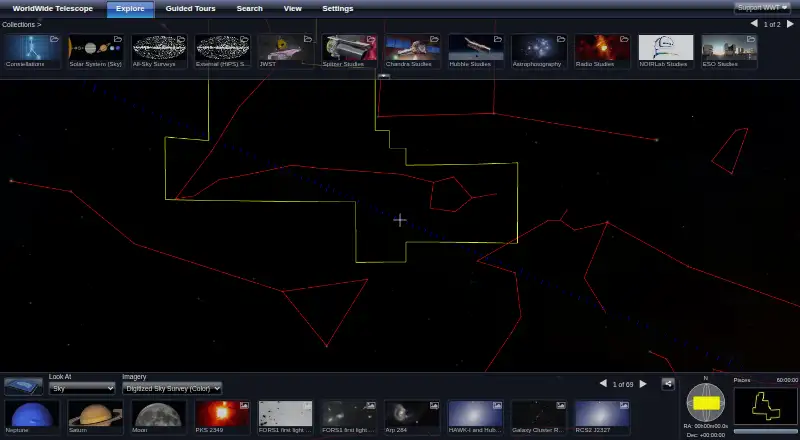
WorldWide Telescope (WWT) is a free, open-source astronomy tool for exploring the sky and presenting scientific data and stories from telescopes, observatories, and research institutions. It lets users view telescope imagery across different wavelengths, follow guided tours, and explore the Solar System in 3D. Its browser client runs without a download, and the project recommends a strong internet connection for the best experience. A Windows client supports planetarium installations ranging from a single-projector dome to multi-server, multi-channel projection with warping and blending. Researchers can use WWT’s rendering engine to visualize and analyze data in Jupyter through pywwt. Developers can embed WWT in webpages, build custom applications with its WebGL engine, or use the documented Layer Control API to load data into the Windows application. The project describes its software and data sets as free and open source, with source code released under the MIT License. WWT is fiscally sponsored by NumFOCUS. Users can ask questions in the online forum or contact the project by email. The listed stable Windows release is version 6.1.2.0, dated July 12, 2022; WWT 6 supports Windows 7 through 11. The WWT Excel add-in is no longer maintained and is unlikely to work on recent operating system installations.
Who it suits
WWT suits students, researchers, museums, planetariums, and scholarly publications that want to explore or present astronomical imagery and scientific data. Researchers working in Jupyter and developers building web experiences can also use its rendering engine, embedding options, and documented APIs.
What it does well
- Explore telescope imagery at different wavelengths and the Solar System in 3D.
- Browser client runs without a download.
- Supports Jupyter data visualization and analysis through pywwt.
- Can be embedded in webpages or used to build custom applications.
- Windows client supports multi-channel planetarium projection with warping and blending.
- Software and data sets are free and open source under the MIT License.
What to know first
- Offline access is not available.
- The Excel add-in is no longer maintained and may not work on recent systems.
- The listed stable Windows release is version 6.1.2.0, dated July 12, 2022.
Limits
The free plan is the free and open-source software and data sets. Offline access is unavailable; the Excel add-in is no longer maintained and is unlikely to work on recent operating system installations.
Plans
| Plan | Billed and limits | Price |
|---|---|---|
| WorldWide Telescope | Free and open source software and data sets | Free |
As worldwidetelescope.org lists them, read 7 Oct 2026. The maker's own page has the final word.
Getting started
- Open the WorldWide Telescope website.
- Use the browser client without downloading software, or choose the Windows platform.
- For Jupyter research workflows, use pywwt with the WWT rendering engine.
- For a custom web project, consult the WebGL engine documentation.
Verdict
Choose WorldWide Telescope for free sky exploration, scientific data presentation, or planetarium projection, especially if you need its Jupyter or web development tools. Look elsewhere if offline access is essential or if you depend on the unmaintained Excel add-in.
Questions
Is WorldWide Telescope free?
Yes. The listed WorldWide Telescope plan costs nothing, and the project describes its software and data sets as free and open source.
Which platforms does it support?
The listed platforms are API, web, and Windows. The browser client requires no download; WWT 6 supports Windows 7 through 11.
Can I use WorldWide Telescope offline?
No. Offline access is listed as unavailable.
Is WorldWide Telescope open source?
Yes. The project says its source code was released under the MIT License and describes the software and data sets as free and open source.
Can researchers use it with Jupyter?
Yes. Researchers can use the rendering engine to visualize and analyze data in Jupyter through pywwt.
Who sponsors the project, and where can I get help?
WorldWide Telescope is fiscally sponsored by NumFOCUS. Users can ask questions in the online WWT Forum or contact the project by email.
Facts from WorldWide Telescope's own pages
- Developer API
- The documentation describes a Layer Control API for programmatically loading data into the WWT Windows application. · docs.worldwidetelescope.org, 7 Oct 2026
- Exploration
- Users can explore the sky at different wavelengths, view telescope imagery, watch guided tours, and explore the Solar System in 3D. · worldwidetelescope.org, 7 Oct 2026
- Notable limits
- The WWT Excel add-in is no longer maintained and is unlikely to work on recent operating system installations. · worldwidetelescope.org, 7 Oct 2026
- Open source
- The project describes its software and data sets as free and open source, and says its source code was released under the MIT License. · worldwidetelescope.org, 7 Oct 2026
- Planetariums
- The Windows client supports planetarium setups from single-projector domes to multi-server, multi-channel dome projection, including warping and blending. · worldwidetelescope.org, 7 Oct 2026
- Project sponsor
- WorldWide Telescope is a fiscally sponsored project of NumFOCUS, a nonprofit supporting the open-source scientific computing community. · worldwidetelescope.org, 7 Oct 2026
- Purpose
- WorldWide Telescope enables visualization and sharing of scientific data and stories from telescopes, observatories, and institutions for students, researchers, museums, planetariums, and scholarly publications. · worldwidetelescope.org, 7 Oct 2026
- Research tools
- Researchers can use WWT’s rendering engine to visualize and analyze data inside Jupyter with pywwt. · worldwidetelescope.org, 7 Oct 2026
- Support
- Users can ask questions and get help through the online WWT Forum or contact the project by email. · worldwidetelescope.org, 7 Oct 2026
- Web client
- The web client runs in a browser and requires no download; the site recommends a strong internet connection for the best experience. · worldwidetelescope.org, 7 Oct 2026
- Web embedding
- WWT can be embedded in a webpage or used to build a custom application, and the project provides WebGL engine documentation. · worldwidetelescope.org, 7 Oct 2026
- Windows
- The current stable Windows release listed is version 6.1.2.0, dated July 12, 2022, and WWT 6 supports Windows 7 through 11. · worldwidetelescope.org, 7 Oct 2026
Where WorldWide Telescope stands on Freedom251
- Astronomy Apps#28 of 35