Freedom251 › AI Object Removal Tools
wipe.photos
What wipe.photos is
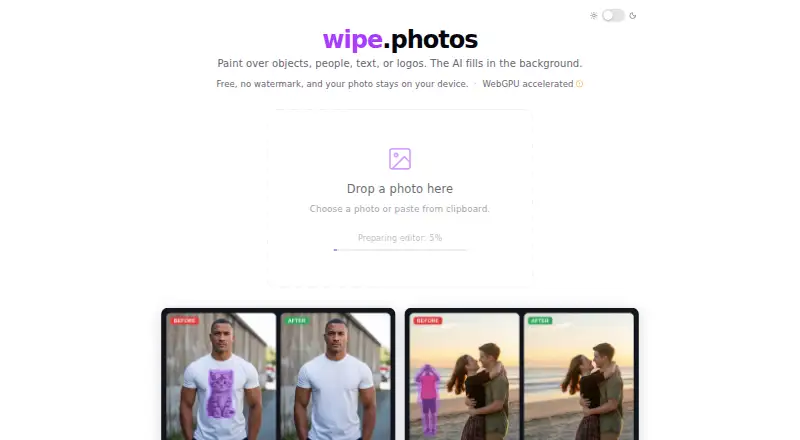
wipe.photos is a free browser-based tool for removing unwanted objects, people, text, and logos from photos. Choose, drag and drop, or paste an image, then paint over the area to remove; its AI inpainting reconstructs the background. The site also offers face pixelation and black-and-white photo conversion. Editing runs in the browser, and the site says photos do not leave the user's device. Inpainting uses WebGPU acceleration, but WebGPU is not required. It works in modern desktop and mobile browsers without installation. On a first visit, the model downloads once and is saved in the browser. The model is LaMa from Samsung Research, and the site identifies its license as Apache 2.0. JPG, PNG, and WebP images are accepted, while inpainting results download as PNG. No account or login is required, and downloads have no watermark. The free plan is listed as free, with no usage cap. Results depend on the background: textured areas such as grass, pavement, sand, or water are easier to reconstruct than blank surfaces.
Who it suits
It suits people who want to remove objects or text from photos in a browser on desktop or mobile. It may be useful when avoiding uploads is important, since the site says editing happens on the device.
What it does well
- Free plan has no usage cap.
- No account or login is needed.
- Photos stay on the device during editing, according to the site.
- Accepts JPG, PNG, and WebP images.
- Works in modern desktop and mobile browsers without installation.
What to know first
- Results depend on the background being reconstructed.
- Inpainting results download as PNG.
- The model downloads once on the first visit.
Limits
The Free plan costs nothing and has no usage cap. The site says results depend on the image background, with textured areas easier to reconstruct than blank surfaces.
Plans
| Plan | Billed and limits | Price |
|---|---|---|
| Free | No usage cap · no watermark · no account required | Free |
As wipe.photos lists them, read 8 Oct 2026. The maker's own page has the final word.
Getting started
- Open wipe.photos in a modern desktop or mobile browser.
- Choose, drag and drop, or paste a JPG, PNG, or WebP image.
- On the first visit, allow the model to download and save in the browser.
- Paint over the area to remove.
- Download the inpainting result as a PNG.
Verdict
wipe.photos offers browser-based object removal alongside face pixelation and monochrome conversion, with no account or watermark. Its stated results are easier on textured backgrounds than blank ones.
Questions
How much does wipe.photos cost?
The Free plan costs nothing and has no usage cap.
Do I need an account?
No account or login is required.
Which image formats can I use?
It accepts JPG, PNG, and WebP images. Inpainting results download as PNG.
Does editing upload my photos?
The site says editing runs in the browser and photos never leave the user's device.
Which model does it use, and what is its license?
It uses LaMa, an inpainting model from Samsung Research, and identifies the license as Apache 2.0.
Can I use it on mobile?
It works in modern browsers on desktop and mobile, with no installation required.
Facts from wipe.photos's own pages
- Account and watermark
- The site says no account or login is needed and downloads have no watermark. · wipe.photos, 8 Oct 2026
- Additional tools
- The site also offers browser-based face pixelation and black-and-white photo conversion. · wipe.photos, 8 Oct 2026
- Best results
- Results depend on the background; the site says textured areas such as grass, pavement, sand, or water are easier to reconstruct than blank surfaces. · wipe.photos, 8 Oct 2026
- Device support
- It works in modern browsers on desktop and mobile, with no installation required. · wipe.photos, 8 Oct 2026
- First use
- On the first visit, the model downloads once and is saved in the browser. · wipe.photos, 8 Oct 2026
- How editing works
- Users paint over the area to remove, and the AI reconstructs the background. · wipe.photos, 8 Oct 2026
- Input options
- Users can choose, drag and drop, or paste an image from the clipboard. · wipe.photos, 8 Oct 2026
- Model and license
- It uses LaMa, an inpainting model from Samsung Research, and identifies its license as Apache 2.0. · wipe.photos, 8 Oct 2026
- Performance
- Inpainting uses WebGPU acceleration, and the site says WebGPU is not required. · wipe.photos, 8 Oct 2026
- Privacy
- The site says editing runs in the browser and photos never leave the user's device. · wipe.photos, 8 Oct 2026
- Supported formats
- It accepts JPG, PNG, and WebP images and downloads the inpainting result as PNG. · wipe.photos, 8 Oct 2026
- What it does
- Uses AI inpainting to remove unwanted objects, people, text, and logos from photos. · wipe.photos, 8 Oct 2026
Where wipe.photos stands on Freedom251
- AI Object Removal Tools#21 of 24