Freedom251 › Desktop Search Software
Inpaint Anything
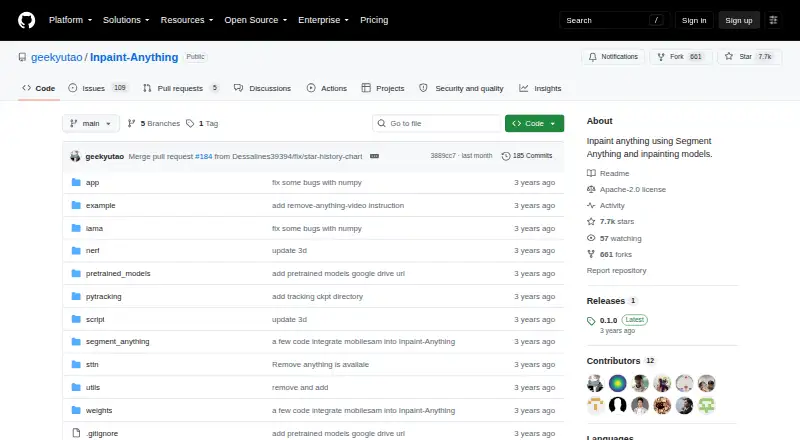
What Inpaint Anything is
Inpaint Anything is a free, open-source project for removing, filling, or replacing objects in images, videos, and 3D scenes. For object removal, users select an object for segmentation and an inpainting model such as LaMa fills the area. Fill Anything uses a text prompt to generate content in a selected region, while Replace Anything uses a prompt to change an image background. Its video workflow tracks an object across frames before filling them with a video inpainting model such as STTN. For 3D scenes, it tracks the object across source views, inpaints those views, and uses NeRF to create new views without the object. The project describes support for any image aspect ratio and 2K resolution. Users can run a local web interface or try a linked hosted interface. Installation requires Python 3.8 or newer, PyTorch, model-specific dependencies, and downloaded checkpoints. The Windows instructions recommend Miniconda and an administrator Anaconda PowerShell Prompt. The README says default hardware targets a single 24GB GPU; some model licenses restrict commercial use.
Who it suits
Inpaint Anything suits users who can install and run an open-source project and want object removal or prompted edits across images, video, or 3D scenes. Check model terms before commercial use.
What it does well
- Free and open source under Apache License 2.0.
- Supports image, video, and 3D object workflows.
- Offers prompted fills and background replacement.
- Provides a local web interface and links to a hosted interface.
- Describes support for any aspect ratio and 2K resolution.
What to know first
- Installation requires Python, PyTorch, dependencies, and model checkpoints.
- Default hardware target is a single 24GB GPU.
- Some model licenses restrict commercial use.
Limits
The project’s defaults target one 24GB GPU, and FLUX.1-Fill can require about 20GB of VRAM. The main_2026 beta branch requires Python 3.12 or newer, PyTorch 2.7 or newer, and CUDA 12.6 or newer; ProPainter and FLUX.1-Fill-dev are non-commercially licensed.
Getting started
- Open the project website and choose the local web interface or linked Hugging Face demo
- Install Python 3.8 or newer with PyTorch and the required model dependencies
- On Windows, use Miniconda and an administrator Anaconda PowerShell Prompt for the Windows requirements
- Download model checkpoints and place them in the documented project directories
- Run the local interface and select an image, video, or 3D workflow
Verdict
Inpaint Anything covers several media-editing workflows, but setup involves dependencies, model downloads, and substantial stated hardware requirements. Review the model licenses before using generated results commercially.
Questions
Is Inpaint Anything free?
Yes. It is described as free and open source, with an Apache License, Version 2.0 repository license.
Which platforms does it support?
The listed platforms are self-hosted, web, and Windows.
Can it edit video and 3D scenes?
Yes. Video workflows track objects across frames, while 3D workflows process source views and synthesize new views with NeRF.
Does it offer a web demo?
The project provides a local web UI and links to a Hugging Face interface for online trials.
What models does it use?
The README identifies Segment Anything, LaMa, Stable Diffusion, OSTrack, and STTN; the main_2026 branch uses SAM 3, LaMa, SDXL, and ProPainter by default in different stages.
Facts from Inpaint Anything's own pages
- 3D processing
- Remove Anything 3D tracks a selected object across source views, inpaints those views, and uses NeRF to synthesize novel views without the object. · github.com, 4 Oct 2026
- Beta branch
- The README describes the main_2026 branch as beta and says it requires Python 3.12 or newer, PyTorch 2.7 or newer, and CUDA 12.6 or newer. · github.com, 4 Oct 2026
- Fill and replace
- Text prompts guide filling selected objects with new content or replacing backgrounds. · github.com, 9 Oct 2026
- Founded
- 2023 · github.com, 28 Sept 2026
- Hardware
- The repository says its defaults target a single 24GB GPU, and FLUX.1-Fill can require about 20GB of VRAM. · github.com, 9 Oct 2026
- Hosted demo
- The README links to a Hugging Face interface for trying Inpaint Anything online. · github.com, 4 Oct 2026
- Image capabilities
- The README lists support for any aspect ratio and 2K resolution. · github.com, 4 Oct 2026
- Integrations
- The README identifies Segment Anything, LaMa, Stable Diffusion, OSTrack, and STTN as models used or acknowledged by the project. · github.com, 4 Oct 2026
- License
- The repository includes an Apache License, Version 2.0, which grants no-charge copyright and patent permissions subject to its terms. · github.com, 4 Oct 2026
- Local interface
- The repository says its demo can run as a local web UI; the main_2026 quick start launches it at localhost:7860. · github.com, 9 Oct 2026
- Media support
- The repository describes workflows for images, videos, and 3D scenes, with support for any aspect ratio and 2K resolution. · github.com, 9 Oct 2026
- Model downloads
- Users need to download model checkpoints and place them in the documented project directories to run the workflows. · github.com, 4 Oct 2026
- Model licensing
- The README notes that ProPainter and FLUX.1-Fill-dev are non-commercially licensed and says to check the terms for LaMa, SDXL, and SAM 3 before commercial use. · github.com, 9 Oct 2026
- Models
- The main_2026 branch uses SAM 3, LaMa, SDXL, and ProPainter by default in different stages, with other backends available. · github.com, 9 Oct 2026
- Object removal
- Users can select an object by clicking it or, on the main_2026 branch, naming it with a text prompt, then fill the removed area. · github.com, 9 Oct 2026
- Prompted editing
- Fill Anything uses a text prompt to generate content in a selected area, while Replace Anything uses a prompt to change the background. · github.com, 4 Oct 2026
- Purpose
- Inpaint Anything uses segmentation and inpainting models to edit images, videos, and 3D scenes. · github.com, 9 Oct 2026
- Requirements
- The main_2026 branch requires Python 3.12 or later, PyTorch 2.7 or later, and CUDA 12.6 or later for its default SAM 3 setup. · github.com, 9 Oct 2026
- Research authors
- The project lists Tao Yu, Runseng Feng, Ruoyu Feng, Jinming Liu, Xin Jin, Wenjun Zeng, and Zhibo Chen as authors. · github.com, 9 Oct 2026
- Robotics workflow
- The main_2026 branch includes batch hand removal from egocentric footage and mask export for Human-to-Robot pipelines. · github.com, 9 Oct 2026
- Video processing
- Remove Anything Video tracks a selected object across video frames and uses a video inpainting model such as STTN to fill it. · github.com, 4 Oct 2026
- Windows setup
- The original README gives a Windows installation path using Miniconda and a Windows-specific requirements file. · github.com, 9 Oct 2026
Where Inpaint Anything stands on Freedom251
- Desktop Search Software#53 of 57
- AI Object Removal Tools#23 of 24