Freedom251 › Desktop Search Software
GlintIndex
What GlintIndex is
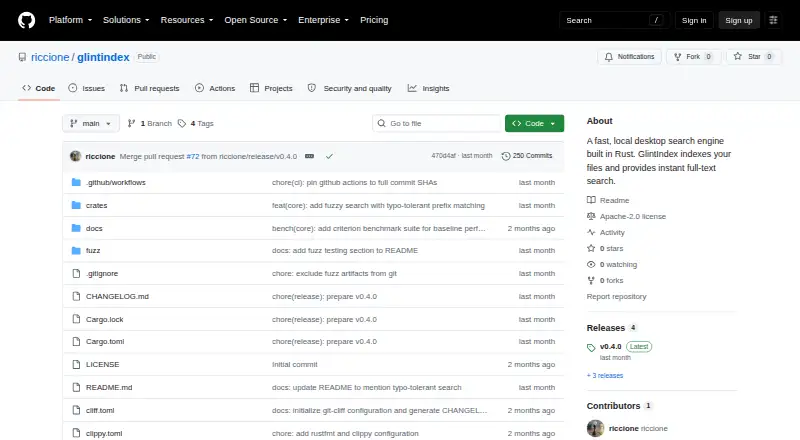
GlintIndex is a free, open-source desktop search engine for finding text within files in local directories. It indexes files for full-text search and processes them on the device, without requiring a network connection. Search uses typo-tolerant fuzzy matching, and results in the graphical interface update as you type. The project can extract text from more than 27 file types, including source code, markup, documents and spreadsheets.
Users can work through either a command-line interface or a GTK4 desktop GUI. The GUI provides syntax-highlighted file previews, file actions, theme and font settings, and index management. GlintIndex is available for Linux, macOS and Windows under the Apache License 2.0. Linux installations require GTK4 system libraries; the Windows and macOS releases include those libraries. The Windows release is distributed as a ZIP archive without an MSI or NSIS installer, and the macOS release is a ZIP without a DMG. The macOS app is not code-signed or notarized, and its README warns that Gatekeeper may show a warning on first launch. By default, the application skips text extraction for files larger than 50 MB and stops parsing an individual document after 10 seconds. GlintIndex is designed for local file search, with indexing locations limited to local directories.
Who it suits
GlintIndex suits people who want to search file contents on a Linux, macOS or Windows computer while keeping processing local. It may be useful to users who want both a command-line option and a desktop interface with previews and index controls.
What it does well
- Processes files locally without a network connection.
- Searches text across more than 27 file types.
- Fuzzy matching accommodates typos in queries.
- Offers both a command-line interface and GTK4 GUI.
- GUI includes syntax-highlighted previews and index management.
- Available free under the Apache License 2.0.
What to know first
- Linux requires GTK4 system libraries.
- Windows and macOS releases are ZIP archives without native installers.
- macOS is not code-signed or notarized and may trigger a Gatekeeper warning.
- Default settings skip extraction above 50 MB and cap parsing at 10 seconds per document.
Limits
By default, GlintIndex skips text extraction for files larger than 50 MB and allows 10 seconds to parse each document. Linux requires GTK4 system libraries; macOS may show a Gatekeeper warning on first launch.
Getting started
- Open the GlintIndex GitHub project page.
- Choose the release for Linux, macOS or Windows.
- Install GTK4 system libraries on Linux.
- Unpack the ZIP release on Windows or macOS.
- Select local directories to index and search through the GUI or command-line interface.
Verdict
Choose GlintIndex if you want free local search across files on Linux, macOS or Windows, with both a GUI and command-line interface. Its local processing and broad file parsing are central strengths. Look elsewhere if you need a native Windows or macOS installer, or need default extraction for files over 50 MB or parsing beyond 10 seconds per document.
Questions
Is GlintIndex free?
Yes. It is free and offered under the Apache License 2.0.
Which operating systems does it support?
GlintIndex is available for Linux, macOS and Windows.
Does it send files to the cloud?
The project says file processing happens locally and files are not sent to the cloud. No network connection is required.
What file types can it search?
It parses text from more than 27 file types, including source code, markup, documents and spreadsheets.
Does it have a graphical interface?
Yes. It provides a GTK4 desktop GUI as well as a command-line interface.
Are there limits on indexing?
The default configuration skips text extraction for files over 50 MB and limits parsing each document to 10 seconds.
Facts from GlintIndex's own pages
- Distribution limits
- The README says Windows is distributed as a ZIP without an MSI or NSIS installer, and macOS as a ZIP without a DMG. · github.com, 11 Oct 2026
- File size limit
- The example configuration sets a 50 MB maximum file size for text extraction and a 10-second parser timeout per document. · github.com, 11 Oct 2026
- File support
- It parses text from more than 27 file types, including source code, markup, documents, and scripts, and automatically skips binary content. · github.com, 11 Oct 2026
- File types
- It parses text from 27+ file types, including source code, markup, documents, and spreadsheets. · github.com, 4 Oct 2026
- GUI features
- The GUI offers live search, syntax-highlighted file previews with line numbers, file actions, appearance settings, and index management. · github.com, 11 Oct 2026
- Index controls
- Users can configure indexed folders and ignore rules, and can rebuild or clear the index. · github.com, 11 Oct 2026
- Indexing limits
- The default configuration skips text extraction for files larger than 50 MB and limits parsing each document to 10 seconds. · github.com, 4 Oct 2026
- Integrations
- The README describes integrations with Tantivy for search and GTK4 for the GUI; it does not list third-party service integrations. · github.com, 11 Oct 2026
- Interfaces
- GlintIndex provides both a command-line interface and a GTK4 desktop GUI. · github.com, 4 Oct 2026
- License
- The project is licensed under Apache License 2.0. · github.com, 11 Oct 2026
- Local processing
- The project says indexing and search happen locally without sending data to the cloud or requiring a network connection. · github.com, 11 Oct 2026
- macOS limitation
- The macOS app is not code-signed or notarized, so the README warns of a Gatekeeper warning on first launch. · github.com, 4 Oct 2026
- macOS warning
- The README says the macOS app is not code-signed or notarized, so Gatekeeper displays a warning on first launch. · github.com, 11 Oct 2026
- Platform requirements
- Linux requires GTK4 system libraries; the README says GTK4 libraries are bundled with Windows and macOS releases. · github.com, 4 Oct 2026
- Platforms
- The README lists Linux, macOS, and Windows requirements and prebuilt releases. · github.com, 11 Oct 2026
- Product
- GlintIndex is a Rust desktop search engine that indexes files and provides full-text search. · github.com, 11 Oct 2026
- Purpose
- GlintIndex is a local desktop search engine that indexes files for full-text search. · github.com, 4 Oct 2026
- Release
- The releases page lists v0.4.0 as the latest release. · github.com, 4 Oct 2026
- Search
- Search supports typo-tolerant fuzzy matching and a CLI interface with pagination. · github.com, 11 Oct 2026
- Security and privacy
- The README states that files are processed locally without sending data to the cloud. · github.com, 4 Oct 2026
Where GlintIndex stands on Freedom251
- Desktop Search Software#52 of 57