Freedom251 › AI Object Removal Tools
RemovePeople.ai
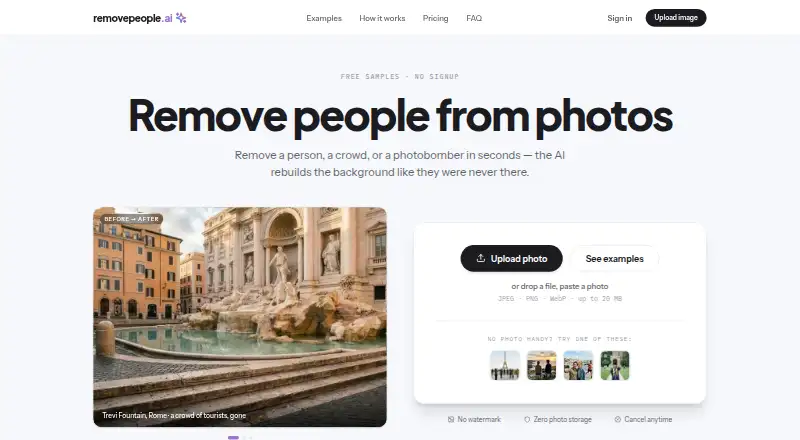
What RemovePeople.ai is
RemovePeople.ai is a browser-based editor that removes people and other unwanted objects from photos, then reconstructs the background from a plain-language request. Brushes and masking are not required. Listed removable items include photobombers, bins, wires, and signs, and one photo generation uses one edit even when several people are named. Before downloading, users can crop, straighten, resize, and rename images. JPEG, PNG, and WebP files up to 20 MB are accepted. The pricing page says photos are never stored or used to train models, and downloads have no watermark on any plan. Visitors can use the full editor on a sample image without signing in or entering payment details. Paid options include 3 HD edits for $4.99, paid once, Starter at $9 a month, Plus at $19 a month, and Studio at $49 a month. Monthly plans provide 20, 50, or 100 edits, with higher plans adding resolution and export options.
Who it suits
RemovePeople.ai suits people who want browser-based removal of people or objects without manual masking. It is also relevant to users needing adjustable monthly edit limits and downloadable, watermark-free results.
What it does well
- Plain-language editing without brushes
- Removes people and listed objects
- Accepts JPEG, PNG, and WebP
- Photos not stored or used for training
- Free sample-photo tryout
What to know first
- Maximum upload size is 20 MB
- No free plan
- Monthly edit limits apply
- Runs in a browser
Limits
The one-time option provides 3 HD edits. Starter, Plus, and Studio provide 20, 50, and 100 edits each month respectively; unused edits refresh monthly.
Plans
| Plan | Billed and limits | Price |
|---|---|---|
| Plus | $19/month · 50 edits every month · 2K output (2816 × 1536) · PNG or WebP export with quality control | $19 a month |
| Studio | $49/month · 100 edits every month · 4K Ultra HD output (5632 × 3072) · export sets · priority support | $49 a month |
| 3 HD edits | Pay once; each new generation uses one edit. · 3 HD edits · JPEG downloads · no watermark | $4.99, paid once |
| Starter | $9/month · 20 edits every month · HD output (1408 × 768) | $9 a month |
As removepeople.ai lists them, read 8 Oct 2026. The maker's own page has the final word.
Getting started
- Open https://removepeople.ai/ in a browser
- Run the full editor on the sample photo without a card or sign-in
- Upload a JPEG, PNG, or WebP image up to 20 MB
- Describe the people or objects to remove
- Crop, straighten, resize, or rename the image
- Choose a one-time pack or monthly plan for continued edits
- Download the result without a watermark
Verdict
RemovePeople.ai offers text-directed photo cleanup with several paid output tiers and a free sample tryout. Its upload cap and monthly edit allowances should be checked against the volume of images you need to process.
Questions
Is there a free plan?
There is no free plan, but visitors can use the full editor on a sample photo without a card or sign-in.
Which platforms are supported?
RemovePeople.ai runs on the web in a browser and requires no software installation.
What files can I upload?
JPEG, PNG, and WebP images up to 20 MB are supported.
Are photos stored?
The pricing page says photos are never stored and never used to train models.
Facts from RemovePeople.ai's own pages
- Browser access
- The service runs in a browser and requires no software installation, according to its landscape-photo guide. · removepeople.ai, 8 Oct 2026
- Cancellation
- The pricing page says subscriptions can be canceled in one click. · removepeople.ai, 8 Oct 2026
- Downloads
- The page says downloads have no watermark on any plan; PNG and WebP export with quality control are listed for Plus and Studio. · removepeople.ai, 8 Oct 2026
- Free tryout
- Visitors can run the full editor on a sample photo for free without a card or sign-in. · removepeople.ai, 8 Oct 2026
- Image adjustments
- Users can crop, straighten, resize, and rename images before downloading. · removepeople.ai, 8 Oct 2026
- Monthly edit limits
- Starter, Plus, and Studio include 20, 50, and 100 edits per month respectively, and unused edits refresh monthly. · removepeople.ai, 8 Oct 2026
- No masking
- Users describe edits in plain words; the page says no brushes or masking are needed. · removepeople.ai, 8 Oct 2026
- Objects
- The pricing page says users can remove objects such as photobombers, bins, wires, and signs too. · removepeople.ai, 8 Oct 2026
- One edit per photo
- An edit counts as one photo generation regardless of how many people are named in the request. · removepeople.ai, 8 Oct 2026
- Payment
- The pricing page lists Stripe checkout, Apple Pay, and Google Pay. · removepeople.ai, 8 Oct 2026
- Privacy
- The pricing page says photos are never stored and are never used to train models. · removepeople.ai, 8 Oct 2026
- Supported files
- The service accepts JPEG, PNG, and WebP images up to 20 MB. · removepeople.ai, 8 Oct 2026
- What it does
- The service removes people from photos and reconstructs the background based on a plain-language description. · removepeople.ai, 8 Oct 2026
Where RemovePeople.ai stands on Freedom251
- AI Object Removal Tools#22 of 24