Freedom251 › Diff and Merge Tools

WinMerge
What WinMerge is
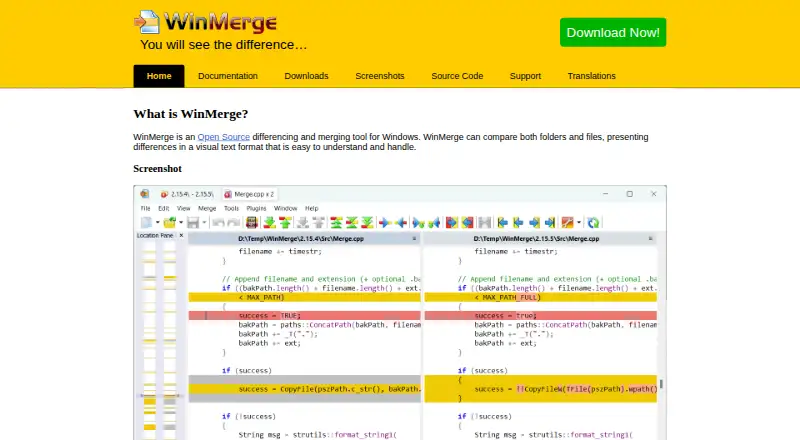
WinMerge is a free Windows application for comparing files and folders and viewing differences to help with merging. It can work as a standalone tool or as an external differencing and merge application. File comparison includes three-way views, syntax highlighting, word wrap, and detection of moved lines. Folder comparisons can include subfolders, apply regular-expression file filters, and compare files by size and date. WinMerge can also compare images using difference blocks or overlays, and show CSV and TSV data in columns with wrapped text. It can create patch files and resolve conflict files. Windows shell integration, 7-Zip archive support, and plugins are available. The listed requirements are Windows XP SP3 or newer for the 32-bit installer and Windows 7 or newer for the 64-bit installer. Version 2.16.58.2 is listed as the current release, dated 2026-08-27. WinMerge is open source under the GNU General Public License and is maintained by volunteers. Support is directed through discussion forums.
Who it suits
WinMerge suits Windows users who need to compare files, folders, images, or tabular data and work through merges or conflict files. Its standalone and external-tool options serve different comparison workflows.
What it does well
- Free and open source under the GNU General Public License.
- Supports three-way file comparisons.
- Folder comparisons can include subfolders and filters.
- Can compare images and display CSV and TSV data.
- Creates patch files and resolves conflict files.
What to know first
- Listed installers support Windows only.
- 32-bit installer requires Windows XP SP3 or newer.
- 64-bit installer requires Windows 7 or newer.
- Distributed without warranty, including implied warranties.
Plans
| Plan | Billed and limits | Price |
|---|---|---|
| WinMerge | Open source under the GNU General Public License | Free |
As winmerge.org lists them, read 2 Oct 2026. The maker's own page has the final word.
Getting started
- Open the WinMerge website.
- Choose the 32-bit or 64-bit installer for a supported Windows version.
- Install and launch WinMerge.
- Use it standalone or configure it as an external differencing and merging tool.
Verdict
WinMerge covers file, folder, image, and table comparisons, with merge-related tools and Windows integrations. It is free, but users should check the installer requirements and note that the license provides no warranty.
Questions
How much does WinMerge cost?
The listed WinMerge plan is free.
Is there a free trial?
No. The listed free trial status is no; WinMerge is offered as a free plan.
Which platforms does WinMerge support?
WinMerge is listed for Windows. The download page lists Windows XP SP3 or newer for the 32-bit installer and Windows 7 or newer for 64-bit.
Can WinMerge perform three-way comparisons?
Yes. It supports three-way file comparisons.
Is WinMerge open source?
Yes. It is distributed under the GNU General Public License.
Where can users get support?
The support page directs users to discussion forums. Bug reporters are asked to include the WinMerge version and, if possible, a configuration log.
Facts from WinMerge's own pages
- Current release
- Version 2.16.58.2 was released on 2026-08-27 and is identified as the current version. · winmerge.org, 2 Oct 2026
- Development
- WinMerge is maintained and developed by volunteers. · winmerge.org, 2 Oct 2026
- File comparison
- It supports three-way file comparisons, syntax highlighting, word wrap, and detection of moved lines. · winmerge.org, 2 Oct 2026
- Folder comparison
- Folder comparisons can use regular-expression file filters, compare files by size and date, and include subfolders. · winmerge.org, 2 Oct 2026
- Image comparison
- Image comparison can highlight differences with blocks and overlay images. · winmerge.org, 2 Oct 2026
- Integrations
- WinMerge offers Windows shell integration, archive support using 7-Zip, and plugin support. · winmerge.org, 2 Oct 2026
- Purpose
- WinMerge compares files and folders and presents differences visually for merging. · winmerge.org, 2 Oct 2026
- Requirements
- The download page lists Windows XP SP3 or newer for the 32-bit installer and Windows 7 or newer for the 64-bit installer. · winmerge.org, 2 Oct 2026
- Security and warranty
- The license text says WinMerge is distributed without any warranty, including implied warranties of merchantability or fitness for a particular purpose. · winmerge.org, 2 Oct 2026
- Support
- The support page directs users to discussion forums and asks bug reporters to include the WinMerge version and, if possible, a configuration log. · winmerge.org, 2 Oct 2026
- Table comparison
- Table comparison displays CSV and TSV contents in columns and can wrap text in each column. · winmerge.org, 2 Oct 2026
- Use
- WinMerge can be used as a standalone application or as an external differencing and merging tool. · winmerge.org, 2 Oct 2026
- Version control
- WinMerge can create patch files and resolve conflict files. · winmerge.org, 2 Oct 2026
Where WinMerge stands on Freedom251
- Diff and Merge Tools#18 of 29