Freedom251 › Embroidery Design Software
Wilcom EmbroideryStudio
What Wilcom EmbroideryStudio is
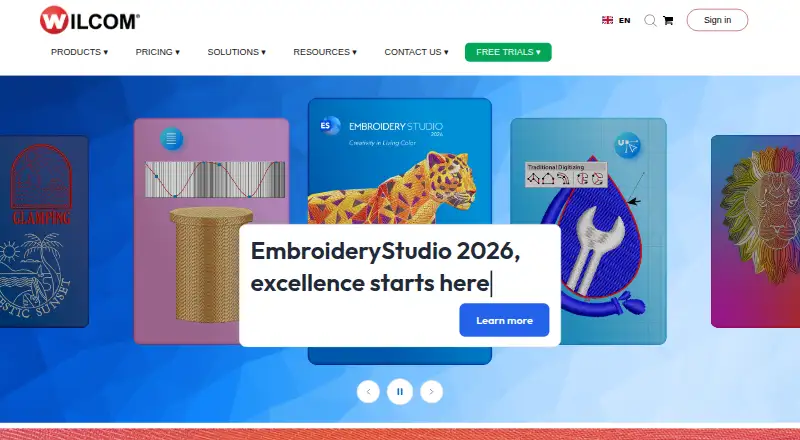
Wilcom EmbroideryStudio is Windows software for creating embroidery designs and supporting embroidery businesses. Its 2026 release comes in four levels: Designing, Decorating, Editing, and Lettering, covering professional digitizing, auto-digitizing and appliqué, design editing, and lettering or monograms. Users can create shapes and fill them with stitches, sequins, or beads, or combine embroidery with graphics. The release adds Multi Blend, Snap to Object, Redwork, and custom accordion spacing. Designing and Decorating include CorelDRAW Graphics Suite and connect to its graphics tools. Compatible Brother embroidery machines can receive designs through direct wireless transfer. The software also offers stitch simulation, vector import, appliqué tools, and support for many machine formats. Subscription and one-time perpetual licence options are available for some levels, with pricing on request. The 14-day trial covers all four levels and included Elements without a dongle or credit card, but excludes CorelDRAW. EmbroideryStudio 2026 is listed for 64-bit Windows 11, not Windows 10.
Who it suits
EmbroideryStudio is intended for professional digitizers, embroidery shops, apparel decorators, and retail or production shops. Its four levels let users choose among digitizing, decorating, editing, and lettering workflows.
What it does well
- Four product levels cover distinct embroidery workflows.
- Supports stitches, sequins, and beads in designs.
- Designing and Decorating include CorelDRAW Graphics Suite.
- Compatible Brother machines support wireless design transfers.
- Trial covers all levels for 14 days.
What to know first
- Windows 11 64-bit is listed; Windows 10 is not.
- CorelDRAW is excluded from the trial.
- Pricing is available on request.
- Published minimum requirements include 16 GB of memory.
Limits
The trial lasts 14 days, runs only on Windows, and excludes CorelDRAW. The Lettering and Editing levels are offered as one-time perpetual licences rather than subscriptions.
Plans
| Plan | Billed and limits | Price |
|---|---|---|
| EmbroideryStudio Designing — monthly-billed annual subscription | 12 months commitment · billed monthly upfront · Full professional digitizing · CorelDRAW Graphics Suite included | On request |
| EmbroideryStudio Decorating — annual subscription | 12 months commitment · billed yearly upfront · renews annually · Auto-digitizing and applique · CorelDRAW Graphics Suite included | On request |
| EmbroideryStudio Decorating — one-time payment | One-time payment · perpetual licence · Auto-digitizing and applique · CorelDRAW Graphics Suite included | On request |
| EmbroideryStudio Lettering — one-time payment | One-time payment · perpetual licence · Create lettering and monograms · not available as a subscription | On request |
| EmbroideryStudio Designing — annual subscription | 12 months commitment · billed yearly upfront · renews annually · Full professional digitizing · CorelDRAW Graphics Suite included | On request |
| EmbroideryStudio Designing — one-time payment | One-time payment · perpetual licence · Full professional digitizing · CorelDRAW Graphics Suite included | On request |
| EmbroideryStudio Decorating — monthly-billed annual subscription | 12 months commitment · billed monthly upfront · Auto-digitizing and applique · CorelDRAW Graphics Suite included | On request |
| EmbroideryStudio Editing — one-time payment | One-time payment · perpetual licence · Adjust and edit existing designs · not available as a subscription | On request |
As wilcom.com lists them, read 7 Oct 2026. The maker's own page has the final word.
Getting started
- Visit the Wilcom website
- Choose an EmbroideryStudio level or licence type
- Start the 14-day Windows trial
- Use a 64-bit Windows 11 system meeting the published requirements
- Transfer designs wirelessly to a compatible Brother embroidery machine
Verdict
EmbroideryStudio brings design creation, digitizing, editing, and lettering options together in a Windows product. Check the level, system requirements, and pricing before choosing a licence.
Questions
Is Wilcom EmbroideryStudio free?
No. It is paid software, with pricing available on request. A 14-day trial is available.
What levels are available?
The four levels are Designing, Decorating, Editing, and Lettering.
Does the trial include CorelDRAW?
No. The 14-day trial includes all four EmbroideryStudio levels and included Elements, but CorelDRAW is excluded.
Can it connect to embroidery machines?
Yes. Compatible Brother embroidery machines can receive designs through direct wireless transfer.
What licence options are offered?
Depending on the level, Wilcom lists monthly-billed annual subscriptions, annual subscriptions, and one-time perpetual licences.
Facts from Wilcom EmbroideryStudio's own pages
- 2026 features
- EmbroideryStudio 2026 includes Multi Blend and Snap to Object, and adds Redwork and custom accordion spacing. · wilcom.com, 7 Oct 2026
- Account security
- Wilcom Account supports two-step verification and provides tools to manage active EmbroideryStudio sessions. · help.wilcom.com, 7 Oct 2026
- CorelDRAW integration
- CorelDRAW Graphics Suite is included with Designing and Decorating, and EmbroideryStudio links to its graphics tools. · wilcom.com, 7 Oct 2026
- Digitizing and decoration
- The software provides tools to create on-screen shapes and fill them with stitches, sequins, and beads, or combine embroidery with graphics. · wilcom.com, 7 Oct 2026
- Founded
- 1979 · wilcom.com, 28 Sept 2026
- Headquarters
- Sydney, New South Wales, Australia · wilcom.com, 28 Sept 2026
- Intended users
- Wilcom describes the product levels for professional digitizers, embroidery shops, apparel decorators, and retail or production shops. · docs.wilcom.com, 7 Oct 2026
- License security
- Wilcom says EmbroideryStudio detects and blocks embroidery files created or modified using pirated versions of the software. · wilcom.com, 7 Oct 2026
- Machine connectivity
- EmbroideryStudio 2026 supports direct wireless design transfers to compatible Brother embroidery machines. · docs.wilcom.com, 7 Oct 2026
- Platform requirement
- EmbroideryStudio 2026 is listed as compatible with 64-bit Windows 11 and not Windows 10. · help.wilcom.com, 7 Oct 2026
- Privacy
- Wilcom's privacy policy says personal data provided to Wilcom may be transferred to and stored in Australia. · wilcom.com, 7 Oct 2026
- Product levels
- EmbroideryStudio 2026 is available in four levels: Designing, Decorating, Editing, and Lettering. · wilcom.com, 7 Oct 2026
- Purpose
- EmbroideryStudio is professional embroidery software for creating designs and supporting embroidery businesses. · wilcom.com, 7 Oct 2026
- Support
- Wilcom directs EmbroideryStudio users to its Help and Support Center and provides a ticket submission option. · wilcom.com, 7 Oct 2026
- System requirements
- The published 2025 minimum requirements include an Intel Core i5 8th Gen or AMD Ryzen 5 4000 Series processor and 16 GB of memory. · help.wilcom.com, 7 Oct 2026
- Trial
- The 14-day trial lets users try all four levels and included Elements without a dongle or credit card; CorelDRAW is excluded and the trial is Windows-only. · wilcom.com, 7 Oct 2026
Where Wilcom EmbroideryStudio stands on Freedom251
- Embroidery Design Software#24 of 31