Freedom251 › Desktop Widget Software
Widgetter
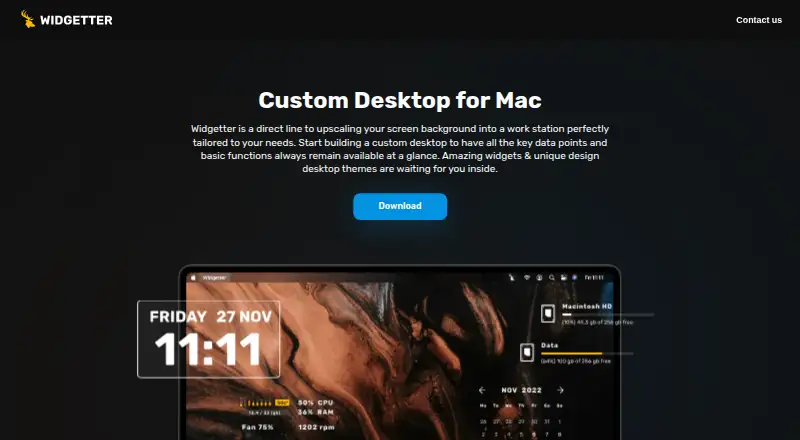
What Widgetter is
Widgetter is a Mac desktop app for placing system information, common controls, and other widgets on the desktop, with wallpaper and desktop skin customization. Users can arrange widgets, keep them always on top, and change their sizes, colors, and fonts. System monitoring options cover CPU, memory, battery, storage, cooling fan speed, internet speed, and downloaded file volume. Other available widgets include calendar, weather, music, photos, tasks and reminders, currency and cryptocurrency quotes, and date and time. The music widget can work with Apple Music or Spotify when the music app is open and Widgetter has permission to access music. The app also offers a collection of 4K and 5K wallpapers. Widgetter is Mac only and requires macOS 13.0 or later. A basic version starts working after installation; the license describes monthly, yearly, and perpetual subscription options, and the app offers in-app purchases. Listed prices are free, $4.99 a month, $39.99 a year, and $59.99, paid once. Subscription use is not permitted on multiple devices. The license identifies Bitnite, LLP as copyright holder and Paddle LLC as payment provider.
Who it suits
Widgetter suits Mac users who want desktop widgets for system monitoring, calendars, weather, media, photos, reminders, or currency quotes alongside wallpaper customization. It may also suit people who want to adjust widget appearance and layout, provided they use macOS 13.0 or later.
What it does well
- Includes widgets for CPU, memory, battery, storage, and internet speed.
- Widgets can be arranged and customized by size, color, and font.
- Offers calendar, weather, music, photo, task, and reminder widgets.
- Includes a free basic version and paid purchase options.
- Provides a collection of 4K and 5K wallpapers.
What to know first
- Requires macOS 13.0 or later.
- The app is Mac only.
- Subscription use is not permitted on multiple devices.
Limits
The free plan is described as a basic version, with its available functionality listed in the app. Subscription use is not permitted on multiple devices.
Plans
| Plan | Billed and limits | Price |
|---|---|---|
| Free | Free · Free download; app offers in-app purchases | Free |
| Year | Year · In-app purchase; multiple Year offers are listed | $39.99 a year |
| Month | Month · In-app purchase; multiple Month offers are listed | $4.99 a month |
| One-Time Purchase | One-Time Purchase · In-app purchase; multiple one-time offers are listed | $59.99, paid once |
As widgetter.com lists them, read 7 Oct 2026. The maker's own page has the final word.
Getting started
- Install Widgetter on a Mac running macOS 13.0 or later.
- Open the app to start using its basic version.
- Arrange widgets and customize their sizes, colors, and fonts.
- For Apple Music or Spotify widgets, keep the music app open and allow Widgetter music access.
- Choose an in-app purchase if you want a monthly, yearly, or one-time option.
Verdict
Choose Widgetter if you want customizable desktop widgets and wallpaper options on a compatible Mac. Its free basic version offers a way to start, with monthly, yearly, and one-time purchase options available. Look elsewhere if you need an app for another platform or need to use a subscription on multiple devices.
Questions
What does Widgetter cost?
The listed options are free, $4.99 a month, $39.99 a year, and $59.99, paid once.
Is there a free plan?
Yes. A basic version starts working when the app is installed, and the listed Free plan costs nothing.
Which platforms does Widgetter support?
Widgetter is Mac only and requires macOS 13.0 or later.
Can Widgetter connect to Apple Music or Spotify?
Its music widget can work with Apple Music or Spotify when the music app is open and Widgetter has permission to access music.
Who holds the license and processes payments?
The license identifies Bitnite, LLP as the copyright holder and Paddle LLC as the payment provider.
Can I use a subscription on more than one device?
No. The license says subscription use is not permitted on multiple devices.
Facts from Widgetter's own pages
- Compatibility
- The App Store listing requires macOS 13.0 or later and describes the app as Mac only. · apps.apple.com, 7 Oct 2026
- Customization
- Users can arrange widgets, keep them always on top, and customize widget sizes, colors, and fonts. · apps.apple.com, 7 Oct 2026
- Free version
- The license describes a basic version that starts working when the application is installed, with its available functionality listed in the app. · widgetter.com, 7 Oct 2026
- Integrations
- The music widget can work with Apple Music or Spotify when the music app is open and Widgetter has permission to access music. · apps.apple.com, 7 Oct 2026
- License and payments
- The license identifies Bitnite, LLP as the copyright holder and Paddle LLC as the payment provider, and describes monthly, yearly, and perpetual subscriptions. · widgetter.com, 7 Oct 2026
- License limit
- The license says subscription use is not permitted on multiple devices. · widgetter.com, 7 Oct 2026
- Other widgets
- The app lists calendar, weather, music, photos, tasks and reminders, currency and cryptocurrency quotes, and date and time widgets. · apps.apple.com, 7 Oct 2026
- Privacy
- The developer reports that analytics may collect device ID, product interaction, and crash data not linked to the user; Apple says these practices have not been verified by Apple. · apps.apple.com, 7 Oct 2026
- Purpose
- Widgetter is a Mac desktop widget and wallpaper customizer that puts system information and common controls on the desktop. · apps.apple.com, 7 Oct 2026
- Support
- The license page lists [email protected] as the contact address. · widgetter.com, 7 Oct 2026
- System widgets
- The listed system widgets cover CPU, memory, battery, storage, cooling fan speed, internet speed, and downloaded file volume. · apps.apple.com, 7 Oct 2026
- Wallpaper
- The app offers a collection of 4K and 5K wallpapers and desktop skins. · apps.apple.com, 7 Oct 2026
Where Widgetter stands on Freedom251
- Desktop Widget Software#24 of 29