Freedom251 › Podcast Recording Software
WesterAudio
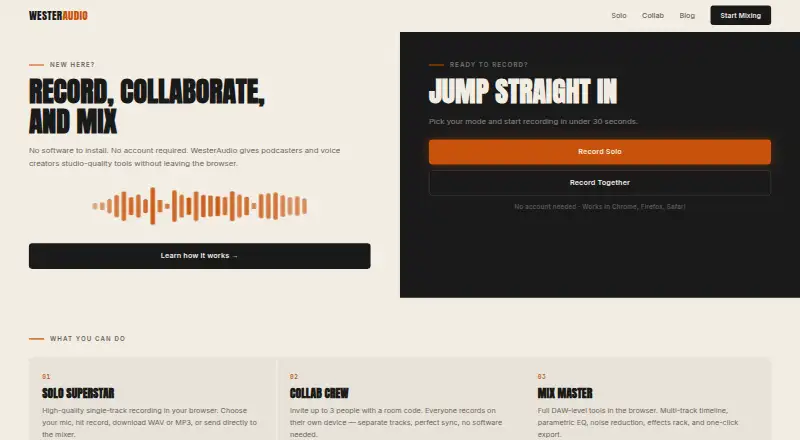
What WesterAudio is
WesterAudio is a browser-based set of recording, collaboration, and mixing tools for podcasters and voice creators. The free plan includes Solo Superstar for recording a single track, Collab Crew for remote sessions with up to three people, and Mix Master for multitrack editing. Solo recordings can be downloaded as WAV or MP3 or sent to the mixer. Collab Crew lets participants record separately on their own devices using a four-character room code. Mix Master includes a multitrack timeline, parametric EQ, noise reduction, an effects rack, and export tools. It can stream a large WAV file from disk during editing or work with smaller sections, and it autosaves in the browser. Finished audio exports as WAV or MP3 for use with a podcast host. WesterAudio says it works in Chrome, Firefox, and Safari, and that recording can begin without an account. Its solo recording page says microphone audio is never stored. Full Mix Master editing requires a tablet or desktop. WesterAudio does not provide built-in RSS distribution or podcast publishing; exported files can be uploaded to hosts such as Spotify for Creators, Transistor, and Buzzsprout.
Who it suits
WesterAudio suits podcasters and voice creators who want browser-based recording and mixing, including remote sessions for up to three people. Full Mix Master editing is intended for tablet or desktop use.
What it does well
- Free plan includes recording, collaboration, and mixing tools.
- Collab Crew supports up to three separate participant tracks.
- Exports finished audio as WAV or MP3.
- No account is required to start recording.
- Autosaves Mix Master work in the browser.
What to know first
- Full Mix Master editing requires a tablet or desktop.
- No built-in RSS distribution or podcast publishing.
- Video recording is not offered.
Plans
| Plan | Billed and limits | Price |
|---|---|---|
| Free | Solo recording · Collab Room (3 people) · Mix Master DAW · No account required | Free |
As westeraudio.com lists them, read 8 Oct 2026. The maker's own page has the final word.
Getting started
- Open the WesterAudio website in Chrome, Firefox, or Safari.
- Start recording without an account, as described on the homepage.
- Use Solo Superstar for a single-track recording or Collab Crew for a session of up to three people.
- Send a solo recording to Mix Master or open audio for multitrack editing.
- Export the finished audio as WAV or MP3 for use with a podcast host.
Verdict
WesterAudio covers recording through editing and audio export in a browser, with separate tools for solo and small-group work. Users who need built-in podcast distribution will need to upload exported files to a podcast host.
Questions
How much does WesterAudio cost?
Its Free plan costs nothing.
Is there a free plan or trial?
There is a free plan, and no free trial.
Which platforms and browsers does it support?
WesterAudio is browser-based and says it works in Chrome, Firefox, and Safari. Full Mix Master editing requires a tablet or desktop.
Can people record remotely?
Yes. Collab Crew supports up to three people recording separately on their own devices, using a four-character room code.
Can it publish a podcast?
WesterAudio does not provide built-in RSS distribution or podcast publishing. Finished files can be exported as WAV or MP3 for upload to podcast hosts.
Do users need an account to record?
The homepage says recording can start without an account.
Facts from WesterAudio's own pages
- Account requirement
- The homepage says no account is required to start recording. · westeraudio.com, 8 Oct 2026
- Audio handling
- The solo recording page states that microphone audio is never stored. · westeraudio.com, 8 Oct 2026
- Autosave
- Mix Master autosaves work in the browser so a refresh will not lose it. · westeraudio.com, 8 Oct 2026
- Browser support
- The homepage says WesterAudio works in Chrome, Firefox, and Safari. · westeraudio.com, 8 Oct 2026
- Device requirement
- Mix Master requires a tablet or desktop for full editing. · westeraudio.com, 8 Oct 2026
- Export workflow
- Users can export finished audio as WAV or MP3 files for use with a podcast host. · westeraudio.com, 8 Oct 2026
- Integrations
- The maker says exported files can be uploaded to podcast hosts such as Spotify for Creators, Transistor, and Buzzsprout. · westeraudio.com, 8 Oct 2026
- Large audio files
- Mix Master can stream a large WAV file from disk while editing and offers options to load a section or download smaller WAV sections. · westeraudio.com, 8 Oct 2026
- Mixing
- Mix Master includes a multitrack timeline, parametric EQ, noise reduction, an effects rack, and export tools. · westeraudio.com, 8 Oct 2026
- Publishing limit
- The maker says WesterAudio does not yet provide built in RSS distribution or podcast publishing. · westeraudio.com, 8 Oct 2026
- Purpose
- WesterAudio provides browser based recording, collaboration, and mixing tools for podcasters and voice creators. · westeraudio.com, 8 Oct 2026
- Remote collaboration
- Collab Crew supports up to three people recording separately on their own devices, with a four character room code. · westeraudio.com, 8 Oct 2026
- Solo recording
- Solo Superstar records a single track in the browser and lets users download WAV or MP3 files or send the recording to the mixer. · westeraudio.com, 8 Oct 2026
Where WesterAudio stands on Freedom251
- Podcast Recording Software#19 of 22