Freedom251 › AI Video Lip Sync Tools
WeryAI Video Lip Sync
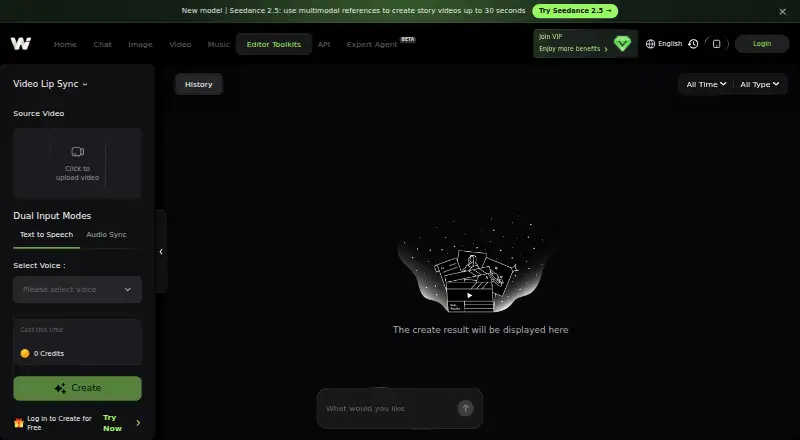
What WeryAI Video Lip Sync is
WeryAI Video Lip Sync changes a video speaker’s lip movements to follow supplied audio or speech generated from text. You can upload an audio file such as MP3 or WAV, paste an audio URL, or type text and select a preset AI voice. The tool is powered by Kling AI and adjusts facial movement, including the jaw, teeth, and tongue. A still portrait can also be used to create a talking-head video. WeryAI says audio syncing works with any language, while text-to-speech supports 50 languages. It recommends a clear, front-facing subject and estimates processing at about two to three times the video length. Free daily credits are available, and paid plans start at $11.91/mo (annual). WeryAI says uploaded materials go to third-party AI providers and are deleted from its servers within 24 hours after task completion unless saved in cloud storage. Its privacy policy says facial-feature data is used for generation, not face recognition or identity verification.
Who it suits
It suits creators who need to match a video or portrait to audio, including speech generated from text. The free daily credits offer a way to try it; paid plans are intended for long-form videos or commercial use.
What it does well
- Accepts audio files, URLs, or typed text.
- Can create a talking head from a portrait.
- Audio syncing works with any language.
- Text-to-speech supports 50 languages.
- Available on Android, iOS, and web.
What to know first
- Processing takes about two to three times video length.
- Uploads are sent to third-party AI providers.
- Server deletion has a cloud-storage exception.
Limits
The free option provides daily credits. The lowest listed paid plan, Basic, costs $142.92 per year, billed annually at $11.91 per month, and includes 400 credits each month, up to 80 videos and up to two concurrent tasks.
Plans
| Plan | Billed and limits | Price |
|---|---|---|
| Ultra | $129.99/Month; Billed yearly: $2399.88; Actually:$1559.88 · 6,100 credits every month · up to 20000 image · up to 1220 video · up to 610 music · up to 5 concurrent tasks | $129.99 a month |
| Basic | $142.92 per year (= $11.91/month, billed annually) · 400 credits every month · up to 1300 image · up to 80 video · up to 40 music · up to 2 concurrent tasks | $142.92 a year |
| Standard | $22.49/Month; Billed yearly: $359.88; Actually:$269.88 · 900 credits every month · up to 3000 image · up to 180 video · up to 90 music · up to 2 concurrent tasks | $22.49 a month |
| Pro | $48.99/Month; Billed yearly: $839.88; Actually:$587.88 · 2,300 credits every month · up to 7600 image · up to 460 video · up to 230 music · up to 3 concurrent tasks | $48.99 a month |
As weryai.com lists them, read 3 Oct 2026. The maker's own page has the final word.
Getting started
- Open the WeryAI Video Lip Sync page.
- Use the web version or access WeryAI on Android or iOS.
- Upload a video or choose a static portrait photo as the source.
- Upload MP3 or WAV audio, paste an audio URL, or type text and choose a preset AI voice.
- Use free daily credits to try Lip Sync, or select a paid plan for additional use.
Verdict
WeryAI combines audio-driven lip syncing with portrait animation and text-to-speech. Check its upload handling and processing time against your needs before using it.
Questions
Does WeryAI Video Lip Sync have a free plan?
Yes. WeryAI says it offers free daily credits to try Lip Sync.
How much do paid plans cost?
The listed starting price is $11.91 per month, billed annually. The Basic plan is $142.92 per year and includes 400 credits each month.
Which platforms can I use?
WeryAI Video Lip Sync is available on Android, iOS and web.
What audio and language options does it support?
You can upload an audio file such as MP3 or WAV, paste an audio URL, or generate speech from text with a preset AI voice. The page says audio syncing works with any language and text-to-speech supports 50+ languages.
Can I use a portrait photo as the source?
Yes. A static portrait photo can be used to create a talking-head effect.
How does WeryAI handle uploaded materials and facial data?
Uploaded materials are sent to third-party AI providers and originals are deleted from WeryAI servers within 24 hours after task completion unless saved in cloud storage. Extracted facial-feature data is used for generation, not face recognition or identity verification.
Facts from WeryAI Video Lip Sync's own pages
- Audio input
- Users can upload an audio file such as MP3 or WAV, or paste an audio URL. · weryai.com, 3 Oct 2026
- Company
- The About page identifies the company as SOMEYA LIMITED and gives its registered address as SHOP 40, 2/F., HOUSTON CENTRE, 63 MODY ROAD TSIM SHA TSUI. · weryai.com, 3 Oct 2026
- Facial data
- The privacy policy says extracted facial-feature data is used for the current generation task and not for face recognition or identity verification. · weryai.com, 3 Oct 2026
- Free use
- WeryAI says it offers free daily credits to test Lip Sync and premium plans for long-form videos or commercial use. · weryai.com, 3 Oct 2026
- Input guidance
- The page recommends that the video subject be front-facing and clear, and says processing takes about 2–3 times the video duration. · weryai.com, 3 Oct 2026
- Languages
- The page says audio syncing works with any language and text-to-speech supports 50+ languages. · weryai.com, 3 Oct 2026
- Model and facial movement
- The page says the tool is powered by Kling AI and adjusts facial movements including teeth, tongue, and jaw. · weryai.com, 3 Oct 2026
- Privacy and uploaded content
- The privacy policy says uploaded materials are sent to third-party AI providers for generation and original uploaded materials are automatically deleted from WeryAI servers within 24 hours after task completion, unless saved in cloud storage. · weryai.com, 3 Oct 2026
- Support
- WeryAI lists [email protected] as its contact email. · weryai.com, 3 Oct 2026
- Talking portraits
- A static portrait photo can be used as the video source to create a talking-head effect. · weryai.com, 3 Oct 2026
- Text to speech
- Users can type text, select a preset AI voice, and generate speech for lip syncing. · weryai.com, 3 Oct 2026
- What it does
- The tool regenerates a video speaker’s lip movements to match uploaded audio or generated speech. · weryai.com, 3 Oct 2026
Where WeryAI Video Lip Sync stands on Freedom251
- AI Video Lip Sync Tools#21 of 28