Freedom251 › iPad Kiosk Software
WebFrame Pro Kiosk
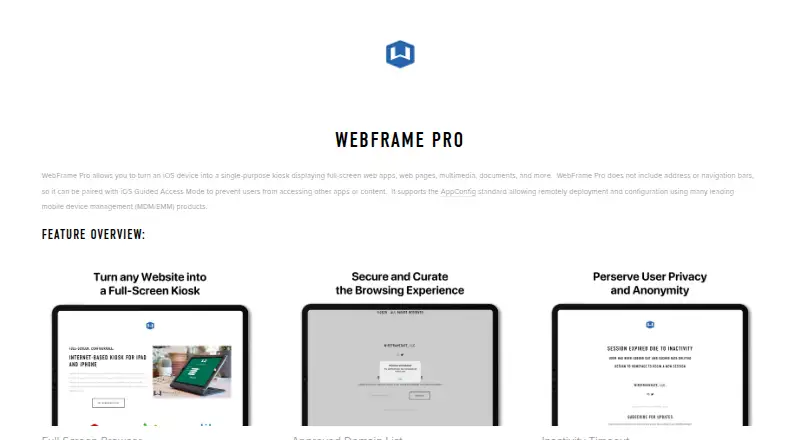
What WebFrame Pro Kiosk is
WebFrame Pro Kiosk turns an iOS device into a single-purpose kiosk for full-screen web apps, pages, multimedia, and documents. Its browser hides address and navigation bars, and an approved-domain list can limit browsing to configured sites. Administrators can set an inactivity timeout to reload the homepage after 1, 3, 5, or 15 minutes, optionally clearing the browser cache. They can control gestures and other user interactions and disable HTML printing. The app supports AppConfig for remote deployment and configuration through compatible MDM or EMM products, including JAMF, VMware Workspace ONE, MobileIron, Microsoft Intune, and SOTI. Single-app remote deployment requires a supervised, MDM-enrolled device. The maker’s edition comparison lists offline support and advanced content filtering for this edition. The product supports iOS and iPadOS, and the plan is listed at $9.99, paid once, with the price subject to change. The maker says it does not collect personal information, though app or system logs may include device and website-loading details.
Who it suits
It suits organizations that want to configure iOS or iPadOS devices as restricted kiosks for web content, documents, or multimedia. Teams using compatible MDM or EMM products can use AppConfig for remote deployment and configuration.
What it does well
- Full-screen browser hides address and navigation bars.
- Approved-domain list can restrict browsing.
- Timeout can reload the homepage after four intervals.
- Supports AppConfig and named MDM or EMM products.
- Edition comparison lists offline support and content filtering.
What to know first
- No free plan is listed.
- Single-app remote deployment requires a supervised, MDM-enrolled device.
- Logs may include device and website-loading details.
- Price is subject to change.
Limits
The plan is paid at $9.99, paid once and has no free plan. Remote single-app deployment is limited to supervised, MDM-enrolled devices.
Plans
| Plan | Billed and limits | Price |
|---|---|---|
| WebFrame Pro Kiosk | iOS kiosk app · price subject to change | $9.99, paid once |
As wireframerate.com lists them, read 4 Oct 2026. The maker's own page has the final word.
Getting started
- Visit the WebFrame Pro Kiosk website
- Install the kiosk app on an iOS or iPadOS device
- Configure the approved-domain list and URL allowlisting
- Set the inactivity timeout and optional cache clearing
- Adjust gestures, interactions and HTML printing
- Connect AppConfig through a compatible MDM or EMM product
Verdict
WebFrame Pro Kiosk provides controls for restricting and resetting a single-purpose iOS kiosk, with remote configuration available through compatible management products. Check the supervised-device requirement for remote single-app deployment and note that the listed one-time price may change.
Questions
What does WebFrame Pro Kiosk cost?
The WebFrame Pro Kiosk plan is $9.99, paid once, and the price is subject to change.
Which platforms are supported?
It is described as an iOS kiosk app supporting iOS and iPadOS.
Can browsing be restricted?
Yes. An approved-domain list and URL allowlisting can limit browsing to configured sites.
Does it support remote management?
Yes. AppConfig supports remote deployment and configuration through compatible MDM or EMM products, including JAMF, VMware Workspace ONE, MobileIron, Microsoft Intune and SOTI.
Does the maker collect personal information?
The maker says it does not collect customers’ or users’ personal information. App or system logs may include device and website-loading details.
Facts from WebFrame Pro Kiosk's own pages
- Domain controls
- An approved-domain list can limit browsing to configured sites. · wireframerate.com, 4 Oct 2026
- Full-screen browser
- The browser has no address or navigation bars. · wireframerate.com, 4 Oct 2026
- Integrations
- The maker names JAMF, VMware Workspace ONE, MobileIron, Microsoft Intune, and SOTI as compatible management products. · wireframerate.com, 4 Oct 2026
- Interaction and printing
- Administrators can control gestures and other user interactions, and can disable HTML printing. · wireframerate.com, 4 Oct 2026
- Offline and filtering
- The maker’s edition comparison lists offline support and advanced content filtering for WebFrame Pro Kiosk. · wireframerate.com, 4 Oct 2026
- Platform limit
- The product is described as an iOS kiosk app, and remote single-app deployment instructions require a supervised, MDM-enrolled device. · wireframerate.com, 4 Oct 2026
- Privacy
- The maker says it does not collect customers’ or users’ personal information, but may collect app or system logs that can include device and website-loading details. · wireframerate.com, 4 Oct 2026
- Purpose
- Turns an iOS device into a single-purpose kiosk for full-screen web apps, pages, multimedia, and documents. · wireframerate.com, 4 Oct 2026
- Remote management
- The app supports AppConfig for remote deployment and configuration through compatible MDM/EMM products. · wireframerate.com, 4 Oct 2026
- Security
- The privacy policy says collected data is protected using commercially acceptable means and that absolute security cannot be guaranteed. · wireframerate.com, 4 Oct 2026
- Session reset
- An inactivity timeout can reload the homepage after 1, 3, 5, or 15 minutes and optionally clear the browser cache. · wireframerate.com, 4 Oct 2026
- Support
- The maker directs users to its WebFrame User Guide and offers a support request contact link. · wireframerate.com, 4 Oct 2026
Where WebFrame Pro Kiosk stands on Freedom251
- iPad Kiosk Software#12 of 13
- Kiosk Browsers#19 of 20