Webcam Effects
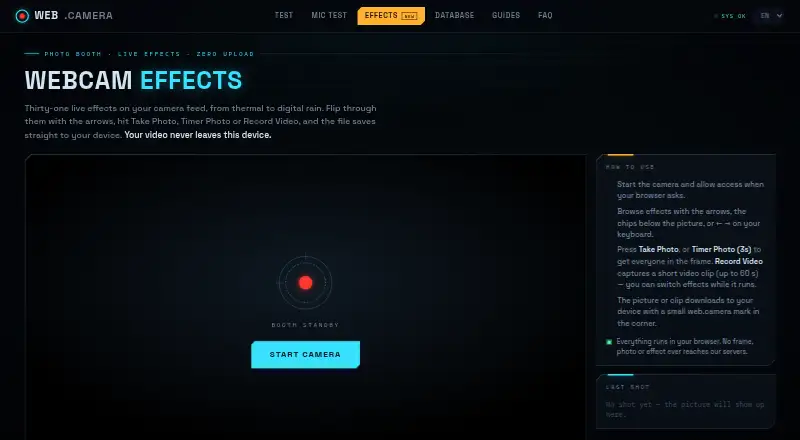
What Webcam Effects is
Webcam Effects turns a browser tab into a photo booth, applying live effects to a camera feed and saving photos or clips to a device. It provides 31 effects, including thermal, night vision, cyberpunk, VHS, glitch, kaleidoscope and digital rain. Capture options include a regular photo, a three-second timer photo and video recording, with effect changes available during recording. Clips can last up to 60 seconds. Effects are computed in JavaScript in the browser and continue working offline after the page loads. The camera stream, rendering and saved image stay within the browser tab; the site says its servers do not receive camera frames. Current Chrome, Edge, Firefox and Safari are supported on desktop, along with Chrome on Android and Safari on iOS. Recordings save as WebM in Chrome, Edge and Firefox, or MP4 in Safari. Downloads include a small web.camera mark. Webcam Effects cannot function as a virtual camera for Zoom, Microsoft Teams or Google Meet. The free plan includes all 31 effects, photos, timer photos and clips up to 60 seconds.
Who it suits
It suits people who want browser-based camera effects for photos or short clips on supported devices. It is not suited to users who need a virtual camera feed for Zoom, Microsoft Teams or Google Meet.
What it does well
- Includes 31 live effects.
- Offers timer photos and video clips up to 60 seconds.
- Effects continue working offline after the page loads.
- Camera frames stay in the browser tab.
- Free plan includes the listed capture options.
What to know first
- Downloads include a small web.camera mark.
- Cannot act as a virtual camera for meeting apps.
- Desktop support is listed for current browsers only.
- Android support is listed for Chrome; iOS for Safari.
Limits
The free plan includes video clips of up to 60 seconds. Downloaded photos and clips carry a small web.camera mark.
Plans
| Plan | Billed and limits | Price |
|---|---|---|
| Free | 31 live effects · photos and 3-second timer · video clips up to 60 seconds · web.camera mark | Free |
As web.camera lists them, read 1 Oct 2026. The maker's own page has the final word.
Getting started
- Open https://web.camera/effects in a supported browser.
- Allow the browser to use the camera.
- Choose an effect and take a photo, set a 3-second timer photo, or record a clip.
- Download the resulting photo or clip to the device.
Verdict
Webcam Effects provides browser-based photo and short video capture with live effects and stated local processing. Note the download mark, 60-second clip limit and lack of virtual-camera integration before using it for meetings.
Questions
How much does Webcam Effects cost?
The Free plan costs nothing.
Which devices and browsers does it support?
It supports current Chrome, Edge, Firefox and Safari on desktop, Chrome on Android, and Safari on iOS.
Can it be used as a camera in Zoom, Teams or Meet?
No. It is not a virtual camera driver and cannot directly insert itself into those meeting apps.
Do camera frames go to the website's servers?
The camera stream, effect rendering and saved picture stay inside the browser tab. The site says its servers cannot receive, store or view camera or microphone streams.
What formats do recorded clips use?
Chrome, Edge and Firefox save clips as WebM; Safari saves them as MP4.
Facts from Webcam Effects's own pages
- Analytics
- Google Analytics 4 runs only after cookie-banner consent, with no advertising pixels, fingerprinting or cross-device tracking. · web.camera, 1 Oct 2026
- Capture modes
- Users can take a photo, use a 3-second timer photo, or record video while switching effects. · web.camera, 1 Oct 2026
- Data protection
- The privacy policy says video and audio never leave the device and that the site has no capability to receive, store or view camera or microphone streams. · web.camera, 1 Oct 2026
- Effects
- The page provides 31 live effects, including thermal, night vision, cyberpunk, VHS, glitch, kaleidoscope and digital rain. · web.camera, 1 Oct 2026
- File formats
- Chrome, Edge and Firefox save recorded clips as WebM, while Safari saves them as MP4. · web.camera, 1 Oct 2026
- Headquarters
- Dugo Selo, Croatia · web.camera, 28 Sept 2026
- Local processing
- Effects are computed in JavaScript inside the browser and continue working offline after the page loads. · web.camera, 1 Oct 2026
- Maker profile
- The site says it is built and moderated by a small independent team of web engineers. · web.camera, 1 Oct 2026
- Meeting integrations
- The page cannot directly insert itself into Zoom, Microsoft Teams or Google Meet because it is not a virtual camera driver. · web.camera, 1 Oct 2026
- Output watermark
- Downloaded photos and clips include a small web.camera mark in the corner. · web.camera, 1 Oct 2026
- Pricing model
- web.camera is described as a free tool with no account, subscription or payment required. · web.camera, 1 Oct 2026
- Privacy
- The camera stream, effect rendering and saved picture stay inside the browser tab, and the servers never receive a frame. · web.camera, 1 Oct 2026
- Purpose
- Webcam Effects is a browser photo booth that applies live effects to a camera feed and downloads photos or clips to the device. · web.camera, 1 Oct 2026
- Support
- Bug reports, corrections, press inquiries and privacy requests go to [email protected], with replies expected within a few working days. · web.camera, 1 Oct 2026
- Supported devices
- The tool supports current Chrome, Edge, Firefox and Safari on desktop, plus Chrome on Android and Safari on iOS. · web.camera, 1 Oct 2026
- Video limit
- Record Video captures clips of up to 60 seconds. · web.camera, 1 Oct 2026
Where Webcam Effects stands on Freedom251
- Webcam Software#23 of 41