Freedom251 › Commodore 64 Emulators
VirtualC64
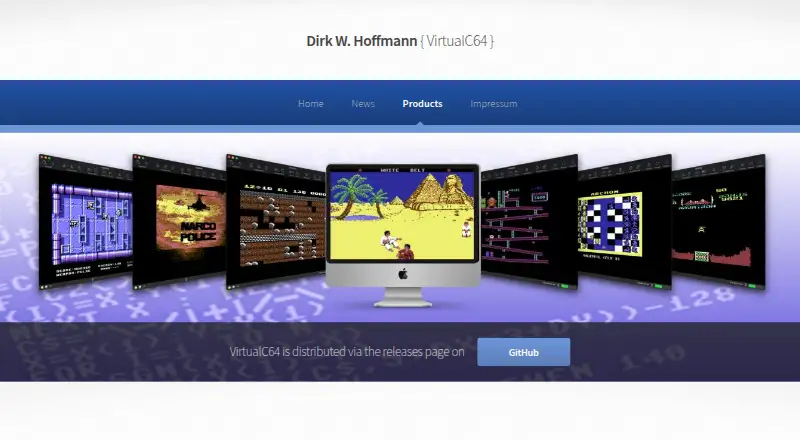
What VirtualC64 is
VirtualC64 is a Commodore 64 emulator for Apple Macintosh computers, with a browser-capable core designed for WebAssembly. It emulates PAL and NTSC systems, including PAL and NTSC C64 and C64 II variants, and emphasizes PAL accuracy and cycle-accurate operation. A built-in debugger and support for D64, T64, PRG, P00, G64, TAP, and CRT media formats are included. Joystick input can use keyboard emulation, USB joysticks, Sony DualShock 4 controllers, or the RetroFun! USB adapter for original Commodore joysticks. The software is free and open source under the GNU General Public License; its CPU core uses the MIT license. On first launch, users are prompted to add four ROM images, which are not pre-installed because their copyright status is unclear. Recent versions include free Mega65 project ROM replacements that can be installed through the ROM configuration panel. Documentation also describes a public API for developers incorporating the emulation core into other projects.
Who it suits
VirtualC64 suits people who want to run Commodore 64 software on a Mac or in a browser. Its documented API may also suit developers incorporating the emulation core into their own projects.
What it does well
- Free and open source under the GNU General Public License
- Emulates PAL and NTSC C64 variants
- Includes a built-in debugger
- Supports seven disk and tape formats
- Offers keyboard and USB joystick input
What to know first
- Four ROM images require setup on first launch
- Listed supported platform is macOS
Limits
VirtualC64 is free. Four ROM images are requested at first launch because they are not pre-installed; recent versions include free Mega65 replacements that can be installed from the ROM configuration panel.
Plans
| Plan | Billed and limits | Price |
|---|---|---|
| VirtualC64 | Open-source emulator; requires legally obtained ROM images or free Mega65 ROM replacements | Free |
As dirkwhoffmann.github.io lists them, read 4 Oct 2026. The maker's own page has the final word.
Getting started
- Visit the VirtualC64 website.
- Download the macOS version or use the browser-compatible emulator.
- At first launch, add four ROM images, or install the free Mega65 replacements from the ROM configuration panel.
- Choose keyboard emulation or a supported joystick for input.
- Load a supported disk or tape file.
VirtualC64 is a free Commodore 64 emulator for macOS, with a WebAssembly-capable core that also runs in a browser. It is aimed at users who care about accurate PAL timing, multiple C64 variants, and developer-level inspection; the principal friction is preparing ROMs before the first session.
Overview
The project started as a virtual CPU environment for computer-engineering teaching and grew into a complete C64 emulator. Its cycle-accurate approach gives PAL emulation particular attention while retaining NTSC support, making it a stronger fit for authenticity-minded users than for anyone seeking the widest possible operating-system coverage.
VirtualC64 is released under the GNU General Public License, while the CPU core is MIT-licensed. The C++20 implementation is designed for portability, and the public API documented by the project gives developers a route to embed the emulation core in their own software. That API is a meaningful advantage for engineering work, but unnecessary overhead for a player who only wants to run old software.
Key features
C64 variants and media
The emulator covers PAL C64, NTSC C64, C64 II PAL, and C64 II NTSC. Support for D64, T64, PRG, P00, G64, TAP, and CRT files accommodates disk images, tape images, programs, and cartridges, so existing collections are less likely to require conversion. A built-in debugger is valuable for tracing and examining software; casual game use will not make much use of it.
ROM preparation
First launch requires four ROM images. They are not pre-installed because their copyright status is unclear, so anyone expecting an immediately runnable package faces an extra setup step. Recent versions include free ROM replacements from the Mega65 project, installable through the ROM configuration panel. Those replacements reduce the legal and practical barrier, although users with specific software or preservation requirements may still need to supply legally obtained images.
Controls
Joystick input can be mapped to the keyboard or taken from an external USB joystick. The project also names Sony DualShock 4 controllers and the RetroFun! USB adapter, the latter allowing original Commodore joysticks to be used. This range suits both a laptop-only setup and a more period-accurate hardware arrangement.
Developer and privacy considerations
The browser-capable core makes experimentation without a native installation possible where the web implementation is used, while the API supports incorporation into other projects. The site can be visited without registration, and its privacy notice says personal data is collected voluntarily where possible and is not shared with third parties without consent. It records pages or requested file names with date and time for statistics, and GitHub hosting may record technical information such as IP addresses. Project support is routed through GitHub Issues and Discussions.
Pricing
| Plan | Price | What it includes |
|---|---|---|
| VirtualC64 | free | Open-source emulator; requires legally obtained ROM images or free Mega65 ROM replacements |
There is no paid tier, trial period, seat allowance, renewal, or usage quota. The free plan is therefore the right choice for every user who accepts the ROM requirement and the project’s macOS focus. Its cost advantage comes with no bundled commercial ROM set and no paid support promise.
Platforms
The native supported platform is macOS. The emulator core is designed for WebAssembly and can run in a browser, extending access beyond the desktop application, while the published platform plan itself identifies macOS. Users on Linux or Windows should not choose VirtualC64 expecting a native build on those systems.
Who it's for
Choose VirtualC64 if you use a Mac and want cycle-accurate, PAL-conscious emulation across both PAL and NTSC machines, broad classic-media support, or a debugger. It also fits developers who need a portable C++20 core, browser execution, or an API for embedding. It is less suitable for newcomers who want bundled ROMs and one-click startup, and for users whose priority is native support across several desktop operating systems.
Pros and cons
Pros
- Detailed variant coverage: Four PAL and NTSC C64 models support software tied to different machine generations.
- Cycle-accurate, PAL-focused emulation: A sensible choice when timing fidelity matters.
- Broad media compatibility: D64, T64, PRG, P00, G64, TAP, and CRT cover major C64 distribution formats.
- Open licensing and developer access: GPL software, an MIT CPU core, WebAssembly compatibility, and a public API serve both users and builders.
- Flexible controller options: Keyboard emulation, USB joysticks, DualShock 4, and RetroFun! cover modern and original-control setups.
Cons
- ROM setup is mandatory: Four images must be added before use, even though free Mega65 replacements are available in recent versions.
- Limited native reach: The listed native platform is macOS, which rules out a straightforward installation for Windows and Linux users.
- Debugger is specialized: Its value is concentrated among developers and preservation-minded users, not ordinary players.
Alternatives
For a wider platform range, VICE is a free GPL emulator for Android, Linux, macOS, and Windows. Breadbin466 is another free option for Linux, macOS, and Windows, using the MIT license while excluding Commodore ROM images from that license.
Frodo is a free alternative for Linux, macOS, and Windows. TRX64 is free, GPL-3.0-or-later software spanning API, Linux, macOS, self-hosted, and Windows deployments, with C64 ROMs excluded. C64 Forever offers a free Express Edition on Windows for readers who prefer a freemium product. Hoxs64 is a free Windows emulator. Atari 5200DS is free to use but targets Atari 5200 rather than Commodore 64 software. Buddi is budgeting software, not an emulator.
For more choices, browse the Commodore 64 Emulators list.
Verdict
VirtualC64 is the right pick for Mac users who value PAL accuracy, cycle-level behavior, format breadth, and an emulator core they can inspect or build upon. Choose something else if you need native Windows or Linux support, or if supplying ROMs before first use is a deal-breaker.
Verdict
VirtualC64 combines multiple C64 variants, media formats, and input options in a free emulator. New users should account for the initial ROM setup; free Mega65 replacements are included with recent versions.
Questions
How much does VirtualC64 cost?
VirtualC64 is free, with a listed plan price of $0.
Which platforms does it support?
macOS is the listed supported platform. Its WebAssembly-compatible core can also run in a browser.
Is VirtualC64 open source?
Yes. The emulator is published under the GNU General Public License, and its CPU core uses the MIT license.
Do I need ROM images?
The emulator prompts for four ROM images at first launch. Recent versions include free ROM replacements from the Mega65 project, installable in the ROM configuration panel.
Which media formats can it load?
It supports D64, T64, PRG, P00, G64, TAP and CRT formats.
Who makes VirtualC64?
The site's imprint identifies Prof. Dr. Dirk W. Hoffmann at Hochschule Karlsruhe in Karlsruhe, Germany.
Facts from VirtualC64's own pages
- Browser core
- The core emulator is designed to work with WebAssembly and can run in a browser. · dirkwhoffmann.github.io, 4 Oct 2026
- Controllers
- Joystick use supports keyboard emulation, external USB joysticks, Sony DualShock 4 controllers, and the RetroFun! USB adapter for original Commodore joysticks. · dirkwhoffmann.github.io, 4 Oct 2026
- CPU core license
- The CPU core is published under the MIT license. · dirkwhoffmann.github.io, 4 Oct 2026
- Developer API
- The official documentation describes a public API for incorporating the emulation core into other projects. · dirkwhoffmann.github.io, 4 Oct 2026
- Documentation
- The official documentation describes the public API for developers incorporating the emulation core into their own projects. · dirkwhoffmann.github.io, 4 Oct 2026
- Emulation
- It emulates both PAL and NTSC, with emphasis on PAL accuracy and cycle-accurate emulation. · dirkwhoffmann.github.io, 4 Oct 2026
- Headquarters
- Karlsruhe, Germany · dirkwhoffmann.github.io, 28 Sept 2026
- Hosting
- The maker states that the website is hosted on GitHub servers and that GitHub may record technical information including IP addresses. · dirkwhoffmann.github.io, 4 Oct 2026
- Implementation
- The documentation says VirtualC64 is implemented in C++20 with portability in mind. · dirkwhoffmann.github.io, 4 Oct 2026
- Input devices
- Joystick input can use keyboard emulation or an external USB joystick; the site also names Sony DualShock 4 controllers and the RetroFun! USB adapter as supported. · dirkwhoffmann.github.io, 4 Oct 2026
- License
- VirtualC64 is open-source under the GNU General Public License, and its CPU core is under the MIT license. · dirkwhoffmann.github.io, 4 Oct 2026
- Maker
- The site's imprint identifies Prof. Dr. Dirk W. Hoffmann at Hochschule Karlsruhe in Karlsruhe, Germany. · dirkwhoffmann.github.io, 4 Oct 2026
- Media formats
- Supported formats include D64, T64, PRG, P00, G64, TAP, and CRT. · dirkwhoffmann.github.io, 4 Oct 2026
- Open source
- VirtualC64 is open-source software published under the GNU General Public License. · dirkwhoffmann.github.io, 4 Oct 2026
- Origin
- VirtualC64 began as a virtual CPU environment intended for computer-engineering courses and evolved into a full emulator. · dirkwhoffmann.github.io, 4 Oct 2026
- Privacy
- The maker's privacy notice says the website can be visited without registration and that personal data is collected voluntarily where possible. · dirkwhoffmann.github.io, 4 Oct 2026
- Purpose
- VirtualC64 turns an Apple Macintosh into a Commodore 64 emulator. · dirkwhoffmann.github.io, 4 Oct 2026
- ROM replacements
- Free ROM replacements developed as part of the Mega65 project ship with recent versions and can be installed from the ROM configuration panel. · dirkwhoffmann.github.io, 4 Oct 2026
- ROM requirement
- On first launch, users are prompted to add four ROM images because they are not pre-installed due to unclear copyright status. · dirkwhoffmann.github.io, 4 Oct 2026
- ROM setup
- The emulator prompts users to add four ROM images because their copyright status is unclear and they are not pre-installed. · dirkwhoffmann.github.io, 4 Oct 2026
- Security and privacy
- The maker's privacy page says the site can be visited without registration, records pages or requested file names with date and time for statistics, and does not share personal data with third parties without consent. · dirkwhoffmann.github.io, 4 Oct 2026
- Support
- The official site links to GitHub Issues and Discussions for the project. · dirkwhoffmann.github.io, 4 Oct 2026
- WebAssembly
- The core emulator is designed to be compatible with WebAssembly and can run in a browser. · dirkwhoffmann.github.io, 4 Oct 2026
Where VirtualC64 stands on Freedom251
- Commodore 64 Emulators#18 of 31