Freedom251 › AI Video Stabilization Software

VidHex AI Video Stabilizer
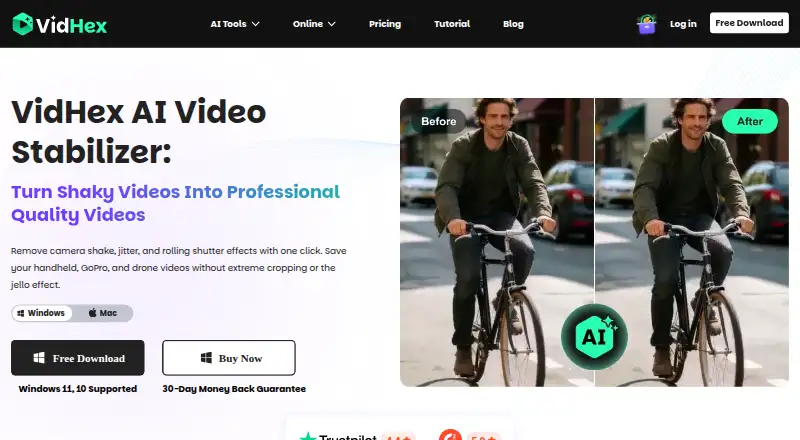
What VidHex AI Video Stabilizer is
VidHex AI Video Stabilizer is Windows and macOS software for reducing shake in footage from phones, cameras, action cameras, drones, and zoom shots. VidHex says its AI analyzes depth and motion vectors to correct rolling-shutter distortion and keep straight lines straight. It calculates an optimal path and can preserve up to 100% of the original frame, according to the maker. The workflow is to import footage, choose the Stabilize model for automatic motion tracking, compare the result side by side, and export. Output resolution goes up to 8K. A free plan allows AI feature trials but limits previews to three seconds; full-video export requires membership. Paid plans include $31.92 a month, $79.92 a year, and $239.92, paid once for perpetual access. Team plans cover 5, 10, or 20 computers. Uploaded content is used for processing and deleted one hour after the processing page closes.
Who it suits
It suits creators working with vlog, travel, social, action-camera, drone, aerial, real-estate, concert, animal, or sports footage. Windows and macOS users can choose free previews or paid export plans.
What it does well
- Windows and macOS support
- Rolling-shutter correction
- Output up to 8K
- Side-by-side preview workflow
- Free AI feature trial
What to know first
- Free previews limited to three seconds
- Full export requires membership
- Paid plans auto-renew where stated
- Cloud credits are membership-based
Limits
Free users can try the AI features but preview only three seconds. Exporting a full video requires a membership; paid plans include specified cloud-credit amounts and full export.
Plans
| Plan | Billed and limits | Price |
|---|---|---|
| Perpetual | One-time payment · 5,000 cloud AI credits · perpetual access to all AI features · free upgrades | $239.92, paid once |
| 1 Month | Auto-renewal; cancel at any time · 100 cloud AI credits · full export · access to all AI features | $31.92 a month |
| Annual Team Plan — 5 Computers | Annual plan · 5 computers · 5,000 additional AI credits · multi-user control · 1-to-1 tech support | $319.92 a year |
| Annual Team Plan — 10 Computers | Annual plan · 10 computers · 10,000 additional AI credits · multi-user control · 1-to-1 tech support | $479.92 a year |
| 1 Year | Auto-renewal; cancel at any time · 1,350 cloud AI credits · full export · access to all AI features | $79.92 a year |
| Annual Team Plan — 20 Computers | Annual plan · 20 computers · 20,000 additional AI credits · multi-user control · 1-to-1 tech support | $799.92 a year |
As vidhex.ai lists them, read 30 Sept 2026. The maker's own page has the final word.
Getting started
- Open the VidHex AI Video Stabilizer website
- Use the Windows or macOS version
- Import your footage
- Select the Stabilize model
- Review the side-by-side preview
- Export the stabilized video
Verdict
VidHex AI Video Stabilizer combines automated motion tracking with rolling-shutter correction and high-resolution output. The free tier is useful for short previews, while exporting complete videos requires a membership.
Questions
What platforms does VidHex AI Video Stabilizer support?
It supports Windows and macOS.
Is there a free plan?
Yes. The free plan allows AI feature trials, with previews limited to three seconds.
How much do paid plans cost?
The 1 Month plan is $31.92 a month, the 1 Year plan is $79.92 a year, and the Perpetual plan is $239.92, paid once. Team plans are 319.92, 479.92, or $799.92 a year for 5, 10, or 20 computers.
What does the Perpetual plan include?
It includes 5,000 cloud AI credits, perpetual access to all AI features, and free upgrades.
How is uploaded content handled?
Uploaded content is used for requested processing. Images and results are automatically deleted one hour after the user last edits or closes the processing page.
Is accelerated cloud processing available?
VIP members can purchase accelerated cloud-processing credits, and purchased credits remain valid for the lifetime of the membership.
Facts from VidHex AI Video Stabilizer's own pages
- Cloud credits
- VIP members can purchase credits for accelerated cloud processing, and the pricing page says purchased credits are valid for the lifetime of the membership. · vidhex.ai, 30 Sept 2026
- Company identity
- The About page identifies the maker as VidHex Studio and describes it as a team focused on AI-powered video enhancement. · vidhex.ai, 30 Sept 2026
- Frame preservation
- The stabilizer calculates an optimal path and can preserve up to 100% of the original frame, according to the maker. · vidhex.ai, 30 Sept 2026
- Free tier limit
- Free users can try AI features but can preview only 3 seconds; full-video export requires a membership. · vidhex.ai, 30 Sept 2026
- Integrations
- The opened product, pricing, download, and support pages do not state integrations for the stabilizer. · vidhex.ai, 30 Sept 2026
- Intended users
- The maker recommends it for vlog, travel, YouTube, TikTok, Reels, GoPro, action, drone, landscape, real estate, aerial, animal, concert, and zoom sports footage. · vidhex.ai, 30 Sept 2026
- Platforms
- The maker lists Windows 11 and 10 and Mac OS X 10.7 or higher, and its pricing page says Windows and Mac are available platforms. · vidhex.ai, 30 Sept 2026
- Privacy and retention
- The privacy policy says uploaded content is used for requested processing and images and results are automatically deleted from servers one hour after the user last edits or closes the processing page. · vidhex.ai, 30 Sept 2026
- Purpose
- VidHex uses AI to stabilize shaky footage from phones, cameras, action cameras, drones, and zoom shots. · vidhex.ai, 30 Sept 2026
- Security
- The privacy policy says uploaded data is transmitted using SSL/TLS encryption and describes firewalls, transport layer security, and restricted access; it does not name a specific certification. · vidhex.ai, 30 Sept 2026
- Stabilization
- The maker says its AI analyzes depth and motion vectors to correct shutter distortion and keep straight lines straight. · vidhex.ai, 30 Sept 2026
- Support
- The support center says users can contact support by email, online feedback, or social media and that the team will respond within one working day. · vidhex.ai, 30 Sept 2026
- Workflow
- The stated workflow is to import footage, click the Stabilize model for automatic motion tracking, then preview a side-by-side comparison and export. · vidhex.ai, 30 Sept 2026
Where VidHex AI Video Stabilizer stands on Freedom251
- AI Video Stabilization Software#22 of 33