Freedom251 › Video Background Removal Software

VideoBGNinja
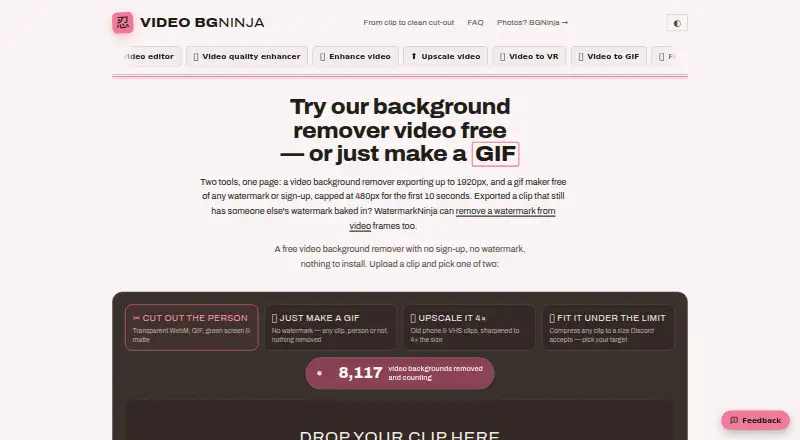
What VideoBGNinja is
VideoBGNinja is a web tool that removes backgrounds from short videos of people, with no green screen or account required. Its AI matting separates a person from the background frame by frame and follows the subject through the clip. Supported inputs include MP4, MOV, WebM, MKV, AVI, M4V, MPG, MPEG, WMV, and 3GP. The tool is intended for talking-head videos, vlogs, interviews, streamers, and dance clips, and works best on people.
Exports include transparent WebM, transparent GIF, green-screen MP4, and alpha-matte MP4. Transparent WebM works in browsers and OBS, while the alpha matte can be used for compositing in After Effects, Resolve, or Premiere. The Free plan costs nothing, adds no watermark, and accepts clips up to 90 seconds and 2 GB, with the longest side up to 1920 px. One-off passes cost €3, paid once for 24 hours or €5, paid once for 30 days; both extend clips to four minutes, 4 GB, and 3840 px and add ProRes 4444 MOV with alpha.
Processing runs on graphics cards in the Netherlands. Uploads are deleted after processing, generated results are wiped within 45 minutes, and the service says files are not watched or used for training. Pets and products may have softer edges or inconsistent results because the tool is built for people.
Who it suits
VideoBGNinja suits people making short, people-focused videos who need a background removed without using a green screen or creating an account. It can also suit editors who want transparent video or alpha-matte output for browser, OBS, or compositing workflows.
What it does well
- Removes backgrounds from people without a green screen or account.
- Accepts ten listed video input formats.
- Free exports include transparent WebM, GIF, and green-screen MP4.
- Free clips have no watermark.
- Paid passes add ProRes 4444 MOV with alpha and priority queueing when busy.
- Uploads are deleted after processing; generated results are wiped within 45 minutes.
What to know first
- The free plan caps clips at 90 seconds, 2 GB, and 1920 px.
- Paid access is needed for ProRes 4444 MOV export.
- Pets and products may have softer edges or inconsistent results.
- Batch processing is not available.
Limits
The Free plan accepts clips up to 90 seconds and 2 GB, with the longest side limited to 1920 px, and does not include MOV export. The free email pass allows four minutes, 4 GB, and 2560 px but renews monthly after leaving an email address; one-off paid passes allow four minutes, 4 GB, and 3840 px and add ProRes 4444 MOV with alpha.
Plans
| Plan | Billed and limits | Price |
|---|---|---|
| Free e-mail pass | Renews monthly after leaving an email address; one click in the email turns it off. · 4 minutes · 4 GB · 2560 px · normal queue · no MOV export | Free |
| Free | 90 seconds · 2 GB · 1920 px · WebM, GIF and green-screen MP4 · no watermark | Free |
| Paid pass — 24 hours | One-off payment for 24 hours; no subscription. · 4 minutes · 4 GB · 3840 px (4K) · ProRes 4444 MOV with alpha · priority queue when busy | €3, paid once |
| Paid pass — 30 days | One-off payment for 30 days; no subscription. · 4 minutes · 4 GB · 3840 px (4K) · ProRes 4444 MOV with alpha · priority queue when busy | €5, paid once |
As videobgninja.com lists them, read 7 Oct 2026. The maker's own page has the final word.
Getting started
- Open the VideoBGNinja website.
- Upload a supported video file: MP4, MOV, WebM, MKV, AVI, M4V, MPG, MPEG, WMV, or 3GP.
- Use the Free plan for clips up to 90 seconds, 2 GB, and 1920 px, or choose a paid pass for higher caps.
- Select an available export format.
- Use transparent WebM in a browser or OBS, or use alpha-matte footage in After Effects, Resolve, or Premiere.
Verdict
Choose VideoBGNinja for short, people-focused clips when you want a web workflow and transparent or green-screen exports. Consider another tool for batch processing or consistent results with pets and products; the paid passes are needed for ProRes MOV and the higher clip limits.
Questions
How much do VideoBGNinja paid passes cost?
The 24-hour pass costs €3, paid once, and the 30-day pass costs €5, paid once. Both are one-off payments with no subscription.
Is there a free plan?
Yes. The Free plan costs nothing and has no watermark. It allows clips up to 90 seconds and 2 GB, with a maximum longest side of 1920 px.
Which platforms does VideoBGNinja support?
VideoBGNinja is a web tool. Its transparent WebM export works in browsers and OBS.
Which video formats can I upload?
Supported inputs are MP4, MOV, WebM, MKV, AVI, M4V, MPG, MPEG, WMV, and 3GP.
Does it offer a free trial?
No free trial is listed. VideoBGNinja has a free plan.
Where is video processing handled?
Processing runs on the service's graphics cards in the Netherlands. It says uploads are deleted after processing and results are wiped within 45 minutes.
Facts from VideoBGNinja's own pages
- AI matting
- It separates a person from the background frame by frame and tracks the subject through the clip. · videobgninja.com, 7 Oct 2026
- Exports
- The tool offers transparent WebM, transparent GIF, green-screen MP4 and alpha-matte MP4 exports; the paid pass adds ProRes 4444 MOV with alpha. · videobgninja.com, 7 Oct 2026
- File retention
- Uploads are deleted after processing and generated results are wiped within 45 minutes; the maker says files are not watched or used for training. · videobgninja.com, 7 Oct 2026
- Headquarters
- Netherlands · videobgninja.com, 28 Sept 2026
- Input support
- The pricing page lists MP4, MOV, WEBM, MKV, AVI, M4V, MPG, MPEG, WMV and 3GP as supported formats. · videobgninja.com, 7 Oct 2026
- Integrations
- The maker says transparent WebM works in browsers and OBS, while the alpha matte can be used for compositing in After Effects, Resolve or Premiere. · videobgninja.com, 7 Oct 2026
- Known limitation
- The maker says pets and products may produce softer edges or inconsistent results because the tool is built for people. · videobgninja.com, 7 Oct 2026
- Limits
- The free tier allows clips up to 90 seconds and 2 GB at up to 1920 px on the longest side; paid passes raise the caps to 4 minutes, 4 GB and 3840 px. · videobgninja.com, 7 Oct 2026
- Payment and privacy
- Payments are processed by Stripe, and the maker says it does not see or store card details. · videobgninja.com, 7 Oct 2026
- Processing location
- The maker says processing runs on its own graphics cards in the Netherlands and videos are not sent to a third-party service. · videobgninja.com, 7 Oct 2026
- Purpose
- VideoBGNinja removes the background from short videos of people without requiring a green screen or account. · videobgninja.com, 7 Oct 2026
- Support
- Users can contact the maker through a form; it aims to reply within a few working days when an email address is provided. · videobgninja.com, 7 Oct 2026
- Use cases
- The maker describes the tool for talking-head videos, vlogs, interviews, streamers and dance clips, and says it works best on people. · videobgninja.com, 7 Oct 2026
Where VideoBGNinja stands on Freedom251
- Video Background Removal Software#18 of 24