Freedom251 › Landscape Software

Vectorworks Landmark
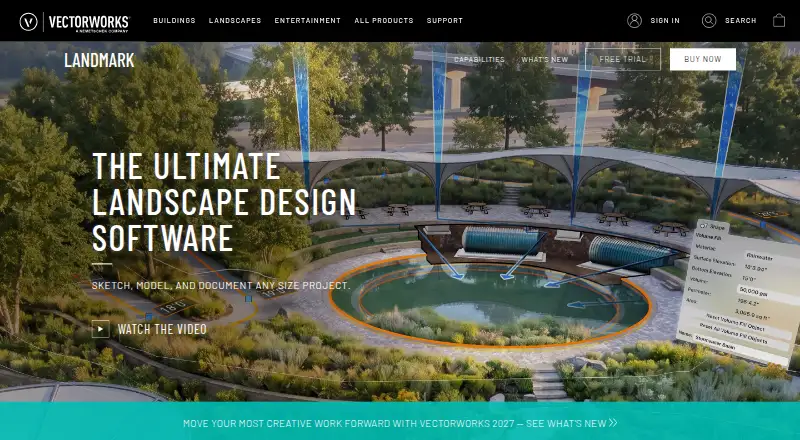
What Vectorworks Landmark is
Vectorworks Landmark is landscape design software for work from pre-design and schematic design through construction documents. Its BIM tools link drawings, details, models, and schedules, so a change in one place is reflected throughout the project. Landscape-specific tools support planting, grading, hardscape, and irrigation design. Terrain analysis covers cut and fill, slope, drainage, water budgets, and sustainability goals. Worksheets and reports can produce estimates, proposals, quantity take-offs, plant lists, material schedules, and land use reports from site drawings. File workflows include AutoCAD, Revit, SketchUp, Rhino, IFC, DWG, RVT, and BCF. Landmark supports cloud sharing and processing; its mobile app can review cloud-hosted files and visualize designs with AR and VR. A free 7-day trial of Design Suite includes Landmark capabilities. Annual pricing is $127.50 a year, billed $1,530.00 billed annually; Monthly pricing is $170 a month. A license can be installed on up to two machines but used on only one device at a time. The software must contact Vectorworks for authorization at first launch and periodically.
Who it suits
Landmark suits landscape professionals who need design tools spanning early planning through construction documents. Its reports, terrain analysis, and planting and irrigation tools are relevant to site design workflows.
What it does well
- BIM links project drawings, models, details, and schedules
- Terrain analysis includes drainage and water budgets
- Supports planting, grading, hardscape, and irrigation
- Reports can generate plant lists and quantity take-offs
- Cloud sharing and mobile AR and VR visualization
What to know first
- No free plan is listed
- License use is limited to one device at a time
- Requires periodic contact with Vectorworks for authorization
- Renewing subscribers must connect within three days
Limits
There is no free plan. The free Design Suite trial lasts 7 days and includes Landmark capabilities; a license is limited to one device in use at a time, and active subscribers must connect within three days of renewal.
Plans
| Plan | Billed and limits | Price |
|---|---|---|
| Annual | $1,530.00 billed annually · Best for frequent use · Unlimited Vectorworks University Courses · 15% off online training · Save by purchasing annually | $1,530 a year |
| Monthly | $170.00 /M · Best for infrequent use · Unlimited Vectorworks University Courses · 10% off online training | $170 a month |
As vectorworks.net lists them, read 2 Oct 2026. The maker's own page has the final word.
Getting started
- Visit the Vectorworks Landmark website.
- Choose the Annual or Monthly plan, or start the 7-day Design Suite trial that includes Landmark capabilities.
- Install the license on up to two machines, observing the one-device-at-a-time use limit.
- Launch the software and connect to Vectorworks for authorization.
- Use the available technical support, online help, knowledgebase, community forums, training, or professional services as needed.
Vectorworks Landmark is professional landscape-design software that carries a site project from early planning through construction documentation. It suits landscape architects, contractors, and other practices that need coordinated drawings, terrain analysis, planting design, and schedules. The trade-off is a substantial subscription and a licence that permits use on only one device at a time.
Overview
Landmark’s BIM workflow connects drawings, details, models, and schedules, so a change made in one location is reflected throughout the project. That is valuable when a design produces a large documentation set and helps avoid contradictory information between sheets and schedules.
Site analysis goes beyond presentation. The software handles cut-and-fill, slope, and drainage studies, evaluates water budgets, and tracks sustainability goals. Those tools make it a stronger choice for sites where grading, water use, and environmental targets drive decisions, rather than for users who only need a quick visual layout.
Worksheets and reports can derive estimates, proposals, quantity take-offs, plant lists, material schedules, and land-use reports from site drawings. This links design to procurement and construction paperwork, with the greatest payoff on detailed professional projects.
Key features
Landscape-specific tools cover planting, grading, hardscape, irrigation, and planting plans. Terrain modeling and a plant library support both analysis and documentation, while cloud sharing and processing extend the workflow beyond a single workstation. The mobile app can review cloud-hosted files and show designs through augmented- and virtual-reality visualization, useful for reviews away from the main computer.
Import, export, and referencing workflows accommodate AutoCAD, Revit, SketchUp, Rhino, and IFC projects. Supported formats include DWG, DXF, DWF, RVT, RFA, SAT, PDF, BMP, JPEG, PNG, and TIFF. That range makes Landmark more practical in mixed consultant environments, although compatibility does not remove the need to manage a coordinated project standard.
Vectorworks identifies AutoTURN and Esri as integrations; AutoTURN’s Vectorworks workflow provides vehicle swept-path analysis. Security safeguards for personal data are described by Vectorworks, with applicable audit or certification information such as SOC 2 or ISO 27001 supplied on written request. Support spans technical requests, online help, a knowledgebase, community forums, training, and professional services.
Pricing
Annual
The Annual plan costs $127.50 a year, billed as $1,530.00 billed annually. It is aimed at frequent users and includes unlimited Vectorworks University courses plus 15% off online training. Paying for the year lowers the effective monthly cost compared with the monthly option, but requires committing to the full annual charge.
Monthly
The Monthly plan is $170 a month, billed monthly. It includes the same unlimited university courses and 10% online-training discount. It suits infrequent or short-term work because it avoids an annual commitment, though continuous use costs more over a year.
There is no free plan. A seven-day free trial of Design Suite includes Landmark capabilities, giving prospective users a short window to check whether its professional workflow fits. A licence can be installed on two machines but can be used on only one device at a time. Constant internet access is not required, yet Vectorworks authorization is needed at first launch and periodically; active subscribers must connect within three days of renewal.
Platforms
Landmark is offered for macOS, Windows, and the web, with the purchase page naming macOS 26, macOS 15, and Windows 11 as supported operating systems. The combination covers desktop production, browser-based access, and mobile review through the companion app, but the single-device usage rule still limits simultaneous work.
Who it's for
Choose Landmark if your practice produces landscape documents that must stay coordinated from concept through construction, or if terrain, irrigation, planting schedules, and sustainability calculations are central to the job. Its reporting and broad file support also suit teams exchanging data with architects, engineers, and contractors.
Look elsewhere if you design only occasional gardens, need a free starting point, or expect several people to work concurrently under one licence. The subscription and authorization cycle are harder to justify for lightweight visual planning.
Pros and cons
- Pro: BIM links drawings, models, details, and schedules so project changes propagate across documentation.
- Pro: Terrain, water-budget, sustainability, grading, planting, and irrigation tools address real site constraints.
- Pro: Reports generate estimates, take-offs, plant lists, schedules, and land-use documentation from drawings.
- Pro: Extensive CAD, BIM, image, and 3D-format support helps in mixed-software projects.
- Con: The annual subscription is a significant commitment, while monthly billing costs more for sustained use.
- Con: Installation on two machines does not allow simultaneous use; only one device can be active at once.
- Con: Periodic authorization and a three-day post-renewal connection requirement add account-management overhead.
Alternatives
Planner 5D is the better starting point for users who want a freemium, multi-platform option with a 59.99 USD annual Premium plan. Home Design 3D suits consumers seeking a freemium mobile and desktop app with low-cost weekly plans rather than professional landscape documentation.
SmartDraw is a paid, trial-based choice spanning Linux, macOS, web, and Windows, with individual, team, and enterprise licensing. AutoLANDSCAPE is a Windows-only paid alternative. PRO Landscape+ targets professional landscape work across Android, iOS, and Windows, with an annual plan billed at $75 a month.
Neighborbrite is a free web option for simpler landscape planning. DynaScape Design is a paid Windows package with CAD-based landscape design, plant and symbol libraries, and landscape drafting tools; its Design plan is $1,599 a year. Home Designer is a paid macOS and Windows alternative with a free trial.
For broader category browsing, see Landscape Design Software and 3D Landscape Design Software.
Verdict
Vectorworks Landmark is a strong recommendation for professional landscape practices that need one coordinated system for terrain analysis, planting and grading, BIM documentation, and project reports. Its main reason to choose it is the breadth of that end-to-end workflow. Its main reason to look elsewhere is cost and licensing: occasional users, budget-conscious designers, and teams needing simultaneous use will find the annual or monthly subscription and one-device limit restrictive.
Verdict
Landmark brings landscape modeling, analysis, documentation, and reporting into one design workflow. Review its authorization requirements and device limit alongside the annual or monthly plan.
Questions
Does Vectorworks Landmark have a free plan?
No. Vectorworks offers a free 7-day trial of Design Suite, which includes Landmark capabilities.
How much does Landmark cost?
The Annual plan is $127.50 a year, billed $1,530.00 billed annually. The Monthly plan is $170 a month.
Which platforms does it support?
The listed platforms are Windows, macOS, and web. The purchase page lists macOS 26 and macOS 15, plus Windows 11, as supported operating systems.
What file formats does it support?
File workflows include AutoCAD, Revit, SketchUp, Rhino, IFC, DWG, RVT, and BCF. Listed import formats also include DXF, DWF, RFA, SAT, PDF, BMP, JPEG, PNG, and TIFF.
What integrations are identified?
Vectorworks identifies AutoTURN and Esri as Landmark integrations. Its AutoTURN Online partner page describes vehicle swept path analysis within Vectorworks.
How many devices can use one license?
A license can be installed on up to two machines but used on only one device at a time.
Facts from Vectorworks Landmark's own pages
- BIM and modeling
- Its BIM tools link drawings, details, models, and schedules so a change in one place is reflected throughout the project. · vectorworks.net, 2 Oct 2026
- Cloud and mobile
- Landmark capabilities include cloud sharing and processing, while the mobile app can review cloud-hosted files and visualize designs with AR and VR. · vectorworks.net, 2 Oct 2026
- File compatibility
- The product supports import, export, and referencing workflows for formats including AutoCAD, Revit, SketchUp, Rhino, IFC, DWG, RVT, and BCF. · vectorworks.net, 2 Oct 2026
- Founded
- 1985 · vectorworks.net, 23 Sept 2026
- Headquarters
- Columbia, Maryland, United States · vectorworks.net, 23 Sept 2026
- Integrations
- Vectorworks identifies AutoTURN and Esri as integrations for Landmark, and its AutoTURN Online partner page describes vehicle swept path analysis within Vectorworks. · vectorworks.net, 2 Oct 2026
- Internet requirement
- The software does not require a constant internet connection, but it must contact Vectorworks for authorization at first launch and periodically; active subscribers must connect within three days of renewal. · vectorworks.net, 2 Oct 2026
- License limit
- A license can be installed on up to two machines but used on only one device at a time. · vectorworks.net, 2 Oct 2026
- Operating systems
- The purchase page lists macOS 26 and macOS 15, plus Windows 11, as supported operating systems. · vectorworks.net, 2 Oct 2026
- Planting and grading
- Landscape-specific tools support planting, grading, hardscape, and irrigation design. · vectorworks.net, 2 Oct 2026
- Purpose
- Landmark is landscape design software for every project phase, from pre-design and schematic design through construction documents. · vectorworks.net, 2 Oct 2026
- Reports
- Worksheets and reporting can generate estimates, proposals, quantity take-offs, plant lists, material schedules, and land use reports from site drawings. · vectorworks.net, 2 Oct 2026
- Security
- Vectorworks says it maintains technical and organizational safeguards for personal data and will provide applicable audit or certification information, such as SOC 2 or ISO 27001, upon written request. · vectorworks.net, 2 Oct 2026
- Site analysis
- Landmark can analyze terrain for cut and fill, slope, and drainage, evaluate water budgets, and track sustainability goals. · vectorworks.net, 2 Oct 2026
- Support
- Support includes technical support requests, an online help system, a knowledgebase, community forums, training, and professional services. · vectorworks.net, 2 Oct 2026
- Trial
- Vectorworks offers a free 7-day trial of Design Suite, which includes Landmark capabilities. · vectorworks.net, 2 Oct 2026
Where Vectorworks Landmark stands on Freedom251
- Landscape Software#9 of 18
- Landscape Design Software#8 of 15
- 3D Landscape Design Software#19 of 30