
UnSpot
What UnSpot is
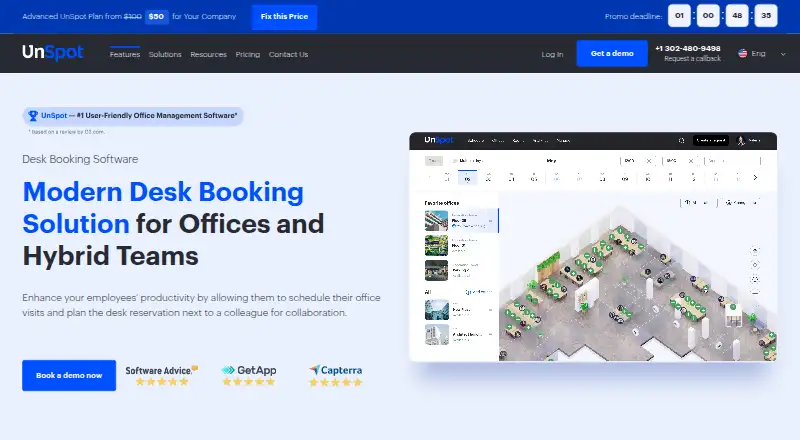
UnSpot helps offices and hybrid teams coordinate workplace visits and reserve desks, meeting rooms, parking spaces, and lockers. Employees can use an interactive office map to find desks by equipment and book near colleagues. Check-ins can be confirmed by QR code, Wi-Fi, or an access control system enabled by an administrator; unattended desks can be released automatically.
Reports cover office workload, booking heat maps, and forecasts of how many employees a location can accommodate. The product lists integrations with Slack, Microsoft Teams, Microsoft 365, Exchange, Google Workspace, Outlook, Google Calendar, Okta, and Zoom. An External API and incoming and outgoing webhooks are available for custom integrations and automation. UnSpot supports Android, iOS, Linux, macOS, web, and Windows, and lists meeting-room booking, desk check-in, floor-plan views, mobile apps, and single sign-on.
The Basic plan starts at $10 per company and includes bookings for desks, meeting rooms, lockers, and parking, along with one interactive map of up to 500 square meters (5,300 square feet). A 14-day free trial is offered. The pricing page also lists an Advanced plan from $50 per company. UnSpot was founded in 2020 and is headquartered in Wilmington, Delaware. Its support includes training sessions for users and administrators and a Help Center.
Who it suits
UnSpot suits companies coordinating office space for hybrid teams, especially those that need desk and room reservations alongside parking or locker booking. Its maps, reports, integrations, and check-in options are relevant to organizations managing workplace visits across locations.
What it does well
- Books desks, meeting rooms, parking spaces, and lockers.
- Interactive maps help employees find desks by equipment and colleagues.
- Reports include workload, heat maps, and capacity forecasts.
- Integrates with Slack, Microsoft Teams, Google Workspace, and other listed services.
- Offers QR code and Wi-Fi check-in.
What to know first
- No free plan is offered.
- The Basic plan includes only one map, capped at 500 square meters (5,300 square feet).
- The Basic plan starts at $10 per company.
Limits
There is no free plan. Basic includes one interactive map covering up to 500 square meters (5,300 square feet).
Plans
| Plan | Billed and limits | Price |
|---|---|---|
| Basic | From $10 / company · Booking of desks, meeting rooms, lockers and parking places | $10 |
| Advanced | From $50 / company · Booking of desks, meeting rooms, lockers and parking places | $50 |
As unspot.com lists them, read 8 Oct 2026. The maker's own page has the final word.
Getting started
- Visit https://unspot.com/desk-booking-software/.
- Start the advertised 14-day free access to the space management software.
- Choose a plan: Basic from $10 per company or Advanced from $50 per company.
- Set up an interactive office map and the spaces employees can book.
- Connect listed integrations or use the External API and webhooks for custom workflows.
Verdict
Pick UnSpot if your company needs hybrid office reservations for multiple kinds of shared spaces, plus maps, check-ins, and workplace reports. Look elsewhere if you need a free plan or the Basic plan's single-map area limit does not fit your office.
Questions
How much does UnSpot cost?
Basic starts at $10 per company, and Advanced starts at $50 per company.
Does UnSpot offer a free trial?
Yes. UnSpot advertises 14-day free access to its space management software.
Which platforms does UnSpot support?
It supports Android, iOS, Linux, macOS, web, and Windows.
What can employees book with UnSpot?
They can reserve desks, meeting rooms, parking spaces, and lockers.
Which integrations does UnSpot list?
The list includes Slack, Microsoft Teams, Microsoft 365, Exchange, Google Workspace, Outlook, Google Calendar, Okta, and Zoom. It also offers an External API and incoming and outgoing webhooks.
What is included in the Basic plan?
Basic includes bookings for desks, meeting rooms, lockers, and parking, plus one interactive map of up to 500 square meters (5,300 square feet).
Facts from UnSpot's own pages
- Analytics
- Its reports include office workload, booking heat maps, and forecasts of how many employees a location can accommodate. · unspot.com, 8 Oct 2026
- API
- UnSpot offers an External API and incoming and outgoing webhooks for custom integrations and automation. · unspot.com, 8 Oct 2026
- Audience
- UnSpot says its solution is for companies of all sizes implementing a hybrid work model. · unspot.com, 8 Oct 2026
- Check-in
- Employees can confirm bookings by QR code, Wi-Fi, or an administrator-enabled access control system; unattended desks can be released automatically. · unspot.com, 8 Oct 2026
- Desk booking
- Employees can find desks by equipment and book near colleagues on an interactive office map. · unspot.com, 8 Oct 2026
- Founded
- 2020 · unspot.com, 28 Sept 2026
- Headquarters
- Wilmington, Delaware, United States · unspot.com, 28 Sept 2026
- Integrations
- The product page lists Slack, Microsoft Teams, Microsoft 365, Exchange, Google Workspace, Outlook, Google Calendar, Okta, and Zoom integrations. · unspot.com, 8 Oct 2026
- Other resources
- The booking system covers meeting rooms, parking spaces, and lockers as well as desks. · unspot.com, 8 Oct 2026
- Plan limit
- The Basic plan includes one interactive map of up to 500 square meters (5,300 square feet). · unspot.com, 8 Oct 2026
- Product
- UnSpot helps offices and hybrid teams plan office visits and reserve desks. · unspot.com, 8 Oct 2026
- Security and privacy
- Its privacy policy says UnSpot follows GDPR principles for EU residents and CCPA requirements for California consumers, and describes safeguards for international data transfers. · unspot.com, 8 Oct 2026
- Support
- The pricing page lists user and administrator training sessions and a Help Center. · unspot.com, 8 Oct 2026
- Trial
- UnSpot advertises free 14-day access to its space management software. · unspot.com, 8 Oct 2026
Where UnSpot stands on Freedom251
- Space Management#8 of 19
- Desk Booking Software#21 of 30