Freedom251 › Systematic Review Software
Universal SLR Assistant
What Universal SLR Assistant is
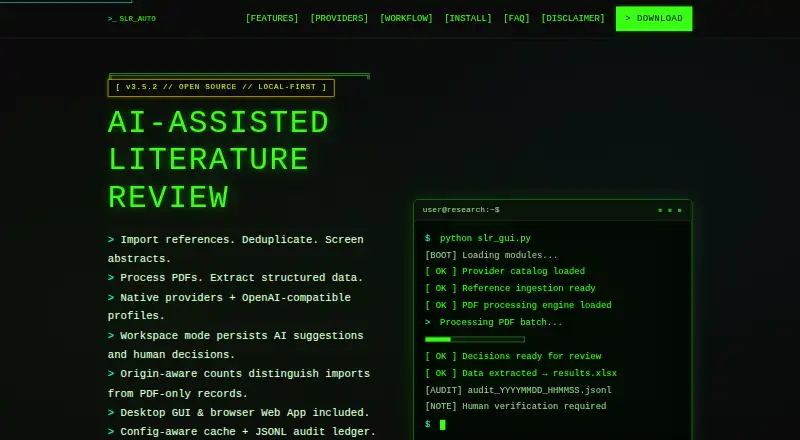
Universal SLR Assistant supports systematic and scoping review workflows with AI-assisted screening, extraction and reproducible outputs. It provides a desktop GUI and a browser-based local Web App. Reference imports include RIS, BibTeX, CSV and plain text, including exports from PubMed, Scopus and Web of Science. The workflow covers abstract screening, full-text PDF processing, structured extraction and export; likely duplicates are identified using DOI and fuzzy title matching. Workspace mode stores references, PDF metadata, review items, decisions and audit events in a local SQLite workspace, keeping AI suggestions separate from human decisions. Exports can include decision files and logs, exclusion reasons, PRISMA-ready counts, a methods disclosure draft and a manifest. Users can choose among cloud and local AI providers. Submitted paper text goes to cloud providers; Ollama or another local endpoint can keep it on the user's computer or local network. The software is free and open source, though cloud AI provider fees may apply. AI output is assistance only: people must verify results and make final review and reporting decisions.
Who it suits
The tool is intended for PhD students, researchers, professors, evidence synthesis teams and authors of systematic or scoping reviews. It suits users who want AI-assisted review work but will verify results and make final decisions themselves.
What it does well
- Imports RIS, BibTeX, CSV and plain-text references.
- Flags likely duplicates with DOI and fuzzy title matching.
- Workspace mode stores review data in local SQLite.
- Offers local and cloud AI provider options.
- Exports PRISMA-ready counts and decision logs.
What to know first
- Human verification and final decisions remain required.
- Cloud providers receive submitted paper text.
- Cloud AI provider API fees may apply.
- Web App is not intended as a public multi-user service.
Limits
AI output is assistance only: human verification and final inclusion, exclusion, extraction and reporting decisions remain required. Cloud AI provider API fees may apply; the local Web App binds to 127.0.0.1 and is not intended as a public multi-user service.
Plans
| Plan | Billed and limits | Price |
|---|---|---|
| Free and open source | MIT License · cloud AI provider API fees may apply | Free |
As sadeghanisi.github.io lists them, read 15 Oct 2026. The maker's own page has the final word.
Getting started
- Open the project website and consult the Complete User Guide or in-app Help panel.
- Choose the desktop GUI or browser-based local Web App.
- Import references from RIS, BibTeX, CSV or plain-text files.
- Select an available AI provider or endpoint for AI-assisted work.
- Use the workflow for screening, full-text processing and extraction, then export results.
Universal SLR Assistant is a free tool for researchers carrying out systematic or scoping reviews. Its best fit is an author or evidence synthesis team that wants screening, extraction and reporting in one workflow, with a local workspace and a choice of AI providers. It offers a substantial review trail, but AI output must be checked and final decisions remain human responsibilities.
Overview
The workflow spans reference import, abstract screening, full-text PDF processing, structured extraction and export. It accepts RIS, BibTeX, CSV and plain-text files, including exports from PubMed, Scopus and Web of Science. DOI and fuzzy-title matching flag likely duplicates, helping reduce clutter before screening; those matches should not be treated as confirmed duplicates without review.
Workspace mode stores references, PDF metadata, review items, decisions and audit events in a local SQLite workspace. Crucially, it distinguishes AI suggestions from human decisions. Exports include decision CSV and XLSX files, separate AI and human decision logs, full-text exclusion reasons, PRISMA-ready counts, a methods disclosure draft and a manifest. That combination is useful for researchers who need a traceable process and organized outputs, rather than just a tool for finding papers.
Key features
Broad AI provider choice, with a privacy trade-off
Provider options include OpenAI, Anthropic Claude, Google Gemini, Ollama, OpenRouter, DeepSeek, Mistral, Kimi, xAI, LM Studio, vLLM, LocalAI and custom OpenAI-compatible endpoints. This range accommodates both cloud services and local setups. Cloud providers receive submitted paper text; Ollama or another local endpoint can keep it on the user's computer or local network. The choice therefore has practical privacy consequences, and users should select a provider with their data-handling needs in mind.
Local workspace and safeguards
The browser-based Web App binds to 127.0.0.1 for local use; it is not intended to serve as a public multi-user service. API keys are not written to the desktop or Web App settings files, and audit ledgers do not store keys or full paper text. These are useful boundaries, but they do not remove the need to consider what is sent to a cloud provider. AI is assistance only: people must verify outputs and make the final inclusion, exclusion, extraction and reporting decisions.
Support routes include the Complete User Guide, in-app Help panel, output logs, tests and GitHub issues.
Pricing
Universal SLR Assistant is free and open source under the MIT License: free. There is no paid plan described. Cloud AI provider API fees may apply, so the software's free price does not necessarily make every workflow cost-free. Its free plan includes screening, AI paper summaries, full-text analysis, systematic review support, reference deduplication, data extraction and full-text storage. Exports include Excel (.xlsx), CSV, JSON, Markdown and plain text.
Platforms
It supports Linux, macOS, Windows and web, with a desktop GUI as well as a browser-based local Web App. The Web App's localhost binding makes it suitable for individual local use, not a public shared service.
Who it's for
PhD students, researchers, professors, evidence synthesis teams and authors of systematic or scoping reviews are the intended audience. It is particularly well suited to people who want a structured path from references to documented decisions and exports, and who can review AI assistance rather than delegate final judgments to it. It is a weaker fit for teams seeking a public multi-user Web App or anyone who expects automated decisions to stand without human verification.
Pros and cons
Pros
- Review workflow covers multiple stages: import, screening, full-text processing, extraction and export live in one tool.
- Useful audit and reporting outputs: separate decision logs, exclusion reasons, PRISMA-ready counts and a methods disclosure draft support traceability.
- Local and cloud AI options: users can choose a local endpoint to keep paper text on their computer or local network, or select among numerous providers.
- Free and open source: the MIT-licensed plan has no software price, though cloud API charges may apply.
Cons
- Human review remains essential: AI suggestions do not replace verification or final review decisions.
- Cloud use sends submitted paper text to providers: users concerned about transmission must choose a local endpoint or otherwise account for that exposure.
- The Web App is not a public team service: its localhost-only design limits its role in shared deployments.
Alternatives
Systematic Review Software and AI Literature Review Software are directories for comparing options by category.
Choose ReviewAid if you want another free, open-source option available on Linux, macOS, Windows, web and self-hosted platforms; its listed plan is free under Apache 2.0.
ASReview is another free, open-source option, with Linux, macOS, web, API and self-hosted platforms. Its ASReview LAB plan is free, though running your own hardware or server may cost money.
RevMan is worth considering if you prefer a freemium product with a free plan and a free trial.
Pick Bango if you want a free researcher-focused option whose plan is described as having no subscription, paywall or limits.
Rayyan offers a free plan with limits of three active reviews, two free reviewers, one sample and limited mobile app access; its Android, iOS and web support may suit readers seeking mobile access.
Catchii is a web-based free option described as supporting multiple users without subscriptions, paid upgrades or advertisements.
Covexe is a web-based freemium alternative whose free plan includes an AI co-pilot with 100 messages per day.
HAWC is a free web option for exploring public assessments; creating assessments requires requesting an account.
Verdict
Universal SLR Assistant is a strong choice for review authors who want a free, end-to-end systematic or scoping workflow with local workspace storage and detailed decision and reporting exports. Its central advantage is the combination of structured review records and flexible AI-provider choice. Look elsewhere if you need a public multi-user Web App, and keep human verification central—especially when submitting paper text to a cloud provider.
Verdict
Universal SLR Assistant covers much of a systematic or scoping review workflow and offers local workspace storage alongside cloud and local AI options. Review its data-transmission behavior and keep human verification central to the process.
Questions
What does Universal SLR Assistant cost?
The Free and open source plan is free. Cloud AI provider API fees may apply.
Is it open source?
Yes. The free plan is under the MIT License.
Which review types does it support?
It supports systematic reviews and scoping reviews.
Which platforms are available?
The listed platforms are Linux, macOS, web and Windows. The project provides a desktop GUI and a browser-based local Web App.
Which reference file types can it import?
It imports RIS, BibTeX, CSV and plain-text reference files, including exports from PubMed, Scopus and Web of Science.
Where does paper text go when using AI providers?
Cloud providers receive submitted paper text. Ollama or another local endpoint can keep paper text on the user's computer or local network.
Facts from Universal SLR Assistant's own pages
- Abstract screening
- AI evaluates titles and abstracts against user criteria and returns Include, Exclude or Maybe recommendations for human review. · sadeghanisi.github.io, 15 Oct 2026
- AI providers
- Provider options include OpenAI, Anthropic Claude, Google Gemini, Ollama, OpenRouter, DeepSeek, Mistral, Kimi, xAI, LM Studio, vLLM, LocalAI, and custom OpenAI-compatible endpoints. · github.com, 30 Sept 2026
- API and extensibility
- The Web App exposes workspace review and export HTTP endpoints, and contributors can add providers through the LLM interface or OpenAI-compatible profiles. · github.com, 15 Oct 2026
- Audit ledger
- Each run can create a JSONL ledger containing provider, model, hashes, cache status, parsing status and retry metadata without storing API keys or full paper text. · sadeghanisi.github.io, 15 Oct 2026
- Caching
- Configuration-aware JSON caching keys results by text, stage, provider, model, prompts and extraction settings. · github.com, 15 Oct 2026
- Cloud data transmission
- When cloud providers are selected, submitted paper text is sent to the provider's API; router providers add another intermediary. · sadeghanisi.github.io, 15 Oct 2026
- Data transmission
- Cloud providers receive submitted paper text, while Ollama or another local endpoint can keep paper text on the user's computer or local network. · sadeghanisi.github.io, 30 Sept 2026
- Deduplication
- Duplicate detection combines DOI matching with fuzzy title matching and leaves final review to the researcher. · sadeghanisi.github.io, 15 Oct 2026
- Developer post: automation
- A mirrored developer post lists automated deduplication and extraction as product capabilities. · ngntipkolamrenang.twstalker.com, 15 Oct 2026
- Developer post: cost
- A mirrored developer post says the tool has no monthly fees and is free under the MIT license. · ngntipkolamrenang.twstalker.com, 15 Oct 2026
- Developer post: local integration
- A mirrored developer post highlights local Ollama integration and processing PDFs on the user's own machine. · ngntipkolamrenang.twstalker.com, 15 Oct 2026
- Developer post: platforms
- A mirrored developer post names Windows, macOS and Linux as supported desktop platforms. · ngntipkolamrenang.twstalker.com, 15 Oct 2026
- Developer post: privacy
- A mirrored developer post claims local LLM use can keep data from leaving the user's hardware. · ngntipkolamrenang.twstalker.com, 15 Oct 2026
- Developer post: providers
- A mirrored developer post describes support for more than nine AI providers, including OpenAI, Claude, Gemini and DeepSeek. · ngntipkolamrenang.twstalker.com, 15 Oct 2026
- Developer profile
- A public profile identifies Mo Anisi as holding a BSc in Biology, an MSc in Cognitive Science and an MSc in Health and Social Welfare. · ngntipkolamrenang.twstalker.com, 15 Oct 2026
- Documentation
- Documentation includes a 1,550-line complete user guide, in-app help, troubleshooting guidance, tests and GitHub issues. · github.com, 15 Oct 2026
- Exports
- Workspace exports include decision CSV/XLSX files, AI and human decision logs, exclusion reasons, PRISMA-ready counts, a methods draft and a manifest. · github.com, 15 Oct 2026
- Hardware guidance
- The user guide lists 4 GB RAM and 2 GB disk as minimums, with 8 GB RAM and 5 GB disk recommended; Ollama guidance lists at least 8 GB RAM and 10 GB disk. · github.com, 15 Oct 2026
- Human decisions
- AI outputs remain suggestions, while final Include, Exclude or Maybe decisions require a human reviewer. · github.com, 15 Oct 2026
- Installation
- Installation uses a Git clone, virtual environment and pip requirements, with batch launchers for Windows and Python commands for macOS or Linux. · sadeghanisi.github.io, 15 Oct 2026
- Intended users
- It is intended for PhD students, researchers, professors, evidence synthesis teams, and systematic or scoping review authors. · sadeghanisi.github.io, 30 Sept 2026
- Interfaces
- The project provides a desktop GUI and a browser-based local Web App. · sadeghanisi.github.io, 30 Sept 2026
- Limit: appraisal
- The product does not provide risk-of-bias or quality-appraisal tooling. · github.com, 15 Oct 2026
- Limitations
- AI output is assistance only; human verification and final inclusion, exclusion, extraction, and reporting decisions remain required. · sadeghanisi.github.io, 30 Sept 2026
Where Universal SLR Assistant stands on Freedom251
- Systematic Review Software#2 of 30
- AI Literature Review Software#3 of 38