Freedom251 › Systematic Review Software

Bango
What Bango is
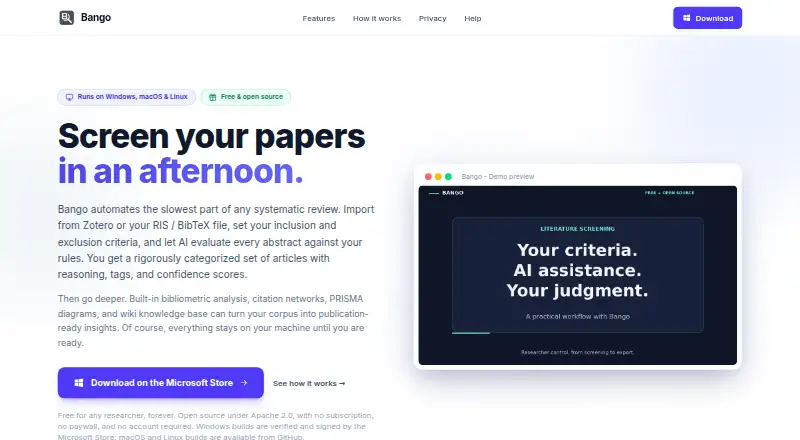
Bango is free software for automating abstract screening in systematic literature reviews. It checks articles against criteria set by the user and returns decisions with reasoning, matched rules, suggested tags, and confidence scores. Researchers can import RIS or BibTeX files and Zotero collections, with up to 10,000 articles supported per project. Analysis tools cover co-authorship networks, citation graphs, keyword maps, publication timelines, author rankings, and co-citation analysis. Bango also creates PRISMA 2020 flow diagrams from record counts and exports them as SVG or PNG. The maker says project data stays on the user's computer, without cloud uploads, login, or an account; API keys are encrypted locally, and backups leave out credentials. AI connections include hosted providers and local or OpenAI-compatible endpoints. Zotero import and export are supported, and the software can generate Boolean search strings for several research databases. Bango runs on Linux, macOS, and Windows, though its macOS builds support Apple Silicon only. The Free plan costs nothing, with no subscription, paywall, or limits.
Who it suits
Bango suits researchers, including academics, PhD students, and professional analysts, conducting systematic literature reviews. It is available for Linux, Windows, and Apple Silicon Macs.
What it does well
- Screens articles against user-defined criteria.
- Supports up to 10,000 articles per project.
- Creates PRISMA 2020 diagrams for SVG or PNG export.
- Project data stays on the user's computer.
- Free plan costs nothing.
What to know first
- Intel Macs are not supported.
- Issue responses depend on maker availability.
Plans
| Plan | Billed and limits | Price |
|---|---|---|
| Free | Free for any researcher · no subscription, paywall, or limits | Free |
As bango.boncode.net lists them, read 30 Sept 2026. The maker's own page has the final word.
Getting started
- Visit the Bango website.
- Use a Linux, Windows, or Apple Silicon Mac computer.
- Import RIS or BibTeX files or a Zotero collection.
- Set your screening criteria and use an available AI integration.
Bango is a desktop app for screening and analyzing systematic literature reviews with AI. It suits researchers who want screening, bibliometric analysis, and PRISMA diagrams in one free workflow. Its locally stored projects are a strong fit for privacy-conscious users, but its macOS builds require Apple Silicon.
Overview
Bango evaluates articles against criteria you define, then returns a decision with reasoning, matched rules, suggested tags, and a confidence score. That makes its screening output more inspectable than a bare include-or-exclude result, though researchers still need to judge whether the reasoning fits their protocol.
Projects can contain up to 10,000 articles. Bango imports RIS and BibTeX files and Zotero collections, and supports reference deduplication, data extraction, full-text storage, and protocol support for systematic reviews. Its focus is specific: it is built for systematic review work, rather than general-purpose reference management.
Key features
Screening and analysis
After screening, Bango can map co-authorship, citations, keywords, publication timelines, author rankings, and co-citations. These views can help researchers understand the literature beyond screening decisions, particularly when a review includes a large body of work.
For reporting, it generates PRISMA 2020 flow diagrams from record counts and exports them as SVG or PNG. It can also generate Boolean search strings for PubMed, Scopus, Web of Science, Cochrane Library, EBSCOhost, JSTOR, ScienceDirect, and arXiv. Zotero import and export make it a more practical fit for researchers already using that reference manager.
AI and data handling
Bango connects to hosted AI services including OpenAI, Anthropic, Google Gemini, Mistral AI, and z.ai, as well as llama.cpp, Ollama, LM Studio, and other OpenAI-compatible endpoints. That range gives researchers options for choosing an AI provider or local-compatible endpoint. Bango says project data stays on the user’s computer, without cloud uploads, login, or an account.
The maker says API keys are encrypted locally with AES-256-GCM using a machine-derived key, and project backups omit credentials. Researchers should still choose an AI integration with their own data-handling requirements in mind.
Pricing
Free — free. Bango’s plan is free for any researcher, with no subscription, paywall, or limits. The free offering includes the app’s systematic-review workflow; there is no free trial because the plan is free. There is no paid tier to unlock a larger project quota or additional listed features.
This is a compelling option for individual researchers and teams who can work in the desktop app and configure an AI integration themselves. The cost claim is about Bango: fees charged by an AI provider or the infrastructure for a hosted endpoint may be separate.
Platforms
Bango is available for Linux, macOS, and Windows. Its macOS builds support Apple Silicon only, so Intel Mac users need another platform or another tool. Project data remaining on the user’s computer may appeal to researchers who prefer a desktop workflow over a web service.
Who it's for
Bango is aimed at academics, PhD students, and professional analysts conducting systematic reviews. It is especially well suited to researchers who want AI-assisted screening alongside bibliometric tools and PRISMA diagram creation, without paying a software subscription.
It is less suitable for Intel Mac users, or for anyone who needs a web-based workflow. Support is through GitHub issue reports, with responses depending on availability, so users who need assured or rapid support should weigh that limitation.
Pros and cons
- Pros: Free with no subscription or stated article limits, and supports projects of up to 10,000 articles.
- Pros: Combines AI screening, bibliometric analysis, PRISMA 2020 diagrams, and search-string generation in one systematic-review app.
- Pros: Projects stay on the user’s computer, with no account or cloud upload required.
- Cons: Intel Macs are not supported, narrowing the macOS audience.
- Cons: AI provider or hosting costs may sit outside Bango’s free price.
- Cons: GitHub-based support has no guaranteed response time.
Alternatives
For more options, see Systematic Review Software.
- ReviewAid is another free option, with Linux, macOS, Windows, web, and self-hosted platforms and an Apache 2.0 open-source plan. Choose it if those deployment options or that license better suit your workflow.
- ASReview is free and open source, with desktop, web, self-hosted, and API platforms. Choose it if you prefer its open-source approach; running your own hardware or server may incur costs.
- RevMan
- Universal SLR Assistant is free and open source under the MIT License, with cloud AI provider API fees potentially applying. Choose it if that license and platform mix fit better.
- Rayyan has a free plan limited to 3 active reviews, 2 free reviewers, 1 sample, and limited mobile app access, with a paid Essential plan at $4.99 a month per seat. Choose it if Android or iOS access matters more than Bango’s desktop-focused workflow.
- Catchii
- Covexe
- HAWC
Verdict
Choose Bango if you want a free desktop tool that brings systematic-review screening, literature analysis, and PRISMA diagram creation together, while keeping project data on your computer. Look elsewhere if you use an Intel Mac, need a web workflow, or want support with a guaranteed response.
Verdict
Bango combines abstract screening with literature-review analysis and PRISMA diagram creation in a free desktop app. Its Apple Silicon-only macOS builds exclude Intel Mac users.
Questions
How much does Bango cost?
The Free plan costs nothing, with no subscription or paywall.
Is there a limit on the free plan?
The maker describes the Free plan as having no limits. A project supports up to 10,000 articles.
Which operating systems does Bango support?
Bango runs on Linux, macOS, and Windows. The macOS builds are for Apple Silicon; Intel Macs are not supported.
Does Bango require an account or upload project data to the cloud?
The maker says project data stays on the user's computer and that no cloud upload, login, or account is required.
Which AI services can it connect to?
Listed integrations include OpenAI, Anthropic, Google Gemini, Mistral AI, z.ai, llama.cpp, Ollama, LM Studio, and other OpenAI-compatible endpoints.
How can users get help?
The README asks users to report issues on GitHub and says responses depend on availability.
Facts from Bango's own pages
- AI integrations
- The README lists hosted integrations with OpenAI, Anthropic, Google Gemini, Mistral AI, and z.ai, plus llama.cpp, Ollama, LM Studio, and other OpenAI-compatible endpoints. · github.com, 30 Sept 2026
- Analysis
- Its bibliometric tools include co-authorship networks, citation graphs, keyword maps, publication timelines, author rankings, and co-citation analysis. · bango.boncode.net, 30 Sept 2026
- Audience
- The maker describes Bango as free software for researchers, including academics, PhD students, and professional analysts. · bango.boncode.net, 30 Sept 2026
- Data handling
- Bango says project data stays on the user’s computer, with no cloud uploads, login, or account required. · bango.boncode.net, 30 Sept 2026
- Imports
- It imports RIS and BibTeX files and Zotero collections, and supports up to 10,000 articles per project. · bango.boncode.net, 30 Sept 2026
- Limits
- The maker says macOS builds are for Apple Silicon only; Intel Macs are not supported. · github.com, 30 Sept 2026
- PRISMA
- Bango generates PRISMA 2020 flow diagrams from record counts and exports them as SVG or PNG. · bango.boncode.net, 30 Sept 2026
- Purpose
- Bango automates abstract screening for systematic literature reviews by evaluating articles against user-defined criteria with AI. · bango.boncode.net, 30 Sept 2026
- Research integrations
- Bango supports Zotero import and export and can generate Boolean search strings for PubMed, Scopus, Web of Science, Cochrane Library, EBSCOhost, JSTOR, ScienceDirect, and arXiv. · github.com, 30 Sept 2026
- Screening
- AI screening returns decisions, reasoning, matched rules, suggested tags, and confidence scores. · bango.boncode.net, 30 Sept 2026
- Security
- The maker says API keys are encrypted locally with AES-256-GCM using a machine-derived key, and project backups omit credentials. · bango.boncode.net, 30 Sept 2026
- Support
- The README asks users to report issues on GitHub and says responses depend on availability. · github.com, 30 Sept 2026
Where Bango stands on Freedom251
- Systematic Review Software#3 of 30