Freedom251 › File Compression Software
Universal Extractor 2
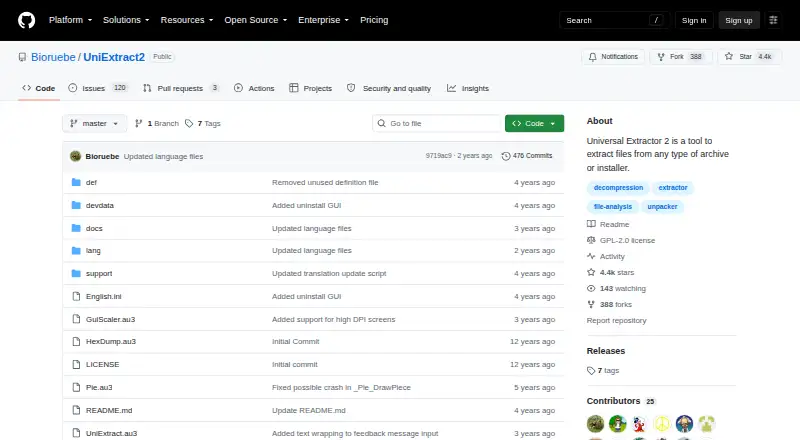
What Universal Extractor 2 is
Universal Extractor 2 is a free Windows program for extracting files from archives, installers, disk images, game archives, and multimedia files. The project lists more than 500 additional supported file types, including formats such as 7z, RAR, ZIP, TAR, and gzip. Batch mode processes multiple files, while scan-only mode identifies a file type without extracting it. Other features include command-line tools, silent mode, password-list support for common archives, an updater, and context-menu integration. The program is described as portable and supports Windows XP or newer, with some limits on outdated Windows versions. Context-menu entries create registry entries, and some extractors may leave traces. The main program uses the GPLv2 license, while some bundled third-party extractors have different licenses, including commercial-use restrictions. Universal Extractor 2 is for extraction only and cannot recompress files. The project says the program remains in beta and updates are rare; its releases page lists version 2.0.0 RC 3 as a pre-release. Security software may flag it because of its bundled extractors, updater, and AutoIt implementation; the maintainer describes these detections as false positives.
Who it suits
It suits Windows users who need to unpack varied archives and other packaged files, including in batches or through command-line tools. Users who need to recompress files should look elsewhere.
What it does well
- Supports more than 500 additional file types.
- Batch mode processes multiple files.
- Scan-only mode identifies file types without extraction.
- Portable version and command-line tools are available.
- Free for Windows XP or newer.
What to know first
- Cannot recompress files.
- Project says updates are rare and it remains in beta.
- Some bundled extractors have commercial-use restrictions.
- Context-menu entries create registry entries.
Limits
The free plan provides extraction only. Windows XP or newer is required, and outdated Windows versions have some limits.
Plans
| Plan | Billed and limits | Price |
|---|---|---|
| Universal Extractor 2 | Windows XP or newer; extraction only | Free |
As github.com lists them, read 11 Oct 2026. The maker's own page has the final word.
Getting started
- Open the project website on GitHub
- Download the Windows version or portable copy
- Run Universal Extractor 2 on Windows XP or newer
- Use the application, command-line tools, or context-menu integration to extract files
Verdict
Universal Extractor 2 offers broad extraction support and batch and scan-only modes on Windows. It is an extraction-only project that remains in beta, with rare updates and differing licenses among some bundled extractors.
Questions
How much does Universal Extractor 2 cost?
The Universal Extractor 2 plan is free.
Which platforms are supported?
It supports Windows XP or newer.
Can it recompress extracted files?
No. The program is designed for extraction only.
Is a portable version available?
Yes. A portable version is listed, though context-menu integration creates registry entries and some extractors may leave traces.
Is Universal Extractor 2 open source?
The main program is licensed under GPLv2. Some bundled third-party extractors use different licenses.
Who maintains it?
William Engelmann maintains the project under the name Bioruebe.
Facts from Universal Extractor 2's own pages
- Batch processing
- Batch mode lets users process multiple files. · github.com, 11 Oct 2026
- File detection
- Scan-only mode detects the type of a file without extracting it. · github.com, 11 Oct 2026
- License
- The main program is licensed under GPLv2, and some bundled third-party extractors have different licenses, including restrictions on commercial use. · github.com, 11 Oct 2026
- Maintainer
- The GitHub profile identifies the maintainer as William Engelmann, using the name Bioruebe. · github.com, 11 Oct 2026
- Notable limitation
- Universal Extractor is designed for extraction and cannot recompress files. · github.com, 11 Oct 2026
- Other features
- The project lists a built-in updater, password-list support for common archives, silent mode and context-menu integration. · github.com, 11 Oct 2026
- Platform requirement
- The stated system requirement is Windows XP or newer, with some limits on outdated Windows versions. · github.com, 11 Oct 2026
- Portable use
- The program describes itself as portable, while noting that context-menu entries create registry entries and some extractors may leave traces. · github.com, 11 Oct 2026
- Purpose
- Universal Extractor 2 extracts files from archives, installers, disk images, game archives and multimedia files. · github.com, 11 Oct 2026
- Release status
- The README says the program is still in beta and updates are rare; the releases page lists version 2.0.0 RC 3 as a pre-release. · github.com, 11 Oct 2026
- Security
- The maintainer says security software can flag the program because it bundles many extractors, includes an updater and is written in AutoIt, and describes these detections as false positives. · github.com, 11 Oct 2026
- Support
- Users can report issues on GitHub, send feedback from the Help menu, or contact the maintainer by email; the maintainer notes replies may take a while. · github.com, 11 Oct 2026
- Supported formats
- The project says it supports more than 500 additional file types, with an overview of supported types in its formats list. · github.com, 11 Oct 2026
Where Universal Extractor 2 stands on Freedom251
- File Compression Software#23 of 36