True North Budgeting
What True North Budgeting is
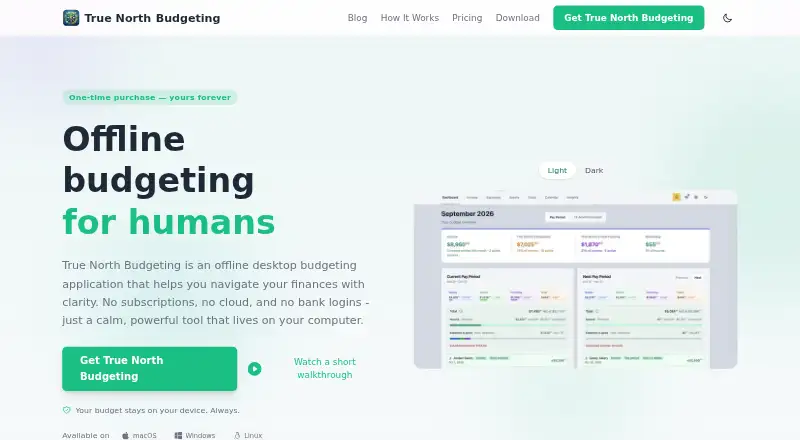
True North Budgeting is a desktop budgeting application for macOS, Windows, and Linux. It runs on the user’s computer, keeps the budget file locally, and says it stores nothing in the cloud. Core budgeting works offline, and the app does not request bank or financial-account credentials. It also says it does not send financial data to analytics services; data benefits from the operating system’s built-in security and encryption features.
Its budgeting tools include pay-period grouping, a 12-month forecast, 50/30/20 allocation, goals, and a monthly calendar. The calendar displays cash flow with color coding, and users can edit events directly. Two one-time lifetime licenses are offered: Personal costs $29.99, paid once for one computer and one license; Navigator costs $49.99, paid once for three licenses, including one to share. Future updates are included with either license. The maker, True North Budgeting, is headquartered in Phoenix, Arizona, United States. Its listed contact address is [email protected].
Who it suits
True North Budgeting suits people who want to manage budgets offline on a macOS, Windows, or Linux computer without entering bank credentials. Personal covers one computer, while Navigator provides licenses for a desktop, laptop, and one to share.
What it does well
- Works offline and stores the budget file locally.
- Does not request bank or financial-account credentials.
- Includes a 12-month forecast and 50/30/20 allocation.
- Color-coded calendar lets users edit events instantly.
- Future updates are included with both lifetime licenses.
What to know first
- There is no free plan.
- Personal is limited to one computer and one license.
Limits
There is no free plan. Personal covers one computer and one lifetime license; Navigator includes three lifetime licenses.
Plans
| Plan | Billed and limits | Price |
|---|---|---|
| Personal | One-time purchase; lifetime license · 1 lifetime license | $29.99, paid once |
| Navigator | One-time purchase; lifetime licenses · 3 lifetime licenses | $49.99, paid once |
As truenorthbudgeting.com lists them, read 28 Sept 2026. The maker's own page has the final word.
Getting started
- Visit https://truenorthbudgeting.com/.
- Choose macOS, Windows, or Linux as your platform.
- Select the Personal or Navigator one-time lifetime license.
- Install the desktop application on the computer or computers covered by the license.
Verdict
Choose True North Budgeting if you want offline budgeting on a desktop computer, with forecasting, goals, and calendar tools. Navigator is the option for three licenses, including one to share; look elsewhere if you need a free plan.
Questions
How much does True North Budgeting cost?
Personal costs $29.99, paid once. Navigator costs $49.99, paid once.
Is there a free plan?
No, the product has no free plan.
Which platforms does it support?
It is available on macOS, Windows, and Linux as a desktop application.
Does it work offline?
Yes. Core budgeting works offline, and the budget file is stored locally.
Does it connect to bank accounts?
The app does not ask for bank or financial-account credentials.
Who makes True North Budgeting?
It is made by True North Budgeting, headquartered in Phoenix, Arizona, United States.
Facts from True North Budgeting's own pages
- Bank Logins
- The app does not ask for bank credentials or financial-account credentials. · truenorthbudgeting.com, 28 Sept 2026
- Budget Features
- Includes pay-period grouping, a 12-month forecast, 50/30/20 allocation, goals, and a monthly calendar. · truenorthbudgeting.com, 28 Sept 2026
- Calendar Editing
- Users can view cash flow on a color-coded monthly calendar and edit events instantly. · truenorthbudgeting.com, 28 Sept 2026
- Cloud Storage
- The product states that nothing is stored in the cloud. · truenorthbudgeting.com, 28 Sept 2026
- Financial Telemetry
- The desktop app does not send financial data to analytics services. · truenorthbudgeting.com, 28 Sept 2026
- Deployment
- desktop · truenorthbudgeting.com, 23 Sept 2026
- Desktop Application
- It is an offline desktop budgeting application that runs on the user's computer. · truenorthbudgeting.com, 28 Sept 2026
- Free plan
- No · truenorthbudgeting.com, 23 Sept 2026
- Free Tier
- No free tier is stated in the supplied page text. · truenorthbudgeting.com, 28 Sept 2026
- Future Updates
- Future updates are included with both listed lifetime licenses. · truenorthbudgeting.com, 28 Sept 2026
- Headquarters
- Phoenix, Arizona, United States · truenorthbudgeting.com, 4 Oct 2026
- Media Coverage
- The homepage says the product was featured in several named media outlets. · truenorthbudgeting.com, 28 Sept 2026
- Offline Operation
- Core budgeting works offline and the budget file is stored locally. · truenorthbudgeting.com, 28 Sept 2026
- Supported Platforms
- Available on macOS, Windows, and Linux. · truenorthbudgeting.com, 28 Sept 2026
- Pricing Model
- One-time purchase with no subscriptions, recurring charges, or hidden fees. · truenorthbudgeting.com, 28 Sept 2026
- Security Encryption
- Data benefits from the operating system's built-in security and encryption features. · truenorthbudgeting.com, 28 Sept 2026
- Sharing Licenses
- Navigator provides three licenses and includes one license to share. · truenorthbudgeting.com, 28 Sept 2026
- Support Contact
- The page lists [email protected] as a contact address. · truenorthbudgeting.com, 28 Sept 2026
- Trial Refund
- The supplied page text does not state a trial or refund policy. · truenorthbudgeting.com, 28 Sept 2026
Where True North Budgeting stands on Freedom251
- Budgeting apps#29 of 39
- Budgeting Software#31 of 36