Freedom251 › Generative Design Software
TopOpt
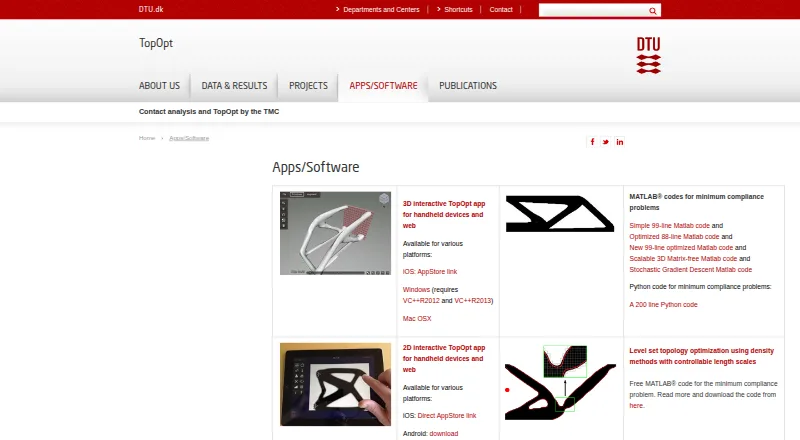
What TopOpt is
TopOpt is a collection of topology optimization apps and code from a joint research effort between DTU Mechanical Engineering and DTU Compute. The group develops and applies density-based methods. Its Apps/Software page lists interactive 2D and 3D apps for handheld devices and web, as well as MATLAB and Python code for minimum compliance problems. A 99-line MATLAB implementation is aimed at engineering education and people new to topology optimization. Other offerings include code for buckling optimization and photonics; the photonics materials cover 2D cylindrical metalens design and include five COMSOL Multiphysics models. For very large workloads, a PETSc-based parallel framework offers a 3D linear elasticity solver, filters, parallel MMA, and input/output tools. ParaView version 4.0 or newer is recommended for visualization. The 2D app is listed for iOS, Android, Linux, Mac OSX, and Windows; the 3D app is listed for iOS, Windows, and Mac OSX. Windows downloads require VC++R2012 and VC++R2013. The listed code is free; no price is stated for the interactive apps.
Who it suits
It suits students, newcomers, and researchers exploring topology optimization through interactive apps or code. The PETSc framework is intended for very large-scale optimization on structured grids.
What it does well
- Interactive 2D and 3D apps are listed
- 99-line MATLAB code targets engineering education
- PETSc framework supports parallel large-scale optimization
- Photonics offering includes five COMSOL models
What to know first
- Windows app downloads require VC++R2012 and VC++R2013
- No price is stated for the interactive apps
- ParaView 4.0 or newer is recommended for visualization
Plans
| Plan | Billed and limits | Price |
|---|---|---|
| TopOpt apps and software | The Apps/Software page lists free MATLAB code for minimum compliance and buckling optimization and free MATLAB and COMSOL code for photonics; it gives no price for the interactive apps. | Free |
| Free MATLAB code for minimum-compliance problems | 99-line, 88-line, new 99-line optimized, scalable 3D matrix-free and stochastic-gradient-descent codes | Free |
| Free MATLAB code for buckling optimization | TopBuck250 code for 2D buckling, compliance and volume-constrained designs | Free |
| Free MATLAB and COMSOL photonics codes | 200-line MATLAB inverse-design code and five COMSOL models | Free |
As topopt.mek.dtu.dk lists them, read 29 Sept 2026. The maker's own page has the final word.
Getting started
- Visit the TopOpt Apps/Software page.
- Choose the interactive 2D or 3D app for a listed platform.
- For Windows app downloads, install VC++R2012 and VC++R2013 as required.
- Select MATLAB or Python code for minimum compliance, or explore the listed buckling and photonics code.
- For large structured-grid problems, use the PETSc-based framework and the recommended ParaView version for visualization.
TopOpt is a collection of topology-optimization apps and code from a DTU research group, suited to engineering students and practitioners choosing a tool for a specific optimization task. Its range runs from compact teaching examples to a parallel framework, but it is a collection rather than one unified application.
Overview
Topology optimization seeks material layouts that meet design objectives and constraints. The DTU group develops and applies density-based methods as a joint effort between DTU Mechanical Engineering and DTU Compute. The group is based in Kongens Lyngby, Denmark; DTU was founded in 1829.
The offerings cover interactive 2D and 3D apps, educational code, specialist implementations and a PETSc-based framework. That breadth gives readers several ways into the subject, but choosing by problem and workflow matters: the compact examples and large-scale framework serve different needs.
Key features
Interactive apps and introductory code
Interactive 2D and 3D apps are listed for handheld devices and the web. The 99-line MATLAB implementation is aimed at engineering education, students and newcomers. Its compact form makes it a focused entry point, not the choice for very large-scale parallel work.
For minimum-compliance problems, the collection also includes MATLAB code and a Python implementation described as 200 lines. These provide concise implementations for readers working with that problem class.
Specialist implementations
TopBuck250 extends top99neo to 2D buckling optimization, supporting buckling-load-factor maximization and minimum-volume design with compliance and buckling constraints. It is the more relevant option for those specific buckling objectives.
The photonics offering combines a 200-line MATLAB code for 2D cylindrical metalens design with five COMSOL Multiphysics models. That makes it the focused route for the stated metalens application, rather than a general-purpose photonics suite.
Parallel framework
The PETSc-based framework targets very large-scale topology optimization on structured grids. It includes mesh and optimization parameters, a 3D linear-elasticity solver, standard and PDE-based filters, parallel MMA, and IO and Python script converters. This is the strongest fit for demanding parallel work, though it brings a PETSc dependency and a recommendation to use ParaView 4.0 or newer for visualization.
The Apps/Software page also lists TopOpt for Grasshopper, linking to a separate project page.
Pricing
The pricing model is free. The TopOpt apps and software plan is free. Free MATLAB code is offered for minimum-compliance and buckling optimization, and free MATLAB and COMSOL code is offered for photonics. The interactive apps are listed without a stated price, so readers should not assume their terms match the free code offerings.
Platforms
The overall platform range spans Android, iOS, Linux, macOS, web and Windows, but support differs by app. The 3D app is listed for iOS, Windows and Mac OSX; the 2D app is listed for iOS, Android, Linux, Mac OSX and Windows. Windows downloads for both apps require VC++R2012 and VC++R2013, a setup consideration before choosing them. No security or compliance statements or support plan are provided.
Who it's for
Students and newcomers have a clear starting point in the 99-line MATLAB code. Researchers and practitioners can choose compact minimum-compliance implementations, the focused buckling and photonics offerings, or the PETSc framework when structured-grid scale and parallel execution are priorities. Readers who need one integrated application or a stated support plan should look elsewhere.
Pros and cons
- Pros: The collection spans teaching examples, interactive apps and large-scale parallel optimization, so users can choose a form suited to their level and task.
- Pros: The PETSc framework brings a 3D elasticity solver, multiple filter approaches and parallel MMA together for very large structured-grid problems.
- Pros: TopBuck250 and the photonics code target specific buckling and metalens problems rather than leaving those use cases to generic examples.
- Cons: The offerings are a collection, not one unified application, so readers must select the appropriate tool for their workflow.
- Cons: Windows app downloads require two VC++ runtimes, adding a prerequisite before use.
- Cons: No support plan or security and compliance statements are provided, which may be a drawback for organizations that require them.
Alternatives
Generative Design Software is a broader category to browse when you want to compare tools beyond TopOpt's topology-optimization collection.
NETVIBES is a paid, web, mobile and self-hosted option with a free plan and trial; choose it if those deployment choices and its enterprise data-science plan better match your needs.
Avocado is a free option for Android, Linux, macOS and Windows, but it is in early development, requires a PlayStation BIOS and has variable game compatibility.
Dakota is a free, open-source package under the GNU LGPL for Linux, macOS and Windows; choose it if that licensing and platform combination suits your work.
Plato offers a free Linux open-source version with a limited set of objectives and constraints, as well as a licensed version with custom pricing; the open-source version suits users whose needs fit those limits.
FEniTop is another free option for Linux and Windows.
Z88Arion is another free option for Windows.
FreeTO is another free option.
Ansys optiSLang is a paid option with a free trial and Linux, self-hosted, web and Windows platforms. Its oSL Pro plan has unlimited parameters, constraints and objectives and enables LS-OPT; choose it when those capabilities fit better than TopOpt's research-focused collection.
Verdict
TopOpt is a strong choice for students learning topology optimization and for researchers or practitioners who can match a specific problem to its code or parallel framework. Its specialized methods and breadth are the reason to choose it; the fragmented collection, Windows prerequisites and absence of a stated support plan are reasons to look elsewhere if you need a unified, supported application.
Verdict
TopOpt combines interactive tools with educational code and a parallel framework for more demanding work. Check the platform lists and Windows prerequisites before choosing an app.
Questions
Is TopOpt free?
The listed MATLAB code for minimum compliance and buckling optimization, and the MATLAB and COMSOL photonics code, are free.
Which platforms are listed for the apps?
The 2D app is listed for iOS, Android, Linux, Mac OSX, and Windows. The 3D app is listed for iOS, Windows, and Mac OSX.
What does the PETSc framework include?
It includes mesh and optimization parameters, a 3D linear elasticity solver, standard and PDE-based filters, parallel MMA, and IO and Python script converters.
Does TopOpt include photonics materials?
Yes. The offering includes a 200-line MATLAB code for 2D cylindrical metalens design and five COMSOL Multiphysics models.
What is TopBuck250 for?
TopBuck250 extends top99neo to 2D buckling problems. It supports buckling load factor maximization and minimum volume design with compliance and buckling constraints.
Facts from TopOpt's own pages
- 3D constraints and controls
- The 3D app provides symmetry conditions, prescribed solid or void regions, load scaling and rotation, pause/resume, marching-cubes and voxel visualization, and mesh/domain presets. · topopt.mek.dtu.dk, 14 Oct 2026
- 3D export
- The 3D app exports optimized structures for workflows such as 3D printing. · topopt.mek.dtu.dk, 14 Oct 2026
- 3D optimization
- The interactive 3D app solves minimum-compliance topology optimization and lets users change loads, supports and volume fraction while optimization runs. · topopt.mek.dtu.dk, 14 Oct 2026
- 3D system requirements
- The Windows 3D build requires the 64-bit Visual C++ 2012 and 2013 redistributables. · topopt.mek.dtu.dk, 14 Oct 2026
- Android adoption
- The AppBrain listing estimates 22 thousand downloads and identifies version 2.8 as free with an Everyone content rating. · appbrain.com, 14 Oct 2026
- Android availability limitation
- AppBrain reports that the Android app was unpublished from Google Play on 6 December 2021 and last updated on 20 December 2014. · appbrain.com, 14 Oct 2026
- Apple compatibility
- The App Store listing requires iOS or iPadOS 11 or later and lists a 105 MB size. · apps.apple.com, 14 Oct 2026
- Apple privacy limitation
- Apple says the developer has not provided privacy-practice details for the app. · apps.apple.com, 14 Oct 2026
- Buckling extensibility
- TopBuck250 can be coupled with the MMA MATLAB routine or other mathematical-programming tools. · topopt.mek.dtu.dk, 14 Oct 2026
- Buckling optimization
- TopBuck250 supports fundamental buckling-load-factor maximization and minimum-volume designs with compliance and buckling constraints in two-dimensional domains. · topopt.mek.dtu.dk, 14 Oct 2026
- Educational audience
- The 99-line MATLAB code is intended for engineering education and is offered to students and newcomers to topology optimization. · topopt.mek.dtu.dk, 29 Sept 2026
- Founded
- 1829 · topopt.mek.dtu.dk, 28 Sept 2026
- Framework components
- The PETSc framework includes mesh and optimization parameters, a 3D linear elasticity solver, standard and PDE based filters, parallel MMA, and IO and Python script converters. · topopt.mek.dtu.dk, 29 Sept 2026
- Grasshopper
- The Apps/Software page lists TopOpt for Grasshopper and links to a Grasshopper project page. · topopt.mek.dtu.dk, 29 Sept 2026
- Grasshopper integration
- TopOpt provides a plugin/project link for Rhino and Grasshopper workflows. · topopt.mek.dtu.dk, 14 Oct 2026
- Group
- The group is a joint research effort between DTU Mechanical Engineering and DTU Compute. · topopt.mek.dtu.dk, 29 Sept 2026
- Headquarters
- Kongens Lyngby, Denmark · topopt.mek.dtu.dk, 28 Sept 2026
- Independent ecosystem
- MATLAB Central hosts a TopOpt GUI created to assist users of the DTU program; its page records zero reviews and six downloads. · mathworks.com, 14 Oct 2026
- Independent technical limit
- A 2026 Springer study says TopOpt does not present principal-stress, von-Mises-stress or displacement FEA results and is limited to two materials. · link.springer.com, 14 Oct 2026
- Integrations
- The PETSc framework is built upon PETSc, and the page recommends ParaView version 4.0 or newer for visualization. · topopt.mek.dtu.dk, 29 Sept 2026
- Interactive apps
- The site lists 2D and 3D interactive TopOpt apps for handheld devices and web. · topopt.mek.dtu.dk, 29 Sept 2026
- Large scale framework
- The PETSc-based code is a fully parallel framework for very large scale topology optimization on structured grids. · topopt.mek.dtu.dk, 29 Sept 2026
- Level-set education
- The level-set MATLAB code is aimed at engineering education and explains transition from density designs to level-set designs. · topopt.mek.dtu.dk, 14 Oct 2026
- Level-set limitation
- The level-set code is explicitly not performance-optimized because it favors transparent loops over vectorization. · topopt.mek.dtu.dk, 14 Oct 2026
Where TopOpt stands on Freedom251
- Generative Design Software#1 of 20