Freedom251 › Teacher Resource Libraries
Topmarks
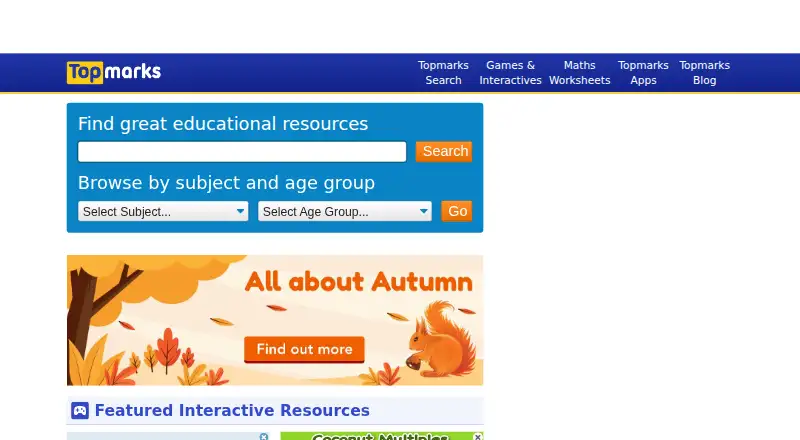
What Topmarks is
Topmarks is a free educational resource site for children, teachers and parents supporting learning at home or in school. It offers interactive games, worksheets, classroom resources and apps, and also selects educational content from around the web. Its listed topics include maths, English, spelling and grammar, punctuation, writing, reading, number, geometry, measures, data handling and problem solving. Resources are grouped for ages 3–5, 5–7, 7–11 and 11–16, with school levels from Reception to Year 6. The Hit the Button Maths app provides mental maths and calculation practice for ages 5–11, covering times tables, division, square numbers, number bonds, doubling and halving. It has 166 game modes across six topics, timed and untimed practice, up to 30 player profiles per device and guest play. The app works without an internet connection and has no ads or in-app purchases; its listed one-time price is £3.49 GBP / $3.99 USD / €3.99 EUR / $5.99 AUD. Topmarks was founded in 1998 and is headquartered in Nottingham, UK.
Who it suits
Topmarks may suit families and educators looking for learning materials across primary-school subjects and age groups. Hit the Button Maths is aimed at ages 5–11 and supports practice at home or in class.
What it does well
- Website resources are free to use
- Hit the Button offers 166 game modes
- App supports up to 30 player profiles per device
- App works offline and has no ads or in-app purchases
- Teachers and parents may use resources in lessons or at home
What to know first
- Hit the Button Maths app has a one-time purchase price
- App licenses are not transferable across platforms
- Educational institutions need a license for each computer
- Standalone redistribution or sale of resources is prohibited
Limits
The website is free to use with no subscription. Hit the Button Maths costs 3.99 USD once (£3.49 GBP / $3.99 USD / €3.99 EUR / $5.99 AUD); licenses do not transfer across platforms, and educational institutions need a license for each computer.
Plans
| Plan | Billed and limits | Price |
|---|---|---|
| Topmarks website | Free to use · no subscription | Free |
| Hit the Button Maths app | £3.49 GBP / $3.99 USD / €3.99 EUR / $5.99 AUD · Licenses are not transferable across platforms · Educational institutions need a license for each computer | $3.99, paid once |
As topmarks.co.uk lists them, read 7 Oct 2026. The maker's own page has the final word.
Getting started
- Open the Topmarks website to browse its educational resources.
- Choose an interactive game, worksheet, classroom resource, or app.
- For Hit the Button Maths, use its listing for Windows, Mac, iPad, iPhone, Android devices, or Kindle Fire.
- Topmarks also describes Chromebook support for the app in its support FAQ.
- Teachers may use resources in classrooms and live online lessons; parents may use them at home.
Topmarks is a broad resource library for primary learning, with games, worksheets and classroom materials across core subjects. It suits parents and teachers seeking activities for home or school, while Hit the Button is the more focused option for children practising mental maths. The free website offers breadth; the separate app adds offline drills for a one-time fee.
Overview
Topmarks combines resources it creates with educational content selected from around the web. Materials span maths, English, reading, writing, spelling and grammar, with further coverage of number, geometry, measures, data handling and problem solving. The range gives adults several formats for finding practice or classroom material, but it is a library rather than a single course or learning sequence.
Its stated age bands run from 3–5 through 11–16, while school levels run from Reception to Year 6. That breadth may help families and teachers looking across primary stages, but the age range alone does not establish a continuous secondary curriculum.
Key features
Resources for home and classroom
Interactive games, worksheets, classroom resources and apps offer different ways to approach a topic. Teachers may use resources in classrooms and live online lessons, and parents may use them at home. Standalone redistribution or sale is prohibited, so the materials are not suited to anyone seeking content to repackage or sell.
Hit the Button Maths practice
Hit the Button targets mental maths and calculation for ages 5–11. Its 166 game modes cover times tables, division, square numbers, number bonds, doubling and halving, with timed and untimed practice. That combination makes it a more concentrated fit for repetition and speed practice than the broader website. It works without an internet connection, supports guest play and allows up to 30 player profiles on a device. The app has no ads or in-app purchases.
Privacy and support
Topmarks says its apps do not collect or share personal information, and pupil data stays on the device. Its website privacy policy says it complies with GDPR requirements and the ICO Age Appropriate Design Code. The website uses Cloudflare to mitigate security risks during cyber-attacks. Questions about the resources or website can be sent to email support.
Pricing
The Topmarks website costs nothing, with no subscription. There is no free trial, but the site itself is free to use. This is the best fit for families and teachers who want a broad selection of resources without a recurring fee.
Hit the Button Maths costs $3.99, paid once (£3.49 GBP / $3.99 USD / €3.99 EUR / $5.99 AUD). It buys a focused set of offline maths activities without ads or in-app purchases, rather than access to a broader paid curriculum. Licenses are not transferable across platforms, and educational institutions need a license for each computer; schools should factor that per-computer requirement into the cost.
Platforms
The website is available on web, and Topmarks lists support for Android, iOS, macOS and Windows. Hit the Button is listed for Windows, Mac, iPad, iPhone, Android devices and Kindle Fire; Chromebook support is also described in its support FAQ. The app license cannot be moved between platforms, so choose the platform carefully before buying.
Who it's for
Topmarks is a practical starting point for parents supporting learning at home and teachers looking for games, worksheets or classroom resources across primary subjects. Hit the Button is a better match for ages 5–11 who need repeated practice in specific calculation skills, especially where offline access and multiple profiles on one device matter. It is less suited to learners seeking a single structured course or adults looking specifically for a broad paid curriculum.
Pros and cons
- Pros: The free website covers multiple subjects, age bands and resource formats, so families and teachers can look beyond one type of activity.
- Pros: Hit the Button works offline and supports 30 profiles per device, which suits shared devices and practice away from a connection.
- Pros: The app has no ads or in-app purchases, and Topmarks says pupil data is stored locally rather than collected or shared by its apps.
- Cons: Hit the Button is a focused maths practice app, not a substitute for the website's wider mix or a structured course.
- Cons: App licenses do not transfer across platforms, and institutions need a license for each computer.
- Cons: Resources cannot be redistributed or sold as standalone materials, limiting reuse outside permitted home and teaching contexts.
Alternatives
For a wider directory of options aimed at educators, browse Teacher Resource Libraries. Choose Myatt & Co instead if you want films and resources, including a free small selection and a monthly plan for all films and resources. BusyTeacher is a better fit for printable worksheets and lesson plans, with a free collection and a one-time purchase for its PDF e-book library.
CommonLit may suit teachers and students seeking a text library and curriculum at no charge, or schools considering its paid Spark plan. For free educational materials without an access fee, consider ReadWriteThink or Education World, which is funded by corporate sponsors and advertisers. Scootle offers free access with registration, requests an education or university email, and also provides guest access. Australian Teacher is another free teaching-resource option; downloads and printing are subject to its copyright terms. Classroom Secrets has a free plan and a one-user monthly plan for readers who want a subscription option.
Verdict
Choose Topmarks for free, varied learning resources that parents can use at home and teachers can use in class, or buy Hit the Button when the need is specifically offline calculation practice for ages 5–11. Look elsewhere if you need a structured course, or if your institution cannot accommodate a separate app license for every computer.
Verdict
Topmarks brings together free learning resources across a wide range of subjects and age groups. Hit the Button Maths adds offline practice for ages 5–11, with a one-time app purchase.
Questions
Is Topmarks free?
The Topmarks website is free to use with no subscription. Hit the Button Maths is a separate app priced at 3.99 USD once (£3.49 GBP / $3.99 USD / €3.99 EUR / $5.99 AUD).
Which platforms are listed?
Topmarks is listed for web, Windows, macOS, iOS, and Android. Hit the Button Maths is listed for Windows, Mac, iPad, iPhone, Android devices, and Kindle Fire; Chromebook support is described in the support FAQ.
What ages and subjects does it cover?
The listed age groups are 3–5, 5–7, 7–11, and 11–16, with school levels from Reception to Year 6. Subjects include maths, English, spelling and grammar, punctuation, writing, reading, number, geometry, measures, data handling, and problem solving.
What does Hit the Button Maths include?
It provides 166 game modes across six topics, including times tables, division, square numbers, number bonds, doubling, and halving. It offers timed and untimed practice for ages 5–11.
Does the maths app need an internet connection?
No. The app requires no internet connection and has no ads or in-app purchases.
Can teachers and parents use Topmarks resources?
Teachers may use resources in classrooms and live online lessons, and parents may use them at home. Standalone redistribution or sale is prohibited.
Facts from Topmarks's own pages
- Age range
- The Hit the Button Maths app is described as mental maths and calculation practice for ages 5–11. · topmarks.co.uk, 7 Oct 2026
- App platforms
- The app is listed for Windows, Mac, iPad, iPhone, Android devices, and Kindle Fire; Chromebook support is also described in the support FAQ. · topmarks.co.uk, 7 Oct 2026
- App privacy
- Topmarks says its apps do not collect or share personal information, and pupil data is stored locally on the device. · topmarks.co.uk, 7 Oct 2026
- App topics
- Hit the Button covers times tables, division, square numbers, number bonds, doubling, and halving. · topmarks.co.uk, 7 Oct 2026
- Connectivity and ads
- The app requires no internet connection and has no ads or in-app purchases. · topmarks.co.uk, 7 Oct 2026
- Curated resources
- Alongside its own resources, Topmarks hand-picks educational content from around the web. · topmarks.co.uk, 7 Oct 2026
- Educational use limits
- Teachers may use resources in their classrooms and live online lessons, and parents may use them at home; standalone redistribution or sale is prohibited. · topmarks.co.uk, 7 Oct 2026
- Founded
- 1998 · topmarks.co.uk, 28 Sept 2026
- Game modes
- The app offers 166 maths game modes across six topics, with timed and untimed practice. · topmarks.co.uk, 7 Oct 2026
- Headquarters
- Nottingham, UK · topmarks.co.uk, 28 Sept 2026
- Intended users
- Topmarks describes resources for children, teachers, and parents supporting learning at home and in school. · topmarks.co.uk, 7 Oct 2026
- Player profiles
- The app supports up to 30 player profiles per device and also offers guest play. · topmarks.co.uk, 7 Oct 2026
- Support
- Topmarks directs users with questions about its resources or website to email support. · topmarks.co.uk, 7 Oct 2026
- Web privacy
- The website privacy policy says it complies with GDPR requirements and the ICO Age Appropriate Design Code. · topmarks.co.uk, 7 Oct 2026
- Website security
- The website uses Cloudflare to mitigate security risks during cyber-attacks. · topmarks.co.uk, 7 Oct 2026
- What it offers
- Topmarks provides educational resources including learning games, worksheets, and classroom resources for primary-age children. · topmarks.co.uk, 7 Oct 2026
Where Topmarks stands on Freedom251
- Teacher Resource Libraries#15 of 30