Freedom251 › Educational Video Libraries

PBS LearningMedia
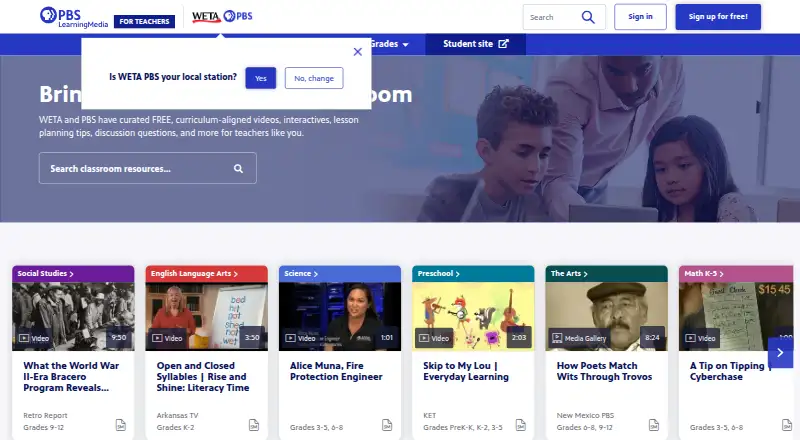
What PBS LearningMedia is
PBS LearningMedia is a web-based resource library for educators and students from pre-kindergarten through grade 12. It offers more than 30,000 classroom materials made by PBS member stations and partners, including videos, images, interactives, lesson plans, articles and primary sources. Content aligns with state and national curriculum standards, and search filters cover grade, subject, resource type, video length, accessibility supports and language. With an account, educators can browse by standards, save favorites, build lessons and create shareable folders. Students and educators can watch videos, complete assignments, and search and share content. The service integrates with Google Classroom, Clever and Remind; its Google Workspace Marketplace listing also supports saving, downloading, creating content, teacher lesson tools and sharing to Google Classroom. Classroom use does not require permission, including distribution through supported tools. Printed pages must show the website URL and cannot be distributed to students for a charge. PBS says it will not sell student data or use it for targeted advertising. All features require a free account.
Who it suits
It suits PreK–12 educators and students looking for standards-aligned classroom materials and lesson tools. Teachers who use Google Classroom, Clever or Remind can share content through those integrations.
What it does well
- More than 30,000 classroom-ready materials
- Content aligns with state and national standards
- Search filters include grade, subject and language
- Integrates with Google Classroom, Clever and Remind
What to know first
- All features require a free account
- Printed pages must show the website URL
- Printed pages cannot be distributed for a charge
Limits
The free plan is listed as free, and a free account is required for all features. Printed pages must include the website URL and cannot be distributed to students for a charge.
Plans
| Plan | Billed and limits | Price |
|---|---|---|
| PBS LearningMedia | PreK–12 educators and students · free account required for all features | Free |
As pbslearningmedia.org lists them, read 30 Sept 2026. The maker's own page has the final word.
Getting started
- Open https://www.pbslearningmedia.org/ in a web browser
- Create a free account to access all features
- Browse by standards or filter resources by grade, subject, type, video length, accessibility supports or language
- Save favorites, build lessons or create shareable folders
- Share content through Google Classroom, Clever or Remind
PBS LearningMedia is a web-based PreK–12 resource library and classroom toolset for educators and students. It is best for teachers who want standards-aligned materials and sharing tools without a subscription. Its breadth and classroom integrations are useful, though every feature requires a free account and printed pages carry restrictions.
Overview
More than 30,000 classroom-ready materials from PBS member stations and partners span videos, images, interactives, lesson plans, articles and primary sources. State and national curriculum alignment gives teachers a useful starting point for matching resources to course goals; the range of formats also suits lessons that need more than video. Students can watch videos and complete assignments, while users can search and share content on the platform.
Key features
Search filters cover grade, subject, resource type, video length, accessibility supports and language. That makes a large library more manageable, particularly when a lesson has specific grade, format or accessibility needs. With a free account, teachers can browse by standards, save favorites, build lessons and create shareable folders.
PBS LearningMedia integrates with Google Classroom, Clever and Remind. Its Google Workspace Marketplace listing supports saving, downloading and creating content, teacher lesson tools, and sharing to Google Classroom. These options fit classrooms already using those services; video downloads are not included as a platform feature, so it is not a substitute for a video-download library.
PBS says classroom use does not require permission, including distribution through Lesson Builder, Clever, Google Classroom or Remind. Printed pages must include the website URL and cannot be distributed to students for a charge. Those terms leave room for ordinary classroom sharing but make paid print distribution unsuitable. For training or a refresher, PBS directs users to [email protected]. PBS also says it will not sell student data or use it for targeted advertising, and that it uses commercially reasonable technical, administrative and physical safeguards.
Pricing
PBS LearningMedia costs nothing. The free plan serves PreK–12 educators and students, and a free account is required for all features; there is no paid tier to choose for additional access. That keeps it accessible to individual teachers and students, while requiring account setup even for the full feature set. Classroom tools and admin analytics are included, and the plan indicates mobile access, although the platform is web-based.
| Plan | Price | Best for |
|---|---|---|
| PBS LearningMedia | free | PreK–12 educators and students seeking the full set of classroom features without a subscription. |
Platforms
PBS LearningMedia is available on the web. The plan includes mobile access, but there is no separate mobile platform in its platform list.
Who it's for
It is a strong fit for PreK–12 teachers who plan around curriculum standards, need a broad mix of classroom materials, or share content through Google Classroom, Clever or Remind. Students can use the service for videos and assignments. Teachers who need paid printing, video downloads, or access without creating an account should look elsewhere.
Pros and cons
- Pros: More than 30,000 standards-aligned resources across multiple formats give teachers breadth for lesson planning.
- Pros: Standards browsing, lesson building, folders and classroom integrations support sharing and classroom workflows.
- Pros: The free plan includes classroom tools and admin analytics, with no subscription charge.
- Cons: All features require a free account, so access is not entirely account-free.
- Cons: Printed pages must retain the website URL and cannot be sold to students, limiting some handout uses.
- Cons: Video downloads are not included, which may rule it out for workflows that depend on downloaded video.
Alternatives
For browsing other collections, compare Educational Video Libraries and Teacher Resource Libraries.
- ClickView is worth considering for teachers seeking a free account with a free school allocation of 10 video streams per month, expandable to 35 by inviting others; it also offers Android, iOS and web access.
- Gil Hedley Integral Anatomy is a focused alternative for learners seeking its anatomy video series and related content, including a free plan.
- Into Film+ suits English state schools funded by the Department for Education with a valid PVS Licence, offering a free 600+ title catalogue.
- NFSA Digital Resource Finder offers free-for-education video clips and resources.
- TED-Ed is an option for free lesson creation and lesson consumption tools.
- VideoLectures.NET offers open access to educational video lectures, including on iOS and the web.
- Australian Screen Online (ASO) Education is another freely available web resource.
- Open Yale Courses offers free public access without registration, but does not provide Yale course credit, a degree or a certificate.
Verdict
Choose PBS LearningMedia if you teach PreK–12 and want a large, standards-aligned resource library with lesson-building and classroom-sharing tools at no subscription cost. Its mix of formats and integrations makes it particularly useful for curriculum-focused classrooms. Look elsewhere if you need downloadable video or want to distribute printed pages to students for a charge.
Verdict
PBS LearningMedia combines a large, standards-aligned library with tools for lessons, assignments and sharing. Its free account unlocks all features, while print use has specific conditions.
Questions
Is PBS LearningMedia free?
Yes. The PBS LearningMedia plan is free, and a free account is required for all features.
Which platforms can I use?
PBS LearningMedia is available on the web, and mobile access is listed.
What age or grade range does it serve?
The platform is for educators and students from pre-kindergarten through grade 12.
Does it integrate with classroom tools?
Yes. Integrations include Google Classroom, Clever and Remind. The Google Workspace Marketplace listing supports sharing to Google Classroom.
Can educators use its materials in class?
PBS says classroom use does not require permission, including distribution through Lesson Builder, Clever, Google Classroom or Remind. Printed pages must include the website URL and cannot be distributed to students for a charge.
How does PBS describe student data use?
PBS says it will not sell student data or use it for targeted advertising, and uses commercially reasonable technical, administrative and physical safeguards.
Facts from PBS LearningMedia's own pages
- Assignments
- Users can watch videos, complete assignments, search and share content on the platform. · docs.pbs.org, 30 Sept 2026
- Audience
- The platform is available to educators and students from pre-kindergarten through 12th grade. · pbs.org, 30 Sept 2026
- Classroom use
- PBS says classroom use of PBS LearningMedia content does not require permission, including distribution through Lesson Builder, Clever, Google Classroom or Remind. · help.pbs.org, 30 Sept 2026
- Content library
- The service provides more than 30,000 classroom-ready materials created by PBS member stations and partners. · docs.pbs.org, 30 Sept 2026
- Filtering
- Search filters include grade, subject, resource type, video length, accessibility supports and language. · pbs.org, 30 Sept 2026
- Founded
- 2011 · pbslearningmedia.org, 23 Sept 2026
- Google Workspace
- The Google Workspace Marketplace listing supports saving, downloading and creating content, teacher lesson tools and sharing to Google Classroom. · workspace.google.com, 30 Sept 2026
- Integrations
- PBS LearningMedia has integrated with Google Classroom, Clever and Remind. · pbs.org, 30 Sept 2026
- Printing limit
- Printed pages must include the website URL and cannot be distributed for a charge to students. · help.pbs.org, 30 Sept 2026
- Purpose
- PBS LearningMedia is a free PreK–12 digital media service for educators nationwide. · docs.pbs.org, 30 Sept 2026
- Resource types
- Resources include videos, images, interactives, lesson plans, articles and primary sources. · pbs.org, 30 Sept 2026
- Standards alignment
- PBS LearningMedia content is aligned to state and national curriculum standards. · docs.pbs.org, 30 Sept 2026
- Student privacy
- PBS states it will not sell student data or use it for targeted advertising and uses commercially reasonable technical, administrative and physical safeguards. · pbs.org, 30 Sept 2026
- Support
- PBS documentation directs users seeking training or a refresher to contact [email protected]. · docs.pbs.org, 30 Sept 2026
- Teacher tools
- An account enables browsing by standards, favoriting resources, building lessons and creating sharable folders. · pbs.org, 30 Sept 2026
Where PBS LearningMedia stands on Freedom251
- Educational Video Libraries#13 of 33
- Teacher Resource Libraries#13 of 30